
How to Use XY6020L: Examples, Pinouts, and Specs
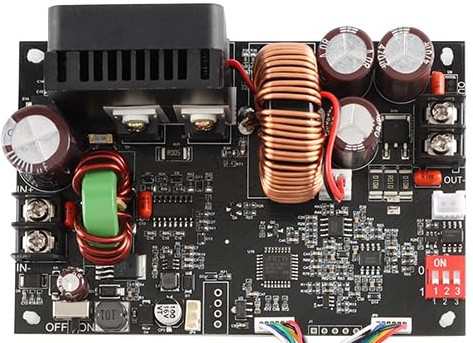
 Design with XY6020L in Cirkit Designer
Introduction
The XY6020L is a low-dropout (LDO) voltage regulator manufactured by Sinilink. It is designed to provide a stable and precise output voltage with a minimal input-output voltage difference. This makes it ideal for applications requiring high efficiency and low power dissipation, such as battery-powered devices, portable electronics, and sensitive circuits.
Explore Projects Built with XY6020L
 Open Project in Cirkit Designer
 Open Project in Cirkit Designer
 Open Project in Cirkit Designer
 Open Project in Cirkit Designer
Explore Projects Built with XY6020L
Open Project in Cirkit DesignerOpen Project in Cirkit DesignerOpen Project in Cirkit DesignerOpen Project in Cirkit DesignerCommon Applications
- Battery-powered devices (e.g., smartphones, wearables)
- Microcontroller-based systems
- Low-noise analog circuits
- IoT devices and sensors
- Powering sensitive electronic components
Technical Specifications
Key Technical Details
| Parameter | Value |
|---|---|
| Manufacturer Part ID | XY6020L |
| Input Voltage Range | 2.5V to 6.0V |
| Output Voltage Range | 1.2V to 5.0V (fixed or adjustable) |
| Output Current | Up to 200mA |
| Dropout Voltage | 200mV (typical at 200mA load) |
| Quiescent Current | 50µA (typical) |
| Output Voltage Accuracy | ±2% |
| Operating Temperature | -40°C to +85°C |
| Package Type | SOT-23-5, SOT-89, or DFN |
Pin Configuration and Descriptions
SOT-23-5 Package
| Pin Number | Pin Name | Description |
|---|---|---|
| 1 | VIN | Input voltage supply (2.5V to 6.0V) |
| 2 | GND | Ground connection |
| 3 | EN | Enable pin (active high, logic level control) |
| 4 | VOUT | Regulated output voltage |
| 5 | NC/ADJ | No connection (fixed version) or adjust pin |
SOT-89 Package
| Pin Number | Pin Name | Description |
|---|---|---|
| 1 | VIN | Input voltage supply (2.5V to 6.0V) |
| 2 | GND | Ground connection |
| 3 | VOUT | Regulated output voltage |
Usage Instructions
How to Use the XY6020L in a Circuit
- Input Capacitor: Connect a ceramic capacitor (e.g., 1µF) close to the VIN pin to stabilize the input voltage and reduce noise.
- Output Capacitor: Use a low-ESR ceramic capacitor (e.g., 1µF to 10µF) at the VOUT pin to ensure stable operation and minimize output voltage ripple.
- Enable Pin (EN):
- Tie the EN pin to VIN for always-on operation.
- Use a microcontroller or external logic to control the EN pin for power-saving modes.
- Adjustable Version: For the adjustable version, connect a resistor divider to the ADJ pin to set the desired output voltage.
- Thermal Considerations: Ensure adequate heat dissipation, especially when operating near the maximum output current.
Example Circuit
Below is an example of using the XY6020L to regulate a 3.3V output from a 5V input:
   +5V Input
      |
      |----[1µF]----+---- VIN (Pin 1)
                    |
                   GND (Pin 2)
                    |
                   EN (Pin 3) ----> Connect to VIN or microcontroller GPIO
                    |
                   VOUT (Pin 4) ----> +3.3V Output
                    |
      +3.3V Output [10µF]
Arduino UNO Example Code
If the XY6020L is used to power an Arduino UNO or control its peripherals, the EN pin can be toggled using a GPIO pin. Below is an example code snippet:
// Define the pin connected to the EN pin of the XY6020L
const int enablePin = 7;

void setup() {
  // Set the enable pin as an output
  pinMode(enablePin, OUTPUT);

  // Enable the voltage regulator
  digitalWrite(enablePin, HIGH); // Set HIGH to enable the regulator
}

void loop() {
  // Example: Toggle the regulator ON and OFF every 5 seconds
  digitalWrite(enablePin, HIGH); // Enable the regulator
  delay(5000);                   // Wait for 5 seconds
  digitalWrite(enablePin, LOW);  // Disable the regulator
  delay(5000);                   // Wait for 5 seconds
}
Important Considerations
- Always use the recommended input and output capacitors for stable operation.
- Avoid exceeding the maximum input voltage (6.0V) or output current (200mA).
- For adjustable versions, ensure the resistor divider is calculated correctly to achieve the desired output voltage.
- Minimize trace lengths between the regulator and capacitors to reduce noise and improve stability.
Troubleshooting and FAQs
Common Issues and Solutions
Output Voltage is Unstable or Noisy
- Ensure the output capacitor is a low-ESR ceramic type with the correct value (1µF to 10µF).
- Check for proper grounding and minimize noise on the input voltage.
Regulator Overheats
- Verify that the output current does not exceed 200mA.
- Ensure adequate heat dissipation, such as using a heatsink or proper PCB layout.
No Output Voltage
- Check if the EN pin is properly connected (HIGH for enabled).
- Verify the input voltage is within the specified range (2.5V to 6.0V).
Incorrect Output Voltage
- For adjustable versions, confirm the resistor divider values are correct.
- Measure the input voltage to ensure it is sufficient for the desired output.
FAQs
Q: Can the XY6020L be used with a 9V battery?
A: No, the maximum input voltage for the XY6020L is 6.0V. Using a 9V battery would damage the component.
Q: What happens if the EN pin is left floating?
A: The EN pin should not be left floating. It must be tied to VIN or controlled by a logic signal to ensure proper operation.
Q: Can I use electrolytic capacitors instead of ceramic capacitors?
A: While electrolytic capacitors can be used, low-ESR ceramic capacitors are recommended for optimal performance and stability.
Q: Is the XY6020L suitable for powering noise-sensitive analog circuits?
A: Yes, the XY6020L's low dropout voltage and low quiescent current make it suitable for noise-sensitive applications.