
How to Use pixhawk 6c: Examples, Pinouts, and Specs
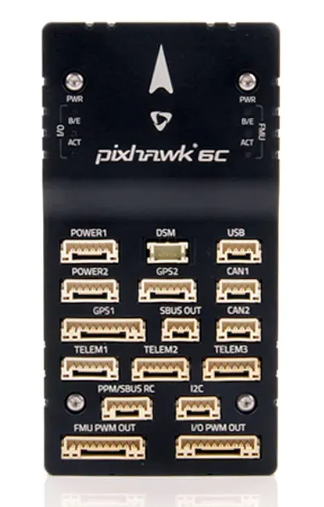
 Design with pixhawk 6c in Cirkit Designer
Introduction
The Pixhawk 6C is an advanced flight control hardware designed for drones and unmanned vehicles. It features a powerful processor, multiple sensor interfaces, and support for various autopilot software platforms, such as PX4 and ArduPilot. This versatile controller enables precise navigation, stable flight, and reliable control for a wide range of unmanned aerial and ground vehicles.
Explore Projects Built with pixhawk 6c
 Open Project in Cirkit Designer
 Open Project in Cirkit Designer
 Open Project in Cirkit Designer
 Open Project in Cirkit Designer
Explore Projects Built with pixhawk 6c
Open Project in Cirkit DesignerOpen Project in Cirkit DesignerOpen Project in Cirkit DesignerOpen Project in Cirkit DesignerCommon Applications and Use Cases
- Multirotor drones (quadcopters, hexacopters, etc.)
- Fixed-wing UAVs
- VTOL (Vertical Take-Off and Landing) aircraft
- Ground robots and rovers
- Autonomous marine vehicles
- Research and development in robotics and UAV systems
Technical Specifications
The Pixhawk 6C is equipped with cutting-edge hardware to ensure high performance and reliability. Below are its key technical details:
Key Technical Details
- Processor: STM32H743, 32-bit ARM Cortex-M7, 480 MHz
- IMUs (Inertial Measurement Units): Dual IMUs for redundancy
- IMU1: ICM-42688-P
- IMU2: ICM-42605
- Barometer: MS5611
- Power Supply: 4.3V to 5.4V input voltage range
- Interfaces:
- 8 PWM outputs
- 2 CAN bus interfaces
- 1 I2C port
- 1 SPI port
- 1 UART/serial port
- GPS port
- Flash Memory: 16 MB
- Dimensions: 38.5 mm x 55.5 mm x 15.5 mm
- Weight: 15 grams
Pin Configuration and Descriptions
The Pixhawk 6C features multiple connectors for peripherals and sensors. Below is a table summarizing the key pin configurations:
| Connector | Pin | Description |
|---|---|---|
| Power Input | VCC | Main power supply (4.3V to 5.4V) |
| GND | Ground | |
| PWM Outputs | PWM1-8 | Motor/servo control signals |
| CAN Bus | CAN_H | CAN bus high signal |
| CAN_L | CAN bus low signal | |
| I2C Port | SCL | I2C clock line |
| SDA | I2C data line | |
| SPI Port | SCK | SPI clock |
| MISO | SPI master-in/slave-out | |
| MOSI | SPI master-out/slave-in | |
| UART Port | TX | UART transmit |
| RX | UART receive | |
| GPS Port | TX | GPS transmit |
| RX | GPS receive | |
| GND | Ground |
Usage Instructions
The Pixhawk 6C is designed to be integrated into a variety of unmanned systems. Below are the steps and best practices for using the Pixhawk 6C in a typical drone application.
How to Use the Pixhawk 6C in a Circuit
Power Connection:
- Connect a regulated power supply (4.3V to 5.4V) to the VCC and GND pins of the Pixhawk 6C.
- Ensure the power source can provide sufficient current for all connected peripherals.
Sensor and Peripheral Connections:
- Attach GPS, telemetry modules, and other sensors to their respective ports (e.g., GPS port, I2C, or SPI).
- Connect ESCs (Electronic Speed Controllers) or servos to the PWM output pins.
Autopilot Software Setup:
- Install compatible autopilot software such as PX4 or ArduPilot on the Pixhawk 6C.
- Use a ground control station (e.g., QGroundControl or Mission Planner) to configure the software and calibrate sensors.
Communication Setup:
- Connect telemetry modules to the UART port for wireless communication with the ground control station.
- Use the CAN bus for advanced peripherals like LiDAR or additional IMUs.
Testing and Calibration:
- Perform pre-flight checks, including sensor calibration, motor testing, and fail-safe configuration.
- Verify that all connections are secure and that the system is functioning as expected.
Important Considerations and Best Practices
- Power Supply: Always use a stable and regulated power source to avoid damaging the Pixhawk 6C.
- Firmware Updates: Regularly update the firmware to ensure compatibility with the latest features and bug fixes.
- Vibration Isolation: Mount the Pixhawk 6C on vibration-dampening material to improve IMU performance.
- Redundancy: Take advantage of the dual IMUs and redundant power inputs for increased reliability.
- Safety: Configure fail-safe mechanisms to handle communication loss or low battery scenarios.
Example Code for Arduino UNO Integration
While the Pixhawk 6C is typically used with autopilot software, it can communicate with an Arduino UNO via UART for custom applications. Below is an example of how to send data to the Pixhawk 6C:
#include <SoftwareSerial.h>

// Define RX and TX pins for communication with Pixhawk
SoftwareSerial pixhawkSerial(10, 11); // RX = pin 10, TX = pin 11

void setup() {
  // Initialize serial communication
  Serial.begin(9600); // For debugging
  pixhawkSerial.begin(57600); // Pixhawk communication baud rate

  Serial.println("Arduino-Pixhawk communication initialized.");
}

void loop() {
  // Send a test message to Pixhawk
  pixhawkSerial.println("Hello Pixhawk!");

  // Check for incoming data from Pixhawk
  if (pixhawkSerial.available()) {
    String incomingData = pixhawkSerial.readString();
    Serial.print("Received from Pixhawk: ");
    Serial.println(incomingData);
  }

  delay(1000); // Wait 1 second before sending the next message
}
Troubleshooting and FAQs
Common Issues and Solutions
Pixhawk 6C Not Powering On:
- Cause: Insufficient or unstable power supply.
- Solution: Verify the input voltage (4.3V to 5.4V) and ensure the power source can handle the current load.
No Communication with Ground Control Station:
- Cause: Incorrect telemetry module connection or configuration.
- Solution: Check the UART port connections and ensure the telemetry module is properly configured.
Unstable Flight or Poor Navigation:
- Cause: Improper sensor calibration or excessive vibration.
- Solution: Recalibrate all sensors and ensure the Pixhawk 6C is mounted on vibration-dampening material.
Firmware Update Fails:
- Cause: Interrupted connection during the update process.
- Solution: Use a reliable USB cable and ensure the computer does not enter sleep mode during the update.
FAQs
Q: Can the Pixhawk 6C be used with fixed-wing aircraft?
- A: Yes, the Pixhawk 6C supports fixed-wing aircraft and can be configured using PX4 or ArduPilot.
Q: What is the maximum number of motors the Pixhawk 6C can control?
- A: The Pixhawk 6C has 8 PWM outputs, allowing it to control up to 8 motors or servos.
Q: Does the Pixhawk 6C support GPS modules?
- A: Yes, the Pixhawk 6C has a dedicated GPS port and supports various GPS modules for navigation.
Q: How do I connect additional sensors to the Pixhawk 6C?
- A: Additional sensors can be connected via the I2C, SPI, or CAN bus interfaces.
This concludes the documentation for the Pixhawk 6C. For further assistance, refer to the official Pixhawk documentation or community forums.