
How to Use Si4703: Examples, Pinouts, and Specs
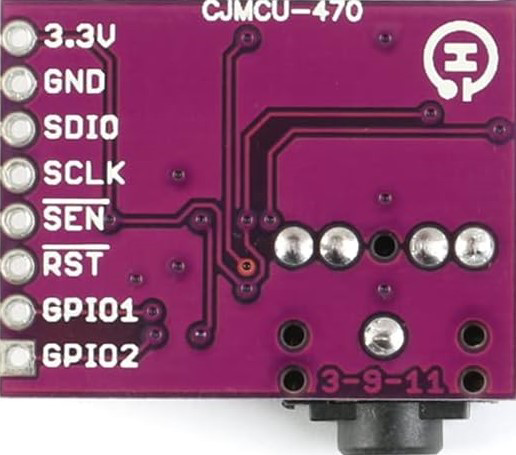
 Design with Si4703 in Cirkit Designer
Introduction
The Si4703 by JESSINE is a low-power FM radio receiver IC designed for portable and compact applications. It features a built-in digital signal processing (DSP) engine that ensures high-quality audio reception. The chip supports various audio formats and includes an integrated antenna switch, making it a versatile choice for FM radio integration. Its I2C interface allows for easy control and communication with microcontrollers, making it ideal for modern electronic devices.
Explore Projects Built with Si4703
 Open Project in Cirkit Designer
 Open Project in Cirkit Designer
 Open Project in Cirkit Designer
 Open Project in Cirkit Designer
Explore Projects Built with Si4703
Open Project in Cirkit DesignerOpen Project in Cirkit DesignerOpen Project in Cirkit DesignerOpen Project in Cirkit DesignerCommon Applications
- Portable FM radios
- MP3 players with FM functionality
- Wearable devices with radio features
- Automotive infotainment systems
- Home audio systems
Technical Specifications
Key Technical Details
| Parameter | Value |
|---|---|
| Operating Voltage | 2.7V to 5.5V |
| Supply Current | 19 mA (typical) |
| Frequency Range | 76 MHz to 108 MHz |
| Audio Output | Analog stereo |
| Interface | I2C |
| Sensitivity | -110 dBm |
| Antenna Input Impedance | 50 Ω |
| Package Type | 20-pin SSOP |
| Operating Temperature Range | -20°C to +85°C |
Pin Configuration and Descriptions
| Pin Number | Pin Name | Description |
|---|---|---|
| 1 | GND | Ground |
| 2 | VDD | Power supply input (2.7V to 5.5V) |
| 3 | SDA | I2C data line |
| 4 | SCL | I2C clock line |
| 5 | RFGND | RF ground for antenna |
| 6 | ANTENNA | Antenna input |
| 7 | GPIO1 | General-purpose I/O pin |
| 8 | GPIO2 | General-purpose I/O pin |
| 9 | RST | Reset pin (active low) |
| 10 | LOUT | Left audio output |
| 11 | ROUT | Right audio output |
| 12-20 | NC | No connection |
Usage Instructions
How to Use the Si4703 in a Circuit
- Power Supply: Connect the VDD pin to a regulated power supply (2.7V to 5.5V). Ensure proper decoupling capacitors are placed near the VDD pin to reduce noise.
- I2C Communication: Connect the SDA and SCL pins to the corresponding I2C pins of your microcontroller. Use pull-up resistors (typically 4.7 kΩ) on both lines.
- Antenna: Attach an external antenna to the ANTENNA pin for optimal FM signal reception. Ensure the antenna impedance matches the 50 Ω input impedance of the chip.
- Audio Output: Connect the LOUT and ROUT pins to an audio amplifier or headphones for stereo audio output.
- Reset: Use the RST pin to initialize the chip. Pull the pin low for at least 10 ms during startup.
Important Considerations
- Antenna Placement: Place the antenna away from noisy components to avoid interference.
- I2C Address: The default I2C address of the Si4703 is
0x10. Ensure no address conflicts with other devices on the I2C bus. - Bypass Capacitors: Use appropriate bypass capacitors (e.g., 0.1 µF) near the power supply pins to stabilize the voltage.
- GPIO Pins: Configure GPIO1 and GPIO2 as needed for additional functionality, such as interrupts or status indicators.
Example Code for Arduino UNO
Below is an example of how to interface the Si4703 with an Arduino UNO to tune to an FM station:
#include <Wire.h> // Include the Wire library for I2C communication

#define SI4703_ADDRESS 0x10 // Default I2C address of the Si4703

void setup() {
  Wire.begin(); // Initialize I2C communication
  Serial.begin(9600); // Initialize serial communication for debugging

  // Reset the Si4703
  pinMode(2, OUTPUT); // Use pin 2 for the RST pin
  digitalWrite(2, LOW); // Pull RST low
  delay(10); // Wait for 10 ms
  digitalWrite(2, HIGH); // Release RST
  delay(100); // Wait for the chip to initialize

  // Initialize the Si4703
  Wire.beginTransmission(SI4703_ADDRESS);
  Wire.write(0x02); // Write to the POWERCFG register
  Wire.write(0x4001); // Enable the chip and set to FM mode
  Wire.endTransmission();
  delay(100);

  Serial.println("Si4703 initialized.");
}

void loop() {
  // Example: Tune to 101.1 MHz
  uint16_t frequency = 1011; // Frequency in 100 kHz steps (101.1 MHz = 1011)
  Wire.beginTransmission(SI4703_ADDRESS);
  Wire.write(0x03); // Write to the CHANNEL register
  Wire.write((frequency << 6) | 0x8000); // Set frequency and enable tuning
  Wire.endTransmission();
  delay(100);

  Serial.println("Tuned to 101.1 MHz.");
  while (1); // Stop the loop
}
Notes:
- Ensure the RST pin is connected to a digital pin on the Arduino for proper initialization.
- Modify the
frequencyvariable in the code to tune to a different FM station.
Troubleshooting and FAQs
Common Issues
No Audio Output:
- Ensure the antenna is properly connected and positioned for optimal reception.
- Verify that the audio output pins (LOUT and ROUT) are connected to an amplifier or headphones.
I2C Communication Failure:
- Check the pull-up resistors on the SDA and SCL lines.
- Ensure the I2C address (
0x10) matches the address in your code.
Poor Signal Reception:
- Use a longer or higher-quality antenna.
- Avoid placing the Si4703 near high-frequency noise sources.
Chip Not Responding:
- Verify the RST pin is correctly toggled during initialization.
- Check the power supply voltage and ensure it is within the specified range.
FAQs
Q: Can the Si4703 receive AM radio signals?
A: No, the Si4703 is designed specifically for FM radio reception.
Q: What is the maximum distance for FM signal reception?
A: The reception range depends on the antenna quality and environmental factors. Typically, it can receive signals from 10 to 50 miles in ideal conditions.
Q: Can I use the Si4703 with a 3.3V microcontroller?
A: Yes, the Si4703 operates within a voltage range of 2.7V to 5.5V, making it compatible with 3.3V systems.
Q: How do I improve audio quality?
A: Use a high-quality antenna and ensure proper grounding to minimize noise and interference.