
How to Use SOFT CABLE CONVERTER BOARD: Examples, Pinouts, and Specs
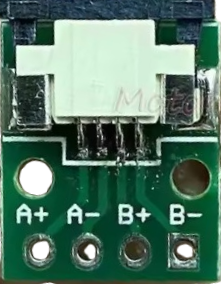
 Design with SOFT CABLE CONVERTER BOARD in Cirkit Designer
Introduction
The SOFT CABLE CONVERTER BOARD is a versatile circuit board designed to convert signals between different cable types, enabling seamless communication and compatibility between devices or systems with varying connection standards. This component is particularly useful in applications where devices with incompatible cable interfaces need to work together without requiring extensive modifications.
Explore Projects Built with SOFT CABLE CONVERTER BOARD
 Open Project in Cirkit Designer
 Open Project in Cirkit Designer
 Open Project in Cirkit Designer
 Open Project in Cirkit Designer
Explore Projects Built with SOFT CABLE CONVERTER BOARD
Open Project in Cirkit DesignerOpen Project in Cirkit DesignerOpen Project in Cirkit DesignerOpen Project in Cirkit DesignerCommon Applications and Use Cases
- Bridging communication between devices with different cable standards (e.g., USB to UART, HDMI to VGA).
- Prototyping and testing in electronics development.
- Industrial automation systems requiring signal conversion.
- Consumer electronics where legacy and modern devices need to interoperate.
Technical Specifications
The SOFT CABLE CONVERTER BOARD is designed to handle a wide range of signal types and operates within the following parameters:
Key Technical Details
- Input Voltage: 3.3V to 5V DC
- Signal Types Supported: Digital and analog signals (varies by model)
- Operating Temperature Range: -20°C to 70°C
- Maximum Signal Frequency: 10 MHz
- Dimensions: 50mm x 30mm x 10mm
- Connector Types: Varies by model (e.g., USB, HDMI, VGA, UART, etc.)
Pin Configuration and Descriptions
The pin configuration may vary depending on the specific model of the SOFT CABLE CONVERTER BOARD. Below is an example configuration for a USB-to-UART converter board:
| Pin Name | Description | Direction |
|---|---|---|
| VCC | Power input (3.3V to 5V DC) | Input |
| GND | Ground connection | - |
| TXD | Transmit data | Output |
| RXD | Receive data | Input |
| RTS | Request to send (optional) | Output |
| CTS | Clear to send (optional) | Input |
For other models, refer to the specific datasheet or user manual.
Usage Instructions
How to Use the Component in a Circuit
- Power the Board: Connect the VCC and GND pins to a suitable power source (3.3V to 5V DC).
- Connect Input and Output Cables: Attach the input cable to the source device and the output cable to the target device. Ensure the connectors match the board's specifications.
- Signal Configuration: If required, configure the board's settings (e.g., baud rate for UART) using jumpers or software tools.
- Verify Connections: Double-check all connections to ensure proper alignment and avoid damage to the board or connected devices.
- Test the Setup: Power on the system and verify that the signal conversion is functioning as expected.
Important Considerations and Best Practices
- Voltage Matching: Ensure that the input and output signal voltages are within the board's supported range to prevent damage.
- Cable Quality: Use high-quality cables to minimize signal degradation, especially for high-frequency signals.
- Static Protection: Handle the board with care and use anti-static precautions to avoid damage from electrostatic discharge (ESD).
- Firmware Updates: If the board includes a microcontroller, check for firmware updates to ensure compatibility with the latest devices.
Example: Connecting to an Arduino UNO
The SOFT CABLE CONVERTER BOARD can be used to interface an Arduino UNO with a UART-based device. Below is an example code snippet for communication:
// Example: Arduino UNO communicating with a UART device via the converter board

#include <SoftwareSerial.h>

// Define RX and TX pins for SoftwareSerial
SoftwareSerial mySerial(10, 11); // RX = pin 10, TX = pin 11

void setup() {
  Serial.begin(9600); // Start the hardware serial communication
  mySerial.begin(9600); // Start the software serial communication

  Serial.println("SOFT CABLE CONVERTER BOARD Test");
  mySerial.println("Hello from Arduino!"); // Send data to the UART device
}

void loop() {
  // Check if data is available from the UART device
  if (mySerial.available()) {
    String data = mySerial.readString(); // Read the incoming data
    Serial.print("Received: ");
    Serial.println(data); // Print the received data to the Serial Monitor
  }

  // Check if data is available from the Serial Monitor
  if (Serial.available()) {
    String data = Serial.readString(); // Read the input from Serial Monitor
    mySerial.print(data); // Send the data to the UART device
  }
}
Troubleshooting and FAQs
Common Issues Users Might Face
No Signal Conversion:
- Cause: Incorrect cable connections or mismatched signal types.
- Solution: Verify the input and output connections and ensure the board supports the required signal types.
Overheating:
- Cause: Exceeding the board's voltage or current limits.
- Solution: Check the power supply and ensure it is within the specified range (3.3V to 5V DC).
Data Corruption:
- Cause: Poor-quality cables or high-frequency interference.
- Solution: Use shielded cables and minimize interference sources near the board.
Device Not Recognized:
- Cause: Missing or outdated drivers (for USB-based boards).
- Solution: Install the latest drivers from the manufacturer's website.
Solutions and Tips for Troubleshooting
- Check Connections: Ensure all cables are securely connected and match the board's pin configuration.
- Test with Known Devices: Use devices with known compatibility to isolate the issue.
- Inspect the Board: Look for physical damage or loose components that may affect performance.
- Consult the Datasheet: Refer to the board's datasheet for detailed specifications and troubleshooting steps.
By following this documentation, users can effectively utilize the SOFT CABLE CONVERTER BOARD for a wide range of signal conversion applications.