
How to Use LiFePO4 3.2V 6000mah: Examples, Pinouts, and Specs
 Design with LiFePO4 3.2V 6000mah in Cirkit Designer
Introduction
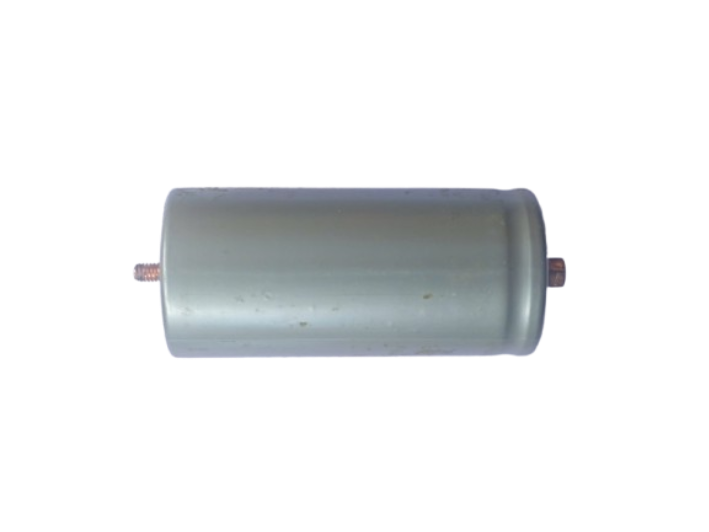
The LiFePO4 3.2V 6000mAh is a lithium iron phosphate rechargeable battery designed for high-performance and long-lasting energy storage. With a nominal voltage of 3.2 volts and a capacity of 6000 milliamp-hours (mAh), this battery is known for its excellent thermal stability, safety, and extended cycle life compared to other lithium-ion chemistries. It is widely used in applications requiring reliable and efficient power delivery.
Explore Projects Built with LiFePO4 3.2V 6000mah
 Open Project in Cirkit Designer
 Open Project in Cirkit Designer
 Open Project in Cirkit Designer
 Open Project in Cirkit Designer
Explore Projects Built with LiFePO4 3.2V 6000mah
Open Project in Cirkit DesignerOpen Project in Cirkit DesignerOpen Project in Cirkit DesignerOpen Project in Cirkit DesignerCommon Applications and Use Cases
- Solar energy storage systems
- Electric vehicles (EVs) and e-bikes
- Uninterruptible power supplies (UPS)
- Portable electronics and power banks
- Robotics and IoT devices
- Backup power for embedded systems
Technical Specifications
The following table outlines the key technical specifications of the LiFePO4 3.2V 6000mAh battery:
| Parameter | Value |
|---|---|
| Nominal Voltage | 3.2V |
| Capacity | 6000mAh (6Ah) |
| Maximum Charge Voltage | 3.65V |
| Minimum Discharge Voltage | 2.5V |
| Standard Charge Current | 0.5C (3A) |
| Maximum Charge Current | 1C (6A) |
| Standard Discharge Current | 0.5C (3A) |
| Maximum Discharge Current | 1C (6A) |
| Cycle Life | ≥2000 cycles (at 80% DOD) |
| Operating Temperature | Charge: 0°C to 45°C |
| Discharge: -20°C to 60°C | |
| Storage Temperature | -10°C to 45°C |
| Dimensions | Varies by manufacturer |
| Weight | ~150g |
Pin Configuration and Descriptions
The LiFePO4 battery typically has two terminals:
| Pin | Label | Description |
|---|---|---|
| 1 | Positive (+) | Positive terminal for charging and discharging |
| 2 | Negative (-) | Negative terminal for charging and discharging |
Usage Instructions
How to Use the Component in a Circuit
Charging the Battery:
- Use a LiFePO4-compatible charger with a constant current/constant voltage (CC/CV) charging profile.
- Set the maximum charge voltage to 3.65V and the charge current to no more than 1C (6A).
- Ensure the battery is charged in a temperature range of 0°C to 45°C.
Connecting the Battery:
- Connect the positive terminal of the battery to the positive rail of your circuit.
- Connect the negative terminal of the battery to the ground (GND) of your circuit.
- Use appropriate connectors or soldering techniques to ensure a secure connection.
Discharging the Battery:
- Ensure the load does not exceed the maximum discharge current of 6A.
- Avoid discharging the battery below 2.5V to prevent damage.
Protection Circuit:
- Use a Battery Management System (BMS) to monitor and protect the battery from overcharging, over-discharging, and short circuits.
- A BMS also helps balance the cells in multi-cell configurations.
Important Considerations and Best Practices
- Avoid Overcharging or Over-discharging: Always use a BMS or a charger with built-in protection to prevent damage.
- Temperature Management: Operate the battery within the specified temperature range to ensure safety and longevity.
- Storage: Store the battery at 30%-50% charge in a cool, dry place if not in use for extended periods.
- Parallel or Series Connections: When connecting multiple batteries, ensure they are of the same capacity and charge level to avoid imbalances.
Example: Using with an Arduino UNO
To power an Arduino UNO with the LiFePO4 battery, follow these steps:
- Connect the positive terminal of the battery to the VIN pin of the Arduino.
- Connect the negative terminal of the battery to the GND pin of the Arduino.
- Ensure the battery voltage is within the Arduino's acceptable input range (7-12V). If necessary, use a DC-DC boost converter to step up the voltage.
Sample Code for Monitoring Battery Voltage
You can use the Arduino UNO to monitor the battery voltage using an analog pin. Here's an example:
// Define the analog pin connected to the voltage divider
const int voltagePin = A0;

// Define the voltage divider resistor values (in ohms)
const float R1 = 10000.0; // Resistor connected to battery positive
const float R2 = 10000.0; // Resistor connected to ground

void setup() {
  Serial.begin(9600); // Initialize serial communication
}

void loop() {
  int sensorValue = analogRead(voltagePin); // Read the analog value
  float voltage = sensorValue * (5.0 / 1023.0); // Convert to voltage
  voltage = voltage * ((R1 + R2) / R2); // Adjust for voltage divider

  Serial.print("Battery Voltage: ");
  Serial.print(voltage);
  Serial.println(" V");

  delay(1000); // Wait for 1 second before the next reading
}
Note: Use a voltage divider to scale down the battery voltage to a safe range for the Arduino's analog input (0-5V).
Troubleshooting and FAQs
Common Issues and Solutions
Battery Not Charging:
- Cause: Charger not compatible with LiFePO4 chemistry.
- Solution: Use a charger specifically designed for LiFePO4 batteries.
Battery Drains Quickly:
- Cause: Excessive load or degraded battery capacity.
- Solution: Check the load current and ensure it is within the battery's discharge limits. Replace the battery if it has reached the end of its cycle life.
Battery Overheats:
- Cause: Overcharging or excessive discharge current.
- Solution: Use a BMS to monitor and protect the battery. Ensure proper ventilation.
Voltage Drops Below 2.5V:
- Cause: Over-discharging the battery.
- Solution: Recharge the battery immediately. Avoid deep discharges in the future.
FAQs
Q: Can I use this battery in series or parallel configurations?
- A: Yes, but ensure all batteries are of the same capacity, charge level, and age. Use a BMS for multi-cell setups.
Q: How long will this battery last?
- A: The battery can last over 2000 cycles at 80% depth of discharge (DOD) under proper usage conditions.
Q: Is this battery safe for indoor use?
- A: Yes, LiFePO4 batteries are thermally stable and safer than other lithium-ion chemistries. However, always follow safety guidelines.
Q: Can I use a standard lithium-ion charger?
- A: No, use a charger specifically designed for LiFePO4 batteries to avoid overcharging or damaging the battery.