
How to Use SSM2167 Eval Board: Examples, Pinouts, and Specs
 Design with SSM2167 Eval Board in Cirkit Designer
Introduction
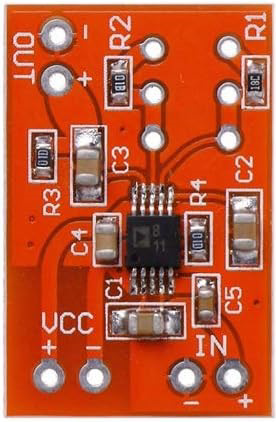
The SSM2167 Eval Board is a development platform designed by Analog Devices to evaluate the performance of the SSM2167 audio processor. The SSM2167 is a low-voltage, low-power audio processor that integrates noise reduction, compression, and automatic gain control (AGC) into a single chip. The evaluation board simplifies the process of testing and prototyping audio signal processing applications.
Explore Projects Built with SSM2167 Eval Board
 Open Project in Cirkit Designer
 Open Project in Cirkit Designer
 Open Project in Cirkit Designer
 Open Project in Cirkit Designer
Explore Projects Built with SSM2167 Eval Board
Open Project in Cirkit DesignerOpen Project in Cirkit DesignerOpen Project in Cirkit DesignerOpen Project in Cirkit DesignerCommon Applications and Use Cases
- Noise reduction in microphones for communication devices
- Audio enhancement in consumer electronics (e.g., headsets, intercoms)
- Automatic gain control for voice recording systems
- Signal conditioning for hearing aids and assistive listening devices
- Prototyping audio circuits for embedded systems
Technical Specifications
Key Technical Details
- Audio Processor IC: SSM2167
- Operating Voltage: 2.7 V to 5.5 V
- Current Consumption: 1.5 mA (typical)
- Compression Ratio: Adjustable (1:1 to ∞:1)
- Noise Gate Threshold: Adjustable
- Input Impedance: 20 kΩ
- Output Impedance: 300 Ω
- Gain Range: 18 dB to 24 dB
- Package Type: 8-lead SOIC (onboard SSM2167)
- Board Dimensions: Compact, designed for easy integration into test setups
Pin Configuration and Descriptions
The SSM2167 Eval Board provides access to the SSM2167's pins via onboard connectors. Below is the pin configuration for the SSM2167 IC:
| Pin | Name | Description |
|---|---|---|
| 1 | GND | Ground connection for the IC. |
| 2 | IN | Audio input signal. Connect to the microphone or audio source. |
| 3 | GAIN | Gain adjustment pin. Use an external resistor to set the desired gain. |
| 4 | VCAOUT | Voltage-controlled amplifier output. Internally connected to the compressor. |
| 5 | DETECT | Detector output. Used internally for compression and noise gating. |
| 6 | THRESH | Noise gate threshold adjustment. Connect an external resistor to set the level. |
| 7 | OUT | Audio output signal. Connect to the next stage of the audio circuit. |
| 8 | VDD | Positive power supply (2.7 V to 5.5 V). |
Usage Instructions
How to Use the Component in a Circuit
- Power Supply: Connect a regulated DC power supply (2.7 V to 5.5 V) to the VDD and GND pins of the evaluation board.
- Audio Input: Connect the audio source (e.g., microphone or audio signal generator) to the IN pin.
- Gain Adjustment: Use an external resistor on the GAIN pin to set the desired gain. Refer to the SSM2167 datasheet for resistor value recommendations.
- Noise Gate Threshold: Adjust the noise gate threshold by connecting an external resistor to the THRESH pin.
- Audio Output: Connect the OUT pin to the next stage of your audio circuit (e.g., amplifier or speaker).
- Testing and Prototyping: Use the onboard test points to monitor signals and evaluate the performance of the SSM2167.
Important Considerations and Best Practices
- Power Supply Decoupling: Use a 0.1 µF ceramic capacitor close to the VDD pin to reduce noise and ensure stable operation.
- Input Signal Level: Ensure the input signal does not exceed the maximum input voltage range to avoid distortion.
- Thermal Management: The SSM2167 operates at low power, so no additional heat sinking is required.
- Prototyping: Use the evaluation board in a clean, static-free environment to prevent damage to the IC.
Example: Connecting to an Arduino UNO
The SSM2167 Eval Board can be used with an Arduino UNO for audio signal processing. Below is an example of how to interface the board with the Arduino:
Circuit Connections
- Connect the OUT pin of the SSM2167 Eval Board to an analog input pin (e.g., A0) on the Arduino.
- Connect the IN pin to an audio source (e.g., microphone).
- Power the evaluation board using the Arduino's 5V and GND pins.
Arduino Code Example
// Example code to read audio signal from SSM2167 Eval Board and display
// the signal level on the serial monitor.

const int audioInputPin = A0; // Analog pin connected to SSM2167 OUT pin

void setup() {
  Serial.begin(9600); // Initialize serial communication at 9600 baud
}

void loop() {
  int audioSignal = analogRead(audioInputPin); // Read audio signal
  Serial.println(audioSignal); // Print signal level to serial monitor

  delay(10); // Small delay for stability
}
Troubleshooting and FAQs
Common Issues and Solutions
No Output Signal:
- Ensure the power supply is connected and within the specified voltage range.
- Verify that the input signal is properly connected to the IN pin.
- Check the connections to the OUT pin and ensure it is connected to the next stage.
Distorted Audio Output:
- Reduce the input signal level to avoid overloading the SSM2167.
- Verify the gain and noise gate threshold resistor values.
Excessive Noise:
- Ensure proper grounding of the evaluation board.
- Use shielded cables for audio input and output connections.
Noisy Power Supply:
- Add a decoupling capacitor (0.1 µF) close to the VDD pin to filter noise.
FAQs
Q1: Can the SSM2167 Eval Board be used with battery power?
A1: Yes, the board can be powered by a battery as long as the voltage is within the 2.7 V to 5.5 V range.
Q2: How do I adjust the compression ratio?
A2: The compression ratio is internally set and cannot be directly adjusted. However, you can modify the gain and noise gate threshold to influence the overall audio processing.
Q3: Can I use the SSM2167 Eval Board for stereo audio?
A3: No, the SSM2167 is a mono audio processor. For stereo applications, you would need two SSM2167 ICs and corresponding circuitry.
Q4: Is the evaluation board compatible with other microcontrollers?
A4: Yes, the board can be used with any microcontroller that supports analog input, such as Arduino, Raspberry Pi (with ADC), or STM32.