
How to Use JZ QC-MINI: Examples, Pinouts, and Specs
 Design with JZ QC-MINI in Cirkit Designer
Introduction
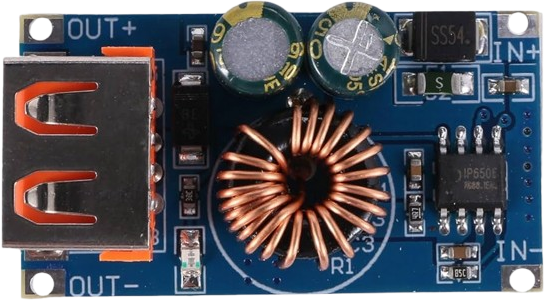
The JZ QC-MINI is a compact quick charger designed for efficient and reliable charging of electronic devices. It features multiple output ports and incorporates smart charging technology to optimize power delivery, ensuring fast and safe charging for a wide range of devices. Its small form factor makes it ideal for portable applications, travel, and integration into custom electronic projects.
Explore Projects Built with JZ QC-MINI
 Open Project in Cirkit Designer
 Open Project in Cirkit Designer
 Open Project in Cirkit Designer
 Open Project in Cirkit Designer
Explore Projects Built with JZ QC-MINI
Open Project in Cirkit DesignerOpen Project in Cirkit DesignerOpen Project in Cirkit DesignerOpen Project in Cirkit DesignerCommon Applications and Use Cases
- Charging smartphones, tablets, and other USB-powered devices
- Powering small electronic projects and development boards
- Use in portable power banks or travel adapters
- Integration into custom charging stations or kiosks
Technical Specifications
Key Technical Details
- Input Voltage: 100-240V AC, 50/60Hz
- Output Voltage: 5V, 9V, 12V DC (auto-adjust based on device requirements)
- Maximum Output Current: 3A (at 5V), 2A (at 9V), 1.5A (at 12V)
- Power Rating: Up to 18W
- Ports: 2 USB-A output ports
- Smart Charging Technology: Automatically detects and adjusts output for connected devices
- Protection Features: Over-voltage, over-current, short-circuit, and thermal protection
- Dimensions: 50mm x 30mm x 20mm
- Weight: 40g
Pin Configuration and Descriptions
The JZ QC-MINI does not have traditional pins but features two USB-A output ports. Below is a description of the ports:
| Port Number | Type | Description |
|---|---|---|
| Port 1 | USB-A | Primary output port with smart charging capability. Supports 5V, 9V, 12V DC. |
| Port 2 | USB-A | Secondary output port with smart charging capability. Supports 5V, 9V, 12V DC. |
Usage Instructions
How to Use the JZ QC-MINI in a Circuit
- Power Input: Connect the JZ QC-MINI to a standard AC power source (100-240V AC).
- Device Connection: Plug your device into one of the USB-A output ports using a compatible USB cable.
- Smart Charging: The JZ QC-MINI will automatically detect the connected device and adjust the output voltage and current for optimal charging.
- Multiple Devices: You can connect up to two devices simultaneously. Note that the total power output will be shared between the two ports.
Important Considerations and Best Practices
- Ensure that the connected devices are compatible with the supported output voltages (5V, 9V, 12V).
- Avoid overloading the charger by connecting devices that exceed the maximum power rating of 18W.
- Use high-quality USB cables to minimize power loss and ensure efficient charging.
- Keep the charger in a well-ventilated area to prevent overheating.
- Do not expose the charger to water, extreme temperatures, or physical damage.
Example: Using the JZ QC-MINI with an Arduino UNO
The JZ QC-MINI can be used to power an Arduino UNO via its USB port. Below is an example of how to connect and use it:
- Connect the JZ QC-MINI to an AC power source.
- Use a USB-A to USB-B cable to connect the JZ QC-MINI to the Arduino UNO's USB port.
- The Arduino UNO will receive 5V power from the charger, sufficient for most projects.
Here is a simple Arduino sketch to test the setup:
// Blink an LED connected to pin 13 on the Arduino UNO
// Ensure the JZ QC-MINI is connected to power the Arduino

void setup() {
  pinMode(13, OUTPUT); // Set pin 13 as an output pin
}

void loop() {
  digitalWrite(13, HIGH); // Turn the LED on
  delay(1000);            // Wait for 1 second
  digitalWrite(13, LOW);  // Turn the LED off
  delay(1000);            // Wait for 1 second
}
Troubleshooting and FAQs
Common Issues and Solutions
Device Not Charging
- Cause: The connected device may not be compatible with the charger's output voltages.
- Solution: Verify that the device supports 5V, 9V, or 12V input. Use a compatible USB cable.
Slow Charging
- Cause: The USB cable may be of poor quality or too long, causing power loss.
- Solution: Use a high-quality, short USB cable to minimize power loss.
Charger Overheating
- Cause: The charger may be operating in a poorly ventilated area or is overloaded.
- Solution: Ensure proper ventilation and avoid connecting devices that exceed the maximum power rating.
No Power Output
- Cause: The charger may not be properly connected to the AC power source.
- Solution: Check the AC connection and ensure the power outlet is functional.
FAQs
Q: Can I use the JZ QC-MINI to charge two devices simultaneously?
- A: Yes, but the total power output (18W) will be shared between the two ports.
Q: Is the JZ QC-MINI compatible with fast-charging protocols like Quick Charge or Power Delivery?
- A: The JZ QC-MINI supports smart charging technology, which adjusts output voltage and current for optimal charging. However, it may not support proprietary fast-charging protocols like Quick Charge 4.0 or USB Power Delivery.
Q: Can I use the JZ QC-MINI to power development boards other than Arduino?
- A: Yes, as long as the board operates within the supported voltage and current range (5V, 9V, 12V, up to 18W).
Q: Is the JZ QC-MINI safe to use with sensitive electronics?
- A: Yes, the charger includes over-voltage, over-current, short-circuit, and thermal protection to ensure safe operation.