Cirkit Designer Logo
Cirkit Designer
Your all-in-one circuit design IDE
Home / 
Component Documentation

How to Use gnd: Examples, Pinouts, and Specs


Image of gnd
Cirkit Designer LogoDesign with gnd in Cirkit Designer

Introduction

The GND (Ground) pin is a fundamental component in any electrical or electronic circuit. It serves as the reference point for all voltage measurements and provides a common return path for electric current. In the context of Arduino UNO, the GND pin is essential for establishing a stable circuit and ensuring proper operation of connected components.

Explore Projects Built with gnd
Use Cirkit Designer to design, explore, and prototype these projects online. Some projects support real-time simulation. Click "Open Project" to start designing instantly!
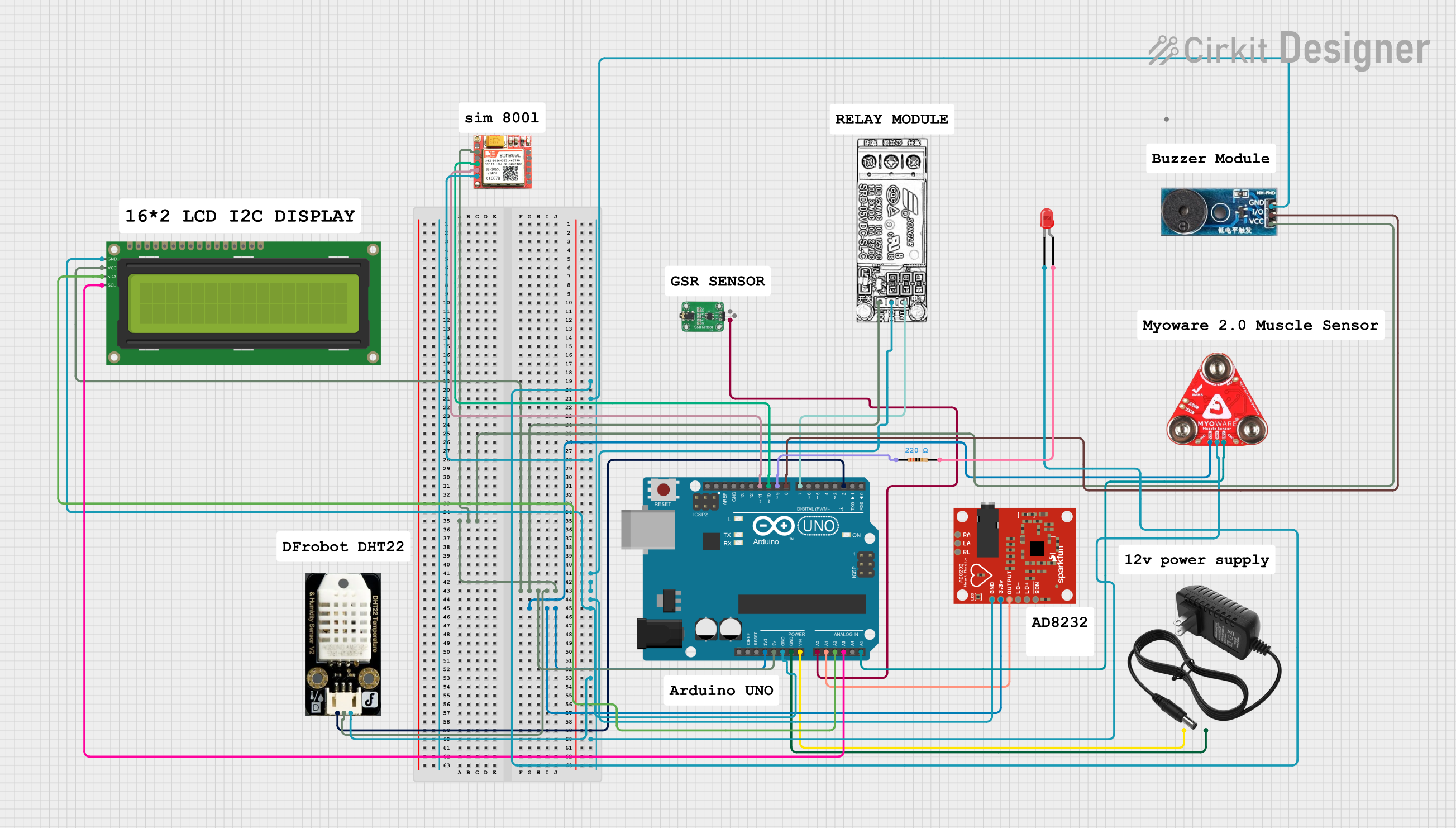
Arduino UNO Based Health Monitoring System with GSM Reporting
Image of BODY MONITORING SYSTEM: A project utilizing gnd in a practical application
This circuit is designed for a health monitoring system that measures temperature, heart rate, galvanic skin response (GSR), and muscle activity (EMG). It uses an Arduino UNO as the central processing unit, interfacing with a DHT22 temperature and humidity sensor, an AD8232 heart rate monitor, a GSR sensor, a Myoware muscle sensor, and a SIM800L GSM module for communication. The system can control a relay for a steam generator, sound a buzzer, and display data on an I2C LCD screen, with the ability to send SMS alerts based on sensor readings.
Cirkit Designer LogoOpen Project in Cirkit Designer
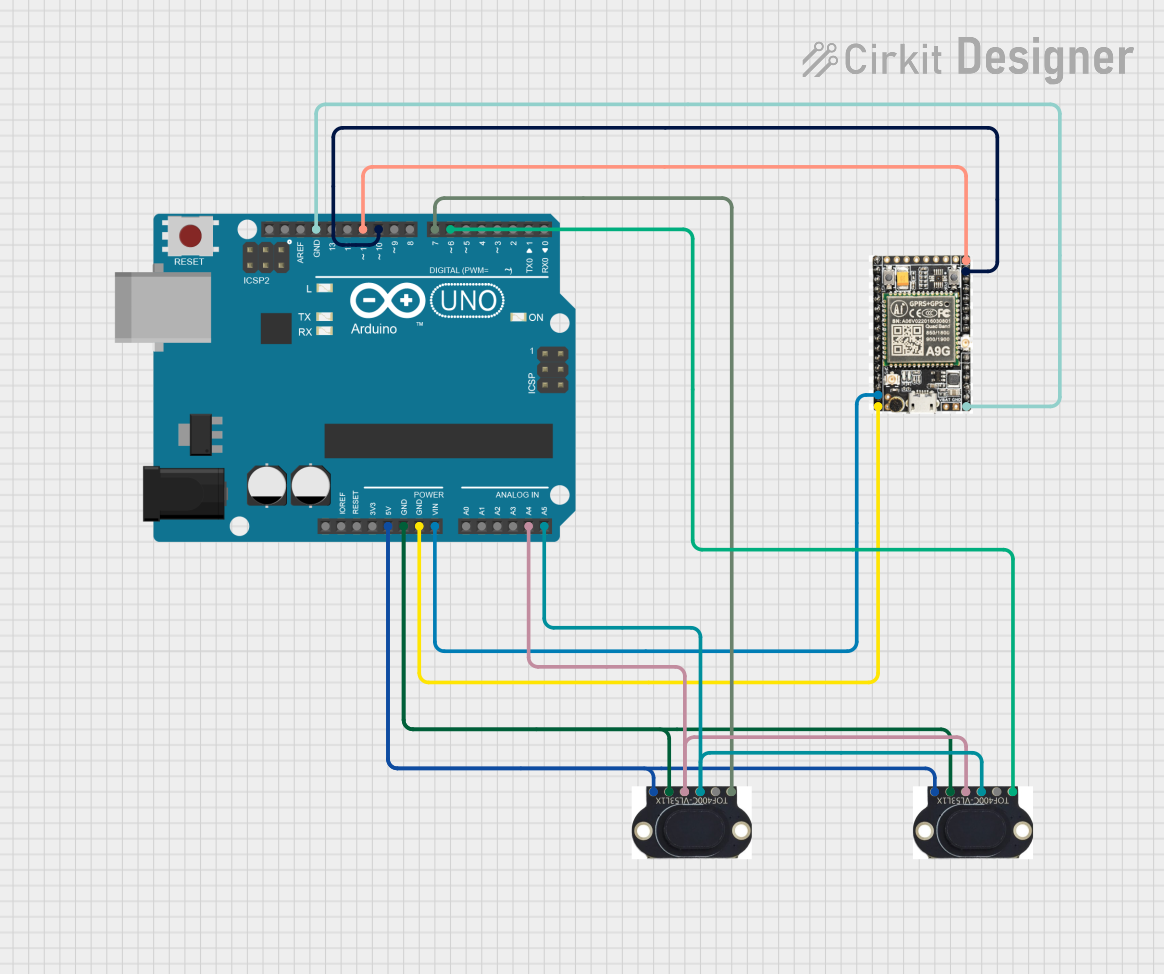
Arduino UNO with A9G GSM/GPRS and Dual VL53L1X Distance Sensors
Image of TED CIRCUIT : A project utilizing gnd in a practical application
This circuit features an Arduino UNO microcontroller interfaced with an A9G GSM/GPRS+GPS/BDS module and two VL53L1X time-of-flight distance sensors. The A9G module is connected to the Arduino via serial communication for GPS and GSM functionalities, while both VL53L1X sensors are connected through I2C with shared SDA and SCL lines and individual SHUT pins for selective sensor activation. The Arduino is programmed to control these peripherals, although the specific functionality is not detailed in the provided code.
Cirkit Designer LogoOpen Project in Cirkit Designer
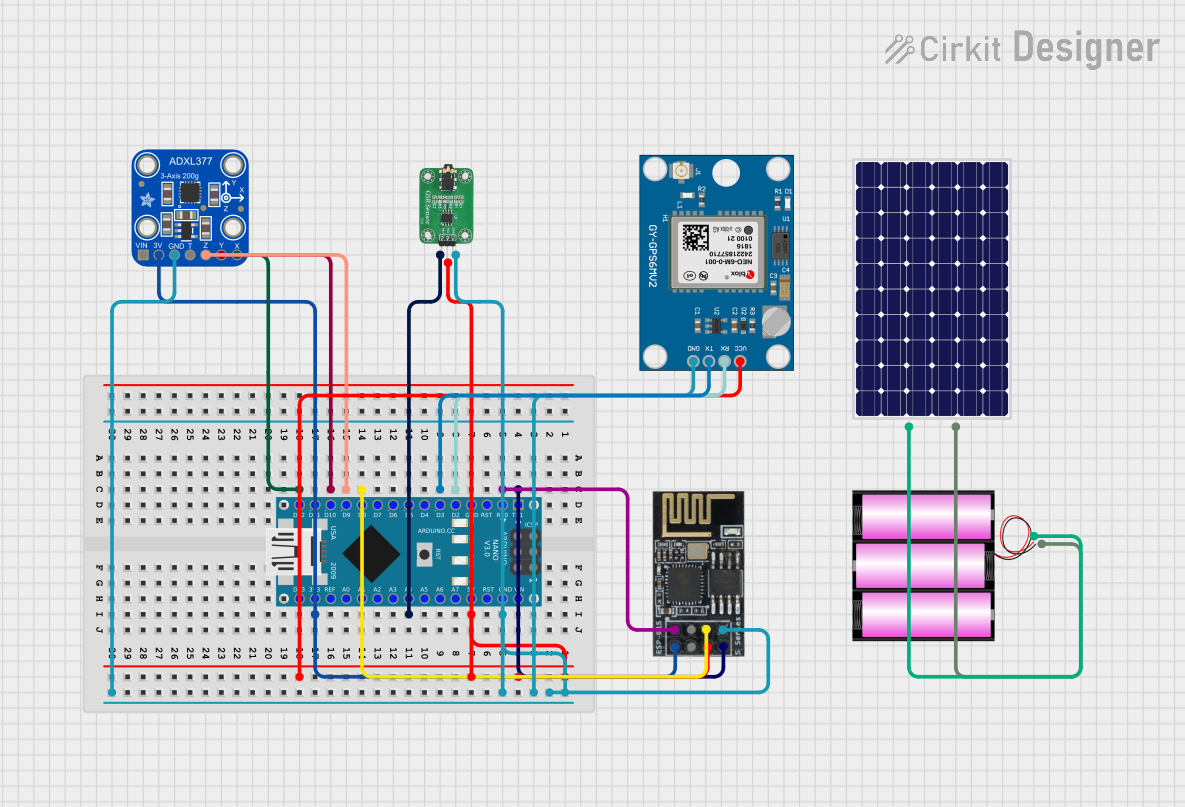
Arduino Nano-Based Health Monitoring System with Wi-Fi and GPS
Image of zekooo: A project utilizing gnd in a practical application
This circuit is a sensor-based data acquisition system using an Arduino Nano, which collects data from a GSR sensor, an ADXL377 accelerometer, and a Neo 6M GPS module. The collected data is then transmitted via a WiFi module (ESP8266-01) for remote monitoring. The system is powered by a 12V battery, which is charged by a solar panel.
Cirkit Designer LogoOpen Project in Cirkit Designer
Solar-Powered GSM/GPRS+GPS Tracker with Seeeduino XIAO
Image of SOS System : A project utilizing gnd in a practical application
This circuit features an Ai Thinker A9G development board for GSM/GPRS and GPS/BDS connectivity, interfaced with a Seeeduino XIAO microcontroller for control and data processing. A solar cell, coupled with a TP4056 charging module, charges a 3.3V battery, which powers the system through a 3.3V regulator ensuring stable operation. The circuit likely serves for remote data communication and location tracking, with the capability to be powered by renewable energy and interfaced with additional sensors or input devices via the Seeeduino XIAO.
Cirkit Designer LogoOpen Project in Cirkit Designer

Explore Projects Built with gnd

Use Cirkit Designer to design, explore, and prototype these projects online. Some projects support real-time simulation. Click "Open Project" to start designing instantly!
Image of BODY MONITORING SYSTEM: A project utilizing gnd in a practical application
Arduino UNO Based Health Monitoring System with GSM Reporting
This circuit is designed for a health monitoring system that measures temperature, heart rate, galvanic skin response (GSR), and muscle activity (EMG). It uses an Arduino UNO as the central processing unit, interfacing with a DHT22 temperature and humidity sensor, an AD8232 heart rate monitor, a GSR sensor, a Myoware muscle sensor, and a SIM800L GSM module for communication. The system can control a relay for a steam generator, sound a buzzer, and display data on an I2C LCD screen, with the ability to send SMS alerts based on sensor readings.
Cirkit Designer LogoOpen Project in Cirkit Designer
Image of TED CIRCUIT : A project utilizing gnd in a practical application
Arduino UNO with A9G GSM/GPRS and Dual VL53L1X Distance Sensors
This circuit features an Arduino UNO microcontroller interfaced with an A9G GSM/GPRS+GPS/BDS module and two VL53L1X time-of-flight distance sensors. The A9G module is connected to the Arduino via serial communication for GPS and GSM functionalities, while both VL53L1X sensors are connected through I2C with shared SDA and SCL lines and individual SHUT pins for selective sensor activation. The Arduino is programmed to control these peripherals, although the specific functionality is not detailed in the provided code.
Cirkit Designer LogoOpen Project in Cirkit Designer
Image of zekooo: A project utilizing gnd in a practical application
Arduino Nano-Based Health Monitoring System with Wi-Fi and GPS
This circuit is a sensor-based data acquisition system using an Arduino Nano, which collects data from a GSR sensor, an ADXL377 accelerometer, and a Neo 6M GPS module. The collected data is then transmitted via a WiFi module (ESP8266-01) for remote monitoring. The system is powered by a 12V battery, which is charged by a solar panel.
Cirkit Designer LogoOpen Project in Cirkit Designer
Image of SOS System : A project utilizing gnd in a practical application
Solar-Powered GSM/GPRS+GPS Tracker with Seeeduino XIAO
This circuit features an Ai Thinker A9G development board for GSM/GPRS and GPS/BDS connectivity, interfaced with a Seeeduino XIAO microcontroller for control and data processing. A solar cell, coupled with a TP4056 charging module, charges a 3.3V battery, which powers the system through a 3.3V regulator ensuring stable operation. The circuit likely serves for remote data communication and location tracking, with the capability to be powered by renewable energy and interfaced with additional sensors or input devices via the Seeeduino XIAO.
Cirkit Designer LogoOpen Project in Cirkit Designer

Common Applications and Use Cases

  • Establishing a common reference point in circuits.
  • Completing electrical circuits for sensors, actuators, and other peripherals.
  • Ensuring stable operation of microcontrollers and other electronic devices.
  • Reducing noise and interference in signal processing circuits.

Technical Specifications

The GND pin on the Arduino UNO is designed to provide a stable ground connection for the board and connected components. Below are the key technical details:

General Specifications

Parameter Value
Manufacturer Arduino
Manufacturer Part ID UNO
Voltage Reference 0V (Ground)
Current Capacity Up to 500mA (shared with other pins)

Pin Configuration and Description

The Arduino UNO board includes multiple GND pins for convenience. These pins are internally connected and function identically.

Pin Label Description
GND Ground pin. Used as a reference point for voltage and a return path for current.

Usage Instructions

How to Use the GND Pin in a Circuit

  1. Connect the GND Pin to Your Circuit:

    • Identify the GND pin on the Arduino UNO board.
    • Connect the GND pin to the ground rail of your breadboard or directly to the ground terminal of your circuit.
  2. Establish a Common Ground:

    • Ensure that all components in your circuit share the same ground reference by connecting their ground terminals to the GND pin.
  3. Avoid Ground Loops:

    • When connecting multiple devices, ensure that there is only one ground reference point to prevent ground loops, which can cause noise and instability.

Important Considerations and Best Practices

  • Shared Current Capacity: The GND pin shares its current capacity with other pins on the Arduino UNO. Ensure that the total current does not exceed the board's limits (500mA).
  • Proper Grounding: For circuits with high-frequency signals or sensitive analog components, use a star grounding technique to minimize noise.
  • Power Supply Ground: If using an external power supply, connect its ground terminal to the Arduino GND pin to maintain a common reference.

Example: Connecting a Sensor to Arduino UNO

Below is an example of connecting a temperature sensor (e.g., LM35) to the Arduino UNO, using the GND pin.

// Example: Reading temperature from an LM35 sensor
// Connect the LM35 sensor as follows:
// - VCC pin of LM35 to 5V on Arduino
// - GND pin of LM35 to GND on Arduino
// - OUT pin of LM35 to A0 on Arduino

const int sensorPin = A0; // Analog pin connected to LM35 OUT pin
float temperature;        // Variable to store temperature value

void setup() {
  Serial.begin(9600); // Initialize serial communication
}

void loop() {
  int sensorValue = analogRead(sensorPin); // Read analog value from sensor
  temperature = (sensorValue * 5.0 / 1023.0) * 100.0; 
  // Convert analog value to temperature in Celsius
  Serial.print("Temperature: ");
  Serial.print(temperature);
  Serial.println(" °C");
  delay(1000); // Wait for 1 second before next reading
}

Troubleshooting and FAQs

Common Issues Users Might Face

  1. No Voltage Reference:

    • Problem: The circuit does not function as expected because there is no common ground.
    • Solution: Ensure that all components in the circuit share the same ground reference by connecting their ground terminals to the GND pin.
  2. Ground Loop Noise:

    • Problem: Unwanted noise or instability in the circuit due to multiple ground paths.
    • Solution: Use a single ground reference point and avoid creating loops in the ground connections.
  3. Overloading the GND Pin:

    • Problem: Excessive current draw through the GND pin causes overheating or instability.
    • Solution: Ensure that the total current through the GND pin does not exceed the Arduino UNO's limit (500mA).

FAQs

Q: Can I use any GND pin on the Arduino UNO?
A: Yes, all GND pins on the Arduino UNO are internally connected and function identically. You can use any of them as needed.

Q: What happens if I don't connect the GND pin?
A: Without a ground connection, your circuit will lack a common reference point, leading to erratic behavior or failure to operate.

Q: Can I connect multiple devices to the same GND pin?
A: Yes, you can connect multiple devices to the same GND pin, but ensure that the total current does not exceed the board's capacity.

Q: How do I reduce noise in my circuit?
A: Use proper grounding techniques, such as star grounding, and avoid ground loops. Additionally, use decoupling capacitors near sensitive components.