
How to Use AS7341: Examples, Pinouts, and Specs
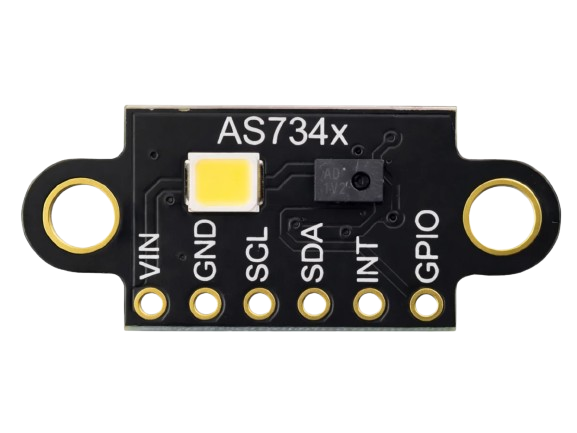
 Design with AS7341 in Cirkit Designer
Introduction
The AS7341 is a highly versatile spectral sensor capable of measuring light intensity across multiple wavelengths. It features 11 discrete channels for color detection, making it ideal for applications requiring precise spectral analysis. The sensor is commonly used in color sensing, ambient light sensing, and environmental monitoring. Its compact design and I²C interface make it suitable for integration into a wide range of devices, including portable electronics, IoT systems, and industrial equipment.
Explore Projects Built with AS7341
 Open Project in Cirkit Designer
 Open Project in Cirkit Designer
 Open Project in Cirkit Designer
 Open Project in Cirkit Designer
Explore Projects Built with AS7341
Open Project in Cirkit DesignerOpen Project in Cirkit DesignerOpen Project in Cirkit DesignerOpen Project in Cirkit DesignerTechnical Specifications
The AS7341 offers advanced spectral sensing capabilities with the following key specifications:
Key Technical Details
- Operating Voltage: 1.8V (core) and 3.3V (I/O)
- Spectral Channels: 11 (including visible and near-infrared)
- Communication Interface: I²C (up to 1 MHz)
- Measurement Range: 0.1 lux to 10,000 lux
- Operating Temperature: -40°C to +85°C
- Package: 20-pin LGA (2.0 mm x 2.0 mm x 0.65 mm)
Pin Configuration and Descriptions
The AS7341 has a 20-pin layout. Below is a table summarizing the key pins:
| Pin Name | Type | Description |
|---|---|---|
| VDD | Power | Core supply voltage (1.8V). |
| VDD_IO | Power | I/O supply voltage (1.8V to 3.3V). |
| GND | Ground | Ground connection. |
| SDA | I²C Data | Serial data line for I²C communication. |
| SCL | I²C Clock | Serial clock line for I²C communication. |
| INT | Output | Interrupt output for event signaling. |
| GPIO1 | Input/Output | General-purpose I/O pin. |
| GPIO2 | Input/Output | General-purpose I/O pin. |
| LED | Output | LED driver output for illumination control. |
| NC | - | No connection (leave unconnected). |
Usage Instructions
How to Use the AS7341 in a Circuit
- Power Supply: Connect the VDD pin to a 1.8V power source and the VDD_IO pin to a 3.3V source. Ensure proper decoupling capacitors are placed near the power pins.
- I²C Communication: Connect the SDA and SCL pins to the corresponding I²C lines of your microcontroller. Use pull-up resistors (typically 4.7 kΩ) on both lines.
- Interrupt Handling: If required, connect the INT pin to a GPIO pin on your microcontroller to handle interrupts.
- LED Control: Use the LED pin to drive an external LED for illumination, if needed.
- Initialization: Configure the sensor via I²C commands to set the desired measurement mode and gain settings.
Important Considerations and Best Practices
- I²C Address: The default I²C address of the AS7341 is
0x39. Ensure no address conflicts on the I²C bus. - Optical Isolation: Place the sensor in an enclosure or use an optical filter to prevent interference from stray light.
- Calibration: Perform calibration to account for environmental factors and improve measurement accuracy.
- ESD Protection: Implement proper ESD protection measures to safeguard the sensor.
Example Code for Arduino UNO
Below is an example of how to interface the AS7341 with an Arduino UNO using the Wire library:
#include <Wire.h>

#define AS7341_I2C_ADDRESS 0x39 // Default I²C address of AS7341

void setup() {
  Wire.begin(); // Initialize I²C communication
  Serial.begin(9600); // Initialize serial communication for debugging

  // Initialize the AS7341
  if (!initializeAS7341()) {
    Serial.println("AS7341 initialization failed!");
    while (1); // Halt execution if initialization fails
  }

  Serial.println("AS7341 initialized successfully!");
}

void loop() {
  // Read spectral data from the AS7341
  uint16_t channelData = readChannelData(0x95); // Example: Read channel F1
  Serial.print("Channel F1 Data: ");
  Serial.println(channelData);

  delay(1000); // Wait 1 second before the next reading
}

bool initializeAS7341() {
  Wire.beginTransmission(AS7341_I2C_ADDRESS);
  Wire.write(0x80); // Enable the sensor (register 0x80)
  Wire.write(0x01); // Power ON the sensor
  return (Wire.endTransmission() == 0); // Return true if successful
}

uint16_t readChannelData(uint8_t channelRegister) {
  Wire.beginTransmission(AS7341_I2C_ADDRESS);
  Wire.write(channelRegister); // Specify the channel register to read
  if (Wire.endTransmission() != 0) {
    return 0; // Return 0 if communication fails
  }

  Wire.requestFrom(AS7341_I2C_ADDRESS, 2); // Request 2 bytes of data
  if (Wire.available() < 2) {
    return 0; // Return 0 if insufficient data is received
  }

  uint16_t data = Wire.read(); // Read the first byte (MSB)
  data = (data << 8) | Wire.read(); // Read the second byte (LSB)
  return data;
}
Troubleshooting and FAQs
Common Issues
No Response from the Sensor:
- Cause: Incorrect I²C wiring or address mismatch.
- Solution: Verify the SDA and SCL connections and ensure the correct I²C address is used.
Inaccurate Measurements:
- Cause: Stray light interference or improper calibration.
- Solution: Use an optical filter and perform calibration in the target environment.
Interrupts Not Triggering:
- Cause: Interrupt pin not configured correctly.
- Solution: Check the INT pin connection and ensure the microcontroller is configured to handle interrupts.
FAQs
Q: Can the AS7341 measure UV light?
A: No, the AS7341 is designed for visible and near-infrared light detection only.Q: What is the maximum I²C speed supported?
A: The AS7341 supports I²C speeds up to 1 MHz (Fast Mode Plus).Q: Is the AS7341 suitable for outdoor use?
A: While the sensor can operate in a wide temperature range, it should be protected from direct exposure to harsh environmental conditions.
By following this documentation, users can effectively integrate and utilize the AS7341 spectral sensor in their projects.