
How to Use Scalance XB005: Examples, Pinouts, and Specs
 Design with Scalance XB005 in Cirkit Designer
Introduction
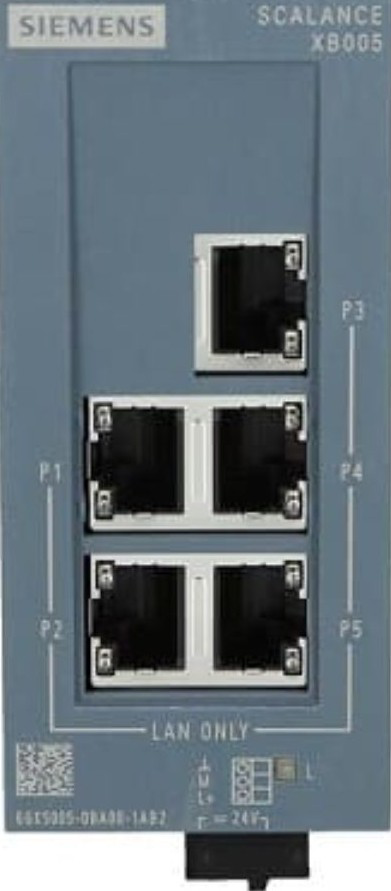
The Scalance XB005, manufactured by Siemens, is a managed Ethernet switch designed for industrial applications. It provides reliable network connectivity and advanced features such as VLAN support, redundancy, and security options. This switch is engineered to ensure robust communication in harsh environments, making it ideal for industrial automation, process control, and other mission-critical applications.
Explore Projects Built with Scalance XB005
 Open Project in Cirkit Designer
 Open Project in Cirkit Designer
 Open Project in Cirkit Designer
 Open Project in Cirkit Designer
Explore Projects Built with Scalance XB005
Open Project in Cirkit DesignerOpen Project in Cirkit DesignerOpen Project in Cirkit DesignerOpen Project in Cirkit DesignerCommon Applications and Use Cases
- Industrial automation and control systems
- Process monitoring and data acquisition
- Factory floor networking
- Redundant network configurations for high availability
- Secure communication in harsh environmental conditions
Technical Specifications
Key Technical Details
| Parameter | Specification |
|---|---|
| Manufacturer | Siemens |
| Model | Scalance XB005 |
| Type | Managed Ethernet Switch |
| Number of Ports | 5 Fast Ethernet Ports (10/100 Mbps) |
| Input Voltage Range | 24 V DC (18.5 V to 30.2 V DC) |
| Power Consumption | < 3 W |
| Operating Temperature | -40°C to +70°C |
| Protection Class | IP20 |
| Dimensions (W x H x D) | 45 mm x 100 mm x 87 mm |
| Weight | Approx. 0.2 kg |
| Mounting | DIN rail |
| Certifications | CE, UL, cUL, and more |
Pin Configuration and Descriptions
The Scalance XB005 does not have traditional "pins" like an IC but instead features Ethernet ports and a power input terminal. Below is the description of its key interfaces:
Ethernet Ports
| Port Number | Description |
|---|---|
| Port 1-5 | 10/100 Mbps Fast Ethernet ports for connecting devices or other switches. |
Power Input Terminal
| Terminal | Description |
|---|---|
| +24 V | Positive DC power input (18.5-30.2 V). |
| 0 V | Ground connection. |
Usage Instructions
How to Use the Scalance XB005 in a Network
Powering the Device:
- Connect a 24 V DC power supply to the power input terminal.
- Ensure the power supply is within the specified voltage range (18.5-30.2 V DC).
Connecting Devices:
- Use standard Ethernet cables to connect devices (e.g., PLCs, HMIs, or other switches) to the Ethernet ports.
- The ports automatically detect the speed (10/100 Mbps) and duplex mode of connected devices.
Configuring the Switch:
- Access the switch's management interface via a web browser or a network management tool.
- Configure VLANs, redundancy protocols, and security settings as needed for your application.
Mounting:
- Mount the switch on a DIN rail in a control cabinet or other suitable enclosure.
- Ensure proper ventilation and avoid exposure to excessive heat or moisture.
Important Considerations and Best Practices
- Redundancy: Use redundancy protocols (e.g., RSTP) to ensure high availability in critical applications.
- VLAN Configuration: Segment your network using VLANs to improve security and reduce broadcast traffic.
- Environmental Conditions: Ensure the operating environment meets the specified temperature and humidity ranges.
- Cable Quality: Use industrial-grade Ethernet cables for reliable performance in harsh environments.
Example: Connecting to an Arduino UNO
While the Scalance XB005 is not directly programmable, it can be used to connect an Arduino UNO to a network. Below is an example of how to send data from an Arduino UNO to a networked device via the switch:
Arduino Code Example
#include <SPI.h>
#include <Ethernet.h>

// MAC address and IP address for the Arduino
byte mac[] = { 0xDE, 0xAD, 0xBE, 0xEF, 0xFE, 0xED };
IPAddress ip(192, 168, 1, 177);

// Initialize the Ethernet client
EthernetClient client;

void setup() {
  // Start the Ethernet connection
  Ethernet.begin(mac, ip);
  Serial.begin(9600);

  // Check for Ethernet hardware
  if (Ethernet.hardwareStatus() == EthernetNoHardware) {
    Serial.println("Ethernet shield not found. Check connections.");
    while (true);
  }

  // Check for a valid connection
  if (Ethernet.linkStatus() == LinkOFF) {
    Serial.println("Ethernet cable is not connected.");
  }
}

void loop() {
  // Example: Send data to a server
  if (client.connect("192.168.1.100", 80)) {
    client.println("GET /data HTTP/1.1");
    client.println("Host: 192.168.1.100");
    client.println("Connection: close");
    client.println();
  }

  // Wait for a response and print it
  while (client.available()) {
    char c = client.read();
    Serial.print(c);
  }

  // Disconnect the client
  client.stop();

  // Wait before sending the next request
  delay(10000);
}
Note: Replace
192.168.1.100with the IP address of the target device on the network.
Troubleshooting and FAQs
Common Issues and Solutions
No Power to the Switch:
- Cause: Incorrect or insufficient power supply.
- Solution: Verify the power supply voltage is within the range of 18.5-30.2 V DC.
No Network Connectivity:
- Cause: Faulty cables or incorrect configuration.
- Solution: Check Ethernet cables for damage and ensure proper configuration of IP addresses and VLANs.
Intermittent Connectivity:
- Cause: Environmental interference or poor cable quality.
- Solution: Use shielded Ethernet cables and ensure the switch is installed in a suitable environment.
Unable to Access Management Interface:
- Cause: Incorrect IP address or network settings.
- Solution: Reset the switch to factory settings and reconfigure the network.
FAQs
Q1: Can the Scalance XB005 be used in outdoor environments?
A1: No, the Scalance XB005 is rated for indoor use only (IP20 protection). Use an appropriate enclosure for outdoor applications.
Q2: Does the switch support PoE (Power over Ethernet)?
A2: No, the Scalance XB005 does not support PoE. Use a separate PoE injector or switch if needed.
Q3: How do I reset the switch to factory settings?
A3: Refer to the user manual for detailed instructions on performing a factory reset.
Q4: Can I use the Scalance XB005 with non-industrial devices?
A4: Yes, the switch is compatible with any Ethernet-enabled device, but it is optimized for industrial applications.