The TSL2591 is a high-performance digital light sensor designed to provide precise and high-resolution light measurements. It features dual-channel sensors (visible and infrared) and can detect a wide range of light levels, from extremely low to very high intensities. This makes it ideal for applications requiring accurate ambient light sensing, such as automatic brightness control in displays, industrial lighting systems, and environmental monitoring.
Explore Projects Built with TSL2591
Use Cirkit Designer to design, explore, and prototype these projects online. Some projects support real-time simulation. Click "Open Project" to start designing instantly!
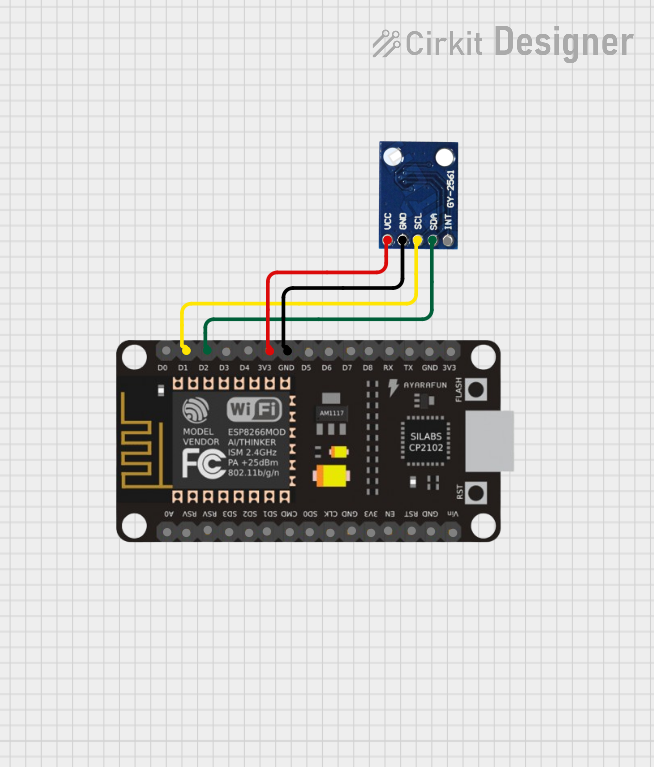
This circuit consists of an ESP8266 NodeMCU microcontroller connected to a TSL2561 Lux Sensor. The microcontroller reads light intensity data from the sensor via I2C communication, with the SCL and SDA lines connected to D1 and D2 pins of the ESP8266, respectively. Power is supplied to the sensor through the 3V3 and GND pins of the ESP8266.
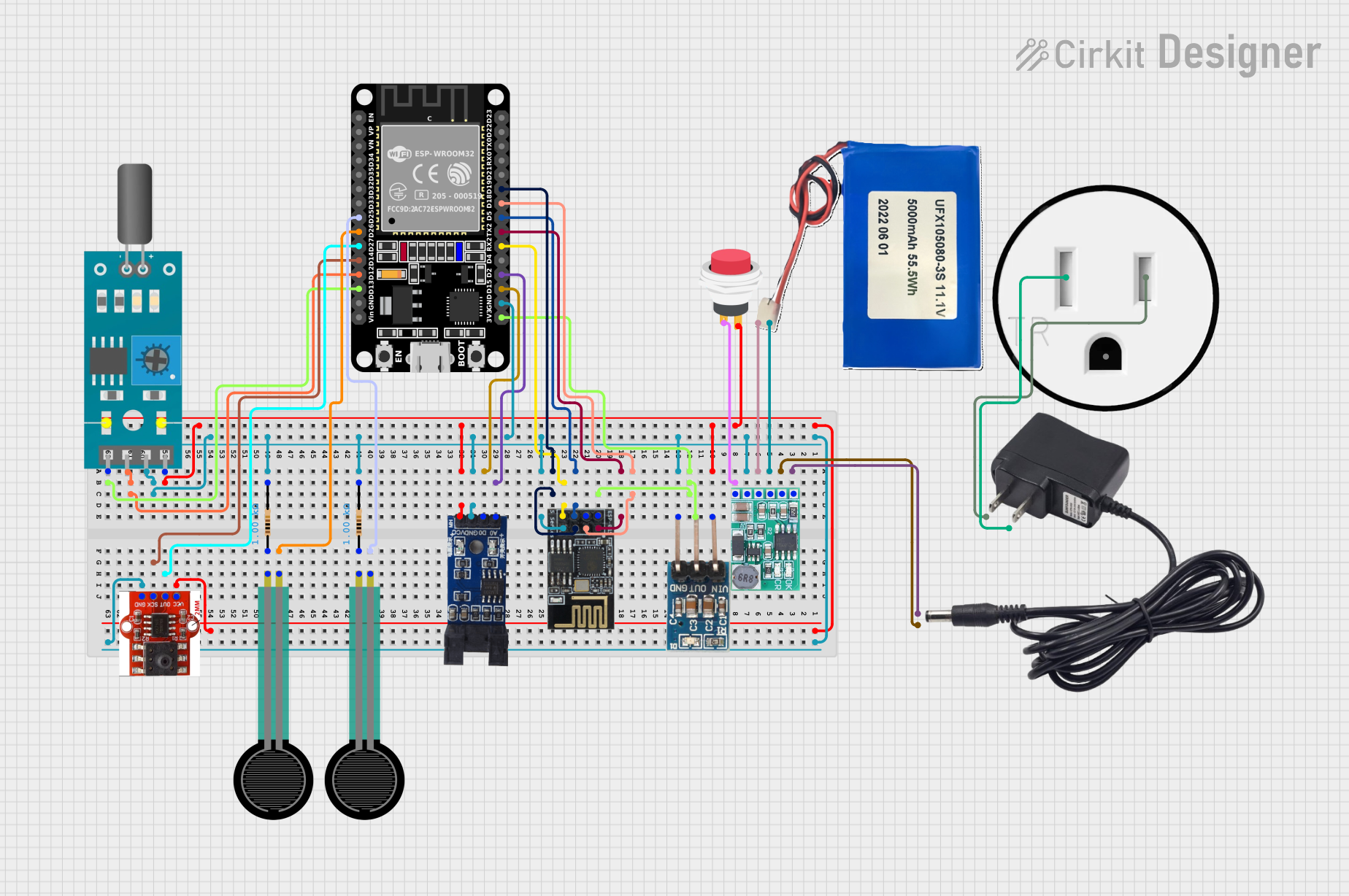
This circuit is a sensor monitoring and data transmission system powered by a Li-ion battery and a 12V adapter. It includes various sensors (tilt, optical encoder, force sensing resistors, and air pressure) connected to an ESP32 microcontroller, which reads sensor data and transmits it via a WiFi module (ESP8266-01). The system is designed to provide real-time sensor data over a WiFi network.
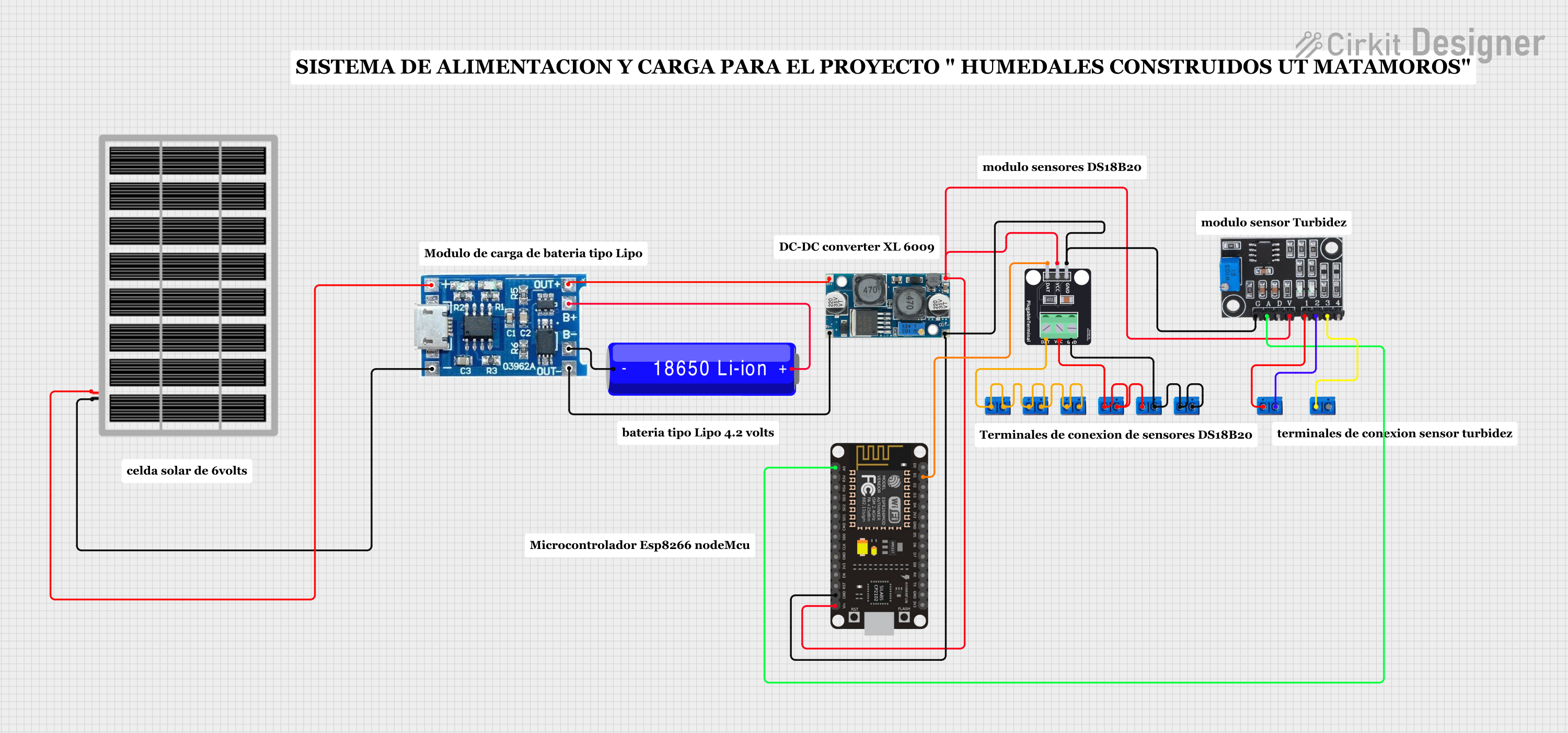
This circuit features an ESP8266 NodeMCU microcontroller interfaced with a DS18B20 temperature sensor and a turbidity module to monitor water quality. The NodeMCU reads temperature data from the DS18B20 sensor and turbidity levels from the turbidity module's analog output. Power management is handled by a 18650 Li-ion battery connected to a solar panel and a Do solara charge controller, with voltage regulation provided by an XL6009 module to ensure stable operation of the microcontroller and sensors.
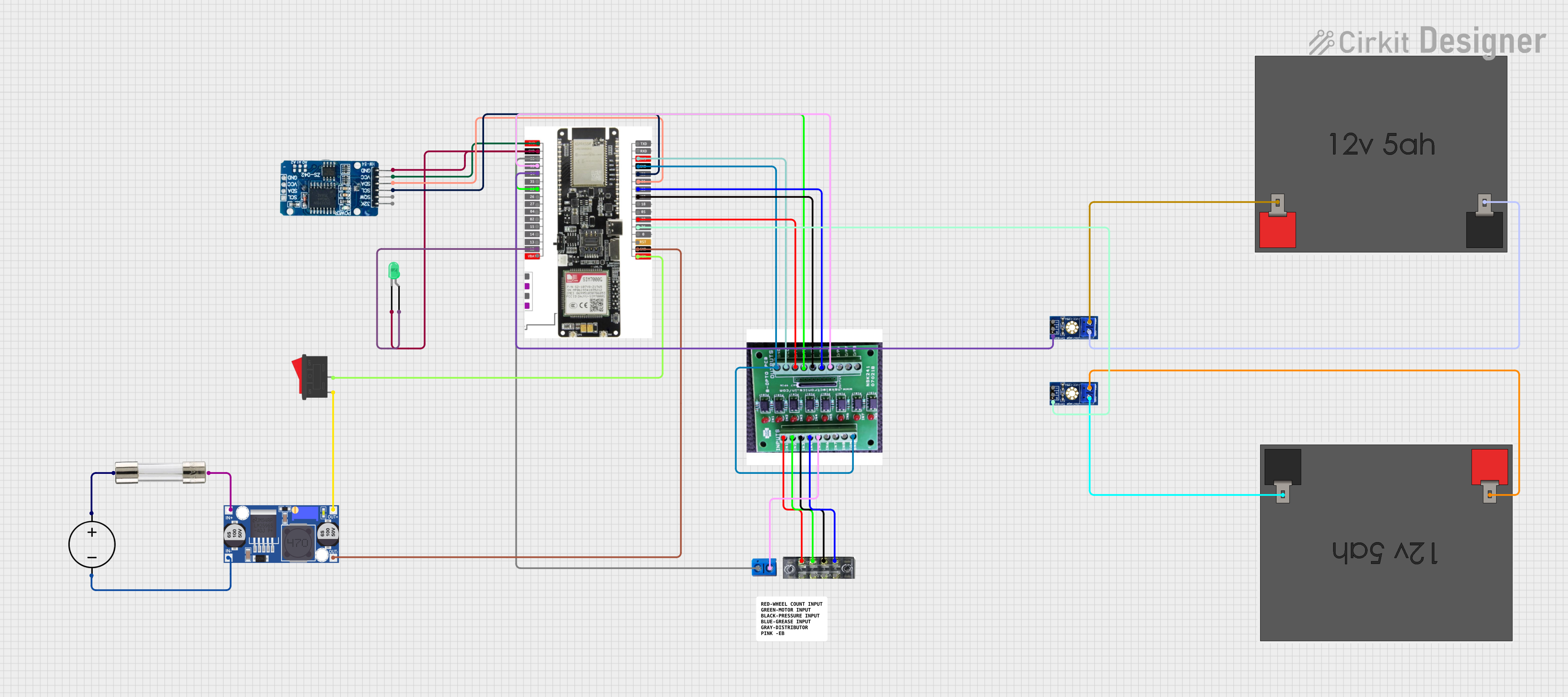
This circuit features a LilyGo-SIM7000G module for cellular communication and GPS functionality, interfaced with an RTC DS3231 for real-time clock capabilities. It includes voltage sensing through two voltage sensor modules, and uses an 8-channel opto-coupler for isolating different parts of the circuit. Power management is handled by a buck converter connected to a DC power source and batteries, with a fuse for protection and a rocker switch for on/off control. Additionally, there's an LED for indication purposes.
Display brightness control in smartphones, tablets, and laptops
Industrial and environmental light monitoring
Smart home automation systems
Agricultural light measurement
Technical Specifications
The TSL2591 is a versatile sensor with the following key technical details:
Parameter
Value
Operating Voltage
2.7V to 3.6V
Communication Interface
I²C (up to 400 kHz)
Spectral Range
188 nm to 1,000 nm
Lux Range
0.0001 lux to 88,000 lux
Resolution
16-bit ADC
Operating Temperature
-30°C to +70°C
Power Consumption
0.6 mA (active), 5 µA (standby)
Pin Configuration and Descriptions
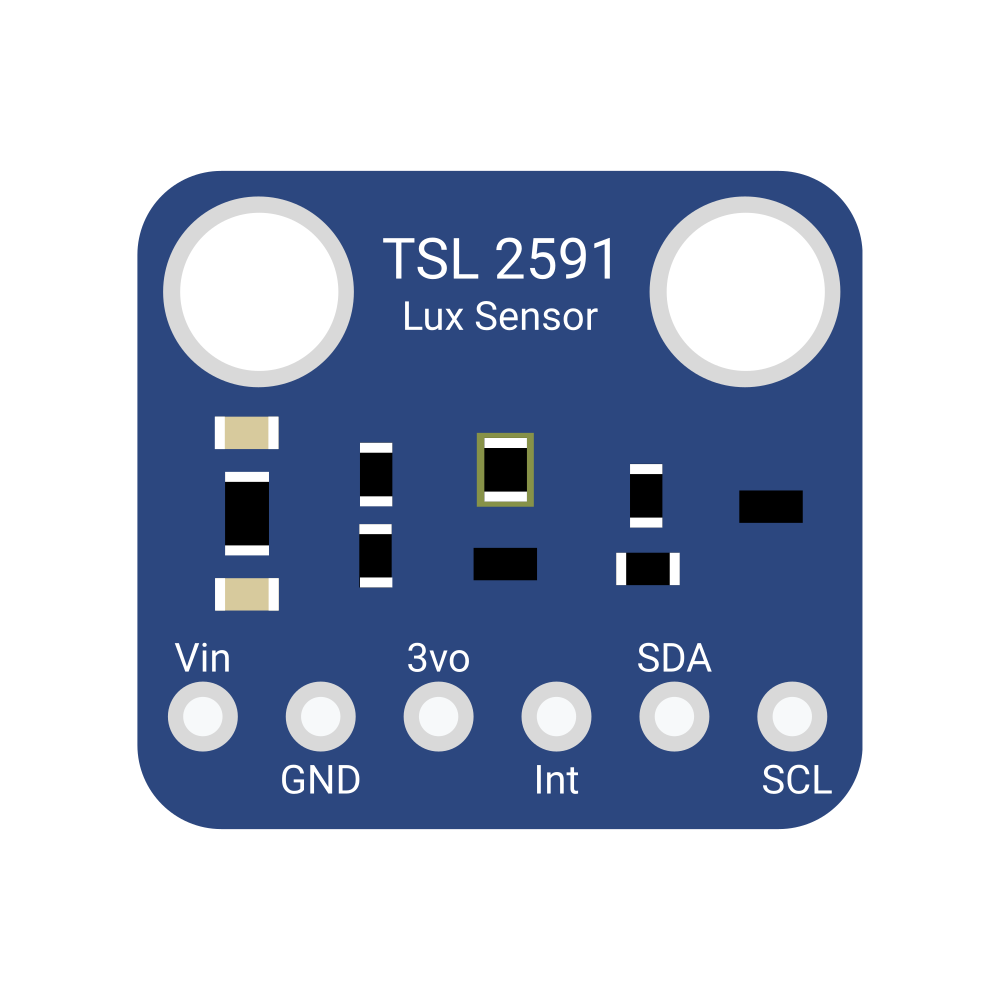
The TSL2591 is typically available in a 6-pin package. Below is the pinout description:
Pin
Name
Description
1
GND
Ground connection
2
VDD
Power supply (2.7V to 3.6V)
3
SDA
I²C data line
4
SCL
I²C clock line
5
INT
Interrupt output (optional, configurable)
6
NC
No connection (leave unconnected or grounded)
Usage Instructions
How to Use the TSL2591 in a Circuit
Power Supply: Connect the VDD pin to a 3.3V power source and the GND pin to ground.
I²C Communication: Connect the SDA and SCL pins to the corresponding I²C pins on your microcontroller. Use pull-up resistors (typically 4.7 kΩ) on both lines if not already present.
Interrupt Pin (Optional): The INT pin can be used to trigger an interrupt on the microcontroller when a light threshold is crossed. If unused, leave it unconnected or grounded.
Address Selection: The TSL2591 has a fixed I²C address of 0x29.
Important Considerations and Best Practices
Light Source Placement: Ensure the sensor is exposed to the light source without obstructions for accurate readings.
Calibration: For precise measurements, calibrate the sensor based on your specific application and environment.
Power Management: Use the standby mode to reduce power consumption when the sensor is not actively measuring.
I²C Pull-Up Resistors: Verify that pull-up resistors are present on the SDA and SCL lines to ensure proper I²C communication.
Example Code for Arduino UNO
Below is an example of how to interface the TSL2591 with an Arduino UNO using the Adafruit TSL2591 library:
#include <Wire.h>
#include <Adafruit_Sensor.h>
#include <Adafruit_TSL2591.h>

// Create an instance of the TSL2591 sensor
Adafruit_TSL2591 tsl = Adafruit_TSL2591(2591);

void configureSensor() {
  // Set gain and integration time for the sensor
  tsl.setGain(TSL2591_GAIN_MED); // Options: LOW, MED, HIGH, MAX
  tsl.setTiming(TSL2591_INTEGRATIONTIME_100MS); // Options: 100MS, 200MS, etc.

  // Print configuration details
  Serial.println(F("TSL2591 configured with medium gain and 100ms integration time."));
}

void setup() {
  Serial.begin(9600);
  if (!tsl.begin()) {
    Serial.println(F("TSL2591 not found. Check wiring and I²C address."));
    while (1); // Halt execution if sensor is not found
  }
  Serial.println(F("TSL2591 sensor initialized."));
  configureSensor();
}

void loop() {
  // Get full-spectrum, infrared, and visible light readings
  uint16_t fullSpectrum = tsl.getFullLuminosity();
  uint16_t infrared = fullSpectrum >> 16;
  uint16_t visible = fullSpectrum & 0xFFFF;

  // Calculate lux value
  float lux = tsl.calculateLux(fullSpectrum & 0xFFFF, fullSpectrum >> 16);

  // Print readings to the Serial Monitor
  Serial.print(F("Visible Light: "));
  Serial.print(visible);
  Serial.print(F(" | Infrared: "));
  Serial.print(infrared);
  Serial.print(F(" | Lux: "));
  Serial.println(lux);

  delay(1000); // Wait 1 second before the next reading
}
Troubleshooting and FAQs
Common Issues and Solutions
Sensor Not Detected
Cause: Incorrect wiring or I²C address mismatch.
Solution: Verify the SDA and SCL connections. Ensure the I²C address is set to 0x29.
Inaccurate Light Measurements
Cause: Obstructions or incorrect gain/integration time settings.
Solution: Ensure the sensor is unobstructed and adjust the gain and integration time for your environment.
No Data Output
Cause: Missing pull-up resistors on the I²C lines.
Solution: Add 4.7 kΩ pull-up resistors to the SDA and SCL lines.
High Power Consumption
Cause: Sensor left in active mode when not in use.
Solution: Use the standby mode to reduce power consumption.
FAQs
Q: Can the TSL2591 measure UV light?
A: No, the TSL2591 is designed to measure visible and infrared light but does not detect UV light.
Q: What is the maximum I²C clock speed supported?
A: The TSL2591 supports I²C communication at speeds up to 400 kHz.
Q: Can I use the TSL2591 with a 5V microcontroller?
A: Yes, but you must use a level shifter to safely interface the 3.3V sensor with a 5V microcontroller.
Q: How do I calculate lux from raw sensor data?
A: The Adafruit TSL2591 library provides a calculateLux() function to simplify lux calculation.

 Open Project in Cirkit Designer