
How to Use DPST SSR: Examples, Pinouts, and Specs
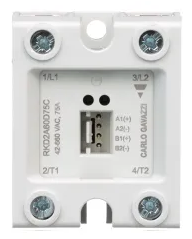
 Design with DPST SSR in Cirkit Designer
Introduction
The Carlo Gavazzi RKD2A23D50C is a Double Pole Single Throw Solid State Relay (DPST SSR) designed for high-performance switching applications. Unlike traditional mechanical relays, this solid-state relay uses semiconductor components to control the flow of electricity, ensuring fast switching speeds, high reliability, and long operational life. The DPST configuration allows it to control two separate circuits simultaneously, making it ideal for industrial and commercial applications.
Explore Projects Built with DPST SSR
 Open Project in Cirkit Designer
 Open Project in Cirkit Designer
 Open Project in Cirkit Designer
 Open Project in Cirkit Designer
Explore Projects Built with DPST SSR
Open Project in Cirkit DesignerOpen Project in Cirkit DesignerOpen Project in Cirkit DesignerOpen Project in Cirkit DesignerCommon Applications and Use Cases
- Industrial automation systems
- HVAC systems
- Motor control and protection
- Lighting control
- Heating elements and temperature control
- Applications requiring high-speed switching and electrical isolation
Technical Specifications
Key Technical Details
| Parameter | Value |
|---|---|
| Manufacturer | Carlo Gavazzi |
| Part Number | RKD2A23D50C |
| Relay Type | Solid State Relay (SSR) |
| Configuration | Double Pole Single Throw (DPST) |
| Load Voltage Range | 24-230 VAC |
| Maximum Load Current | 50 A |
| Control Voltage Range | 4-32 VDC |
| Isolation Voltage | 4000 VAC |
| Switching Speed | < 10 ms |
| Operating Temperature Range | -30°C to +80°C |
| Mounting Type | Panel Mount |
| Certifications | CE, UL, RoHS |
Pin Configuration and Descriptions
The RKD2A23D50C has a straightforward pin configuration for both the control and load sides. Below is the pinout description:
Control Side (Input)
| Pin Number | Description |
|---|---|
| 1 | Positive Control Input (+) |
| 2 | Negative Control Input (-) |
Load Side (Output)
| Pin Number | Description |
|---|---|
| 3 | Load Terminal 1 (Pole 1) |
| 4 | Load Terminal 2 (Pole 1) |
| 5 | Load Terminal 1 (Pole 2) |
| 6 | Load Terminal 2 (Pole 2) |
Usage Instructions
How to Use the Component in a Circuit
Control Side Connection:
- Connect the positive control voltage (4-32 VDC) to Pin 1.
- Connect the negative control voltage (ground) to Pin 2.
- Ensure the control voltage is within the specified range to avoid damage.
Load Side Connection:
- Connect the first circuit to Pins 3 and 4 (Pole 1).
- Connect the second circuit to Pins 5 and 6 (Pole 2).
- Ensure the load voltage and current do not exceed the relay's maximum ratings (230 VAC, 50 A).
Mounting:
- Secure the relay to a panel or heat sink using the mounting holes provided.
- Use thermal paste or a thermal pad if necessary to improve heat dissipation.
Power Up:
- Apply the control voltage to activate the relay.
- When the control voltage is applied, the relay will close both poles, allowing current to flow through the connected circuits.
Important Considerations and Best Practices
- Heat Dissipation: Ensure proper heat dissipation by using a heat sink or fan if the relay operates under high load conditions.
- Electrical Isolation: Verify that the control and load sides are electrically isolated to prevent damage to sensitive control circuits.
- Surge Protection: Use appropriate snubber circuits or varistors to protect the relay from voltage spikes.
- Wiring: Use appropriately rated wires and connectors to handle the load current safely.
- Testing: Test the relay in a low-power setup before deploying it in a high-power application.
Arduino UNO Example Code
The RKD2A23D50C can be controlled using an Arduino UNO. Below is an example code to toggle the relay on and off:
// Define the control pin connected to the relay
const int relayControlPin = 7;

void setup() {
  // Set the relay control pin as an output
  pinMode(relayControlPin, OUTPUT);
}

void loop() {
  // Turn the relay ON
  digitalWrite(relayControlPin, HIGH);
  delay(1000); // Keep the relay ON for 1 second

  // Turn the relay OFF
  digitalWrite(relayControlPin, LOW);
  delay(1000); // Keep the relay OFF for 1 second
}
Troubleshooting and FAQs
Common Issues and Solutions
Relay Not Switching:
- Cause: Insufficient control voltage.
- Solution: Verify that the control voltage is within the 4-32 VDC range.
Overheating:
- Cause: Inadequate heat dissipation.
- Solution: Install a heat sink or improve ventilation around the relay.
Load Not Receiving Power:
- Cause: Incorrect wiring on the load side.
- Solution: Double-check the connections to Pins 3, 4, 5, and 6.
Voltage Spikes Damaging the Relay:
- Cause: Lack of surge protection.
- Solution: Add a snubber circuit or varistor across the load terminals.
Control Circuit Damage:
- Cause: Electrical isolation not maintained.
- Solution: Ensure proper isolation between the control and load sides.
FAQs
Q1: Can this relay handle DC loads?
A1: No, the RKD2A23D50C is designed for AC loads only. For DC loads, use a DC-specific SSR.
Q2: What is the maximum switching frequency?
A2: The relay can switch at speeds up to 10 ms, making it suitable for most industrial applications.
Q3: Is the relay polarity-sensitive on the control side?
A3: Yes, the control side requires correct polarity (Pin 1: +, Pin 2: -) for proper operation.
Q4: Can I use this relay without a heat sink?
A4: For low-current applications, a heat sink may not be necessary. However, for high-current loads, a heat sink is strongly recommended to prevent overheating.
Q5: Does the relay provide galvanic isolation?
A5: Yes, the relay provides 4000 VAC isolation between the control and load sides.