
How to Use ADMP401: Examples, Pinouts, and Specs
 Design with ADMP401 in Cirkit Designer
Introduction
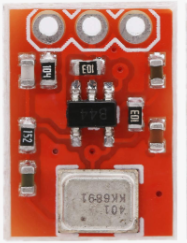
The ADMP401 is a low-power, high-performance MEMS (Micro-Electro-Mechanical Systems) microphone manufactured by Analog Devices. It is designed for portable applications requiring high-quality audio capture. The microphone features an analog output interface, low noise, and low distortion, making it ideal for voice recognition, audio recording, and other sound-sensitive applications.
Explore Projects Built with ADMP401
 Open Project in Cirkit Designer
 Open Project in Cirkit Designer
 Open Project in Cirkit Designer
 Open Project in Cirkit Designer
Explore Projects Built with ADMP401
Open Project in Cirkit DesignerOpen Project in Cirkit DesignerOpen Project in Cirkit DesignerOpen Project in Cirkit DesignerCommon Applications and Use Cases
- Smartphones and tablets
- Voice recognition systems
- Audio recording devices
- Wearable electronics
- IoT devices with sound detection capabilities
Technical Specifications
The ADMP401 is optimized for low-power operation and high audio fidelity. Below are its key technical specifications:
| Parameter | Value |
|---|---|
| Supply Voltage (VDD) | 1.5 V to 3.3 V |
| Supply Current | 250 µA (typical) |
| Sensitivity | −42 dBV ± 3 dB |
| Signal-to-Noise Ratio (SNR) | 62 dBA |
| Frequency Response | 100 Hz to 15 kHz |
| Output Impedance | < 200 Ω |
| Output Type | Analog |
| Operating Temperature Range | −40°C to +85°C |
| Package Type | LGA (4 mm × 3 mm × 1 mm) |
Pin Configuration and Descriptions
The ADMP401 has a simple pinout with four pins. The table below describes each pin:
| Pin Name | Pin Number | Description |
|---|---|---|
| VDD | 1 | Power supply input (1.5 V to 3.3 V). |
| GND | 2 | Ground connection. |
| OUTPUT | 3 | Analog audio output signal. |
| SELECT | 4 | Selects the microphone's output channel polarity. |
Usage Instructions
The ADMP401 is straightforward to use in audio applications. Below are the steps and considerations for integrating it into a circuit:
Circuit Connection
- Power Supply: Connect the VDD pin to a stable power source (1.5 V to 3.3 V). Use a decoupling capacitor (e.g., 0.1 µF) close to the VDD pin to reduce noise.
- Ground: Connect the GND pin to the ground of the circuit.
- Output Signal: Connect the OUTPUT pin to the input of an amplifier or an ADC (Analog-to-Digital Converter) for further processing.
- Channel Selection: Use the SELECT pin to configure the output polarity. Tie it to GND or VDD as required.
Important Considerations
- Decoupling Capacitor: Always use a decoupling capacitor near the VDD pin to ensure stable operation.
- Output Load: The OUTPUT pin should be connected to a high-impedance load to avoid signal degradation.
- Placement: Place the microphone away from noisy components (e.g., switching regulators) to minimize interference.
- Orientation: Ensure the microphone's sound port is unobstructed and oriented toward the sound source.
Example: Connecting to an Arduino UNO
The ADMP401 can be connected to an Arduino UNO for audio signal processing. Below is an example circuit and code:
Circuit Diagram
- Connect the VDD pin to the Arduino's 3.3V pin.
- Connect the GND pin to the Arduino's GND pin.
- Connect the OUTPUT pin to an analog input pin (e.g., A0) on the Arduino.
- Tie the SELECT pin to GND.
Arduino Code
// ADMP401 Microphone Example with Arduino UNO
// This code reads the analog output of the ADMP401 and prints the values
// to the Serial Monitor for basic audio signal visualization.

const int micPin = A0; // Analog pin connected to ADMP401 OUTPUT

void setup() {
  Serial.begin(9600); // Initialize serial communication at 9600 baud
}

void loop() {
  int micValue = analogRead(micPin); // Read the microphone's analog output
  Serial.println(micValue);         // Print the value to the Serial Monitor
  delay(10);                        // Small delay for stability
}
Notes:
- The analog values printed in the Serial Monitor represent the audio signal's amplitude.
- For advanced applications, you can process the signal further (e.g., FFT for frequency analysis).
Troubleshooting and FAQs
Common Issues
No Output Signal:
- Ensure the VDD and GND pins are properly connected.
- Verify that the SELECT pin is tied to either GND or VDD.
- Check the decoupling capacitor near the VDD pin.
Distorted Audio Output:
- Ensure the OUTPUT pin is connected to a high-impedance load.
- Verify that the power supply is stable and within the specified range.
Low Sensitivity:
- Confirm that the microphone's sound port is unobstructed.
- Ensure proper orientation of the microphone toward the sound source.
Interference or Noise:
- Place the microphone away from noisy components or sources of electromagnetic interference.
- Use proper shielding and grounding techniques in your circuit.
FAQs
Q: Can the ADMP401 be used with a 5V power supply?
A: No, the ADMP401 operates within a supply voltage range of 1.5 V to 3.3 V. Using a 5V supply may damage the component.
Q: Is the ADMP401 suitable for outdoor use?
A: The ADMP401 has an operating temperature range of −40°C to +85°C, but it is not waterproof. Additional protection is required for outdoor applications.
Q: How do I improve the signal-to-noise ratio (SNR)?
A: Use a clean power supply, minimize interference, and ensure proper placement of the microphone in your design.
Q: Can I use multiple ADMP401 microphones in the same circuit?
A: Yes, but ensure proper channel selection and avoid crosstalk by isolating the output signals.
By following this documentation, you can effectively integrate the ADMP401 into your audio applications for high-quality sound capture.