
How to Use 9 Port DIN POE++ Switch with 10gb SFP+: Examples, Pinouts, and Specs
 Design with 9 Port DIN POE++ Switch with 10gb SFP+ in Cirkit Designer
Introduction
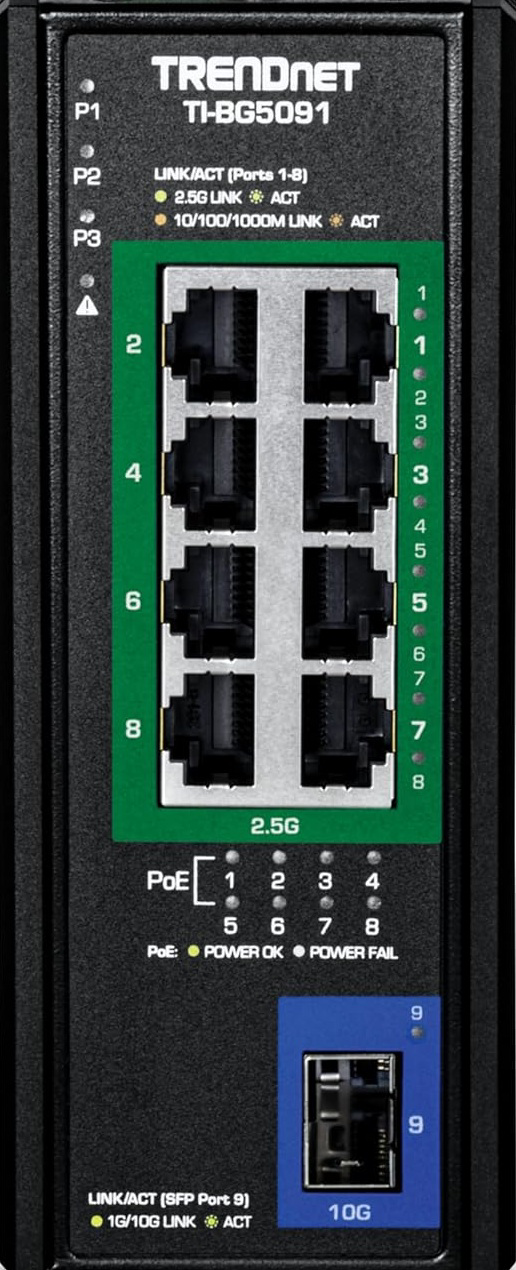
The TrendNet TI-BG5091 is an industrial-grade network switch designed to deliver high-speed data transfer and Power over Ethernet (PoE++) capabilities. With 9 Gigabit PoE++ ports and 1 10G SFP+ slot, this switch is ideal for powering and connecting devices such as IP cameras, wireless access points, and VoIP phones in demanding environments. Its rugged design ensures reliable operation in extreme conditions, making it suitable for industrial, commercial, and outdoor applications.
Explore Projects Built with 9 Port DIN POE++ Switch with 10gb SFP+
 Open Project in Cirkit Designer
 Open Project in Cirkit Designer
 Open Project in Cirkit Designer
 Open Project in Cirkit Designer
Explore Projects Built with 9 Port DIN POE++ Switch with 10gb SFP+
Open Project in Cirkit DesignerOpen Project in Cirkit DesignerOpen Project in Cirkit DesignerOpen Project in Cirkit DesignerCommon Applications and Use Cases
- Surveillance Systems: Powering and connecting IP cameras in large-scale security setups.
- Wireless Networks: Providing power and data to wireless access points in enterprise environments.
- VoIP Systems: Supporting VoIP phones in office or industrial settings.
- Industrial Automation: Connecting and powering devices in manufacturing or process control systems.
- Fiber-Backbone Networks: Utilizing the 10G SFP+ slot for high-speed fiber uplinks in data centers or long-distance connections.
Technical Specifications
Key Technical Details
| Specification | Details |
|---|---|
| Manufacturer | TrendNet |
| Model | TI-BG5091 |
| Ports | 9 x Gigabit PoE++ (802.3bt), 1 x 10G SFP+ |
| PoE Standards | IEEE 802.3af/at/bt |
| PoE Power Budget | 240W |
| Switching Capacity | 40Gbps |
| Operating Temperature | -40°C to 75°C (-40°F to 167°F) |
| Input Voltage | 48-56V DC |
| Mounting Options | DIN-Rail or Wall-Mount |
| Dimensions | 160 x 120 x 50 mm (6.3 x 4.7 x 2 in) |
| Weight | 1.2 kg (2.65 lbs) |
| Certifications | CE, FCC, UL |
Pin Configuration and Descriptions
Power Input Terminal Block
| Pin | Description |
|---|---|
| V+ | Positive DC input (48-56V) |
| V- | Negative DC input (Ground) |
| FG | Frame Ground |
PoE++ Ports (1-9)
| Port | Description |
|---|---|
| 1-9 | Gigabit Ethernet ports with PoE++ support (up to 90W per port, IEEE 802.3bt). |
SFP+ Slot
| Port | Description |
|---|---|
| 10 | 10G SFP+ slot for high-speed fiber uplink. |
Usage Instructions
How to Use the Component in a Network
Powering the Switch:
- Connect a DC power source (48-56V) to the terminal block using the V+ and V- pins.
- Ensure the frame ground (FG) is properly connected to avoid electrical noise or interference.
Connecting Devices:
- Plug Ethernet cables into the PoE++ ports (1-9) to connect and power devices such as IP cameras or access points.
- Use the SFP+ slot (port 10) for high-speed fiber uplinks if required.
Mounting:
- Use the included DIN-rail or wall-mount brackets to securely install the switch in your desired location.
Configuring the Network:
- Access the switch's management interface (if applicable) to configure VLANs, QoS, or other advanced settings.
Important Considerations and Best Practices
- Power Budget: Ensure the total power consumption of connected devices does not exceed the 240W PoE budget.
- Cable Quality: Use Cat5e or higher Ethernet cables for optimal performance and PoE delivery.
- Environmental Conditions: Verify that the operating environment is within the specified temperature range (-40°C to 75°C).
- SFP+ Module Compatibility: Use TrendNet-certified SFP+ modules for guaranteed compatibility and performance.
Example: Connecting to an Arduino UNO via Ethernet
If you are using the TI-BG5091 to connect an Arduino UNO with an Ethernet shield, follow these steps:
- Connect the Ethernet shield to one of the PoE++ ports (1-9) using a standard Ethernet cable.
- Ensure the switch is powered and operational.
- Use the following Arduino code to test the Ethernet connection:
#include <SPI.h>
#include <Ethernet.h>

// MAC address and IP address for the Arduino Ethernet Shield
byte mac[] = { 0xDE, 0xAD, 0xBE, 0xEF, 0xFE, 0xED };
IPAddress ip(192, 168, 1, 177); // Set a static IP address for the Arduino

// Initialize the Ethernet client
EthernetClient client;

void setup() {
  // Start the Ethernet connection
  if (Ethernet.begin(mac) == 0) {
    // If DHCP fails, use the static IP address
    Ethernet.begin(mac, ip);
  }
  Serial.begin(9600);
  Serial.println("Ethernet initialized.");
}

void loop() {
  // Example: Connect to a server and send data
  if (client.connect("example.com", 80)) {
    client.println("GET / HTTP/1.1");
    client.println("Host: example.com");
    client.println("Connection: close");
    client.println();
  }
  delay(1000);
}
Troubleshooting and FAQs
Common Issues and Solutions
No Power to Connected Devices:
- Verify that the switch is receiving the correct input voltage (48-56V DC).
- Check that the total power consumption does not exceed the 240W PoE budget.
- Ensure the connected device supports PoE and is compatible with IEEE 802.3bt.
No Network Connectivity:
- Confirm that the Ethernet cables are securely connected and undamaged.
- Check the network configuration (e.g., IP address, VLAN settings) in the switch's management interface.
- Ensure the SFP+ module is properly seated and compatible with the switch.
Overheating:
- Ensure the switch is installed in a well-ventilated area.
- Verify that the ambient temperature is within the specified operating range.
FAQs
Q: Can I use this switch in outdoor environments?
- A: Yes, the TI-BG5091 is designed for industrial applications and can operate in extreme temperatures. However, it should be housed in a weatherproof enclosure for outdoor use.
Q: What is the maximum distance for PoE++ connections?
- A: The maximum distance is 100 meters (328 feet) when using Cat5e or higher Ethernet cables.
Q: Can I use third-party SFP+ modules?
- A: While third-party modules may work, it is recommended to use TrendNet-certified SFP+ modules for optimal performance and compatibility.
This concludes the documentation for the TrendNet TI-BG5091 9 Port DIN POE++ Switch with 10gb SFP+.