
How to Use iFlight BLITZ BEC 5v/12v: Examples, Pinouts, and Specs
 Design with iFlight BLITZ BEC 5v/12v in Cirkit Designer
Introduction
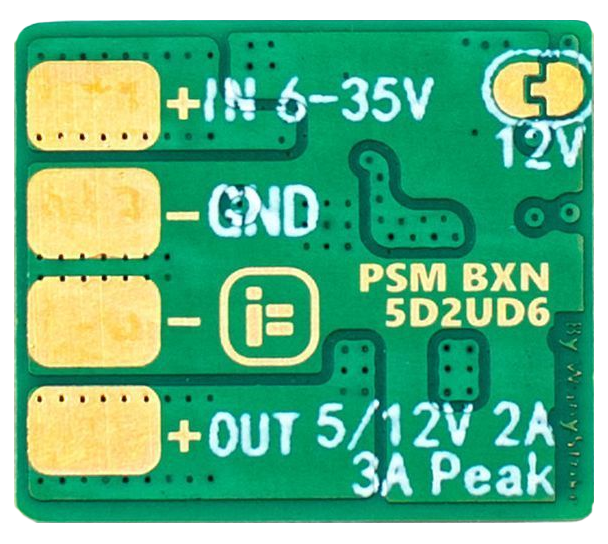
The iFlight BLITZ BEC 5V/12V is a compact and efficient Battery Eliminator Circuit (BEC) designed to provide a stable output voltage of either 5V or 12V. This component is widely used in remote control (RC) applications, such as drones, airplanes, and cars, to power servos, receivers, flight controllers, and other onboard electronics directly from a LiPo battery. By regulating the battery's voltage, the BEC ensures reliable operation of sensitive electronics while protecting them from voltage fluctuations.
Explore Projects Built with iFlight BLITZ BEC 5v/12v
 Open Project in Cirkit Designer
 Open Project in Cirkit Designer
 Open Project in Cirkit Designer
 Open Project in Cirkit Designer
Explore Projects Built with iFlight BLITZ BEC 5v/12v
Open Project in Cirkit DesignerOpen Project in Cirkit DesignerOpen Project in Cirkit DesignerOpen Project in Cirkit DesignerCommon Applications and Use Cases
- Powering flight controllers, receivers, and servos in RC drones and airplanes.
- Supplying stable voltage to FPV (First Person View) cameras and video transmitters.
- Providing regulated power to microcontrollers and sensors in robotics projects.
- Replacing onboard voltage regulators in custom electronics projects.
Technical Specifications
The iFlight BLITZ BEC 5V/12V is designed to handle a wide range of input voltages and provide a stable output for various electronic components. Below are the key technical details:
General Specifications
| Parameter | Value |
|---|---|
| Input Voltage Range | 7V - 26V (2S to 6S LiPo) |
| Output Voltage Options | 5V or 12V (selectable) |
| Maximum Output Current | 3A (continuous) |
| Efficiency | Up to 95% |
| Dimensions | 18mm x 13mm x 5mm |
| Weight | 2g |
Pin Configuration and Descriptions
| Pin Name | Description |
|---|---|
| VIN | Input voltage pin. Connect to the positive terminal of the LiPo battery. |
| GND | Ground pin. Connect to the negative terminal of the LiPo battery. |
| VOUT | Output voltage pin. Provides regulated 5V or 12V, depending on the setting. |
| SEL | Voltage selection pin. Use a solder bridge or jumper to select 5V or 12V. |
Usage Instructions
How to Use the iFlight BLITZ BEC 5V/12V in a Circuit
Determine the Required Output Voltage: Decide whether your application requires 5V or 12V. Use the SEL pin to configure the output voltage:
- For 5V output, connect the SEL pin to the 5V pad.
- For 12V output, connect the SEL pin to the 12V pad.
- Ensure the solder bridge or jumper is properly configured before powering the circuit.
Connect the Input Voltage:
- Connect the VIN pin to the positive terminal of your LiPo battery (2S to 6S).
- Connect the GND pin to the negative terminal of the battery.
Connect the Output Voltage:
- Connect the VOUT pin to the device or circuit requiring regulated power.
- Ensure the connected device does not exceed the maximum output current of 3A.
Power On the Circuit:
- Once all connections are secure, power on the LiPo battery. The BEC will regulate the input voltage and provide a stable output.
Important Considerations and Best Practices
- Heat Dissipation: Although the BEC is highly efficient, it may generate heat under high loads. Ensure adequate ventilation or cooling if operating near the maximum current limit.
- Voltage Selection: Double-check the SEL pin configuration before powering the circuit to avoid damaging connected devices.
- Input Voltage Range: Ensure the input voltage is within the specified range (7V to 26V). Exceeding this range may damage the BEC.
- Polarity: Always verify the polarity of your connections. Reversing the input voltage can permanently damage the component.
Example: Using the BEC with an Arduino UNO
The iFlight BLITZ BEC can be used to power an Arduino UNO from a LiPo battery. Below is an example setup:
- Configure the BEC to output 5V using the SEL pin.
- Connect the VIN pin to the positive terminal of a 3S LiPo battery (11.1V nominal).
- Connect the GND pin to the negative terminal of the battery.
- Connect the VOUT pin to the 5V pin on the Arduino UNO.
- Connect the GND pin of the BEC to the GND pin on the Arduino UNO.
Here is a simple Arduino code example to blink an LED while powered by the BEC:
// Blink an LED connected to pin 13 of the Arduino UNO
// Ensure the BEC is providing 5V to the Arduino's 5V pin

void setup() {
  pinMode(13, OUTPUT); // Set pin 13 as an output
}

void loop() {
  digitalWrite(13, HIGH); // Turn the LED on
  delay(1000);            // Wait for 1 second
  digitalWrite(13, LOW);  // Turn the LED off
  delay(1000);            // Wait for 1 second
}
Troubleshooting and FAQs
Common Issues and Solutions
No Output Voltage:
Cause: Incorrect SEL pin configuration.
Solution: Verify the SEL pin is correctly set to 5V or 12V.
Cause: Loose or incorrect connections.
Solution: Check all connections, ensuring VIN and GND are properly connected to the battery.
Overheating:
- Cause: Operating near or above the maximum current limit.
- Solution: Reduce the load on the BEC or improve cooling/ventilation.
Output Voltage Fluctuations:
- Cause: Input voltage is outside the specified range.
- Solution: Ensure the input voltage is between 7V and 26V.
Connected Device Not Powering On:
- Cause: Device requires a different voltage.
- Solution: Verify the required voltage of the connected device and adjust the SEL pin configuration accordingly.
FAQs
Q: Can I use the BEC to power multiple devices simultaneously?
A: Yes, as long as the total current draw does not exceed 3A.
Q: How do I switch between 5V and 12V output?
A: Use the SEL pin to configure the output voltage. Refer to the pin configuration table for details.
Q: Is the BEC compatible with 1S LiPo batteries?
A: No, the minimum input voltage is 7V, which is higher than the voltage of a 1S LiPo battery.
Q: Can I use the BEC with non-LiPo power sources?
A: Yes, as long as the input voltage is within the 7V to 26V range.