
How to Use Dupont 6P Connector (0.1" Pitch): Examples, Pinouts, and Specs
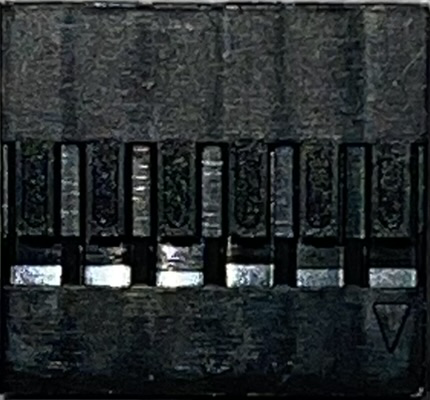
 Design with Dupont 6P Connector (0.1" Pitch) in Cirkit Designer
Introduction
The Dupont 6P Connector is a 6-pin connector with a 0.1-inch (2.54mm) pitch, designed for reliable and versatile connections in electronic circuits. Manufactured by Dupont, this connector is widely used in prototyping, DIY electronics, and professional applications. It is ideal for connecting wires to PCBs, breadboards, or other components, offering a secure and reusable interface.
Explore Projects Built with Dupont 6P Connector (0.1" Pitch)
 Open Project in Cirkit Designer
 Open Project in Cirkit Designer
 Open Project in Cirkit Designer
 Open Project in Cirkit Designer
Explore Projects Built with Dupont 6P Connector (0.1" Pitch)
Open Project in Cirkit DesignerOpen Project in Cirkit DesignerOpen Project in Cirkit DesignerOpen Project in Cirkit DesignerCommon Applications and Use Cases
- Prototyping and development of electronic circuits
- Connecting sensors, modules, and peripherals to microcontrollers
- Extending or bridging connections between PCBs
- Robotics and IoT projects
- Custom wiring harnesses for small-scale electronics
Technical Specifications
The following table outlines the key technical details of the Dupont 6P Connector:
| Parameter | Specification |
|---|---|
| Manufacturer | Dupont |
| Manufacturer Part ID | Dupont |
| Number of Pins | 6 |
| Pitch (Pin Spacing) | 0.1 inch (2.54mm) |
| Connector Type | Female (housing) or Male (header) |
| Current Rating | 3A (maximum) |
| Voltage Rating | 250V AC/DC (maximum) |
| Operating Temperature | -25°C to +85°C |
| Material | Plastic housing with metal contacts |
| Contact Resistance | ≤ 20 mΩ |
| Insulation Resistance | ≥ 1000 MΩ |
Pin Configuration and Descriptions
The Dupont 6P Connector does not have a fixed pinout, as it is typically used for custom wiring. However, the following table provides a general description of the pins:
| Pin Number | Description |
|---|---|
| 1 | Custom signal or power connection |
| 2 | Custom signal or power connection |
| 3 | Custom signal or power connection |
| 4 | Custom signal or power connection |
| 5 | Custom signal or power connection |
| 6 | Custom signal or power connection |
Note: The pin assignments depend on the specific application and wiring configuration.
Usage Instructions
How to Use the Dupont 6P Connector in a Circuit
Prepare the Wires:
- Strip approximately 2-3mm of insulation from the ends of the wires you want to connect.
- Use a crimping tool to attach Dupont crimp pins to the stripped wire ends.
Insert the Crimped Wires:
- Insert the crimped pins into the connector housing until they click into place.
- Ensure the pins are securely locked to prevent accidental disconnection.
Connect to a Header or PCB:
- Align the connector with the corresponding male header or PCB pins.
- Gently push the connector onto the header until it fits snugly.
Verify Connections:
- Double-check the wiring to ensure the correct signals or power lines are connected to the appropriate pins.
Important Considerations and Best Practices
- Avoid Overcurrent: Do not exceed the 3A current rating to prevent overheating or damage.
- Secure Connections: Use heat shrink tubing or cable ties to organize and secure wires, especially in high-vibration environments.
- Polarity Awareness: If using the connector for power connections, ensure proper polarity to avoid damaging components.
- Use a Quality Crimping Tool: A proper crimping tool ensures reliable connections and reduces the risk of loose or intermittent contacts.
Example: Connecting to an Arduino UNO
The Dupont 6P Connector can be used to connect sensors or modules to an Arduino UNO. Below is an example of connecting a 6-pin sensor module:
// Example: Reading data from a 6-pin sensor module connected via Dupont 6P Connector
// Pin connections:
// Dupont Pin 1 -> VCC (5V)
// Dupont Pin 2 -> GND
// Dupont Pin 3 -> Signal 1 (e.g., Data)
// Dupont Pin 4 -> Signal 2 (e.g., Clock)
// Dupont Pin 5 -> Signal 3 (optional)
// Dupont Pin 6 -> Signal 4 (optional)

const int dataPin = 2;  // Arduino pin connected to Dupont Pin 3
const int clockPin = 3; // Arduino pin connected to Dupont Pin 4

void setup() {
  pinMode(dataPin, INPUT);  // Set data pin as input
  pinMode(clockPin, OUTPUT); // Set clock pin as output
  Serial.begin(9600);       // Initialize serial communication
}

void loop() {
  digitalWrite(clockPin, HIGH); // Send a clock signal
  delay(1);                     // Wait for 1ms
  digitalWrite(clockPin, LOW);  // Reset clock signal
  int sensorValue = digitalRead(dataPin); // Read data from sensor
  Serial.println(sensorValue);  // Print sensor value to Serial Monitor
  delay(100);                   // Wait for 100ms before next read
}
Note: Adjust the pin connections and code based on the specific sensor or module being used.
Troubleshooting and FAQs
Common Issues and Solutions
Loose Connections:
- Issue: The connector feels loose or disconnects easily.
- Solution: Ensure the crimp pins are properly inserted and locked into the housing. Use a high-quality crimping tool for secure connections.
Intermittent Signal:
- Issue: The circuit works intermittently or shows unstable behavior.
- Solution: Check for damaged wires, poor crimps, or loose connections. Replace any faulty components.
Incorrect Pinout:
- Issue: The circuit does not function as expected.
- Solution: Verify the pin assignments and ensure the correct signals or power lines are connected.
Overheating:
- Issue: The connector or wires become hot during operation.
- Solution: Ensure the current does not exceed the 3A rating. Use thicker wires if necessary.
FAQs
Q1: Can the Dupont 6P Connector be reused?
A1: Yes, the connector housing and crimp pins can be reused if they are not damaged. However, it is recommended to use new crimp pins for reliable connections.
Q2: What tools are required to use this connector?
A2: A wire stripper, Dupont crimping tool, and optionally, heat shrink tubing for insulation.
Q3: Can this connector handle high-frequency signals?
A3: The Dupont 6P Connector is suitable for low to moderate frequency signals. For high-frequency applications, consider using connectors designed for RF or high-speed data.
Q4: Is this connector compatible with breadboards?
A4: Yes, the 0.1-inch pitch makes it compatible with standard breadboards and male header pins.
Q5: Can I use this connector for power delivery?
A5: Yes, but ensure the current does not exceed 3A and the voltage does not exceed 250V AC/DC.