
How to Use terminalblock-04-01: Examples, Pinouts, and Specs
 Design with terminalblock-04-01 in Cirkit Designer
Introduction
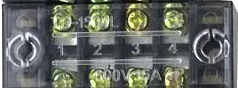
The TerminalBlock-04-01 is a versatile and reliable terminal block designed for connecting multiple wires together in a secure and organized manner. It features four connection points and utilizes screw terminals for easy wire insertion and removal. This component is widely used in electrical and electronic systems to simplify wiring, ensure robust connections, and facilitate maintenance.
Explore Projects Built with terminalblock-04-01
 Open Project in Cirkit Designer
 Open Project in Cirkit Designer
 Open Project in Cirkit Designer
 Open Project in Cirkit Designer
Explore Projects Built with terminalblock-04-01
Open Project in Cirkit DesignerOpen Project in Cirkit DesignerOpen Project in Cirkit DesignerOpen Project in Cirkit DesignerCommon Applications and Use Cases
- Industrial control panels and automation systems
- Power distribution in electrical circuits
- Prototyping and testing of electronic circuits
- Home and building electrical installations
- Securely connecting wires in DIY electronics projects
Technical Specifications
The TerminalBlock-04-01 is designed to handle a wide range of electrical and mechanical requirements. Below are its key technical specifications:
| Parameter | Value |
|---|---|
| Number of Terminals | 4 |
| Terminal Type | Screw clamp |
| Wire Size Compatibility | 22 AWG to 12 AWG |
| Maximum Voltage Rating | 300V AC/DC |
| Maximum Current Rating | 15A |
| Material | Flame-retardant thermoplastic |
| Mounting Type | PCB mount or DIN rail compatible |
| Operating Temperature | -40°C to +105°C |
Pin Configuration and Descriptions
The TerminalBlock-04-01 has four screw terminals, each corresponding to a single connection point. Below is the pin configuration:
| Pin Number | Description |
|---|---|
| 1 | Terminal for wire connection 1 |
| 2 | Terminal for wire connection 2 |
| 3 | Terminal for wire connection 3 |
| 4 | Terminal for wire connection 4 |
Each terminal is independent, allowing for flexible wiring configurations.
Usage Instructions
How to Use the TerminalBlock-04-01 in a Circuit
- Prepare the Wires: Strip the insulation from the ends of the wires you wish to connect. Ensure the exposed conductor length matches the terminal block's specifications (typically 5-7mm).
- Insert the Wires: Loosen the screw on the terminal using a screwdriver. Insert the stripped wire into the terminal opening.
- Secure the Connection: Tighten the screw to clamp the wire securely. Avoid overtightening, as this may damage the wire or terminal.
- Verify the Connection: Gently tug on the wire to ensure it is firmly secured in the terminal.
Important Considerations and Best Practices
- Wire Compatibility: Ensure the wire gauge is within the supported range (22 AWG to 12 AWG).
- Avoid Overloading: Do not exceed the maximum voltage (300V) or current (15A) ratings.
- Proper Mounting: If using the PCB mount version, solder the pins securely to the PCB. For DIN rail mounting, ensure the block is properly clipped onto the rail.
- Insulation: Use insulated wires to prevent accidental short circuits.
- Maintenance: Periodically check the screws for tightness, especially in environments with vibration.
Example: Connecting to an Arduino UNO
The TerminalBlock-04-01 can be used to connect external components, such as sensors or motors, to an Arduino UNO. Below is an example of wiring a 12V DC motor through the terminal block:
- Connect the motor's positive and negative wires to terminals 1 and 2 of the TerminalBlock-04-01.
- Use terminals 3 and 4 to connect the power supply to the motor.
- Optionally, add a diode across the motor terminals to protect against back EMF.
Here is a simple Arduino code snippet to control the motor using a relay:
// Define the relay pin connected to the Arduino
const int relayPin = 7;

void setup() {
  pinMode(relayPin, OUTPUT); // Set the relay pin as an output
  digitalWrite(relayPin, LOW); // Ensure the relay is off initially
}

void loop() {
  digitalWrite(relayPin, HIGH); // Turn the motor on
  delay(5000); // Run the motor for 5 seconds
  digitalWrite(relayPin, LOW); // Turn the motor off
  delay(5000); // Wait for 5 seconds before restarting
}
Note: Ensure the relay module is properly connected to the Arduino and the terminal block is used to organize the motor and power supply connections.
Troubleshooting and FAQs
Common Issues and Solutions
Loose Connections
- Issue: Wires are not securely held in the terminal.
- Solution: Ensure the screws are tightened properly. Check that the wire is stripped to the correct length.
Overheating
- Issue: The terminal block becomes hot during operation.
- Solution: Verify that the current does not exceed the 15A rating. Use thicker wires if necessary.
Wire Slippage
- Issue: Wires slip out of the terminal under vibration.
- Solution: Re-tighten the screws and consider using ferrules for better grip.
Corrosion
- Issue: Terminals show signs of corrosion over time.
- Solution: Use the terminal block in a dry environment or select a version with corrosion-resistant plating.
FAQs
Q1: Can I use the TerminalBlock-04-01 for high-frequency signals?
A1: While the terminal block can handle low-frequency signals, it is not ideal for high-frequency applications due to potential signal degradation.
Q2: Is the TerminalBlock-04-01 suitable for outdoor use?
A2: The standard version is not weatherproof. For outdoor use, consider an enclosure or a weather-resistant terminal block.
Q3: Can I connect wires of different gauges to the same terminal block?
A3: Yes, as long as the wire gauges are within the supported range (22 AWG to 12 AWG).
Q4: How do I mount the TerminalBlock-04-01 on a PCB?
A4: Align the pins with the PCB holes, solder them securely, and ensure proper alignment to avoid stress on the connections.
By following this documentation, you can effectively use the TerminalBlock-04-01 in your projects and ensure reliable and organized wiring.