
How to Use Solenoid Valve 1/2" N/C AC 220V (Male thread): Examples, Pinouts, and Specs
 Design with Solenoid Valve 1/2" N/C AC 220V (Male thread) in Cirkit Designer
Introduction
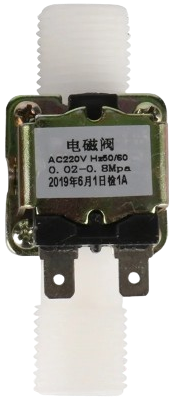
The Solenoid Valve 1/2" N/C AC 220V (Male Thread) is an electromechanical device designed to control the flow of fluids in a system. It operates on an AC voltage of 220V and features a normally closed (N/C) configuration, meaning the valve remains closed when no electrical current is applied. When energized, the solenoid coil generates a magnetic field that opens the valve, allowing fluid to pass through. This model is equipped with a 1/2" male thread for easy integration into piping systems.
Explore Projects Built with Solenoid Valve 1/2" N/C AC 220V (Male thread)
 Open Project in Cirkit Designer
 Open Project in Cirkit Designer
 Open Project in Cirkit Designer
 Open Project in Cirkit Designer
Explore Projects Built with Solenoid Valve 1/2" N/C AC 220V (Male thread)
Open Project in Cirkit DesignerOpen Project in Cirkit DesignerOpen Project in Cirkit DesignerOpen Project in Cirkit DesignerCommon Applications and Use Cases
- Irrigation Systems: Automating water flow for agricultural or garden irrigation.
- HVAC Systems: Controlling the flow of refrigerants or water in heating, ventilation, and air conditioning systems.
- Industrial Automation: Managing fluid flow in manufacturing processes.
- Water Purification Systems: Regulating water flow in filtration and purification setups.
- Home Appliances: Used in washing machines, dishwashers, and other appliances requiring fluid control.
Technical Specifications
Key Technical Details
| Parameter | Specification |
|---|---|
| Operating Voltage | AC 220V |
| Configuration | Normally Closed (N/C) |
| Thread Size | 1/2" Male Thread |
| Material | Brass (body), stainless steel (internal components) |
| Operating Pressure Range | 0.02 MPa to 0.8 MPa |
| Fluid Type | Water, air, or other non-corrosive fluids |
| Power Consumption | Approximately 6-8W |
| Response Time | < 1 second |
| Operating Temperature | 0°C to 80°C |
Pin Configuration and Descriptions
This solenoid valve does not have traditional pins like an IC or microcontroller. Instead, it features two electrical terminals for AC power input. Below is a description of the terminals:
| Terminal Name | Description |
|---|---|
| Terminal 1 | Live (L) wire connection for AC 220V input |
| Terminal 2 | Neutral (N) wire connection for AC 220V input |
Usage Instructions
How to Use the Component in a Circuit
Electrical Connection:
- Connect Terminal 1 to the live (L) wire of the AC 220V power supply.
- Connect Terminal 2 to the neutral (N) wire of the AC 220V power supply.
- Ensure proper insulation and secure connections to avoid electrical hazards.
Plumbing Installation:
- Attach the 1/2" male thread to the corresponding female thread in your piping system.
- Use Teflon tape or a suitable sealant to prevent leaks.
- Ensure the flow direction matches the arrow marked on the valve body.
Operation:
- When the solenoid is energized, the valve opens, allowing fluid to flow.
- When de-energized, the valve closes, stopping the flow.
Important Considerations and Best Practices
- Voltage Compatibility: Ensure the power supply is AC 220V. Using incorrect voltage can damage the solenoid coil.
- Fluid Compatibility: Use only with water, air, or other non-corrosive fluids. Avoid using with oils, acids, or other corrosive substances.
- Pressure Range: Operate within the specified pressure range (0.02 MPa to 0.8 MPa) to prevent damage or malfunction.
- Orientation: Install the valve in the correct orientation as indicated by the flow direction arrow on the body.
- Safety Precautions: Disconnect the power supply before performing any maintenance or installation.
Arduino Integration
Although this solenoid valve operates on AC 220V and cannot be directly controlled by an Arduino, you can use a relay module to interface it with an Arduino. Below is an example of how to control the solenoid valve using an Arduino and a relay module:
Circuit Diagram
- Connect the solenoid valve to the relay's Normally Open (NO) terminal and Common (COM) terminal.
- Connect the relay's control pin to an Arduino digital pin (e.g., pin 7).
Sample Code
// Define the relay control pin
const int relayPin = 7;

void setup() {
  // Set the relay pin as an output
  pinMode(relayPin, OUTPUT);
  // Ensure the relay is off initially
  digitalWrite(relayPin, LOW);
}

void loop() {
  // Turn the solenoid valve ON (relay activated)
  digitalWrite(relayPin, HIGH);
  delay(5000); // Keep the valve open for 5 seconds

  // Turn the solenoid valve OFF (relay deactivated)
  digitalWrite(relayPin, LOW);
  delay(5000); // Keep the valve closed for 5 seconds
}
Note: Ensure proper isolation between the Arduino and the AC circuit to avoid electrical hazards.
Troubleshooting and FAQs
Common Issues and Solutions
| Issue | Possible Cause | Solution |
|---|---|---|
| Valve does not open when powered | Incorrect wiring or no power supply | Verify wiring and ensure AC 220V is supplied. |
| Valve leaks fluid when closed | Damaged internal seal or debris inside | Inspect and clean the valve; replace seals if necessary. |
| Valve makes a buzzing noise | Loose coil or improper voltage | Check the coil and ensure the voltage is stable at 220V AC. |
| Valve does not close after power off | Residual pressure or mechanical failure | Release pressure or inspect for mechanical damage. |
FAQs
Can this valve be used with DC power?
- No, this valve is designed specifically for AC 220V operation.
What happens if the valve is installed backward?
- Installing the valve backward will prevent proper operation. Always follow the flow direction arrow on the valve body.
Can this valve handle hot water?
- Yes, it can handle fluids up to 80°C, making it suitable for most hot water applications.
Is the valve waterproof?
- The valve is designed for fluid control but should not be submerged in water. Ensure the electrical terminals are kept dry.
How do I know if the valve is working?
- You can hear a clicking sound when the solenoid is energized, and fluid should flow through the valve.
This documentation provides all the necessary details to understand, use, and troubleshoot the Solenoid Valve 1/2" N/C AC 220V (Male Thread). Always follow safety guidelines when working with high-voltage components.