The TCS3200, manufactured by Taos, is a programmable color light-to-frequency converter. It is designed to detect and measure the intensity of red, green, blue, and clear light using an array of photodiodes and integrated optical filters. The sensor outputs a square wave with a frequency directly proportional to the intensity of the detected light, making it ideal for applications requiring precise color recognition and measurement.
Explore Projects Built with tcs3200
Use Cirkit Designer to design, explore, and prototype these projects online. Some projects support real-time simulation. Click "Open Project" to start designing instantly!
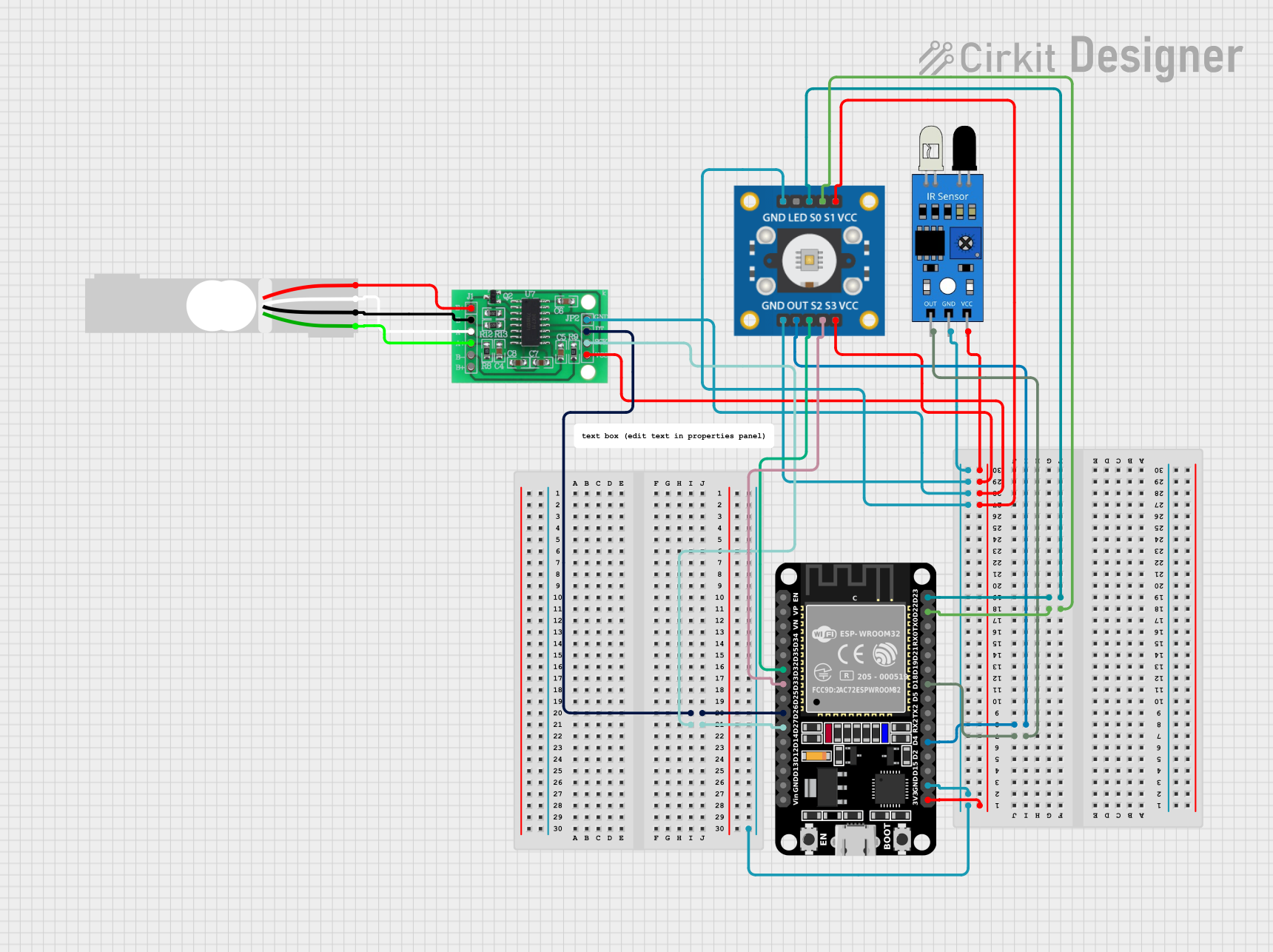
This circuit is designed to interface an ESP32 microcontroller with a TCS3200 color sensor, an IR sensor for proximity detection, and an HX711 load cell amplifier connected to a load cell for weight measurement. It is capable of performing color recognition, object detection, and weight measurement, making it suitable for sorting systems or interactive projects.
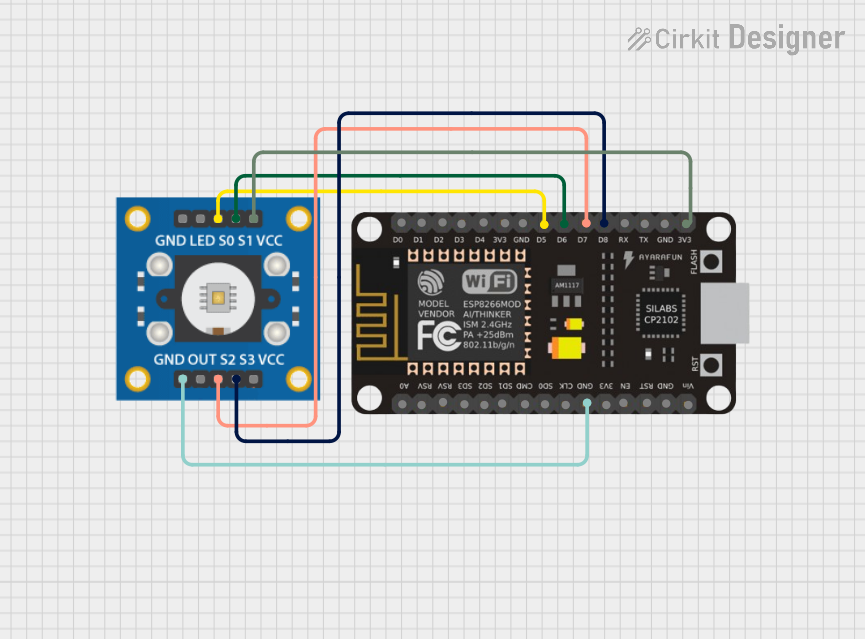
This circuit connects an ESP8266 NodeMCU microcontroller to a TCS3200 color sensor. The NodeMCU's digital pins D5, D6, D7, and D8 are interfaced with the TCS3200's S0, S1, S2, and S3 pins respectively, allowing the microcontroller to control the color sensor's filtering and frequency scaling. Power is supplied to the TCS3200 from the NodeMCU's 3.3V pin, and both devices share a common ground.
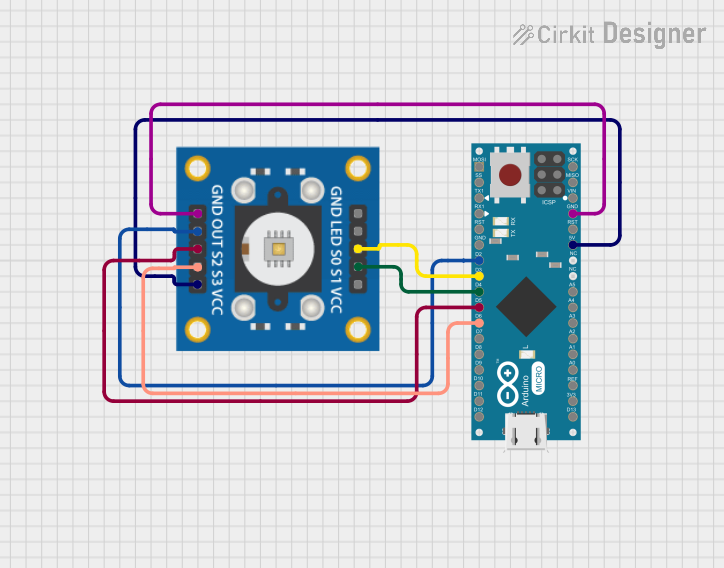
This circuit consists of an Arduino Micro (Rev3) connected to a TCS3200 color sensor. The Arduino controls the sensor's configuration pins (S0, S1, S2, S3) and reads the sensor's output to detect color information, which can be used for various applications such as color recognition or sorting.
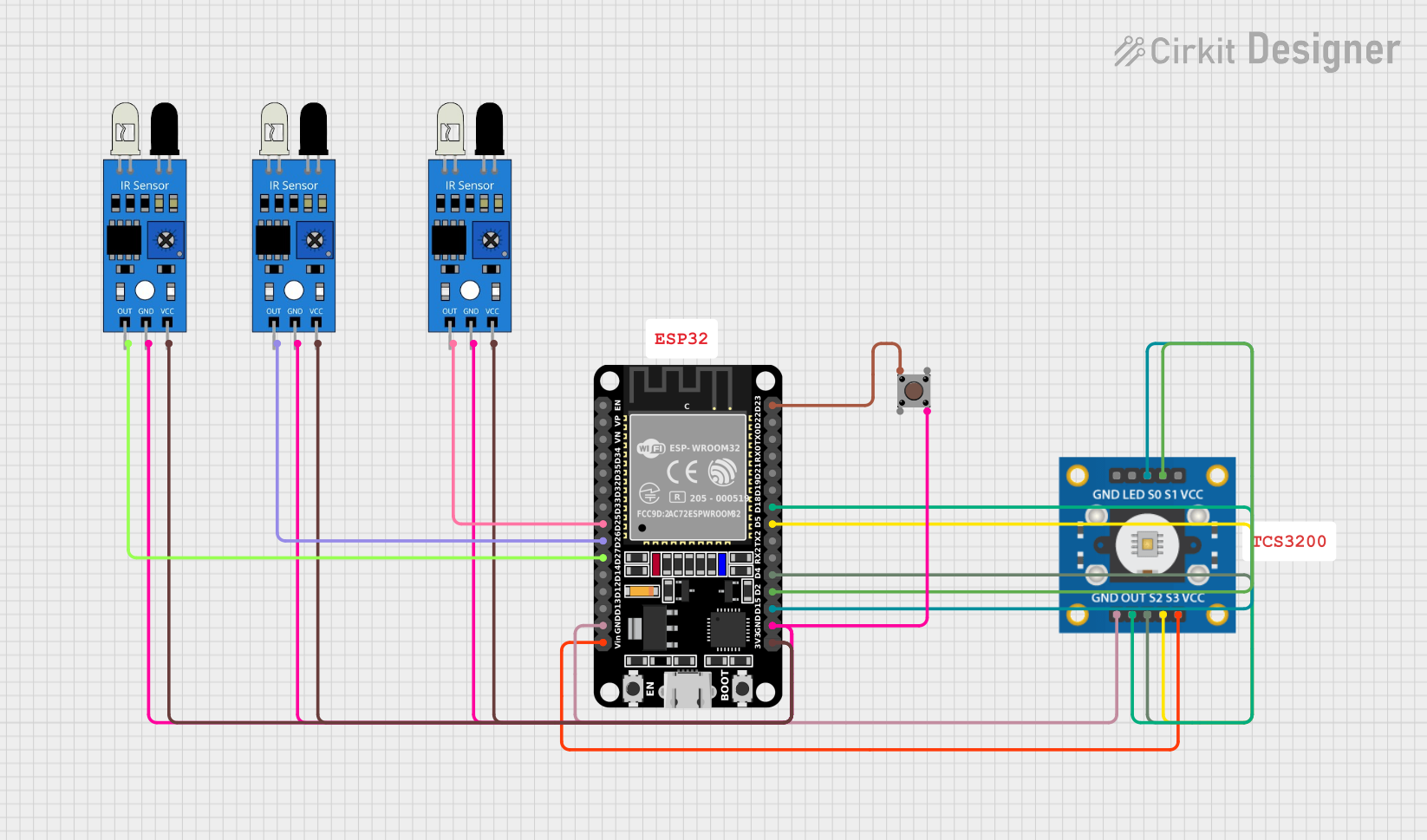
This circuit uses an ESP32 microcontroller to interface with three IR sensors and a TCS3200 color sensor. The IR sensors are connected to the ESP32 to detect obstacles, while the TCS3200 color sensor is used to detect colors. A pushbutton is also included for user input.
The TCS3200 is a highly versatile sensor with the following key specifications:
Parameter
Value
Supply Voltage (Vcc)
2.7V to 5.5V
Operating Current
2mA (typical)
Output Frequency Range
2 Hz to 500 kHz
Output Type
Square wave (frequency output)
Light Sensing Range
Full-spectrum (300 nm to 700 nm)
Temperature Range
-40°C to +85°C
Pin Configuration and Descriptions
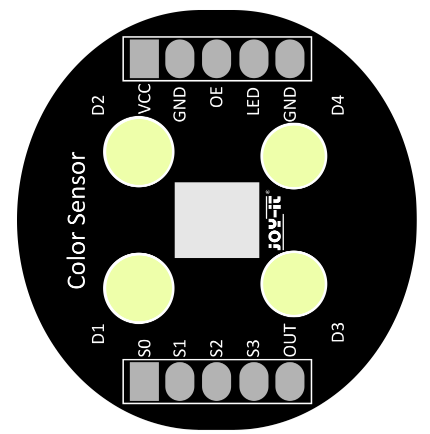
The TCS3200 is typically available in an 8-pin DIP or module form. Below is the pinout description:
Pin
Name
Description
1
S0
Output frequency scaling input (control pin)
2
S1
Output frequency scaling input (control pin)
3
OE
Output enable (active low, enables the output when pulled low)
4
GND
Ground connection
5
OUT
Frequency output (square wave proportional to light intensity)
6
Vcc
Power supply (2.7V to 5.5V)
7
S2
Photodiode filter selection input (control pin)
8
S3
Photodiode filter selection input (control pin)
Photodiode Filter Selection
The TCS3200 uses the S2 and S3 pins to select the active photodiode filter. The table below shows the configuration:
S2
S3
Selected Filter
Low
Low
Red
Low
High
Blue
High
Low
Clear (no filter)
High
High
Green
Frequency Scaling
The S0 and S1 pins control the output frequency scaling, as shown below:
S0
S1
Output Frequency Scaling
Low
Low
Power down (no output)
Low
High
2% of full-scale frequency
High
Low
20% of full-scale frequency
High
High
100% of full-scale frequency
Usage Instructions
Connecting the TCS3200 to a Circuit
Power Supply: Connect the Vcc pin to a 3.3V or 5V power source and the GND pin to ground.
Output Enable: Pull the OE pin low to enable the frequency output.
Filter Selection: Use the S2 and S3 pins to select the desired photodiode filter (red, green, blue, or clear).
Frequency Scaling: Use the S0 and S1 pins to set the output frequency scaling as needed.
Output Reading: Connect the OUT pin to a microcontroller or frequency counter to measure the output frequency.
Best Practices
Use decoupling capacitors (e.g., 0.1 µF) between Vcc and GND to reduce noise.
Avoid exposing the sensor to direct sunlight or high-intensity light sources, as this may saturate the photodiodes.
Place the sensor at a consistent distance from the object being measured for accurate readings.
Use a microcontroller with a timer or interrupt capability to measure the output frequency accurately.
Example: Using TCS3200 with Arduino UNO
Below is an example code to interface the TCS3200 with an Arduino UNO to measure the intensity of red, green, and blue light:
// Pin definitions for TCS3200
#define S0 4  // Connect to S0 pin of TCS3200
#define S1 5  // Connect to S1 pin of TCS3200
#define S2 6  // Connect to S2 pin of TCS3200
#define S3 7  // Connect to S3 pin of TCS3200
#define OUT 8 // Connect to OUT pin of TCS3200

void setup() {
  pinMode(S0, OUTPUT);
  pinMode(S1, OUTPUT);
  pinMode(S2, OUTPUT);
  pinMode(S3, OUTPUT);
  pinMode(OUT, INPUT);

  // Set frequency scaling to 20%
  digitalWrite(S0, HIGH);
  digitalWrite(S1, LOW);

  Serial.begin(9600); // Initialize serial communication
}

void loop() {
  int redFrequency, greenFrequency, blueFrequency;

  // Measure red light intensity
  digitalWrite(S2, LOW);
  digitalWrite(S3, LOW);
  redFrequency = pulseIn(OUT, LOW);
  delay(100);

  // Measure green light intensity
  digitalWrite(S2, HIGH);
  digitalWrite(S3, HIGH);
  greenFrequency = pulseIn(OUT, LOW);
  delay(100);

  // Measure blue light intensity
  digitalWrite(S2, LOW);
  digitalWrite(S3, HIGH);
  blueFrequency = pulseIn(OUT, LOW);
  delay(100);

  // Print the results
  Serial.print("Red: ");
  Serial.print(redFrequency);
  Serial.print(" Green: ");
  Serial.print(greenFrequency);
  Serial.print(" Blue: ");
  Serial.println(blueFrequency);

  delay(500); // Wait before the next measurement
}
Notes:
The pulseIn() function measures the duration of a low pulse on the OUT pin, which corresponds to the frequency.
Adjust the delay values as needed for your application.
Troubleshooting and FAQs
Common Issues
No Output Signal:
Ensure the OE pin is pulled low to enable the output.
Verify the power supply voltage is within the specified range (2.7V to 5.5V).
Inconsistent Readings:
Check for ambient light interference and shield the sensor if necessary.
Ensure the object being measured is at a consistent distance from the sensor.
Output Frequency Too Low:
Verify the S0 and S1 pins are configured correctly for the desired frequency scaling.
Ensure the light source is bright enough for the sensor to detect.
FAQs
Q: Can the TCS3200 detect colors in complete darkness?
A: No, the TCS3200 requires a light source to detect and measure colors. Use an external LED or other light source for operation in low-light conditions.
Q: How do I improve the accuracy of color detection?
A: Use a consistent light source and ensure the sensor is positioned at a fixed distance from the object. Additionally, calibrate the sensor for your specific application.
Q: Can I use the TCS3200 with a 3.3V microcontroller?
A: Yes, the TCS3200 operates within a supply voltage range of 2.7V to 5.5V, making it compatible with 3.3V systems.
Q: What is the purpose of the clear filter?
A: The clear filter allows the sensor to measure the intensity of all light (no color filtering), which can be useful for ambient light sensing or brightness measurement.

 Open Project in Cirkit Designer