
How to Use BMP 280: Examples, Pinouts, and Specs
 Design with BMP 280 in Cirkit Designer
Introduction
The BMP280 is a high-precision barometric pressure sensor capable of measuring atmospheric pressure and temperature. Designed by Bosch Sensortec, it is widely used in weather stations, altitude measurement systems, and Internet of Things (IoT) applications. Its compact size, low power consumption, and high accuracy make it an ideal choice for portable and battery-powered devices. Additionally, the BMP280 supports both I2C and SPI communication protocols, making it versatile and easy to integrate into various microcontroller platforms.
Explore Projects Built with BMP 280
 Open Project in Cirkit Designer
 Open Project in Cirkit Designer
 Open Project in Cirkit Designer
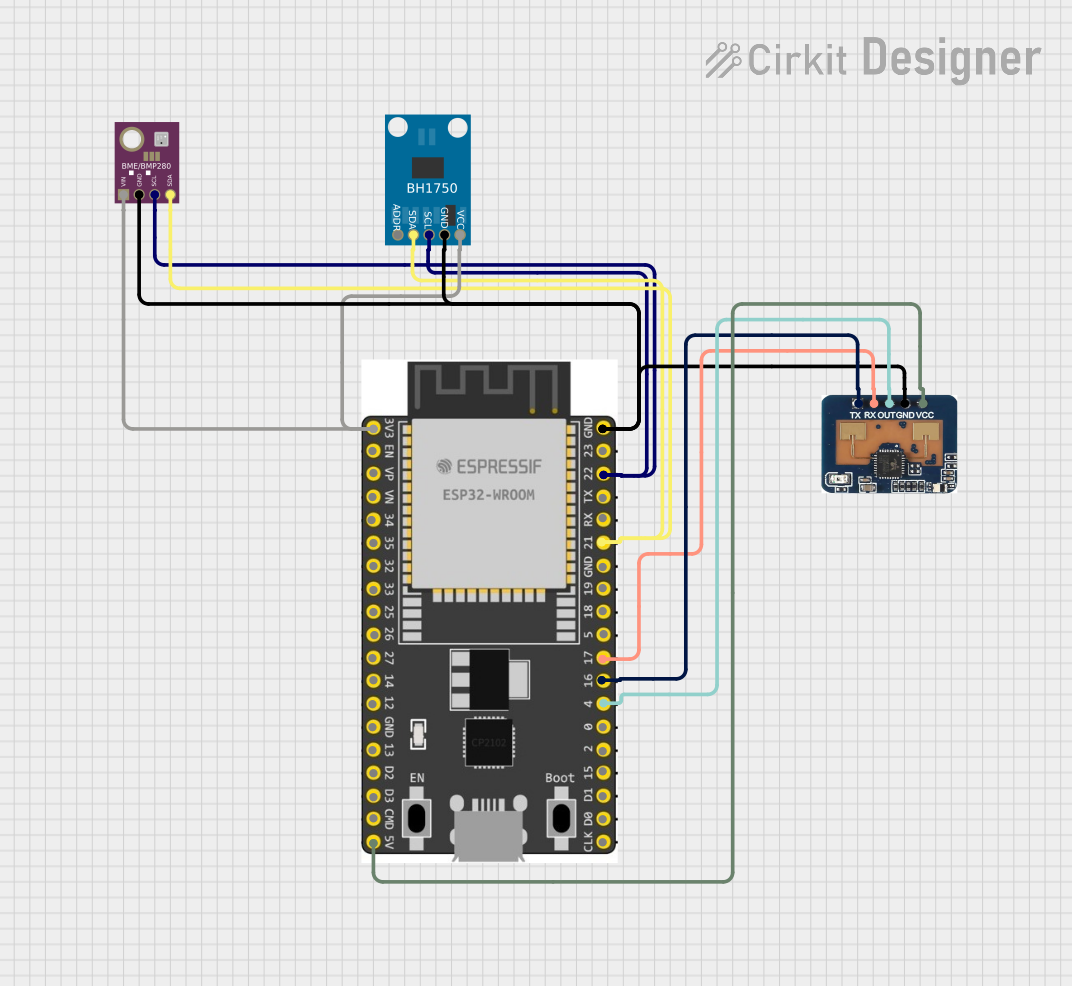 Open Project in Cirkit Designer
Explore Projects Built with BMP 280
Open Project in Cirkit DesignerOpen Project in Cirkit DesignerOpen Project in Cirkit DesignerOpen Project in Cirkit DesignerTechnical Specifications
The BMP280 sensor offers excellent performance and flexibility. Below are its key technical details:
Key Features
- Pressure Range: 300 hPa to 1100 hPa (equivalent to an altitude range of 0 to ~9,000 meters)
- Temperature Range: -40°C to +85°C
- Accuracy:
- Pressure: ±1 hPa
- Temperature: ±1°C
- Operating Voltage: 1.71V to 3.6V
- Current Consumption: 2.7 µA (typical in normal mode)
- Communication Protocols: I2C (up to 3.4 MHz) and SPI (up to 10 MHz)
- Package Dimensions: 2.0 mm × 2.5 mm × 0.95 mm
Pin Configuration and Descriptions
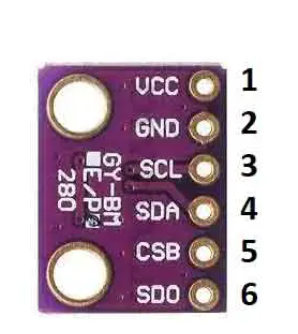
The BMP280 module typically comes with a breakout board that includes the following pins:
| Pin Name | Description |
|---|---|
| VCC | Power supply pin. Connect to 3.3V (or 5V if the breakout board has a regulator). |
| GND | Ground pin. Connect to the ground of the circuit. |
| SCL | Serial Clock Line for I2C communication. |
| SDA | Serial Data Line for I2C communication. |
| CS | Chip Select for SPI communication. Pull low to enable SPI mode. |
| SDO | Serial Data Out for SPI communication. |
Note: For I2C communication, the CS pin should be pulled high or left unconnected.
Usage Instructions
The BMP280 can be easily integrated into a circuit using either I2C or SPI communication. Below are the steps to use the BMP280 with an Arduino UNO via I2C:
Circuit Connection
- Connect the VCC pin of the BMP280 to the 3.3V pin on the Arduino UNO.
- Connect the GND pin of the BMP280 to the GND pin on the Arduino UNO.
- Connect the SCL pin of the BMP280 to the A5 pin on the Arduino UNO (I2C clock line).
- Connect the SDA pin of the BMP280 to the A4 pin on the Arduino UNO (I2C data line).
- Leave the CS and SDO pins unconnected for I2C mode.
Arduino Code Example
Below is an example Arduino sketch to read pressure and temperature data from the BMP280 using the Adafruit BMP280 library:
#include <Wire.h>
#include <Adafruit_Sensor.h>
#include <Adafruit_BMP280.h>

// Create an instance of the BMP280 sensor
Adafruit_BMP280 bmp;

// Define constants for sea level pressure (in hPa)
#define SEALEVELPRESSURE_HPA (1013.25)

void setup() {
  Serial.begin(9600); // Initialize serial communication at 9600 baud
  if (!bmp.begin(0x76)) { // Initialize BMP280 with I2C address 0x76
    Serial.println("Could not find a valid BMP280 sensor, check wiring!");
    while (1); // Halt execution if sensor initialization fails
  }
}

void loop() {
  // Read and print temperature in Celsius
  Serial.print("Temperature = ");
  Serial.print(bmp.readTemperature());
  Serial.println(" °C");

  // Read and print pressure in hPa
  Serial.print("Pressure = ");
  Serial.print(bmp.readPressure() / 100.0F); // Convert Pa to hPa
  Serial.println(" hPa");

  // Calculate and print altitude based on sea level pressure
  Serial.print("Approx. Altitude = ");
  Serial.print(bmp.readAltitude(SEALEVELPRESSURE_HPA));
  Serial.println(" m");

  delay(2000); // Wait for 2 seconds before the next reading
}
Important Considerations
- Ensure the BMP280 is powered with a voltage within its operating range (1.71V to 3.6V). If using a 5V system, confirm that the breakout board includes a voltage regulator.
- Use appropriate pull-up resistors (typically 4.7 kΩ) on the I2C lines (SCL and SDA) if they are not already included on the breakout board.
- Verify the I2C address of the BMP280. The default address is
0x76, but it may be0x77depending on the module configuration.
Troubleshooting and FAQs
Common Issues
The sensor is not detected by the Arduino.
- Solution: Double-check the wiring and ensure the I2C address matches the one in the code. Use an I2C scanner sketch to confirm the address.
Incorrect or fluctuating readings.
- Solution: Ensure stable power supply and proper pull-up resistors on the I2C lines. Avoid placing the sensor near heat sources or in areas with rapid airflow.
Altitude readings are inaccurate.
- Solution: Verify the sea level pressure value (
SEALEVELPRESSURE_HPA) used in the code. Adjust it to match the current atmospheric pressure at sea level in your location.
- Solution: Verify the sea level pressure value (
FAQs
Can the BMP280 measure humidity?
- No, the BMP280 only measures pressure and temperature. For humidity measurements, consider using the BME280 sensor.
What is the maximum altitude the BMP280 can measure?
- The BMP280 can measure altitudes up to approximately 9,000 meters, based on its pressure range.
Can I use the BMP280 with a 5V microcontroller?
- Yes, but only if the breakout board includes a voltage regulator and level shifters. Otherwise, use a logic level converter to avoid damaging the sensor.
By following this documentation, you can effectively integrate and utilize the BMP280 sensor in your projects.