Cirkit Designer Logo
Cirkit Designer
Your all-in-one circuit design IDE
Home / 
Component Documentation

How to Use RP Lidar A1M8 (old): Examples, Pinouts, and Specs
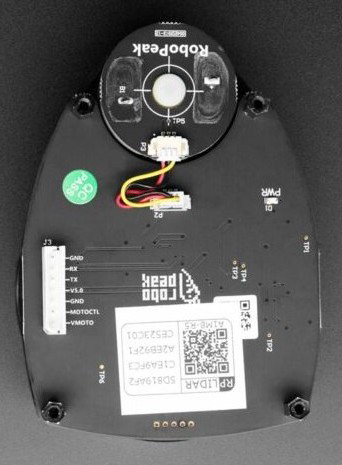

Image of RP Lidar A1M8 (old)
Cirkit Designer LogoDesign with RP Lidar A1M8 (old) in Cirkit Designer

Introduction

The RP Lidar A1M8, manufactured by Slamtec, is a 360-degree laser scanner designed for mapping and navigation applications. It uses laser triangulation to provide accurate distance measurements in real-time, making it an essential component for robotics, autonomous vehicles, and other systems requiring obstacle detection and environmental mapping. Its compact design, low power consumption, and high scanning frequency make it a popular choice for developers and engineers.

Explore Projects Built with RP Lidar A1M8 (old)
Use Cirkit Designer to design, explore, and prototype these projects online. Some projects support real-time simulation. Click "Open Project" to start designing instantly!
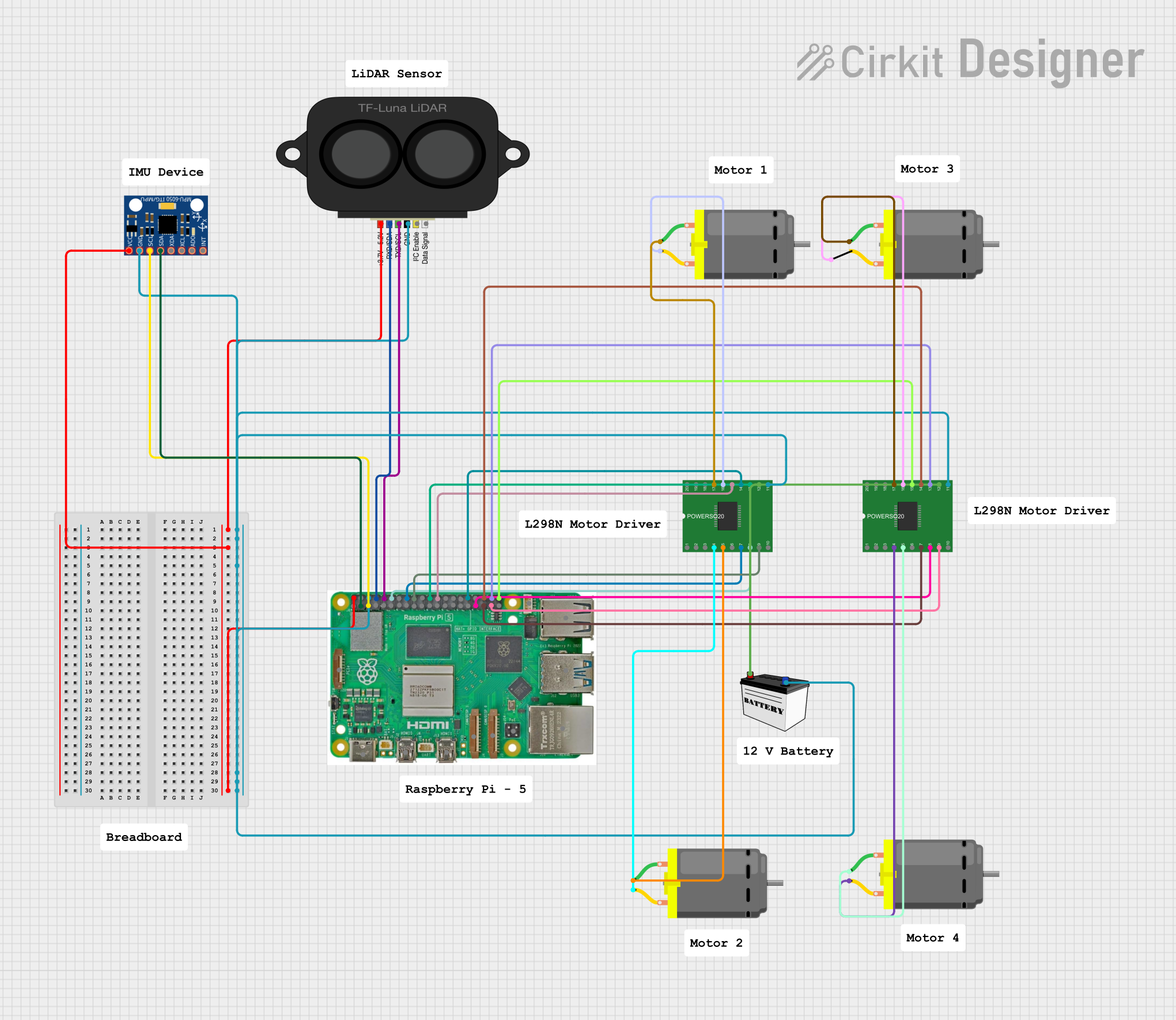
Raspberry Pi 5 Controlled Robotic Vehicle with LIDAR and IMU
Image of Rover: A project utilizing RP Lidar A1M8 (old) in a practical application
This circuit features a Raspberry Pi 5 as the central controller, interfaced with a TF LUNA LIDAR sensor for distance measurement and an MPU-6050 for motion tracking via I2C communication. It also includes two L298 motor drivers powered by a 12V battery to control four DC motors, with the Raspberry Pi's GPIO pins used to manage the direction and speed of the motors.
Cirkit Designer LogoOpen Project in Cirkit Designer
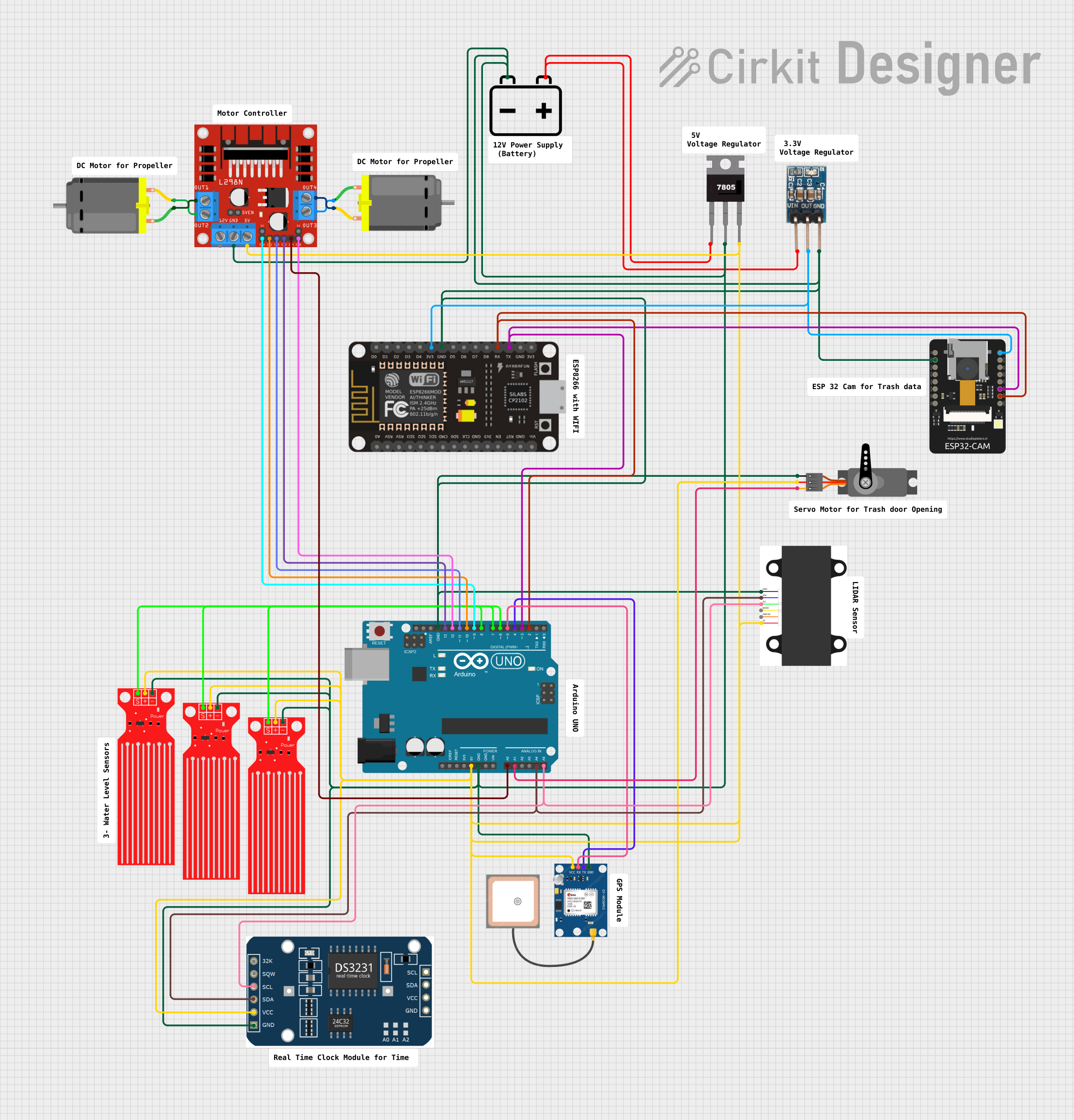
Arduino-Controlled Robotics Platform with GPS, LIDAR, and ESP Communication Modules
Image of Boat Project: A project utilizing RP Lidar A1M8 (old) in a practical application
This circuit is designed to control and monitor various sensors and actuators using an Arduino UNO microcontroller. It includes a LIDAR sensor for distance measurement, a GPS module for location tracking, multiple water level sensors for fluid detection, and a motor driver controlling two DC motors. The system is powered by a 12V battery, with voltage regulation for 3.3V and 5V components, and it features communication between the Arduino, ESP32-CAM, and ESP-8266 for additional functionalities such as wireless control or image capture.
Cirkit Designer LogoOpen Project in Cirkit Designer
Arduino-Controlled Autonomous Rover with LIDAR Navigation and Water Detection
Image of Copy of Boat Project: A project utilizing RP Lidar A1M8 (old) in a practical application
This circuit is designed for a multi-sensor data acquisition and motor control system, powered by a 12V battery with voltage regulation for 5V and 3.3V components. It features an Arduino UNO microcontroller interfaced with a LIDAR sensor, GPS module, RTC module, ESP32-CAM, ESP-8266, multiple water level sensors, and a servo, all for sensing and data collection purposes. Additionally, it controls two DC motors via an L298N motor driver, with the Arduino UNO's firmware responsible for managing sensor readings and motor operations.
Cirkit Designer LogoOpen Project in Cirkit Designer
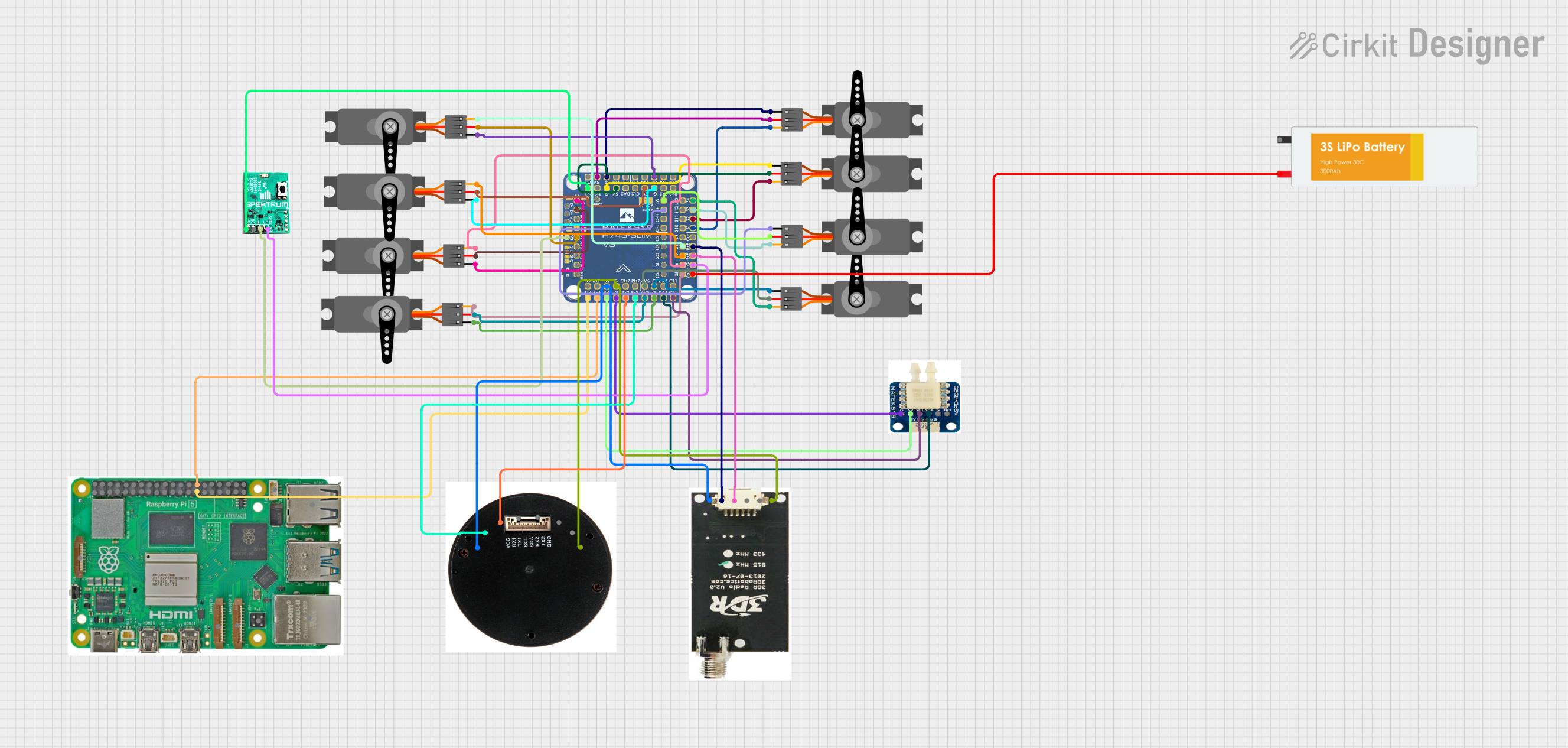
Raspberry Pi and H743-SLIM V3 Controlled Servo System with GPS and Telemetry
Image of Avionics Wiring Diagram: A project utilizing RP Lidar A1M8 (old) in a practical application
This circuit is designed for a UAV control system, featuring an H743-SLIM V3 flight controller connected to multiple servos for control surfaces, a GPS module for navigation, a telemetry radio for communication, and a digital airspeed sensor for flight data. The system is powered by a LiPo battery and includes a Raspberry Pi for additional processing and control tasks.
Cirkit Designer LogoOpen Project in Cirkit Designer

Explore Projects Built with RP Lidar A1M8 (old)

Use Cirkit Designer to design, explore, and prototype these projects online. Some projects support real-time simulation. Click "Open Project" to start designing instantly!
Image of Rover: A project utilizing RP Lidar A1M8 (old) in a practical application
Raspberry Pi 5 Controlled Robotic Vehicle with LIDAR and IMU
This circuit features a Raspberry Pi 5 as the central controller, interfaced with a TF LUNA LIDAR sensor for distance measurement and an MPU-6050 for motion tracking via I2C communication. It also includes two L298 motor drivers powered by a 12V battery to control four DC motors, with the Raspberry Pi's GPIO pins used to manage the direction and speed of the motors.
Cirkit Designer LogoOpen Project in Cirkit Designer
Image of Boat Project: A project utilizing RP Lidar A1M8 (old) in a practical application
Arduino-Controlled Robotics Platform with GPS, LIDAR, and ESP Communication Modules
This circuit is designed to control and monitor various sensors and actuators using an Arduino UNO microcontroller. It includes a LIDAR sensor for distance measurement, a GPS module for location tracking, multiple water level sensors for fluid detection, and a motor driver controlling two DC motors. The system is powered by a 12V battery, with voltage regulation for 3.3V and 5V components, and it features communication between the Arduino, ESP32-CAM, and ESP-8266 for additional functionalities such as wireless control or image capture.
Cirkit Designer LogoOpen Project in Cirkit Designer
Image of Copy of Boat Project: A project utilizing RP Lidar A1M8 (old) in a practical application
Arduino-Controlled Autonomous Rover with LIDAR Navigation and Water Detection
This circuit is designed for a multi-sensor data acquisition and motor control system, powered by a 12V battery with voltage regulation for 5V and 3.3V components. It features an Arduino UNO microcontroller interfaced with a LIDAR sensor, GPS module, RTC module, ESP32-CAM, ESP-8266, multiple water level sensors, and a servo, all for sensing and data collection purposes. Additionally, it controls two DC motors via an L298N motor driver, with the Arduino UNO's firmware responsible for managing sensor readings and motor operations.
Cirkit Designer LogoOpen Project in Cirkit Designer
Image of Avionics Wiring Diagram: A project utilizing RP Lidar A1M8 (old) in a practical application
Raspberry Pi and H743-SLIM V3 Controlled Servo System with GPS and Telemetry
This circuit is designed for a UAV control system, featuring an H743-SLIM V3 flight controller connected to multiple servos for control surfaces, a GPS module for navigation, a telemetry radio for communication, and a digital airspeed sensor for flight data. The system is powered by a LiPo battery and includes a Raspberry Pi for additional processing and control tasks.
Cirkit Designer LogoOpen Project in Cirkit Designer

Common Applications

  • Robotics navigation and obstacle avoidance
  • Autonomous vehicle mapping
  • SLAM (Simultaneous Localization and Mapping) systems
  • Indoor and outdoor environment scanning
  • Industrial automation and safety systems

Technical Specifications

The RP Lidar A1M8 is a versatile and reliable sensor with the following key specifications:

Parameter Value
Scanning Range 0.15 m to 12 m
Scanning Angle 360°
Angular Resolution 1° to 1.5°
Distance Resolution < 1% of the actual distance
Scanning Frequency 5 Hz to 10 Hz
Laser Wavelength 785 nm (Infrared)
Laser Safety Class 1 (Eye-safe)
Operating Voltage 5 V DC
Power Consumption 2.5 W (typical)
Communication Interface UART (3.3V TTL)
Dimensions 70 mm (diameter) x 41 mm (height)
Weight 190 g

Pin Configuration

The RP Lidar A1M8 uses a 4-pin connector for power and communication. The pinout is as follows:

Pin Name Description
1 VCC Power input (5 V DC)
2 GND Ground
3 TX UART Transmit (3.3V TTL)
4 RX UART Receive (3.3V TTL)

Usage Instructions

Connecting the RP Lidar A1M8

  1. Power Supply: Connect the VCC pin to a 5V DC power source and the GND pin to ground.
  2. Communication: Use the TX and RX pins to establish a UART connection with your microcontroller or computer. Ensure the UART voltage level is 3.3V TTL.
  3. Mounting: Secure the lidar on a stable platform to minimize vibrations during operation. The lidar should have an unobstructed 360° view for optimal performance.

Using with Arduino UNO

To use the RP Lidar A1M8 with an Arduino UNO, you will need a USB-to-TTL adapter or a hardware UART interface. Below is an example code snippet to interface the lidar with Arduino:

#include <SoftwareSerial.h>

// Define RX and TX pins for SoftwareSerial
SoftwareSerial lidarSerial(10, 11); // RX = pin 10, TX = pin 11

void setup() {
  Serial.begin(9600); // Initialize Serial Monitor
  lidarSerial.begin(115200); // Initialize Lidar UART communication

  Serial.println("RP Lidar A1M8 Initialized");
}

void loop() {
  if (lidarSerial.available()) {
    // Read data from the lidar
    byte data = lidarSerial.read();
    Serial.print("Lidar Data: ");
    Serial.println(data, HEX); // Print data in hexadecimal format
  }
}

Important Considerations

  • Power Supply: Ensure a stable 5V power source to avoid performance issues.
  • UART Voltage: The RP Lidar A1M8 operates at 3.3V TTL levels. Use a level shifter if your microcontroller operates at 5V.
  • Environment: Avoid direct sunlight or reflective surfaces, as they may interfere with the laser measurements.
  • Firmware: Check for firmware updates from Slamtec to ensure optimal performance.

Troubleshooting and FAQs

Common Issues

  1. No Data Output:

    • Ensure the lidar is powered correctly (5V on VCC and proper ground connection).
    • Verify the UART connection and baud rate (default is 115200 bps).
    • Check for loose or damaged wires.
  2. Inaccurate Measurements:

    • Ensure the lidar has a clear 360° view without obstructions.
    • Avoid using the lidar in environments with excessive dust or reflective surfaces.
  3. Lidar Not Spinning:

    • Check the motor control signal and ensure the motor is not obstructed.
    • Verify the power supply is sufficient to drive the motor.

FAQs

Q: Can the RP Lidar A1M8 be used outdoors?
A: Yes, but it performs best in controlled environments. Direct sunlight or heavy rain may affect its accuracy.

Q: What is the maximum range of the lidar?
A: The maximum range is 12 meters under optimal conditions.

Q: Is the laser safe for human eyes?
A: Yes, the RP Lidar A1M8 uses a Class 1 laser, which is eye-safe.

Q: Can I increase the scanning frequency?
A: Yes, the scanning frequency can be adjusted between 5 Hz and 10 Hz, but higher frequencies may reduce the angular resolution.

By following this documentation, you can effectively integrate and troubleshoot the RP Lidar A1M8 in your projects.