
How to Use С2000-КДЛ-2И исп.01: Examples, Pinouts, and Specs
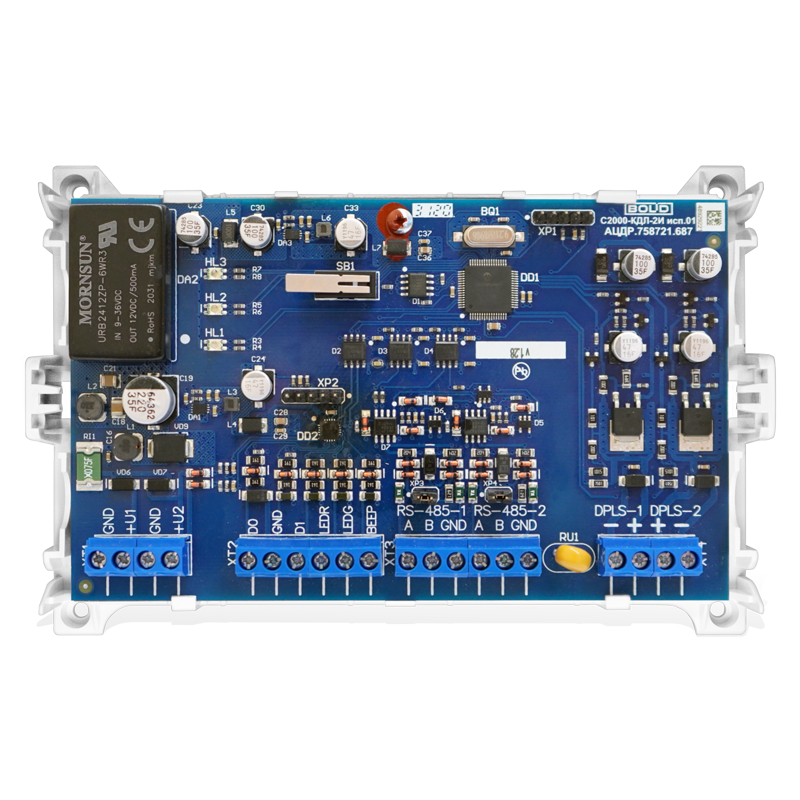
 Design with С2000-КДЛ-2И исп.01 in Cirkit Designer
Introduction
The С2000-КДЛ-2И исп.01, manufactured by Bolid, is a digital signal processor (DSP) designed for real-time signal processing and control in electronic systems. This component is widely used in applications requiring high-speed data processing, such as industrial automation, security systems, and communication devices. Its robust design and versatile functionality make it a reliable choice for demanding environments.
Explore Projects Built with С2000-КДЛ-2И исп.01
 Open Project in Cirkit Designer
 Open Project in Cirkit Designer
 Open Project in Cirkit Designer
 Open Project in Cirkit Designer
Explore Projects Built with С2000-КДЛ-2И исп.01
Open Project in Cirkit DesignerOpen Project in Cirkit DesignerOpen Project in Cirkit DesignerOpen Project in Cirkit DesignerCommon Applications and Use Cases
- Industrial automation systems
- Security and fire alarm systems
- Signal processing in communication devices
- Real-time data acquisition and control
- Embedded systems requiring high-speed processing
Technical Specifications
The С2000-КДЛ-2И исп.01 is engineered to deliver reliable performance under various operating conditions. Below are its key technical specifications:
General Specifications
| Parameter | Value |
|---|---|
| Manufacturer | Bolid |
| Component Type | Digital Signal Processor (DSP) |
| Operating Voltage Range | 9–30 V DC |
| Power Consumption | ≤ 1.5 W |
| Communication Interface | RS-485 |
| Operating Temperature | -30°C to +50°C |
| Dimensions | 105 × 70 × 30 mm |
| Weight | 150 g |
Pin Configuration and Descriptions
The С2000-КДЛ-2И исп.01 features a terminal block for connecting to external devices. Below is the pin configuration:
| Pin Number | Label | Description |
|---|---|---|
| 1 | +12V | Positive power supply input (9–30 V DC) |
| 2 | GND | Ground connection |
| 3 | A | RS-485 communication line (A) |
| 4 | B | RS-485 communication line (B) |
| 5 | IN1 | Input signal 1 (programmable) |
| 6 | IN2 | Input signal 2 (programmable) |
| 7 | OUT1 | Output signal 1 (programmable) |
| 8 | OUT2 | Output signal 2 (programmable) |
Usage Instructions
To use the С2000-КДЛ-2И исп.01 in a circuit, follow these steps:
Power Supply Connection:
Connect the +12V pin to a DC power source within the range of 9–30 V. Ensure the GND pin is connected to the ground of the power supply.Communication Setup:
Use the RS-485 interface (pins A and B) to establish communication with a controller or other devices. Ensure proper termination resistors are used for long-distance communication.Input/Output Configuration:
- Connect external sensors or switches to the input pins (IN1, IN2). These inputs can be programmed for specific functions.
- Use the output pins (OUT1, OUT2) to control external devices such as relays or indicators.
Programming and Integration:
Configure the component using compatible software or a microcontroller. The RS-485 interface allows for easy integration into larger systems.
Important Considerations and Best Practices
- Ensure the power supply voltage is within the specified range to avoid damage.
- Use shielded cables for RS-485 communication to minimize noise and interference.
- Follow proper grounding practices to ensure stable operation.
- If connecting to an Arduino UNO, use an RS-485 module to interface with the С2000-КДЛ-2И исп.01.
Example Arduino Code for RS-485 Communication
Below is an example of how to communicate with the С2000-КДЛ-2И исп.01 using an Arduino UNO and an RS-485 module:
#include <SoftwareSerial.h>

// Define RS-485 communication pins
#define RX_PIN 10  // Arduino RX pin connected to RS-485 module TX
#define TX_PIN 11  // Arduino TX pin connected to RS-485 module RX
#define DE_PIN 2   // RS-485 Driver Enable pin

SoftwareSerial rs485(RX_PIN, TX_PIN);

void setup() {
  pinMode(DE_PIN, OUTPUT);
  digitalWrite(DE_PIN, LOW); // Set RS-485 to receive mode
  rs485.begin(9600);         // Initialize RS-485 communication at 9600 baud
  Serial.begin(9600);        // Initialize Serial Monitor
}

void loop() {
  // Send data to С2000-КДЛ-2И исп.01
  digitalWrite(DE_PIN, HIGH); // Enable RS-485 transmission
  rs485.println("Hello, С2000-КДЛ-2И исп.01!"); // Send message
  digitalWrite(DE_PIN, LOW);  // Set RS-485 to receive mode

  // Wait for a response
  if (rs485.available()) {
    String response = rs485.readString();
    Serial.println("Response: " + response); // Print response to Serial Monitor
  }

  delay(1000); // Wait 1 second before next communication
}
Troubleshooting and FAQs
Common Issues and Solutions
No Communication with the Device:
- Cause: Incorrect RS-485 wiring or termination.
- Solution: Verify the A and B lines are correctly connected. Check for proper termination resistors.
Device Not Powering On:
- Cause: Insufficient or incorrect power supply.
- Solution: Ensure the power supply voltage is within the 9–30 V range and connections are secure.
Unstable Operation:
- Cause: Electrical noise or improper grounding.
- Solution: Use shielded cables for communication and ensure proper grounding.
Inputs/Outputs Not Responding:
- Cause: Incorrect configuration or wiring.
- Solution: Double-check the input/output connections and verify the configuration settings.
FAQs
Q: Can the С2000-КДЛ-2И исп.01 be used outdoors?
A: Yes, but ensure it is housed in a weatherproof enclosure to protect it from environmental factors.
Q: What is the maximum communication distance for RS-485?
A: RS-485 supports communication distances up to 1200 meters, depending on the cable quality and baud rate.
Q: Is the component compatible with 3.3V logic devices?
A: No, the С2000-КДЛ-2И исп.01 requires a 9–30 V DC power supply. Use level shifters if interfacing with 3.3V logic devices.
Q: How do I reset the device?
A: Refer to the manufacturer's manual for specific reset procedures, as it may vary depending on the application.