The L298N Dual H-Bridge Motor Driver, manufactured by Handson Technology (Part ID: Motor Driver), is a versatile and robust motor driver module. It is designed to control the direction and speed of two DC motors or one stepper motor. The module is capable of handling up to 2A per channel and operates at voltages ranging from 5V to 35V, making it suitable for a wide range of motor control applications.
Explore Projects Built with L298N Dual H-Bridge Motor Driver
Use Cirkit Designer to design, explore, and prototype these projects online. Some projects support real-time simulation. Click "Open Project" to start designing instantly!
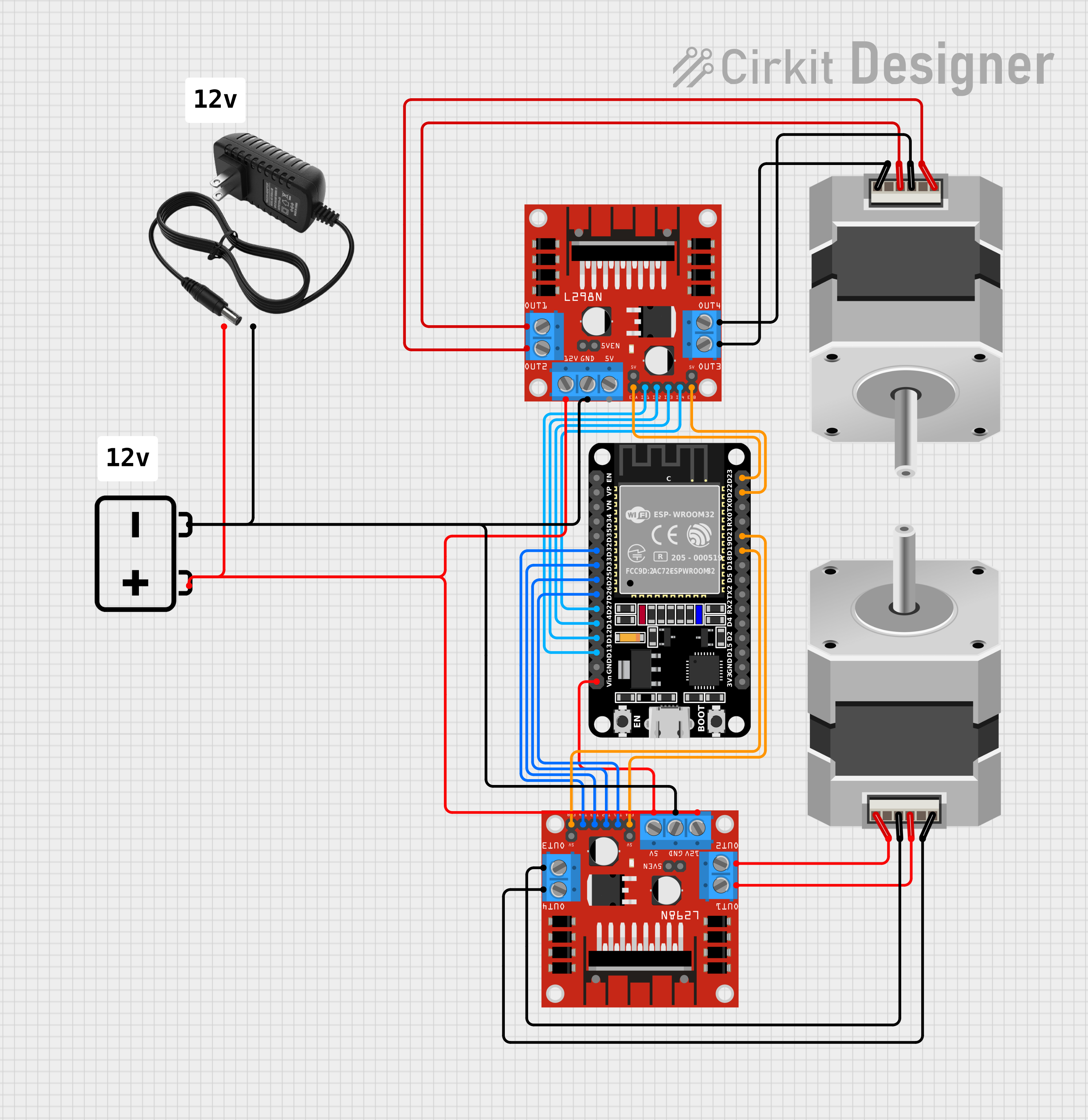
This circuit consists of two L298N DC motor drivers controlled by an ESP32 microcontroller to drive two bipolar stepper motors. The ESP32 uses its GPIO pins to send control signals to the motor drivers, which in turn power the stepper motors with a 12V supply from either a battery or a power supply. The circuit is designed for precise control of stepper motors, likely for applications requiring synchronized movements, such as robotics or CNC machines.
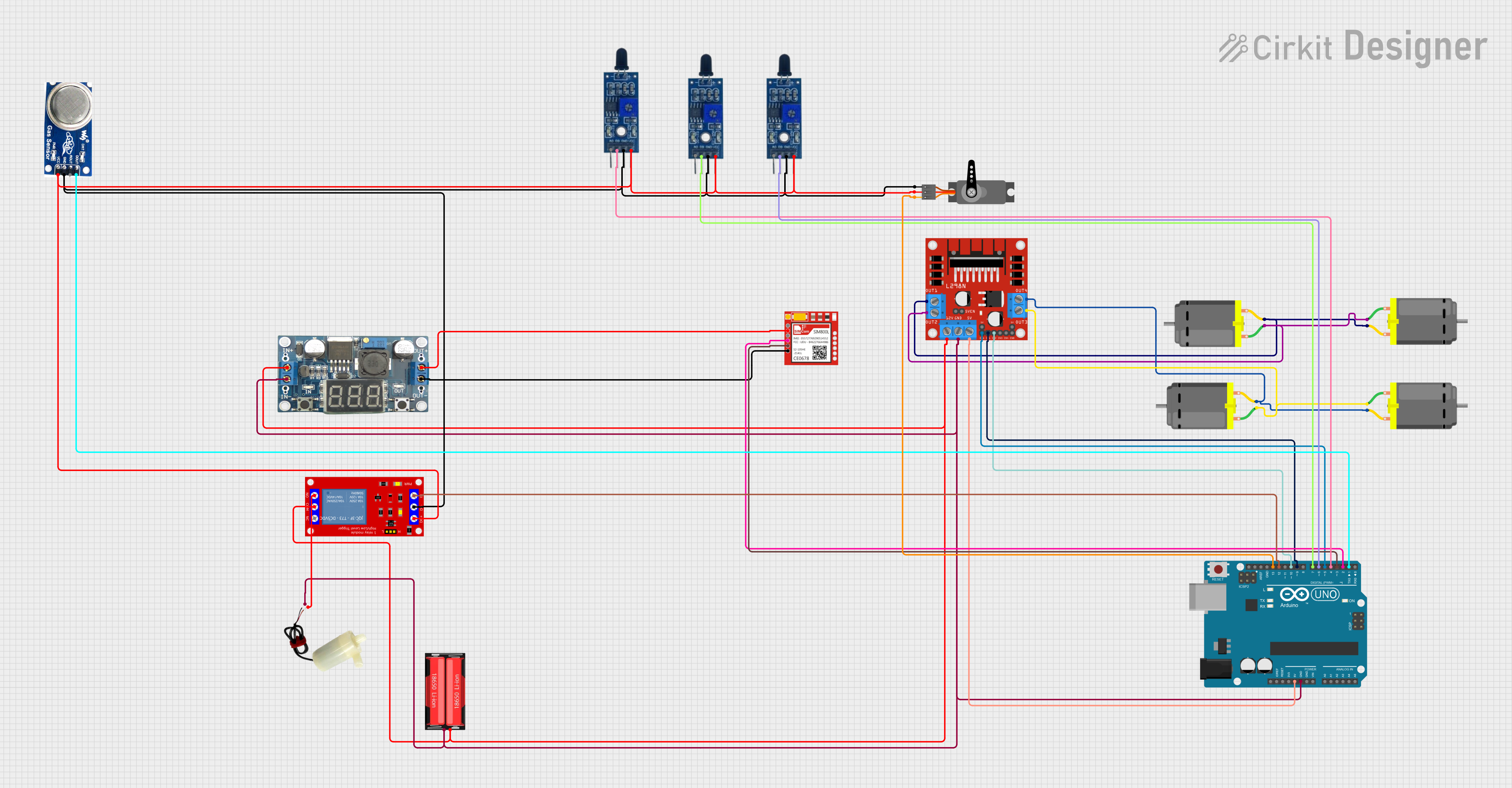
This circuit is designed to control multiple DC motors using an L298N motor driver, which is interfaced with an Arduino UNO microcontroller. The Arduino controls the direction and speed of the motors, as well as a servo motor, and can activate a water pump via a relay module. Additionally, the circuit includes flame and smoke sensors for safety monitoring, and a SIM800L module for potential communication capabilities.
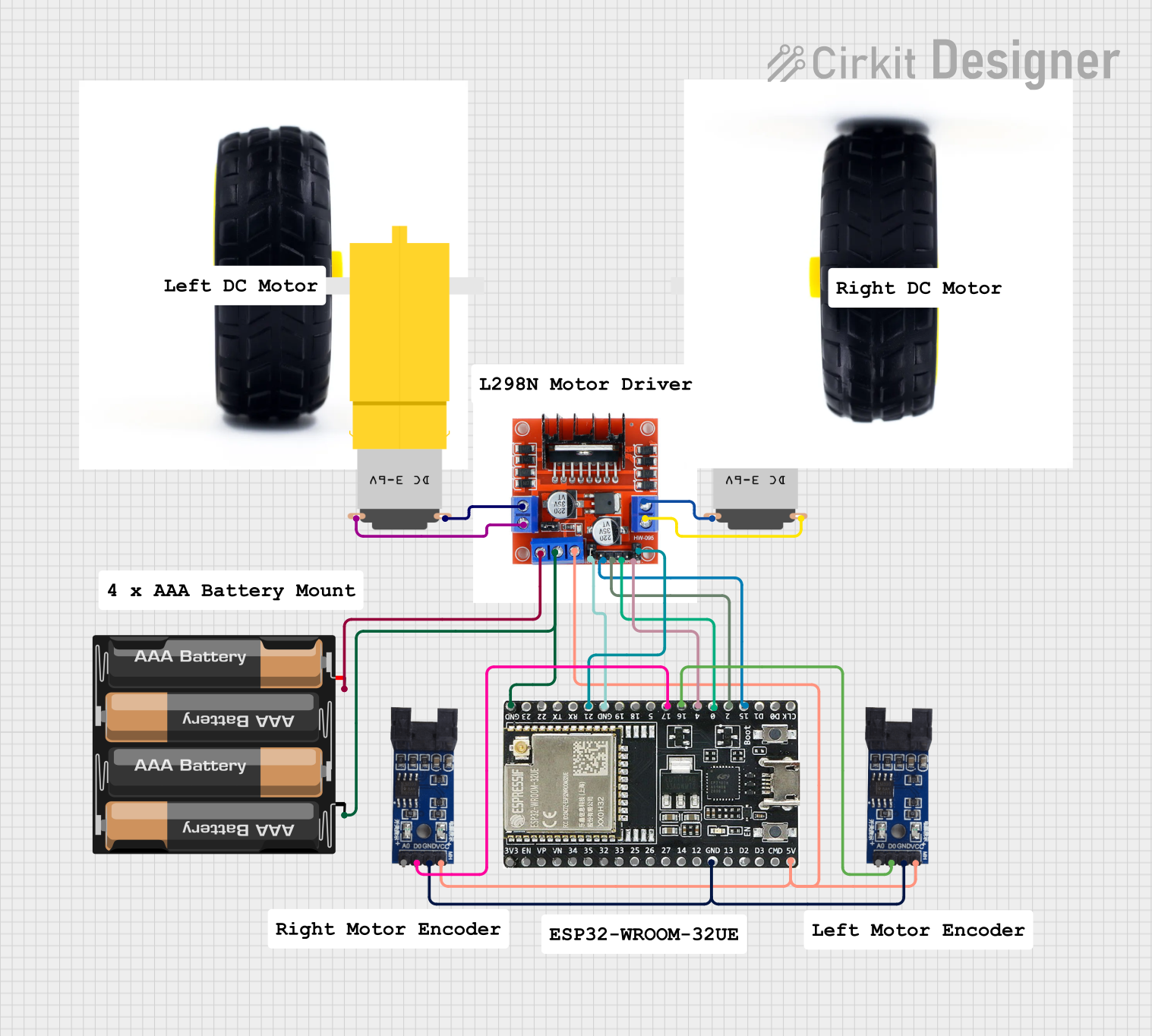
This circuit is designed to control two DC motors using an L298N Dual Motor Driver Module, which receives PWM control signals from an ESP32 microcontroller. The motors' rotational movement can be monitored by two Optical Encoder Sensor Modules connected to the ESP32. Power is supplied by a 4 x AAA battery mount, with the battery's positive terminal connected to the motor driver's 12V input and the negative terminal to the common ground.
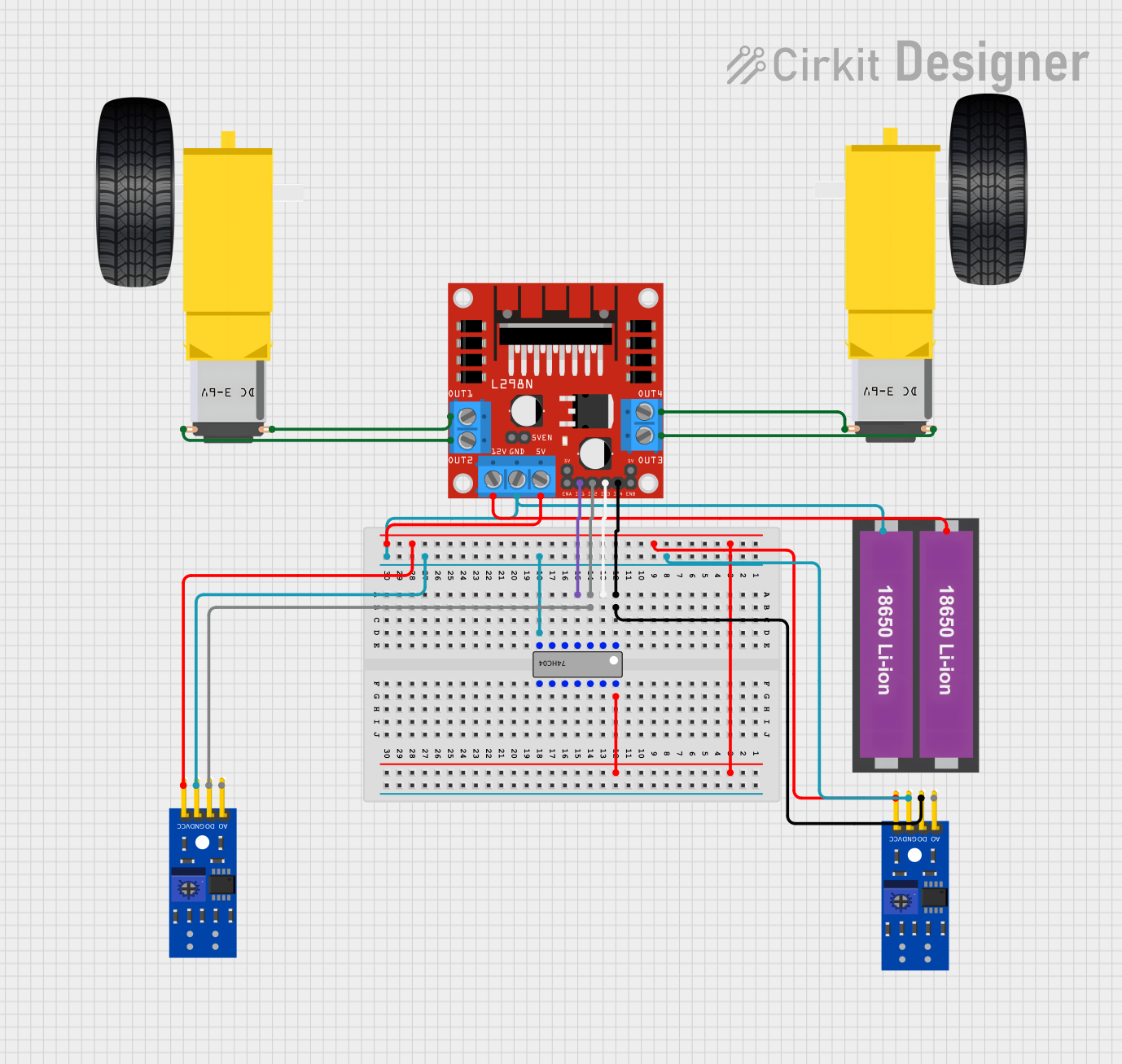
This circuit is designed to control a two-wheeled robot using an L298N motor driver, powered by two 18650 Li-ion batteries. It includes two KY-033 line tracking sensors for navigation and a 74HC04 inverter to process sensor signals and control the motor driver inputs.
Automation: Controlling conveyor belts or actuators.
DIY Projects: Building RC cars, drones, or other motorized devices.
Stepper Motor Control: Driving stepper motors for precise positioning.
Technical Specifications
Below are the key technical details of the L298N Dual H-Bridge Motor Driver:
Parameter
Value
Operating Voltage
5V to 35V
Maximum Current per Channel
2A
Logic Voltage
5V
Control Logic Levels
High: 2.3V to 5V, Low: 0V
Power Dissipation
25W (with proper heat dissipation)
Motor Channels
2 (independent)
Dimensions
43mm x 43mm x 27mm
Pin Configuration and Descriptions
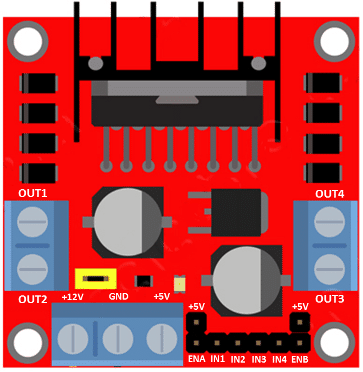
The L298N module has several pins and terminals for motor control and power input. Below is a detailed description:
Power and Motor Terminals
Pin/Terminal
Description
VCC
Power supply for motors (5V to 35V).
GND
Ground connection.
5V
Logic voltage output (used if onboard regulator is active).
OUT1, OUT2
Outputs for Motor A.
OUT3, OUT4
Outputs for Motor B.
Control Pins
Pin
Description
ENA
Enable pin for Motor A (PWM input for speed control).
ENB
Enable pin for Motor B (PWM input for speed control).
IN1, IN2
Control pins for Motor A direction.
IN3, IN4
Control pins for Motor B direction.
Usage Instructions
How to Use the L298N in a Circuit
Power Connections:
Connect the motor power supply to the VCC terminal (5V to 35V).
Connect the ground of the power supply to the GND terminal.
If using the onboard 5V regulator, the 5V pin can be used to power the logic circuit.
Motor Connections:
Connect the motor terminals to OUT1/OUT2 (Motor A) and OUT3/OUT4 (Motor B).
Control Connections:
Use the ENA and ENB pins to enable or disable the motors. These pins can also accept PWM signals for speed control.
Use IN1/IN2 to control the direction of Motor A and IN3/IN4 for Motor B.
Logic Power:
If the motor power supply is greater than 12V, disconnect the onboard 5V regulator jumper and provide an external 5V logic supply.
Important Considerations and Best Practices
Ensure proper heat dissipation by using a heatsink or fan if the current exceeds 1A per channel.
Use diodes or capacitors to suppress voltage spikes caused by motor back-EMF.
Avoid exceeding the maximum voltage and current ratings to prevent damage to the module.
Example: Connecting to an Arduino UNO
Below is an example of how to control a DC motor using the L298N and an Arduino UNO:
Circuit Connections
Motor A: Connect to OUT1 and OUT2.
ENA: Connect to Arduino pin 9 (PWM).
IN1: Connect to Arduino pin 8.
IN2: Connect to Arduino pin 7.
VCC: Connect to motor power supply (e.g., 12V).
GND: Connect to Arduino GND.
Arduino Code
// Define control pins for Motor A
#define ENA 9  // PWM pin for speed control
#define IN1 8  // Direction control pin 1
#define IN2 7  // Direction control pin 2

void setup() {
  // Set motor control pins as outputs
  pinMode(ENA, OUTPUT);
  pinMode(IN1, OUTPUT);
  pinMode(IN2, OUTPUT);
}

void loop() {
  // Rotate motor forward
  digitalWrite(IN1, HIGH);  // Set IN1 high
  digitalWrite(IN2, LOW);   // Set IN2 low
  analogWrite(ENA, 150);    // Set speed (0-255)

  delay(2000);              // Run for 2 seconds

  // Rotate motor backward
  digitalWrite(IN1, LOW);   // Set IN1 low
  digitalWrite(IN2, HIGH);  // Set IN2 high
  analogWrite(ENA, 150);    // Set speed (0-255)

  delay(2000);              // Run for 2 seconds

  // Stop motor
  digitalWrite(IN1, LOW);   // Set IN1 low
  digitalWrite(IN2, LOW);   // Set IN2 low
  analogWrite(ENA, 0);      // Set speed to 0

  delay(2000);              // Wait for 2 seconds
}
Troubleshooting and FAQs
Common Issues and Solutions
Motors Not Running:
Ensure the ENA and ENB pins are enabled (HIGH or PWM signal).
Verify the motor power supply voltage is within the acceptable range (5V to 35V).
Overheating:
Check if the current exceeds 1A per channel. Use a heatsink or fan for cooling.
Ensure proper ventilation around the module.
Erratic Motor Behavior:
Check for loose connections or faulty wiring.
Add capacitors across motor terminals to suppress noise.
Arduino Not Controlling the Motor:
Verify the control pins (IN1, IN2, ENA, etc.) are correctly connected to the Arduino.
Ensure the Arduino is powered and the code is uploaded correctly.
FAQs
Q: Can the L298N drive stepper motors?
A: Yes, the L298N can drive a bipolar stepper motor by controlling the two H-bridges independently.
Q: What is the purpose of the onboard 5V regulator?
A: The onboard 5V regulator provides logic power to the module when the motor power supply is greater than 7V. If using an external 5V logic supply, disconnect the regulator jumper.
Q: Can I use the L298N with a 3.3V microcontroller?
A: Yes, but ensure the control logic levels are compatible. Use level shifters if necessary.
This concludes the documentation for the L298N Dual H-Bridge Motor Driver.

 Open Project in Cirkit Designer