
How to Use 2 x 18650 in case: Examples, Pinouts, and Specs
 Design with 2 x 18650 in case in Cirkit Designer
Introduction
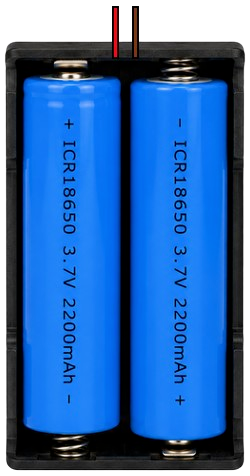
The 2 x 18650 Battery Holder is a compact and durable enclosure designed to securely hold two 18650 lithium-ion batteries. It provides a convenient way to power electronic circuits and devices, offering a stable and portable power source. This holder is commonly used in DIY electronics, robotics, IoT projects, and portable devices where a reliable power supply is essential.
Explore Projects Built with 2 x 18650 in case
 Open Project in Cirkit Designer
 Open Project in Cirkit Designer
 Open Project in Cirkit Designer
 Open Project in Cirkit Designer
Explore Projects Built with 2 x 18650 in case
Open Project in Cirkit DesignerOpen Project in Cirkit DesignerOpen Project in Cirkit DesignerOpen Project in Cirkit DesignerCommon Applications
- Powering Arduino, Raspberry Pi, and other microcontroller-based projects
- Robotics and motorized systems
- Portable electronic devices
- IoT and wireless sensor networks
- LED lighting systems
Technical Specifications
The following table outlines the key technical details of the 2 x 18650 Battery Holder:
| Specification | Details |
|---|---|
| Battery Type | 18650 lithium-ion rechargeable batteries |
| Number of Batteries | 2 |
| Output Voltage | 3.7V (single battery) or 7.4V (two batteries in series, depending on wiring) |
| Maximum Current | Depends on the battery's discharge rating (typically 5A to 20A per cell) |
| Material | ABS plastic with metal spring contacts |
| Dimensions | ~75mm x 40mm x 20mm (varies by manufacturer) |
| Weight | ~20g (without batteries) |
| Wiring Configuration | Series or parallel (varies by model; check product details) |
Pin Configuration and Descriptions
The battery holder typically has two wires for connection:
| Wire Color | Description |
|---|---|
| Red | Positive terminal (+) |
| Black | Negative terminal (-) |
Note: Some models may include additional features like a built-in switch or fuse. Refer to the specific product datasheet for details.
Usage Instructions
How to Use the 2 x 18650 Battery Holder in a Circuit
- Insert Batteries: Place two 18650 lithium-ion batteries into the holder, ensuring correct polarity. The positive and negative terminals are usually marked on the holder.
- Connect Wires: Use the red wire for the positive connection and the black wire for the negative connection. Solder or use connectors to attach the wires to your circuit.
- Choose Wiring Configuration: Verify whether the holder is wired in series (7.4V output) or parallel (3.7V output). This is typically determined by the holder's internal wiring.
- Secure the Holder: Mount the holder securely in your project using screws, adhesive, or zip ties to prevent movement.
Important Considerations and Best Practices
- Battery Selection: Use only high-quality, protected 18650 batteries to ensure safety and performance.
- Polarity Check: Always double-check the polarity of the batteries before inserting them into the holder.
- Avoid Overloading: Ensure the connected circuit does not draw more current than the batteries' maximum discharge rating.
- Heat Management: Avoid exposing the holder to excessive heat, as this can damage the batteries or the holder itself.
- Charging: Remove the batteries from the holder for charging unless the holder is designed with a built-in charging circuit.
Example: Powering an Arduino UNO
To power an Arduino UNO using the 2 x 18650 Battery Holder:
- Insert two 18650 batteries into the holder.
- Connect the red wire to the Arduino's VIN pin and the black wire to the GND pin.
- Ensure the total voltage (3.7V or 7.4V) matches the Arduino's input voltage requirements.
Here is a simple Arduino sketch to blink an LED when powered by the battery holder:
// Blink an LED connected to pin 13
// Ensure the Arduino is powered by the 2 x 18650 Battery Holder

void setup() {
  pinMode(13, OUTPUT); // Set pin 13 as an output
}

void loop() {
  digitalWrite(13, HIGH); // Turn the LED on
  delay(1000);            // Wait for 1 second
  digitalWrite(13, LOW);  // Turn the LED off
  delay(1000);            // Wait for 1 second
}
Note: Ensure the Arduino's voltage regulator can handle the input voltage from the battery holder.
Troubleshooting and FAQs
Common Issues
No Power Output:
- Cause: Batteries are inserted incorrectly or are depleted.
- Solution: Check the polarity and replace or recharge the batteries.
Intermittent Power:
- Cause: Loose connections or poor contact between the batteries and the holder.
- Solution: Ensure the batteries are seated firmly and the wires are securely connected.
Overheating:
- Cause: Excessive current draw or short circuit.
- Solution: Verify the circuit's current requirements and check for short circuits.
Voltage Mismatch:
- Cause: Incorrect wiring configuration (series vs. parallel).
- Solution: Confirm the holder's wiring configuration and ensure it matches your circuit's voltage requirements.
FAQs
Can I use the holder with only one battery?
- Yes, but the output voltage will be halved, and the current capacity will be reduced.
Is the holder waterproof?
- No, the holder is not waterproof. Avoid exposing it to moisture or liquids.
Can I charge the batteries while they are in the holder?
- Only if the holder includes a built-in charging circuit. Otherwise, remove the batteries for charging.
What is the maximum current the holder can handle?
- The maximum current depends on the batteries used and the quality of the holder's contacts. Check the battery's datasheet for its discharge rating.
By following this documentation, you can safely and effectively use the 2 x 18650 Battery Holder in your electronic projects.