
Cirkit Designer
Your all-in-one circuit design IDE
Home /
Component Documentation
How to Use MCB: Examples, Pinouts, and Specs
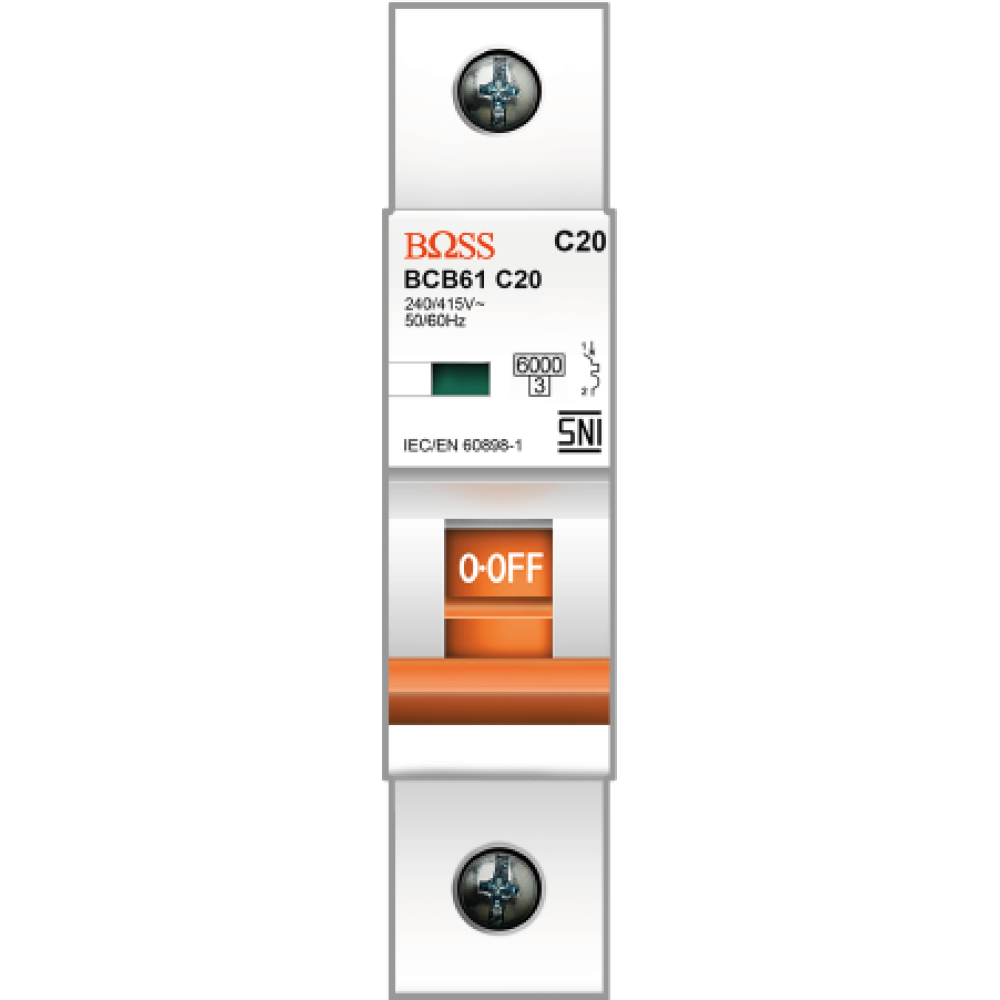
 Design with MCB in Cirkit Designer
Introduction
- A Miniature Circuit Breaker (MCB) is an electromechanical device designed to protect electrical circuits from damage caused by overloads or short circuits. It automatically interrupts the flow of current when it detects a fault, ensuring the safety of electrical systems and connected devices.
- Common applications of MCBs include residential, commercial, and industrial electrical systems. They are widely used in distribution boards, control panels, and as protective devices for individual circuits.
Explore Projects Built with MCB
Flush Switch Controlled Lamp Circuit with AC Power Supply and MCB Protection
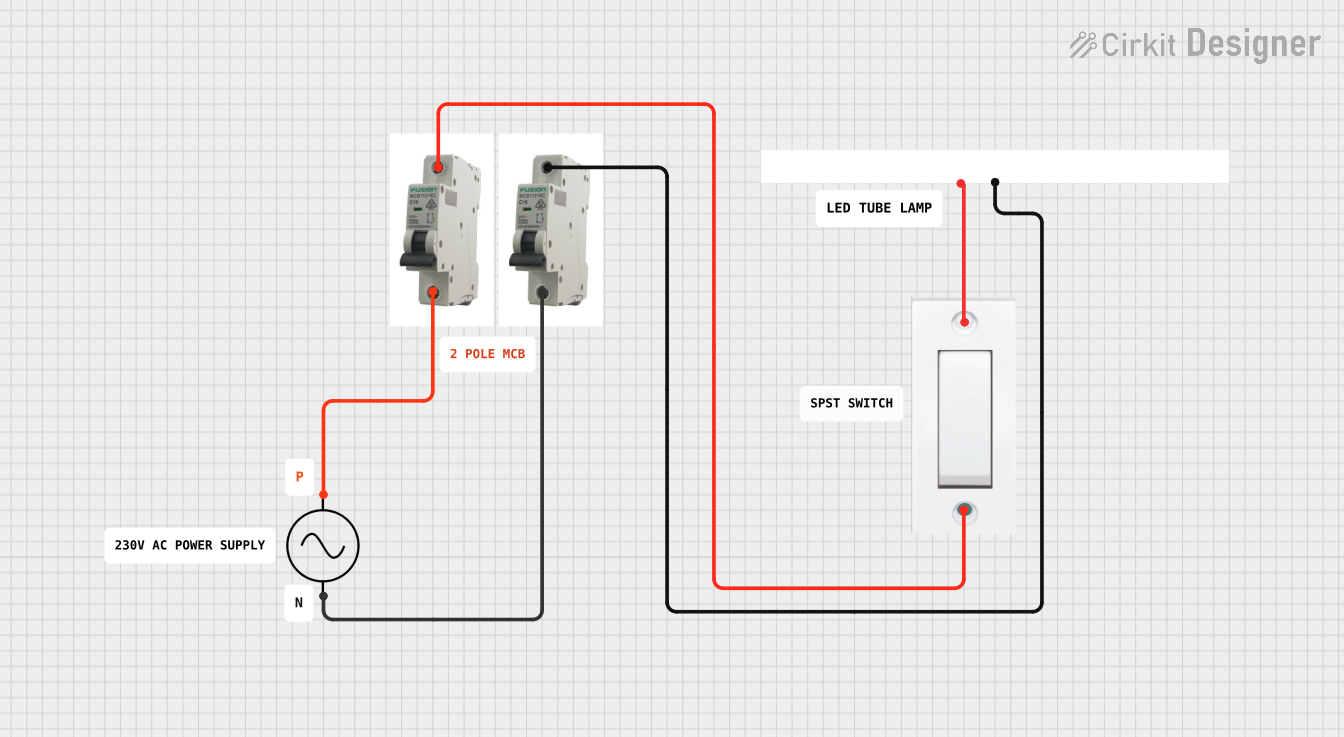
This circuit is designed to control a lamp using a flush switch and is protected by two MCBs (Miniature Circuit Breakers). The AC supply is connected to the input of the first MCB, whose output is connected to the flush switch. The flush switch then controls the power to the lamp, with the second MCB placed in the neutral line for additional safety.
Open Project in Cirkit DesignerLED Indicator System with Power Stabilizer and Measurement Meters
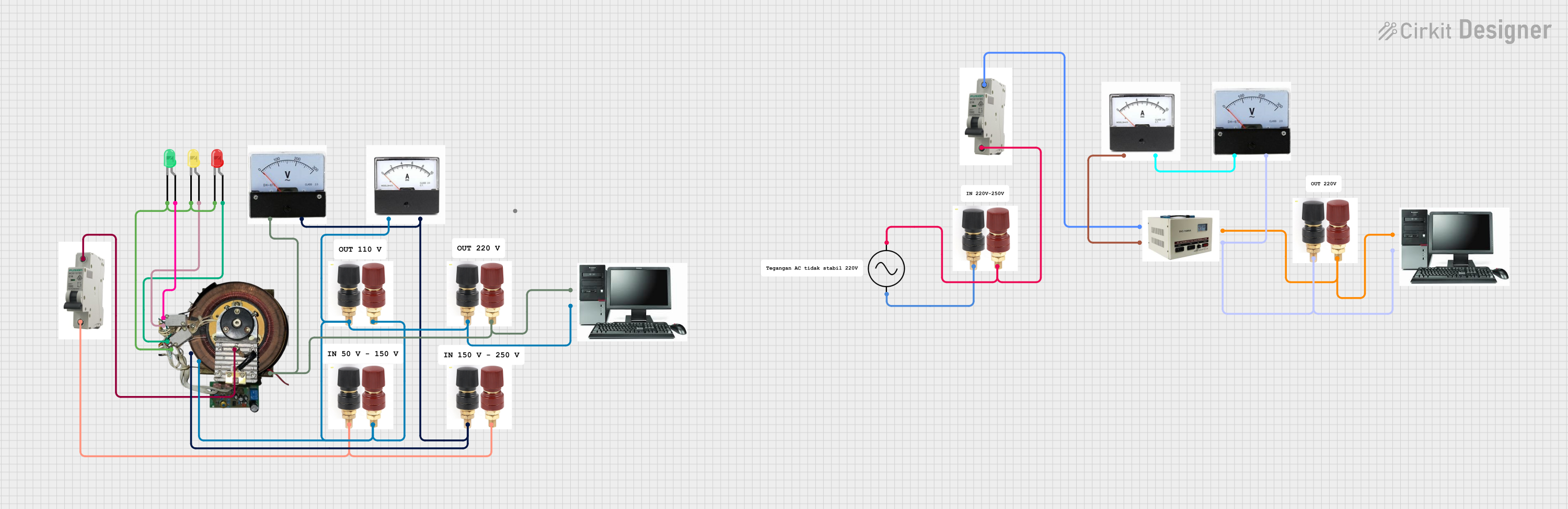
This circuit is a power distribution and monitoring system that includes multiple LEDs for status indication, a stabilizer module, and measurement instruments such as voltmeters and ammeters. It is designed to supply power to a computer and monitor the power quality and current flow, with protection provided by MCBs (Miniature Circuit Breakers).
Open Project in Cirkit DesignerSolar-Powered Battery Charging System with DC-DC Converter
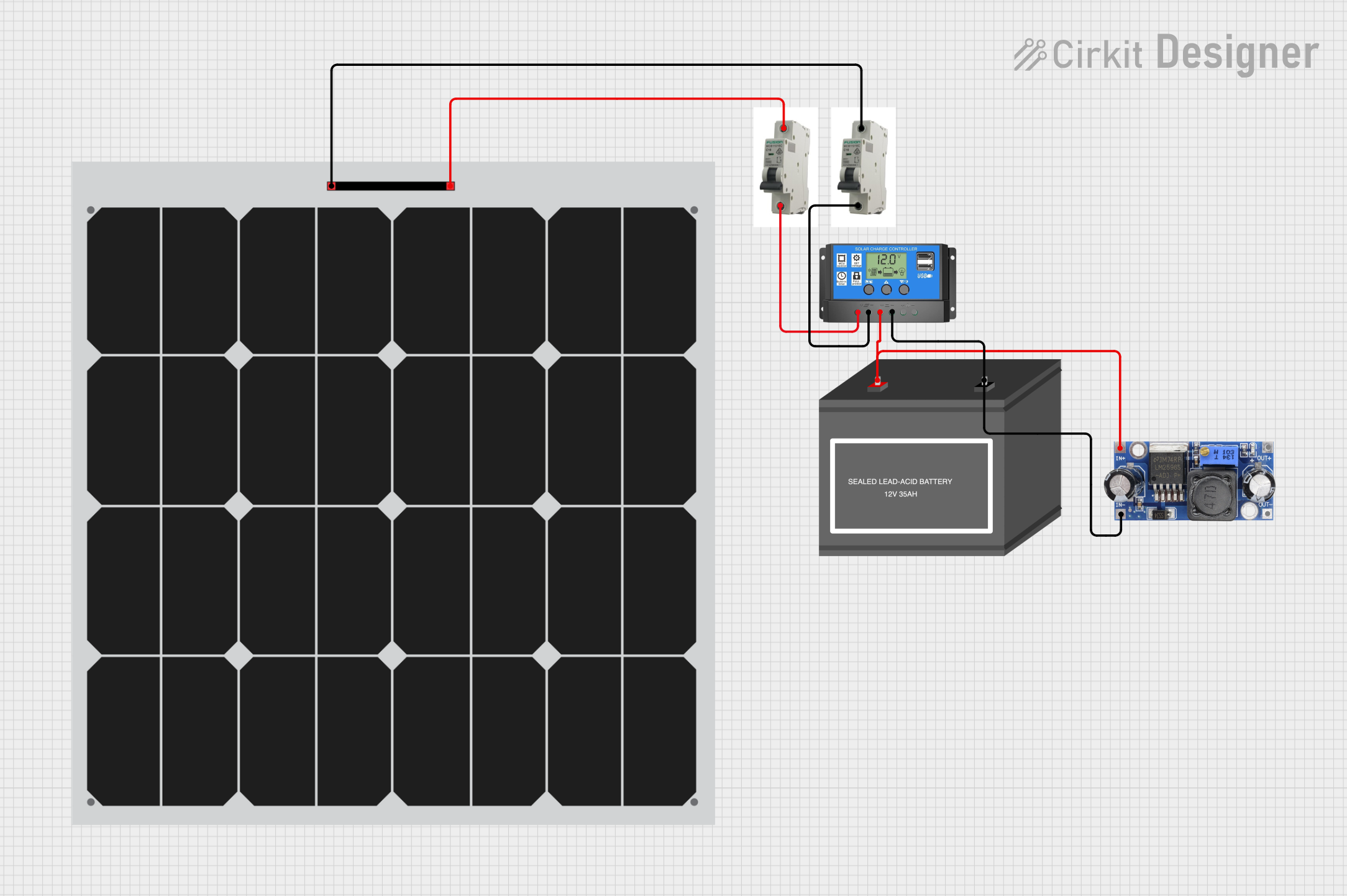
This circuit is a solar power system that uses two solar panels connected through MCBs to a solar charge controller. The charge controller manages the charging of a 12V battery and powers a DC-DC converter, which provides a regulated output voltage.
Open Project in Cirkit DesignerAC Bulb Control Circuit with Flush Switch and MCB Protection
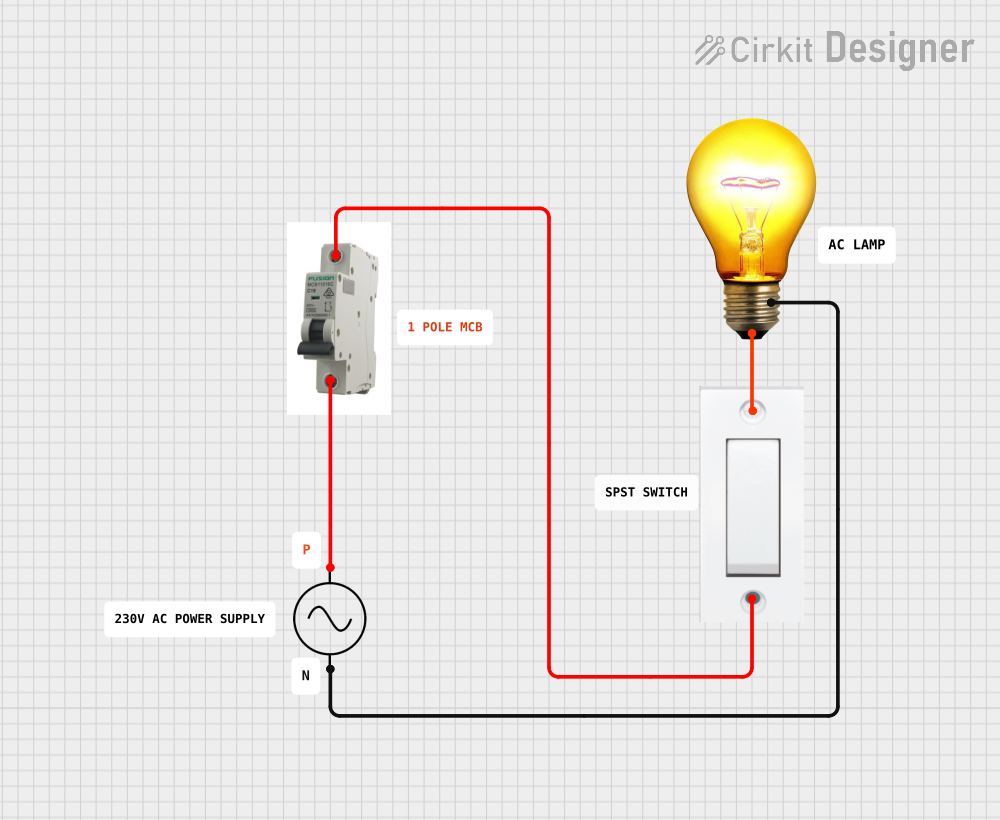
This circuit is designed to control an AC bulb using a flush switch. The AC power supply is connected through an MCB (Miniature Circuit Breaker) for protection, and the flush switch acts as an on/off control for the bulb. There is no microcontroller or embedded code involved in this simple power control circuit.
Open Project in Cirkit DesignerExplore Projects Built with MCB
Flush Switch Controlled Lamp Circuit with AC Power Supply and MCB Protection
This circuit is designed to control a lamp using a flush switch and is protected by two MCBs (Miniature Circuit Breakers). The AC supply is connected to the input of the first MCB, whose output is connected to the flush switch. The flush switch then controls the power to the lamp, with the second MCB placed in the neutral line for additional safety.
Open Project in Cirkit DesignerLED Indicator System with Power Stabilizer and Measurement Meters
This circuit is a power distribution and monitoring system that includes multiple LEDs for status indication, a stabilizer module, and measurement instruments such as voltmeters and ammeters. It is designed to supply power to a computer and monitor the power quality and current flow, with protection provided by MCBs (Miniature Circuit Breakers).
Open Project in Cirkit DesignerSolar-Powered Battery Charging System with DC-DC Converter
This circuit is a solar power system that uses two solar panels connected through MCBs to a solar charge controller. The charge controller manages the charging of a 12V battery and powers a DC-DC converter, which provides a regulated output voltage.
Open Project in Cirkit DesignerAC Bulb Control Circuit with Flush Switch and MCB Protection
This circuit is designed to control an AC bulb using a flush switch. The AC power supply is connected through an MCB (Miniature Circuit Breaker) for protection, and the flush switch acts as an on/off control for the bulb. There is no microcontroller or embedded code involved in this simple power control circuit.
Open Project in Cirkit DesignerTechnical Specifications
- Rated Voltage: Typically 230V AC (single-phase) or 400V AC (three-phase)
- Rated Current: Common ratings include 6A, 10A, 16A, 20A, 32A, 40A, and 63A
- Breaking Capacity: 6kA or 10kA (depending on the model)
- Tripping Characteristics: B, C, or D curves (determines the response to overloads)
- Frequency: 50/60 Hz
- Mounting: DIN rail compatible
- Poles: Single-pole (1P), double-pole (2P), triple-pole (3P), or four-pole (4P)
Pin Configuration and Descriptions
MCBs do not have traditional "pins" like electronic components but instead feature terminals for electrical connections. Below is a description of the key terminals:
| Terminal Name | Description |
|---|---|
| Line (Input) | Connects to the incoming power supply (live wire). |
| Load (Output) | Connects to the circuit or device being protected. |
| Neutral (if applicable) | For double-pole or higher MCBs, connects to the neutral wire. |
Usage Instructions
Installation:
- Ensure the power supply is turned off before installing the MCB.
- Mount the MCB onto a DIN rail in the distribution board or control panel.
- Connect the incoming power supply to the "Line" terminal and the circuit to be protected to the "Load" terminal. For double-pole or higher MCBs, connect the neutral wire to the appropriate terminal.
- Tighten all terminal screws securely to ensure proper electrical contact.
Operation:
- Switch the MCB to the "ON" position to allow current to flow through the circuit.
- In the event of an overload or short circuit, the MCB will automatically trip to the "OFF" position, interrupting the current flow.
Important Considerations:
- Select an MCB with the appropriate current rating and tripping characteristic (B, C, or D curve) based on the load and application.
- Avoid exceeding the rated voltage or current of the MCB.
- Regularly inspect the MCB for signs of wear, damage, or loose connections.
Best Practices:
- Use a multimeter to verify the absence of voltage before working on the circuit.
- Label the MCBs in the distribution board for easy identification of circuits.
- Periodically test the MCB by manually tripping it to ensure proper functionality.
Troubleshooting and FAQs
Common Issues
MCB Trips Frequently:
- Cause: Overloaded circuit or short circuit.
- Solution: Reduce the load on the circuit or identify and fix the short circuit.
MCB Does Not Trip During a Fault:
- Cause: Faulty MCB or incorrect current rating.
- Solution: Replace the MCB with a properly rated one and ensure it is functioning correctly.
Loose Connections at Terminals:
- Cause: Improper tightening of terminal screws.
- Solution: Turn off the power supply and securely tighten the terminal screws.
FAQs
Can an MCB be reset after tripping?
- Yes, an MCB can be manually reset by switching it back to the "ON" position after resolving the fault.
What is the difference between B, C, and D curve MCBs?
- B curve MCBs trip at 3-5 times the rated current, suitable for residential use.
- C curve MCBs trip at 5-10 times the rated current, ideal for commercial and industrial applications.
- D curve MCBs trip at 10-20 times the rated current, used for heavy-duty equipment with high inrush currents.
Can an MCB be used for DC circuits?
- Some MCBs are designed for DC applications, but it is essential to check the manufacturer's specifications to ensure compatibility.