The 5V 8 Channel Relay Board is an electronic module designed to control up to eight devices using a 5V power supply. It acts as an interface between low-voltage control signals (e.g., from a microcontroller) and high-voltage loads, such as lights, motors, or appliances. Each relay on the board can switch devices operating at up to 250V AC or 30V DC, making it ideal for home automation, industrial control, and IoT applications.
Explore Projects Built with 5v 8 Channel Relay Board
Use Cirkit Designer to design, explore, and prototype these projects online. Some projects support real-time simulation. Click "Open Project" to start designing instantly!
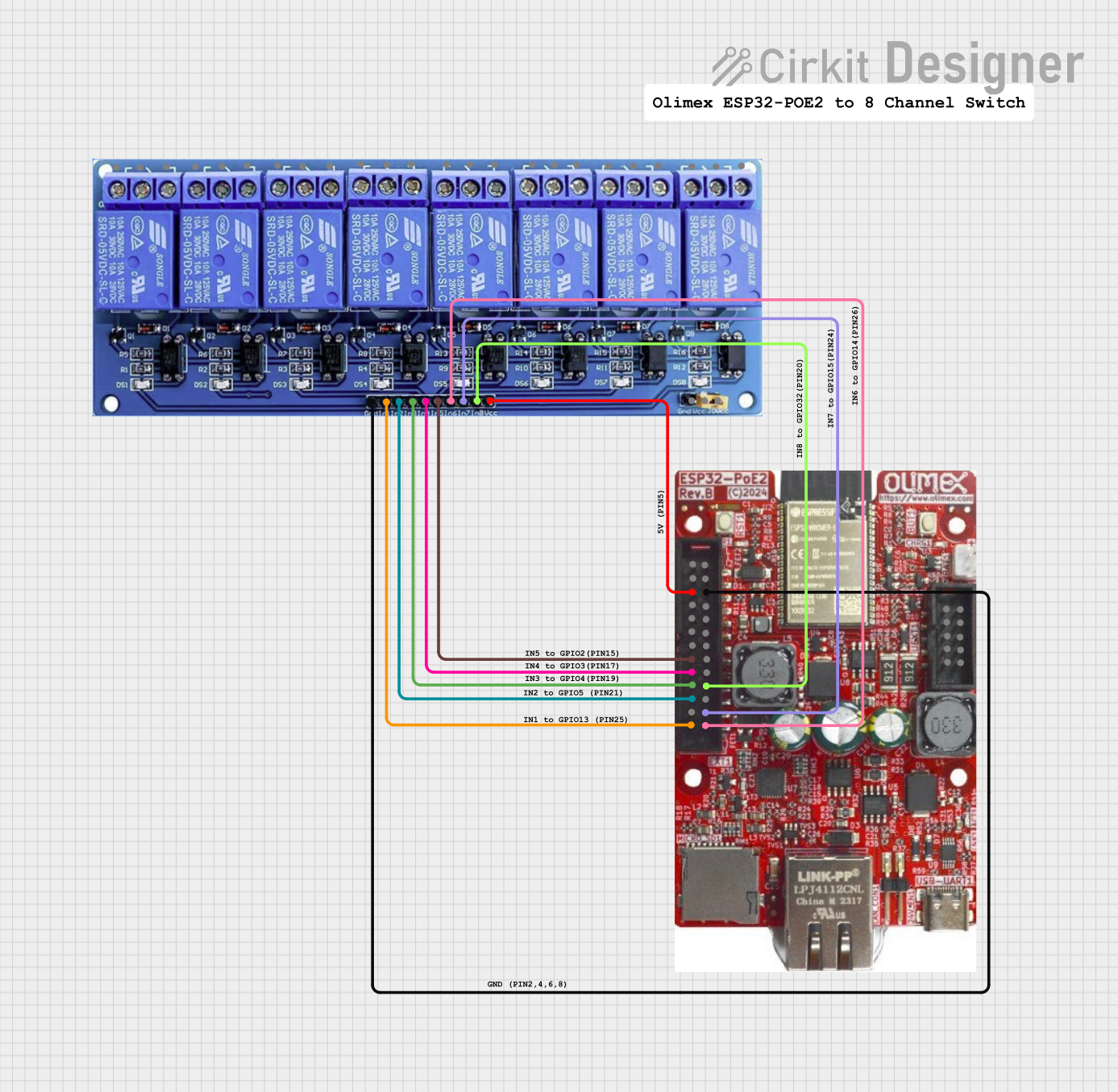
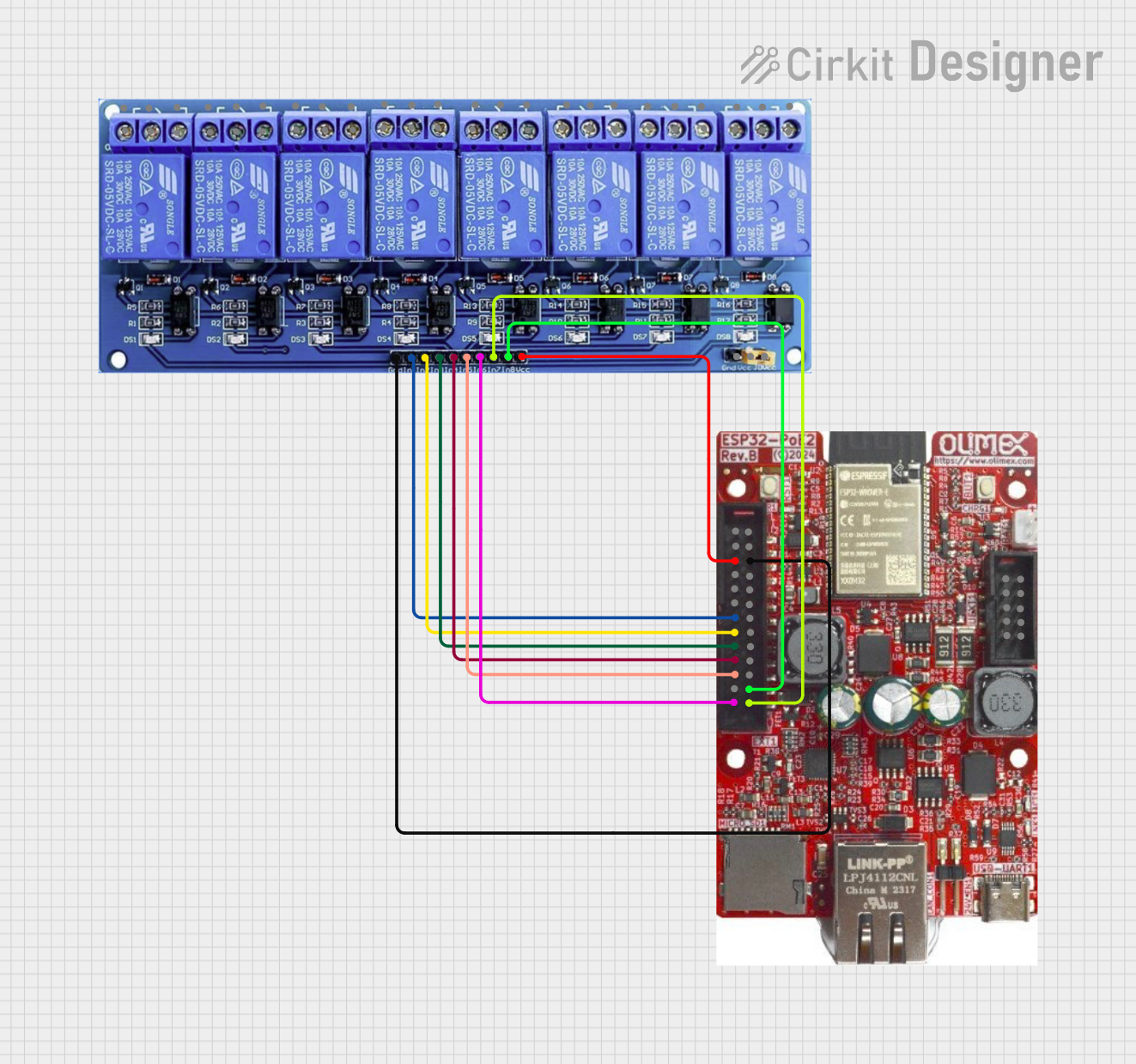
This circuit features an ESP32 microcontroller connected to an 8-channel relay module. The ESP32 controls the relay channels via its GPIO pins, allowing for the switching of external devices or loads through the relays.
This circuit features an ESP32 microcontroller connected to an 8-channel relay module. The ESP32 controls the relay channels via its GPIO pins, allowing it to switch multiple external devices on and off. The ESP32 also provides power to the relay module.
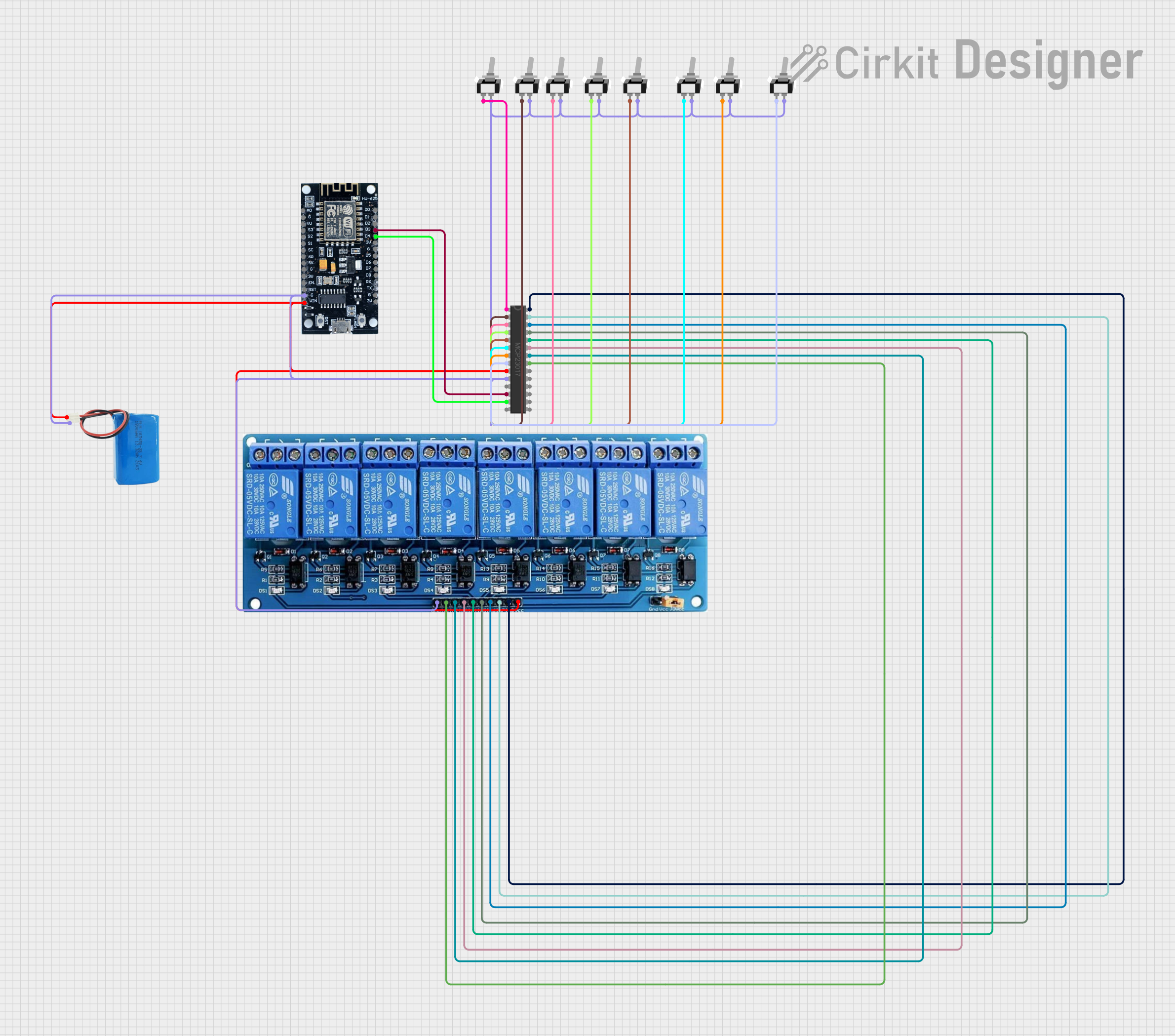
This circuit is designed to control an 8-channel relay module via an ESP8266 microcontroller, which interfaces with an MCP23017 I/O expander over I2C. The ESP8266 connects to a WiFi network and subscribes to MQTT topics to receive commands for toggling the relays. Additionally, there are toggle switches connected to the MCP23017 that allow manual control of the relays, with the system's state being reported back via MQTT.
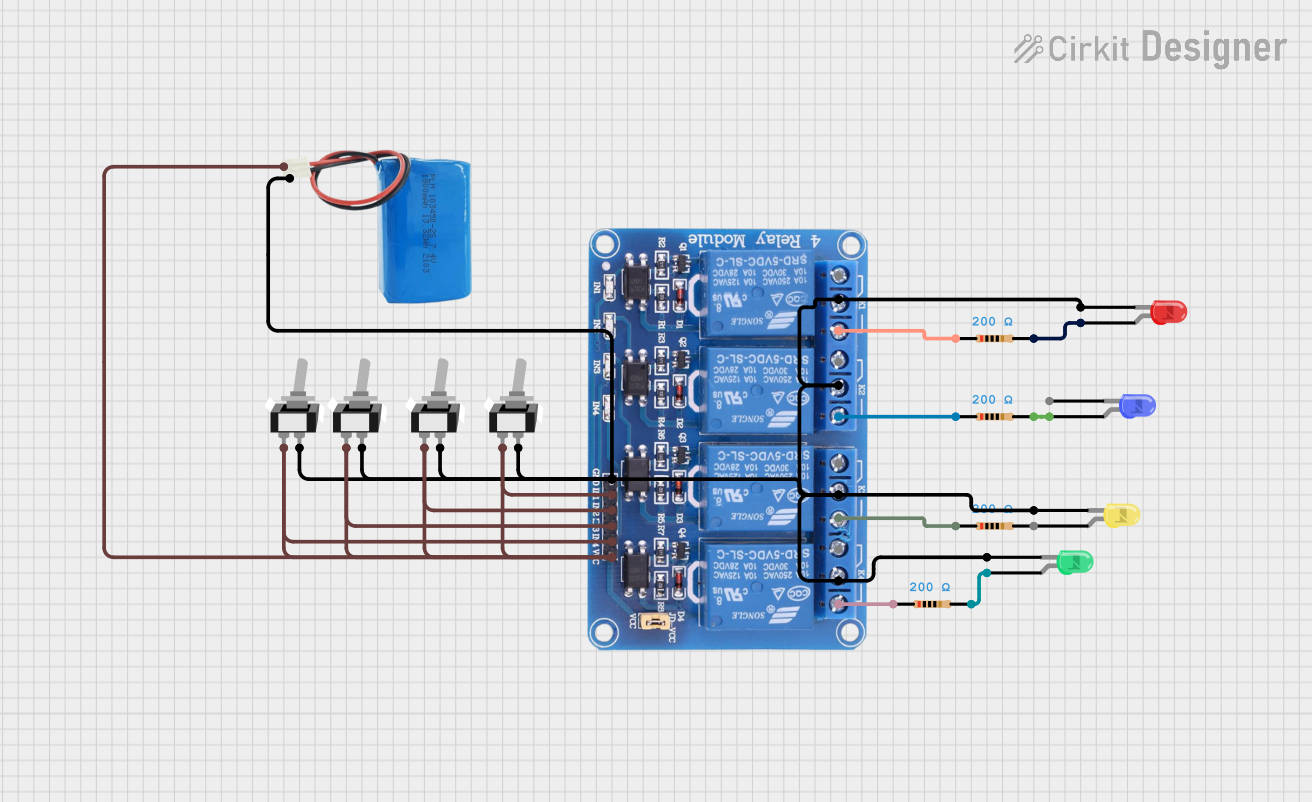
This circuit consists of a 5V battery powering a 4-channel relay module, which controls four LEDs (red, yellow, green, and blue) through individual resistors. Each relay channel is activated by a corresponding SPST toggle switch, allowing manual control of the LEDs.
Home automation systems (e.g., controlling lights, fans, or appliances)
Industrial equipment control
Robotics and motor control
IoT projects requiring high-voltage switching
Prototyping and testing circuits with high-power devices
Technical Specifications
Key Technical Details
Operating Voltage: 5V DC
Trigger Voltage: 3.3V to 5V (compatible with most microcontrollers)
Relay Channels: 8
Maximum Load (per relay):
250V AC at 10A
30V DC at 10A
Relay Type: SPDT (Single Pole Double Throw)
Isolation: Optocoupler isolation for each channel
Indicator LEDs: One LED per channel to indicate relay status
Dimensions: Approximately 140mm x 50mm x 20mm
Pin Configuration and Descriptions
Input Pins
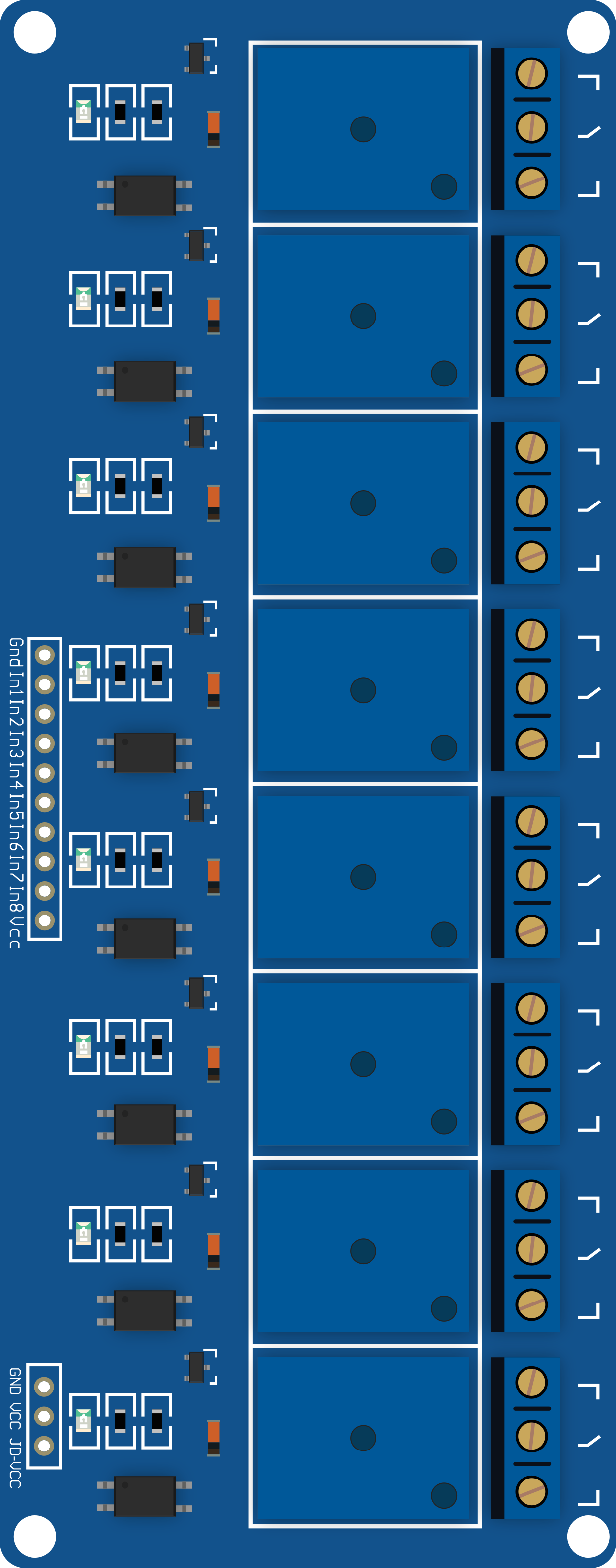
Pin Name
Description
VCC
Connect to 5V power supply to power the relay board.
GND
Ground connection for the relay board.
IN1-IN8
Control pins for each relay channel. A LOW signal activates the relay.
Output Terminals (for each relay)
Terminal Name
Description
COM
Common terminal for the relay. Connect to the power source or load.
NO
Normally Open terminal. Connect to the load for default OFF state.
NC
Normally Closed terminal. Connect to the load for default ON state.
Usage Instructions
How to Use the Component in a Circuit
Power the Relay Board:
Connect the VCC pin to a 5V power supply and the GND pin to ground.
Ensure the power supply can provide sufficient current for all active relays (approximately 70-80mA per relay).
Connect the Control Signals:
Connect the IN1-IN8 pins to the digital output pins of a microcontroller (e.g., Arduino UNO).
A LOW signal (0V) on an input pin will activate the corresponding relay.
Connect the Load:
Identify the device or circuit you want to control.
Connect the power source and load to the relay's COM, NO, or NC terminals based on the desired behavior:
Use COM and NO for devices that should be OFF by default.
Use COM and NC for devices that should be ON by default.
Test the Circuit:
Power on the relay board and microcontroller.
Send control signals to the relay board to toggle the relays and verify the load's behavior.
Important Considerations and Best Practices
Isolation: Ensure proper electrical isolation between the low-voltage control side and the high-voltage load side to prevent damage or hazards.
Current Ratings: Do not exceed the maximum current and voltage ratings of the relays.
Flyback Diodes: If controlling inductive loads (e.g., motors), use flyback diodes across the load to protect the relay from voltage spikes.
Power Supply: Use a stable 5V power supply capable of handling the total current draw of all active relays.
Example: Connecting to an Arduino UNO
Below is an example of how to control the 5V 8 Channel Relay Board using an Arduino UNO:
Circuit Connections
Connect the relay board's VCC to the Arduino's 5V pin.
Connect the relay board's GND to the Arduino's GND pin.
Connect the relay board's IN1-IN8 pins to Arduino digital pins 2-9.
Arduino Code
// Example code to control an 8-channel relay board with an Arduino UNO

// Define the relay control pins
const int relayPins[] = {2, 3, 4, 5, 6, 7, 8, 9};

void setup() {
  // Set all relay pins as outputs
  for (int i = 0; i < 8; i++) {
    pinMode(relayPins[i], OUTPUT);
    digitalWrite(relayPins[i], HIGH); // Set relays to OFF state (HIGH)
  }
}

void loop() {
  // Example: Turn relays ON one by one, then OFF
  for (int i = 0; i < 8; i++) {
    digitalWrite(relayPins[i], LOW); // Activate relay (LOW signal)
    delay(1000); // Wait 1 second
    digitalWrite(relayPins[i], HIGH); // Deactivate relay (HIGH signal)
    delay(1000); // Wait 1 second
  }
}
Troubleshooting and FAQs
Common Issues and Solutions
Relays Not Activating:
Cause: Insufficient power supply.
Solution: Ensure the power supply provides 5V and sufficient current for all active relays.
Relay Stuck in ON or OFF State:
Cause: Incorrect wiring or damaged relay.
Solution: Double-check the wiring and replace the relay if necessary.
Microcontroller Resetting When Relays Activate:
Cause: Voltage drop due to high current draw.
Solution: Use a separate power supply for the relay board and connect the grounds.
Load Not Switching Properly:
Cause: Incorrect connection to the relay terminals.
Solution: Verify the load is connected to the correct COM, NO, or NC terminals.
FAQs
Q: Can I use a 3.3V microcontroller with this relay board? A: Yes, the relay board is compatible with 3.3V control signals, but ensure the VCC pin is powered with 5V.
Q: How many relays can I activate simultaneously? A: You can activate all 8 relays simultaneously, provided your power supply can handle the total current draw.
Q: Can this relay board switch DC loads? A: Yes, it can switch DC loads up to 30V at 10A.
Q: Is the relay board safe for high-voltage applications? A: Yes, but ensure proper insulation and safety precautions when working with high voltages.

 Open Project in Cirkit Designer