
How to Use SY8205 : Examples, Pinouts, and Specs
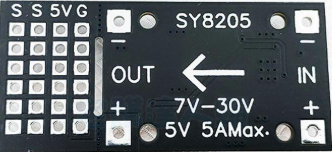
 Design with SY8205 in Cirkit Designer
Introduction
The SY8205 is a high-efficiency step-down (buck) DC-DC converter designed for low-power applications. It is capable of converting a higher input voltage to a lower, stable output voltage with high efficiency. The SY8205 features a wide input voltage range, adjustable output voltage, and built-in protection mechanisms such as overcurrent protection and thermal shutdown. These features make it a reliable choice for powering microcontrollers, sensors, and other electronic devices in portable and embedded systems.
Explore Projects Built with SY8205
 Open Project in Cirkit Designer
 Open Project in Cirkit Designer
 Open Project in Cirkit Designer
 Open Project in Cirkit Designer
Explore Projects Built with SY8205
Open Project in Cirkit DesignerOpen Project in Cirkit DesignerOpen Project in Cirkit DesignerOpen Project in Cirkit DesignerCommon Applications
- Powering microcontrollers and sensors in embedded systems
- Battery-powered devices
- Consumer electronics
- Industrial control systems
- IoT devices
Technical Specifications
Key Specifications
| Parameter | Value |
|---|---|
| Input Voltage Range | 4.5V to 18V |
| Output Voltage Range | Adjustable (0.6V to 15V) |
| Output Current | Up to 3A |
| Switching Frequency | 500kHz |
| Efficiency | Up to 95% |
| Protection Features | Overcurrent, thermal shutdown |
| Package Type | SOT23-6 |
Pin Configuration and Descriptions
The SY8205 is available in a 6-pin SOT23-6 package. The pinout and descriptions are as follows:
| Pin Number | Pin Name | Description |
|---|---|---|
| 1 | VIN | Input voltage pin. Connect to the input power supply (4.5V to 18V). |
| 2 | GND | Ground pin. Connect to the system ground. |
| 3 | SW | Switching node. Connect to the inductor and output capacitor. |
| 4 | FB | Feedback pin. Connect to a resistor divider to set the output voltage. |
| 5 | EN | Enable pin. Drive high to enable the converter, low to disable it. |
| 6 | BST | Bootstrap pin. Connect a capacitor (typically 0.1µF) between BST and SW. |
Usage Instructions
How to Use the SY8205 in a Circuit
- Input Voltage: Ensure the input voltage is within the range of 4.5V to 18V.
- Output Voltage Setting: Use a resistor divider network connected to the FB pin to set the desired output voltage. The output voltage can be calculated using the formula: [ V_{OUT} = V_{REF} \times \left(1 + \frac{R1}{R2}\right) ] where ( V_{REF} ) is 0.6V, ( R1 ) is the resistor connected between FB and VOUT, and ( R2 ) is the resistor connected between FB and GND.
- Inductor Selection: Choose an inductor with a current rating higher than the maximum output current (3A) and an appropriate inductance value to ensure stable operation.
- Capacitor Selection: Use low-ESR capacitors for input and output filtering. Typical values are:
- Input capacitor: 10µF to 22µF
- Output capacitor: 22µF to 47µF
- Bootstrap Capacitor: Connect a 0.1µF ceramic capacitor between the BST and SW pins.
- Enable Pin: Drive the EN pin high (logic level) to enable the converter. Pull it low to disable the converter.
Example Circuit
Below is an example of a basic SY8205 circuit configuration:
VIN (4.5V-18V) ----+----+----+----+----+----+----+----+----+----+----+----+
                   |    |    |    |    |    |    |    |    |    |    |    |
                  [CIN] [L]  [R1] [R2] [COUT] [BST] [SW] [FB] [EN] [GND]
Arduino UNO Example Code
The SY8205 can be used to power an Arduino UNO. Below is an example code snippet to control the EN pin of the SY8205 using a digital output pin of the Arduino:
// Define the pin connected to the SY8205 EN pin
const int enablePin = 7;

void setup() {
  // Set the enable pin as an output
  pinMode(enablePin, OUTPUT);

  // Enable the SY8205 by setting the pin HIGH
  digitalWrite(enablePin, HIGH);
}

void loop() {
  // The SY8205 remains enabled in this example
  // Add your application code here
}
Important Considerations
- Ensure proper heat dissipation, especially when operating at high currents.
- Use short and wide traces for the power path to minimize resistance and improve efficiency.
- Place the input and output capacitors as close as possible to the VIN, GND, and SW pins to reduce noise and improve stability.
Troubleshooting and FAQs
Common Issues and Solutions
| Issue | Possible Cause | Solution |
|---|---|---|
| No output voltage | EN pin is not driven high | Check the EN pin connection and ensure it is set to a logic HIGH level. |
| Output voltage is incorrect | Incorrect resistor divider values | Verify the resistor values and recalculate the output voltage. |
| Overheating | Excessive load current or poor layout | Reduce the load current or improve PCB layout for better heat dissipation. |
| High output ripple | Insufficient output capacitance | Increase the output capacitor value or use low-ESR capacitors. |
| Device shuts down unexpectedly | Overcurrent or thermal protection active | Check the load current and ensure proper cooling. |
FAQs
Can the SY8205 operate with a 3.3V input?
- No, the minimum input voltage is 4.5V.
What is the maximum output current?
- The SY8205 can deliver up to 3A of output current.
How do I calculate the output voltage?
- Use the formula ( V_{OUT} = V_{REF} \times (1 + R1/R2) ), where ( V_{REF} = 0.6V ).
Can I leave the EN pin floating?
- No, the EN pin must be driven high or low. Floating the pin may cause unpredictable behavior.
By following this documentation, you can effectively integrate the SY8205 into your projects and troubleshoot common issues.