Cirkit Designer Logo
Cirkit Designer
Your all-in-one circuit design IDE
Home / 
Component Documentation

How to Use MKE-M20 RS485-TTL GDT: Examples, Pinouts, and Specs
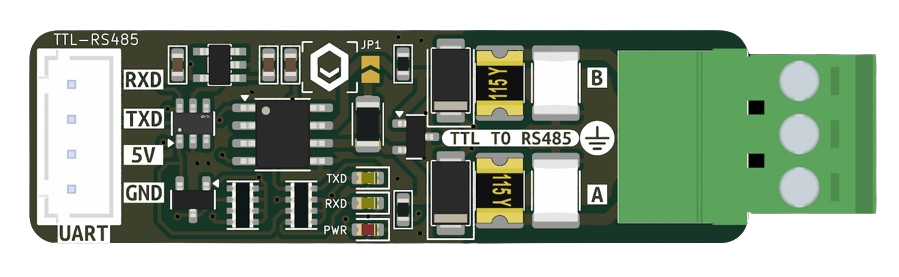

Image of MKE-M20 RS485-TTL GDT
Cirkit Designer LogoDesign with MKE-M20 RS485-TTL GDT in Cirkit Designer

Introduction

The MKE-M20 RS485-TTL GDT is a versatile module designed to bridge communication between RS485 and TTL logic levels. Manufactured by MakerEdu.vn, this module is ideal for applications requiring robust and reliable data transmission over long distances. It features built-in protection against voltage spikes, ensuring durability and stability in industrial environments.

Explore Projects Built with MKE-M20 RS485-TTL GDT
Use Cirkit Designer to design, explore, and prototype these projects online. Some projects support real-time simulation. Click "Open Project" to start designing instantly!
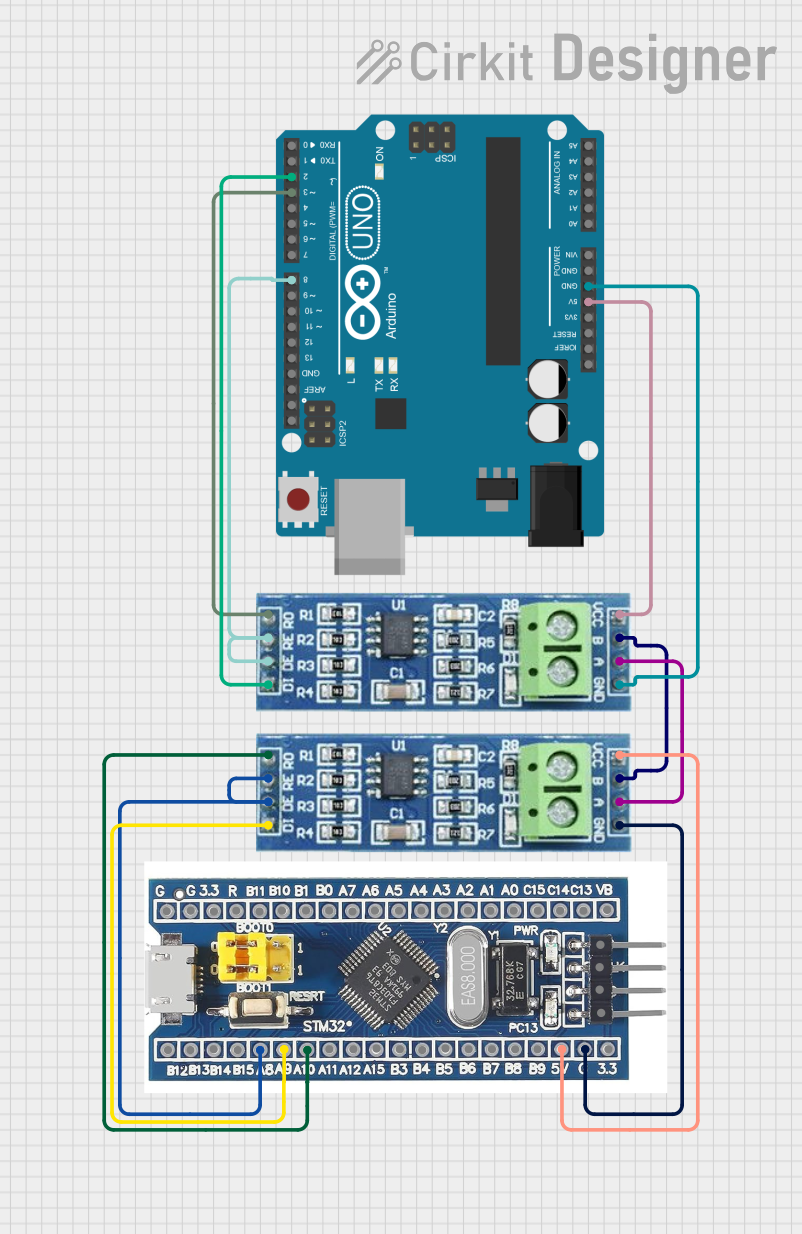
STM32 and Arduino UNO Based Dual RS485 Communication Interface
Image of STM to Arduino RS485: A project utilizing MKE-M20 RS485-TTL GDT in a practical application
This circuit consists of two microcontrollers, an STM32F103C8T6 and an Arduino UNO, each interfaced with separate RS485 transceiver modules for serial communication. The STM32F103C8T6 controls the RE (Receiver Enable) and DE (Driver Enable) pins of one RS485 module to manage its operation, and communicates via the A9 and A10 pins for DI (Data Input) and RO (Receiver Output), respectively. The Arduino UNO is similarly connected to another RS485 module, with digital pins D2 and D3 interfacing with DI and RO, and D8 controlling both RE and DE. The RS485 modules are connected to each other through their A and B differential communication lines, enabling serial data exchange between the two microcontrollers over a robust and long-distance capable RS485 network.
Cirkit Designer LogoOpen Project in Cirkit Designer
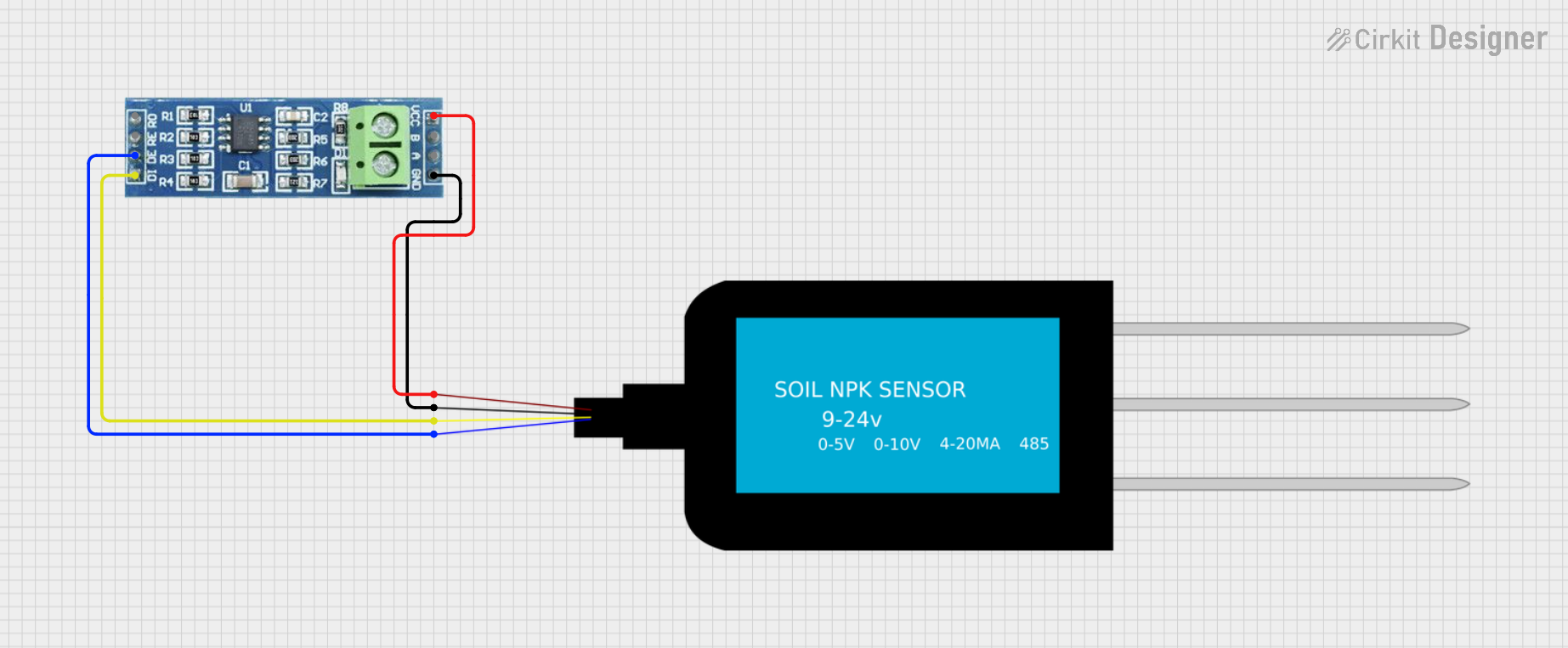
RS485-Enabled NPK Soil Sensor Interface
Image of NPK: A project utilizing MKE-M20 RS485-TTL GDT in a practical application
This circuit connects an NPK Soil Sensor to an RS485 transceiver module. The sensor's VCC and GND pins are connected to the corresponding VCC and GND pins on the RS485 module to provide power. The sensor's analog output (A) and digital output (B) are interfaced with the RS485 module's DI (Data Input) and DE (Driver Enable) pins, respectively, allowing the sensor's signals to be transmitted over an RS485 communication bus.
Cirkit Designer LogoOpen Project in Cirkit Designer
Cellular-Enabled IoT Device with Real-Time Clock and Power Management
Image of LRCM PHASE 2 BASIC: A project utilizing MKE-M20 RS485-TTL GDT in a practical application
This circuit features a LilyGo-SIM7000G module for cellular communication and GPS functionality, interfaced with an RTC DS3231 for real-time clock capabilities. It includes voltage sensing through two voltage sensor modules, and uses an 8-channel opto-coupler for isolating different parts of the circuit. Power management is handled by a buck converter connected to a DC power source and batteries, with a fuse for protection and a rocker switch for on/off control. Additionally, there's an LED for indication purposes.
Cirkit Designer LogoOpen Project in Cirkit Designer
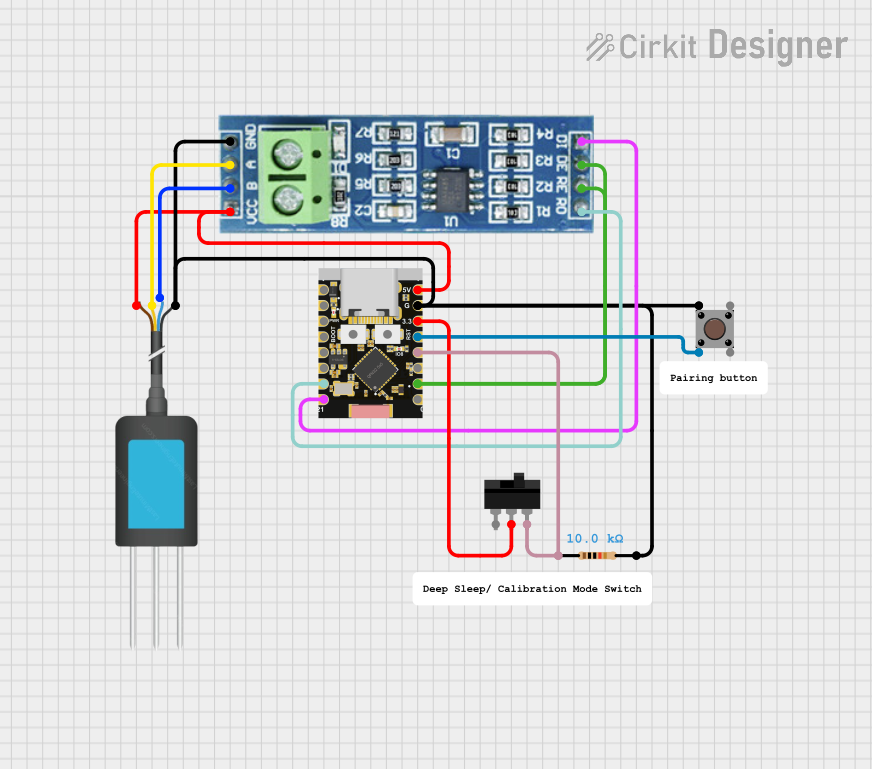
ESP32C3-Based Soil Monitoring System with RS485 Communication
Image of 3-slave-soil: A project utilizing MKE-M20 RS485-TTL GDT in a practical application
This circuit features an ESP32C3 Supermini microcontroller interfaced with an RS485 transceiver module, allowing for serial communication over long distances. A toggle switch and a pushbutton are connected to the ESP32C3 for user input, with a pull-up resistor on the toggle switch. Additionally, the circuit includes an NPK Soil Sensor connected to the RS485 module for measuring soil nutrient levels, with power supplied to the sensor and RS485 module from the ESP32C3.
Cirkit Designer LogoOpen Project in Cirkit Designer

Explore Projects Built with MKE-M20 RS485-TTL GDT

Use Cirkit Designer to design, explore, and prototype these projects online. Some projects support real-time simulation. Click "Open Project" to start designing instantly!
Image of STM to Arduino RS485: A project utilizing MKE-M20 RS485-TTL GDT in a practical application
STM32 and Arduino UNO Based Dual RS485 Communication Interface
This circuit consists of two microcontrollers, an STM32F103C8T6 and an Arduino UNO, each interfaced with separate RS485 transceiver modules for serial communication. The STM32F103C8T6 controls the RE (Receiver Enable) and DE (Driver Enable) pins of one RS485 module to manage its operation, and communicates via the A9 and A10 pins for DI (Data Input) and RO (Receiver Output), respectively. The Arduino UNO is similarly connected to another RS485 module, with digital pins D2 and D3 interfacing with DI and RO, and D8 controlling both RE and DE. The RS485 modules are connected to each other through their A and B differential communication lines, enabling serial data exchange between the two microcontrollers over a robust and long-distance capable RS485 network.
Cirkit Designer LogoOpen Project in Cirkit Designer
Image of NPK: A project utilizing MKE-M20 RS485-TTL GDT in a practical application
RS485-Enabled NPK Soil Sensor Interface
This circuit connects an NPK Soil Sensor to an RS485 transceiver module. The sensor's VCC and GND pins are connected to the corresponding VCC and GND pins on the RS485 module to provide power. The sensor's analog output (A) and digital output (B) are interfaced with the RS485 module's DI (Data Input) and DE (Driver Enable) pins, respectively, allowing the sensor's signals to be transmitted over an RS485 communication bus.
Cirkit Designer LogoOpen Project in Cirkit Designer
Image of LRCM PHASE 2 BASIC: A project utilizing MKE-M20 RS485-TTL GDT in a practical application
Cellular-Enabled IoT Device with Real-Time Clock and Power Management
This circuit features a LilyGo-SIM7000G module for cellular communication and GPS functionality, interfaced with an RTC DS3231 for real-time clock capabilities. It includes voltage sensing through two voltage sensor modules, and uses an 8-channel opto-coupler for isolating different parts of the circuit. Power management is handled by a buck converter connected to a DC power source and batteries, with a fuse for protection and a rocker switch for on/off control. Additionally, there's an LED for indication purposes.
Cirkit Designer LogoOpen Project in Cirkit Designer
Image of 3-slave-soil: A project utilizing MKE-M20 RS485-TTL GDT in a practical application
ESP32C3-Based Soil Monitoring System with RS485 Communication
This circuit features an ESP32C3 Supermini microcontroller interfaced with an RS485 transceiver module, allowing for serial communication over long distances. A toggle switch and a pushbutton are connected to the ESP32C3 for user input, with a pull-up resistor on the toggle switch. Additionally, the circuit includes an NPK Soil Sensor connected to the RS485 module for measuring soil nutrient levels, with power supplied to the sensor and RS485 module from the ESP32C3.
Cirkit Designer LogoOpen Project in Cirkit Designer

Common Applications

  • Industrial automation and control systems
  • Data acquisition systems
  • Long-distance serial communication
  • Home automation networks
  • RS485-based sensor interfacing

Technical Specifications

Key Technical Details

Parameter Specification
Manufacturer MakerEdu.vn
Part ID Module Converter
Communication Protocols RS485, TTL
Operating Voltage 3.3V to 5V
Baud Rate Up to 115200 bps
Protection Features Voltage spike protection, GDT (Gas Discharge Tube)
Operating Temperature Range -40°C to 85°C
Dimensions 40mm x 20mm x 10mm

Pin Configuration and Descriptions

Pin Name Pin Type Description
VCC Power Power input (3.3V to 5V)
GND Ground Ground connection
TXD Output TTL transmit data
RXD Input TTL receive data
A RS485 Line RS485 differential line A
B RS485 Line RS485 differential line B
GND Ground RS485 ground connection

Usage Instructions

How to Use the MKE-M20 RS485-TTL GDT in a Circuit

  1. Power the Module: Connect the VCC pin to a 3.3V or 5V power source and the GND pin to the ground.
  2. Connect RS485 Lines: Attach the RS485 differential lines (A and B) to the corresponding RS485 network.
  3. Connect TTL Lines: Link the TXD and RXD pins to the microcontroller or TTL-compatible device.
  4. Configure Communication: Set the baud rate and communication parameters on your microcontroller to match the RS485 device.

Important Considerations

  • Ensure proper termination resistors are used on the RS485 bus to prevent signal reflections.
  • Avoid connecting the module to power sources exceeding 5V to prevent damage.
  • Use twisted-pair cables for RS485 lines to minimize electromagnetic interference (EMI).
  • The module is designed for half-duplex communication; ensure proper software handling for data direction.

Example: Connecting to an Arduino UNO

Below is an example of how to use the MKE-M20 RS485-TTL GDT with an Arduino UNO for communication with an RS485 device.

Circuit Diagram

  • VCC → 5V on Arduino
  • GND → GND on Arduino
  • TXD → Pin 3 on Arduino
  • RXD → Pin 2 on Arduino
  • A and B → RS485 differential lines

Arduino Code

#include <SoftwareSerial.h>

// Define RX and TX pins for SoftwareSerial
#define RX_PIN 2  // Arduino pin connected to RXD on the module
#define TX_PIN 3  // Arduino pin connected to TXD on the module

// Initialize SoftwareSerial for RS485 communication
SoftwareSerial RS485Serial(RX_PIN, TX_PIN);

void setup() {
  // Start serial communication with the RS485 module
  RS485Serial.begin(9600);  // Set baud rate to 9600
  Serial.begin(9600);       // Start Serial Monitor for debugging

  Serial.println("RS485-TTL Communication Initialized");
}

void loop() {
  // Send data to RS485 device
  RS485Serial.println("Hello RS485 Device!");
  Serial.println("Data sent to RS485 device");

  // Wait for a response
  if (RS485Serial.available()) {
    String response = RS485Serial.readString();
    Serial.print("Received: ");
    Serial.println(response);
  }

  delay(1000);  // Wait 1 second before sending the next message
}

Troubleshooting and FAQs

Common Issues and Solutions

Issue Possible Cause Solution
No communication with RS485 device Incorrect wiring or baud rate mismatch Verify wiring and ensure baud rates match
Data corruption or noise EMI or missing termination resistors Use twisted-pair cables and add termination resistors
Module overheating Overvoltage or excessive current Ensure input voltage is within 3.3V-5V range
No response from module Faulty connections or damaged module Check connections and replace the module if necessary

FAQs

  1. Can the module operate at 3.3V?

    • Yes, the module supports both 3.3V and 5V logic levels.
  2. Is the module compatible with full-duplex RS485 communication?

    • No, the module is designed for half-duplex communication only.
  3. What is the maximum cable length supported?

    • The RS485 standard supports cable lengths up to 1200 meters, but actual performance depends on baud rate and cable quality.
  4. Does the module require external pull-up or pull-down resistors?

    • No, the module has built-in resistors for proper RS485 line biasing.

By following this documentation, users can effectively integrate the MKE-M20 RS485-TTL GDT into their projects for reliable and robust communication.