
How to Use Arduino Opta RS485: Examples, Pinouts, and Specs
 Design with Arduino Opta RS485 in Cirkit Designer
Introduction
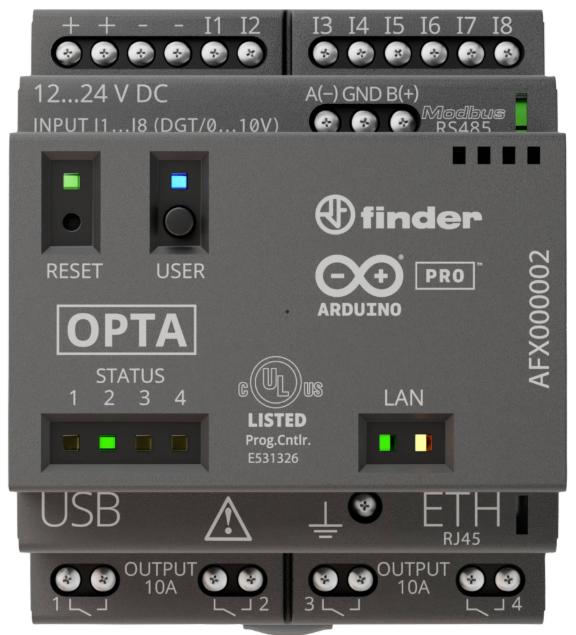
The Arduino Opta RS485 (Manufacturer Part ID: AFX00002) is a compact and robust microcontroller designed for industrial automation and IoT applications. Developed in collaboration with Finder, this Programmable Logic Controller (PLC) combines the simplicity of Arduino programming with the reliability required for industrial environments. It features RS485 communication, making it ideal for Modbus RTU and other industrial communication protocols.
Explore Projects Built with Arduino Opta RS485
 Open Project in Cirkit Designer
 Open Project in Cirkit Designer
 Open Project in Cirkit Designer
 Open Project in Cirkit Designer
Explore Projects Built with Arduino Opta RS485
Open Project in Cirkit DesignerOpen Project in Cirkit DesignerOpen Project in Cirkit DesignerOpen Project in Cirkit DesignerCommon Applications and Use Cases
- Industrial automation and control systems
- Building management systems (BMS)
- IoT edge devices for data acquisition
- Modbus RTU communication with sensors and actuators
- Smart energy management systems
Technical Specifications
The Arduino Opta RS485 is equipped with powerful hardware and versatile communication interfaces. Below are its key specifications:
General Specifications
| Parameter | Value |
|---|---|
| Manufacturer | Finder |
| Part Number | AFX00002 |
| Microcontroller | STM32H747XI dual-core Cortex-M7/M4 |
| Operating Voltage | 24V DC |
| Communication Interface | RS485, Ethernet, Wi-Fi, BLE |
| Digital Inputs | 8 (24V logic) |
| Digital Outputs | 4 relay outputs (10A @ 250V AC) |
| Analog Inputs | 2 (0-10V) |
| Operating Temperature Range | -40°C to +85°C |
| Dimensions | 72mm x 90mm x 60mm |
Pin Configuration and Descriptions
The Arduino Opta RS485 features a terminal block for industrial connections. Below is the pin configuration:
Power and Communication Pins
| Pin Name | Description |
|---|---|
| V+ | 24V DC positive power input |
| V- | 24V DC ground |
| A (RS485) | RS485 differential signal (non-inverting) |
| B (RS485) | RS485 differential signal (inverting) |
| GND | Ground for RS485 communication |
Digital Input Pins
| Pin Name | Description |
|---|---|
| DI1 - DI8 | Digital inputs (24V logic) |
Digital Output Pins
| Pin Name | Description |
|---|---|
| DO1 - DO4 | Relay outputs (10A @ 250V AC) |
Analog Input Pins
| Pin Name | Description |
|---|---|
| AI1, AI2 | Analog inputs (0-10V) |
Usage Instructions
How to Use the Arduino Opta RS485 in a Circuit
- Power Supply: Connect a 24V DC power supply to the V+ and V- terminals.
- RS485 Communication: Connect the RS485 A and B terminals to the corresponding A and B lines of your RS485 network. Ensure proper termination resistors are used if required.
- Digital Inputs: Connect 24V logic signals to the DI1-DI8 terminals for digital input sensing.
- Digital Outputs: Use the DO1-DO4 relay outputs to control external devices such as motors, lights, or solenoids.
- Analog Inputs: Connect 0-10V analog signals to AI1 and AI2 for sensor data acquisition.
Important Considerations and Best Practices
- Ensure the power supply voltage is within the specified range (24V DC).
- Use proper shielding and grounding for RS485 communication to minimize noise.
- Avoid exceeding the maximum current and voltage ratings of the relay outputs.
- Use pull-up or pull-down resistors for digital inputs if required by your application.
- Always follow safety guidelines when working with high-voltage devices connected to the relay outputs.
Example Code for Arduino UNO Integration
The Arduino Opta RS485 can communicate with an Arduino UNO via Modbus RTU over RS485. Below is an example code snippet:
#include <ModbusMaster.h>

// Instantiate ModbusMaster object
ModbusMaster node;

void setup() {
  // Initialize serial communication for RS485
  Serial.begin(9600);

  // Start Modbus communication
  node.begin(1, Serial); // Slave ID = 1
}

void loop() {
  uint8_t result;
  uint16_t data;

  // Read holding register 0x0001 from the Opta RS485
  result = node.readHoldingRegisters(0x0001, 1);

  if (result == node.ku8MBSuccess) {
    data = node.getResponseBuffer(0);
    Serial.print("Register Value: ");
    Serial.println(data);
  } else {
    Serial.println("Failed to read register");
  }

  delay(1000); // Wait 1 second before next read
}
Notes:
- Use an RS485 transceiver module (e.g., MAX485) to connect the Arduino UNO to the Opta RS485.
- Ensure the baud rate and Modbus settings match between the devices.
Troubleshooting and FAQs
Common Issues and Solutions
RS485 Communication Not Working
- Verify the A and B lines are correctly connected.
- Check for proper termination resistors at both ends of the RS485 network.
- Ensure the baud rate and Modbus settings are consistent across devices.
Digital Inputs Not Responding
- Confirm the input voltage is within the 24V logic range.
- Check for loose or incorrect wiring.
Relay Outputs Not Activating
- Ensure the load connected to the relay output does not exceed the rated current and voltage.
- Verify the relay control logic in your code.
Analog Inputs Reading Incorrect Values
- Check the input voltage range (0-10V) and ensure the sensor output matches this range.
- Verify the wiring and connections to the analog input terminals.
FAQs
Q: Can the Opta RS485 be programmed using the Arduino IDE?
A: Yes, the Opta RS485 is fully compatible with the Arduino IDE, allowing for easy programming and integration.
Q: Does the Opta RS485 support wireless communication?
A: Yes, in addition to RS485, the Opta RS485 supports Ethernet, Wi-Fi, and BLE for versatile communication options.
Q: What is the maximum cable length for RS485 communication?
A: RS485 supports cable lengths up to 1200 meters, but this may vary depending on baud rate and cable quality.
Q: Can I use the Opta RS485 in outdoor environments?
A: The Opta RS485 is designed for industrial environments and can operate in temperatures ranging from -40°C to +85°C. However, ensure it is housed in a suitable enclosure for outdoor use.
This concludes the documentation for the Arduino Opta RS485. For further assistance, refer to the official Arduino and Finder resources.