
How to Use powerbank 18650: Examples, Pinouts, and Specs
 Design with powerbank 18650 in Cirkit Designer
Introduction
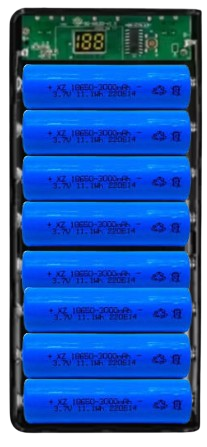
The Powerbank 18650 by Arduino (Part ID: powerbank 18650) is a portable battery pack designed to store and provide power using 18650 lithium-ion cells. This versatile component is ideal for charging devices such as smartphones, tablets, and small electronic projects. Its compact design and rechargeable nature make it a reliable power source for on-the-go applications.
Explore Projects Built with powerbank 18650
 Open Project in Cirkit Designer
 Open Project in Cirkit Designer
 Open Project in Cirkit Designer
 Open Project in Cirkit Designer
Explore Projects Built with powerbank 18650
Open Project in Cirkit DesignerOpen Project in Cirkit DesignerOpen Project in Cirkit DesignerOpen Project in Cirkit DesignerCommon Applications and Use Cases
- Charging mobile devices (e.g., smartphones, tablets, smartwatches)
- Powering small electronic projects and development boards (e.g., Arduino, Raspberry Pi)
- Emergency backup power for portable devices
- DIY portable power solutions
Technical Specifications
The following table outlines the key technical details of the Powerbank 18650:
| Parameter | Specification |
|---|---|
| Input Voltage | 5V DC (via Micro-USB or USB-C port) |
| Output Voltage | 5V DC (via USB-A port) |
| Output Current | Up to 2.1A (depending on load) |
| Battery Type | 18650 Lithium-Ion Cells (not included) |
| Battery Capacity | Depends on installed 18650 cells (e.g., 2600mAh per cell) |
| Number of Cells | 1 to 2 cells supported |
| Charging Method | Constant Current/Constant Voltage (CC/CV) |
| Protection Features | Overcharge, Over-discharge, Short Circuit |
| Dimensions | 96mm x 24mm x 22mm (approx.) |
| Weight | ~30g (without batteries) |
Pin Configuration and Descriptions
The Powerbank 18650 does not have traditional pins but includes the following ports and interfaces:
| Port/Interface | Description |
|---|---|
| Micro-USB Input | Used to charge the 18650 cells inside the powerbank. |
| USB-C Input | Alternative input for charging the powerbank. |
| USB-A Output | Provides 5V DC output for powering external devices. |
| Battery Terminals | Internal slots for 18650 lithium-ion cells. |
Usage Instructions
How to Use the Powerbank 18650 in a Circuit
- Install 18650 Cells: Insert one or two 18650 lithium-ion cells into the battery slots, ensuring correct polarity (+/-).
- Charge the Powerbank: Connect a 5V DC power source (e.g., USB charger) to the Micro-USB or USB-C input port. The internal charging circuit will manage the charging process.
- Power External Devices: Connect your device to the USB-A output port using a USB cable. The powerbank will automatically supply 5V DC to the connected device.
Important Considerations and Best Practices
- Battery Selection: Use high-quality, protected 18650 cells with a capacity of at least 2000mAh for optimal performance.
- Polarity Check: Ensure the correct polarity when inserting the batteries to avoid damage to the powerbank.
- Charging Safety: Do not leave the powerbank charging unattended for extended periods.
- Load Limit: Avoid connecting devices that draw more than 2.1A, as this may trigger the overcurrent protection.
- Temperature: Operate the powerbank within a temperature range of 0°C to 40°C to prevent overheating.
Example: Powering an Arduino UNO
The Powerbank 18650 can be used to power an Arduino UNO via its USB-A output. Below is an example of how to connect and use it:
- Connect the USB-A output of the powerbank to the Arduino UNO's USB port using a USB cable.
- The Arduino UNO will automatically power on and operate as usual.
Here is a simple Arduino sketch to blink an LED while powered by the Powerbank 18650:
// Simple LED Blink Example
// This sketch blinks the built-in LED on pin 13 of the Arduino UNO.

void setup() {
  pinMode(13, OUTPUT); // Set pin 13 as an output
}

void loop() {
  digitalWrite(13, HIGH); // Turn the LED on
  delay(1000);            // Wait for 1 second
  digitalWrite(13, LOW);  // Turn the LED off
  delay(1000);            // Wait for 1 second
}
Troubleshooting and FAQs
Common Issues and Solutions
Powerbank Not Charging
- Cause: Faulty USB cable or power source.
- Solution: Check the USB cable and ensure the power source provides 5V DC.
No Output Power
- Cause: Batteries are not installed or are discharged.
- Solution: Install fully charged 18650 cells and ensure correct polarity.
Device Not Charging
- Cause: Device requires more than 2.1A or incompatible cable.
- Solution: Use a compatible device and cable. Ensure the device's power requirements are within the powerbank's limits.
Overheating
- Cause: Prolonged use at high current or high ambient temperature.
- Solution: Allow the powerbank to cool down before further use. Avoid using it in hot environments.
FAQs
Q1: Can I use unprotected 18650 cells with this powerbank?
A1: It is recommended to use protected 18650 cells to ensure safety and prevent overcharging or over-discharging.
Q2: How long does it take to fully charge the powerbank?
A2: Charging time depends on the capacity of the installed 18650 cells and the input current. For example, with a 1A charger and two 2600mAh cells, it may take approximately 6-8 hours.
Q3: Can I charge the powerbank and use it to power a device simultaneously?
A3: Yes, the powerbank supports pass-through charging, but this may reduce the charging efficiency.
Q4: What happens if I insert the batteries incorrectly?
A4: The powerbank includes reverse polarity protection, but it is always best to double-check the polarity to avoid potential damage.