
How to Use Reyax : Examples, Pinouts, and Specs
 Design with Reyax in Cirkit Designer
Introduction
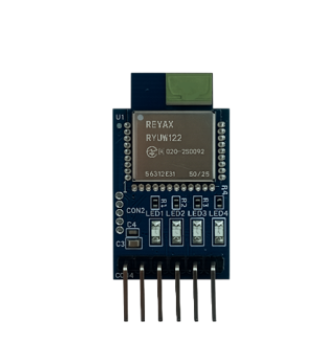
The RYU122 UWB Lite is an ultra-wideband (UWB) wireless communication module manufactured by Reyax. This module is designed for high-precision distance measurement and real-time location tracking in IoT applications. It operates on UWB technology, which enables accurate positioning and low-latency communication, making it ideal for applications such as indoor navigation, asset tracking, and proximity detection.
Explore Projects Built with Reyax
 Open Project in Cirkit Designer
 Open Project in Cirkit Designer
 Open Project in Cirkit Designer
 Open Project in Cirkit Designer
Explore Projects Built with Reyax
Open Project in Cirkit DesignerOpen Project in Cirkit DesignerOpen Project in Cirkit DesignerOpen Project in Cirkit DesignerCommon Applications and Use Cases
- Indoor positioning systems (IPS)
- Real-time location systems (RTLS)
- Asset and personnel tracking
- Proximity-based access control
- Robotics and autonomous navigation
- IoT devices requiring precise distance measurement
Technical Specifications
The RYU122 UWB Lite module is compact and highly efficient, offering robust performance for a variety of wireless communication needs. Below are the key technical details:
Key Technical Details
| Parameter | Specification |
|---|---|
| Operating Frequency | 3.1 GHz to 10.6 GHz (UWB spectrum) |
| Communication Protocol | IEEE 802.15.4-2011 UWB |
| Data Rate | Up to 6.8 Mbps |
| Operating Voltage | 3.3V |
| Current Consumption | 120 mA (typical during transmission) |
| Operating Temperature | -40°C to +85°C |
| Antenna | Integrated PCB antenna |
| Dimensions | 20 mm x 15 mm x 2 mm |
Pin Configuration and Descriptions
The RYU122 UWB Lite module has a simple pinout for easy integration into circuits. Below is the pin configuration:
| Pin Number | Pin Name | Description |
|---|---|---|
| 1 | VCC | Power supply input (3.3V) |
| 2 | GND | Ground |
| 3 | TX | UART Transmit |
| 4 | RX | UART Receive |
| 5 | RST | Reset pin (active low) |
| 6 | GPIO1 | General-purpose I/O pin 1 |
| 7 | GPIO2 | General-purpose I/O pin 2 |
| 8 | NC | Not connected |
Usage Instructions
The RYU122 UWB Lite module is straightforward to use in a circuit. Below are the steps and best practices for integrating it into your project:
How to Use the Component in a Circuit
- Power Supply: Connect the VCC pin to a stable 3.3V power source and the GND pin to the ground.
- UART Communication: Use the TX and RX pins to interface with a microcontroller or computer for data transmission and reception.
- Reset: Connect the RST pin to a GPIO pin on your microcontroller for manual or software-controlled resets.
- GPIO Pins: Use GPIO1 and GPIO2 for additional control or status signaling as needed.
- Antenna: Ensure the module's integrated PCB antenna is not obstructed for optimal performance.
Important Considerations and Best Practices
- Power Stability: Use a low-noise power supply to ensure stable operation.
- Antenna Placement: Avoid placing the module near metal objects or other RF sources to minimize interference.
- UART Configuration: Set the UART baud rate to match the module's default (typically 115200 bps).
- Firmware Updates: Check the manufacturer's website for firmware updates to ensure compatibility and access to the latest features.
Example Code for Arduino UNO
The RYU122 UWB Lite can be easily interfaced with an Arduino UNO using the UART interface. Below is an example code snippet:
#include <SoftwareSerial.h>

// Define RX and TX pins for SoftwareSerial
SoftwareSerial UWBSerial(10, 11); // RX = pin 10, TX = pin 11

void setup() {
  Serial.begin(9600); // Initialize Serial Monitor at 9600 bps
  UWBSerial.begin(115200); // Initialize UWB module at 115200 bps

  Serial.println("RYU122 UWB Lite Module Test");
  delay(1000);
}

void loop() {
  // Send a test command to the UWB module
  UWBSerial.println("AT"); // Replace with actual command for your application

  // Check for response from the UWB module
  if (UWBSerial.available()) {
    String response = UWBSerial.readString();
    Serial.println("UWB Response: " + response);
  }

  delay(1000); // Wait for 1 second before sending the next command
}
Note: Replace the
ATcommand with the appropriate command for your specific application. Refer to the RYU122 UWB Lite command set documentation for details.
Troubleshooting and FAQs
Common Issues Users Might Face
No Response from the Module:
- Ensure the module is powered correctly (3.3V on VCC and proper ground connection).
- Verify the UART connections (TX and RX pins) and baud rate settings.
- Check if the module is in a reset state (RST pin should be high).
Poor Communication Range:
- Ensure the antenna is unobstructed and positioned correctly.
- Avoid interference from nearby RF devices or metal objects.
Module Not Detected by Microcontroller:
- Double-check the wiring and pin assignments in your code.
- Ensure the microcontroller's UART pins are functioning correctly.
Solutions and Tips for Troubleshooting
- Use a multimeter to verify power supply voltage and continuity of connections.
- Test the module with a USB-to-UART adapter and a terminal program to isolate issues.
- Update the module's firmware if communication problems persist.
- Consult the Reyax support team or community forums for additional assistance.
By following this documentation, you can effectively integrate and utilize the RYU122 UWB Lite module in your IoT projects.