
How to Use MaxDetect RHT03 Humidity and Temperature Sensor: Examples, Pinouts, and Specs
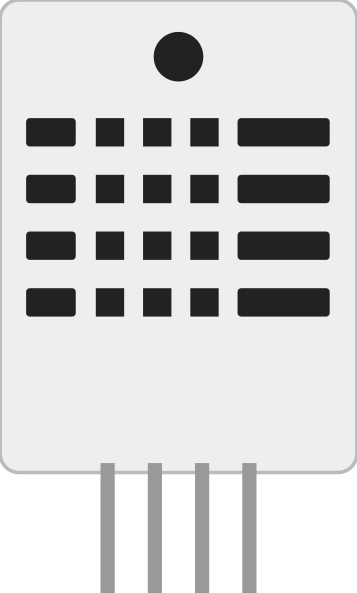
 Design with MaxDetect RHT03 Humidity and Temperature Sensor in Cirkit Designer
Introduction
The MaxDetect RHT03 is a digital sensor designed to measure both relative humidity and temperature with high accuracy. It features a fully calibrated digital output, making it easy to integrate into various applications. The RHT03 is widely used in environmental monitoring systems, HVAC (Heating, Ventilation, and Air Conditioning) systems, weather stations, and other projects requiring precise humidity and temperature data.
Explore Projects Built with MaxDetect RHT03 Humidity and Temperature Sensor
 Open Project in Cirkit Designer
 Open Project in Cirkit Designer
 Open Project in Cirkit Designer
 Open Project in Cirkit Designer
Explore Projects Built with MaxDetect RHT03 Humidity and Temperature Sensor
Open Project in Cirkit DesignerOpen Project in Cirkit DesignerOpen Project in Cirkit DesignerOpen Project in Cirkit DesignerCommon Applications:
- Environmental monitoring systems
- HVAC systems
- Weather stations
- IoT devices for climate control
- Agricultural monitoring systems
- Home automation projects
Technical Specifications
The RHT03 sensor is a reliable and cost-effective solution for measuring humidity and temperature. Below are its key technical details:
Key Specifications:
| Parameter | Value |
|---|---|
| Manufacturer | MaxDetect |
| Part ID | RHT03 |
| Humidity Range | 0% to 100% RH |
| Humidity Accuracy | ±2% RH (25°C) |
| Temperature Range | -40°C to +80°C |
| Temperature Accuracy | ±0.5°C |
| Operating Voltage | 3.3V to 5.5V |
| Max Current Consumption | 2.5mA |
| Communication Protocol | Digital (Single-Wire) |
| Sampling Period | ≥2 seconds |
| Dimensions | 15.1mm x 25mm x 7.7mm |
Pin Configuration:
The RHT03 sensor has four pins, as described in the table below:
| Pin Number | Name | Description |
|---|---|---|
| 1 | VCC | Power supply (3.3V to 5.5V) |
| 2 | DATA | Digital data output (requires pull-up resistor) |
| 3 | NC | Not connected (leave unconnected) |
| 4 | GND | Ground |
Note: A 10kΩ pull-up resistor is recommended on the DATA pin for proper communication.
Usage Instructions
The RHT03 sensor is simple to use and can be interfaced with microcontrollers like Arduino. Below are the steps to use the sensor in a circuit:
Circuit Connection:
- Connect the VCC pin to a 3.3V or 5V power supply.
- Connect the GND pin to the ground of the power supply.
- Connect the DATA pin to a digital input pin on the microcontroller (e.g., Arduino pin 2).
- Add a 10kΩ pull-up resistor between the DATA pin and the VCC pin.
Important Considerations:
- Ensure the sensor is not exposed to condensation or water, as this may damage it.
- Allow the sensor to stabilize for at least 2 seconds after power-up before taking readings.
- Avoid rapid temperature or humidity changes, as this may affect accuracy.
- Place the sensor in a well-ventilated area for accurate measurements.
Sample Arduino Code:
Below is an example of how to interface the RHT03 sensor with an Arduino UNO:
#include <DHT.h>

// Define the pin connected to the RHT03 DATA pin
#define DATA_PIN 2

// Define the sensor type (DHT22 is compatible with RHT03)
#define SENSOR_TYPE DHT22

// Initialize the DHT sensor
DHT rht03(DATA_PIN, SENSOR_TYPE);

void setup() {
  Serial.begin(9600); // Start serial communication
  rht03.begin();      // Initialize the sensor
  Serial.println("RHT03 Sensor Initialized");
}

void loop() {
  // Read humidity and temperature
  float humidity = rht03.readHumidity();
  float temperature = rht03.readTemperature();

  // Check if the readings are valid
  if (isnan(humidity) || isnan(temperature)) {
    Serial.println("Failed to read from RHT03 sensor!");
    return;
  }

  // Print the readings to the Serial Monitor
  Serial.print("Humidity: ");
  Serial.print(humidity);
  Serial.print(" %\t");
  Serial.print("Temperature: ");
  Serial.print(temperature);
  Serial.println(" °C");

  // Wait 2 seconds before the next reading
  delay(2000);
}
Note: The above code uses the DHT library, which is compatible with the RHT03 sensor. Install the library via the Arduino Library Manager if not already installed.
Troubleshooting and FAQs
Common Issues:
No Data Output:
- Ensure the pull-up resistor (10kΩ) is connected between the DATA pin and VCC.
- Verify that the sensor is powered with the correct voltage (3.3V to 5.5V).
- Check the wiring for loose or incorrect connections.
Incorrect or NaN Readings:
- Ensure the sensor is not exposed to extreme environmental conditions.
- Allow the sensor to stabilize for at least 2 seconds after power-up.
- Verify that the sampling period is at least 2 seconds between readings.
Intermittent Data Loss:
- Check for electromagnetic interference (EMI) from nearby devices.
- Use shorter wires to reduce signal degradation.
FAQs:
Q: Can the RHT03 sensor be used outdoors?
A: The RHT03 is not waterproof and should not be exposed to rain or condensation. Use a protective enclosure if deploying outdoors.
Q: What is the maximum cable length for the DATA pin?
A: The recommended maximum cable length is 20 meters. Use shielded cables for longer distances to reduce noise.
Q: How often can I take readings from the sensor?
A: The RHT03 requires a minimum sampling period of 2 seconds between readings.
Q: Is the RHT03 compatible with 3.3V microcontrollers?
A: Yes, the RHT03 operates within a voltage range of 3.3V to 5.5V, making it compatible with 3.3V systems.
By following this documentation, you can effectively integrate the MaxDetect RHT03 sensor into your projects for accurate humidity and temperature measurements.