
How to Use ILI9341 Touch 2.8": Examples, Pinouts, and Specs
 Design with ILI9341 Touch 2.8" in Cirkit Designer
Introduction
The ILI9341 Touch 2.8" is a 2.8-inch TFT LCD display with an integrated touchscreen interface. It is widely used in embedded systems to create graphical user interfaces (GUIs) for applications such as control panels, handheld devices, and IoT projects. The display features a resolution of 240x320 pixels, offering vibrant colors and clear visuals. It supports communication via SPI (Serial Peripheral Interface) or parallel interfaces, making it versatile and compatible with a variety of microcontrollers.
Explore Projects Built with ILI9341 Touch 2.8"
 Open Project in Cirkit Designer
 Open Project in Cirkit Designer
 Open Project in Cirkit Designer
 Open Project in Cirkit Designer
Explore Projects Built with ILI9341 Touch 2.8"
Open Project in Cirkit DesignerOpen Project in Cirkit DesignerOpen Project in Cirkit DesignerOpen Project in Cirkit DesignerCommon Applications
- Graphical user interfaces for embedded systems
- IoT devices with interactive displays
- Portable instrumentation and control panels
- Educational and hobbyist projects
- Smart home devices
Technical Specifications
Below are the key technical details of the ILI9341 Touch 2.8" display:
| Parameter | Specification |
|---|---|
| Display Type | TFT LCD |
| Screen Size | 2.8 inches |
| Resolution | 240x320 pixels |
| Color Depth | 16-bit (65,536 colors) |
| Touchscreen Type | Resistive or Capacitive |
| Communication Interface | SPI or 8/16-bit Parallel |
| Operating Voltage | 3.3V (logic level) |
| Backlight Voltage | 3.3V to 5V |
| Current Consumption | ~50mA (typical) |
| Controller IC | ILI9341 |
Pin Configuration
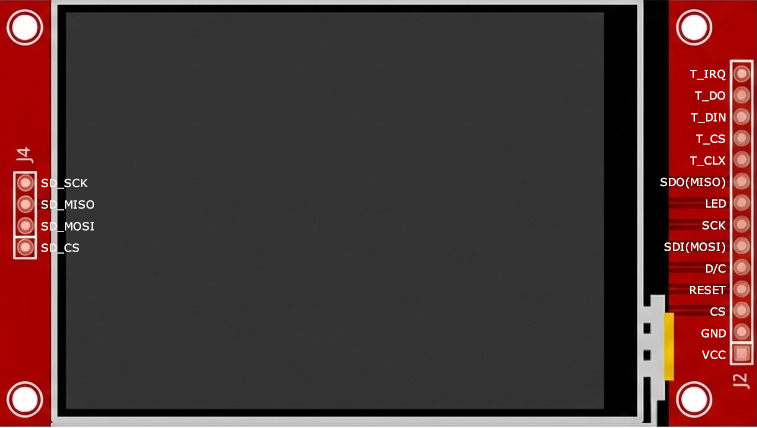
The ILI9341 Touch 2.8" display typically has the following pinout:
SPI Interface Pinout
| Pin Name | Description |
|---|---|
| VCC | Power supply (3.3V or 5V) |
| GND | Ground |
| CS | Chip Select (active low) |
| RESET | Reset signal (active low) |
| DC/RS | Data/Command control |
| SDI/MOSI | Serial Data Input (Master Out Slave In) |
| SCK | Serial Clock |
| LED | Backlight control (3.3V or 5V) |
| T_CLK | Touchscreen clock |
| T_CS | Touchscreen chip select |
| T_DIN | Touchscreen data input |
| T_DO | Touchscreen data output |
| T_IRQ | Touchscreen interrupt (active low) |
Parallel Interface Pinout
For parallel communication, additional data pins (D0-D15) are used. Refer to the specific module's datasheet for detailed pin mapping.
Usage Instructions
Connecting the ILI9341 to an Arduino UNO (SPI Mode)
To use the ILI9341 Touch 2.8" display with an Arduino UNO, follow these steps:
Wiring: Connect the display to the Arduino as follows:
ILI9341 Pin Arduino UNO Pin VCC 3.3V GND GND CS Pin 10 RESET Pin 9 DC/RS Pin 8 SDI/MOSI Pin 11 SCK Pin 13 LED 3.3V or 5V T_CLK Pin 13 T_CS Pin 4 T_DIN Pin 11 T_DO Pin 12 T_IRQ Pin 2 Install Libraries: Install the following libraries in the Arduino IDE:
Adafruit_GFX(for graphics rendering)Adafruit_ILI9341(for ILI9341 driver support)Adafruit_STMPE610(for touchscreen functionality)
Example Code: Use the following code to initialize the display and touchscreen:
#include <Adafruit_GFX.h>       // Graphics library
#include <Adafruit_ILI9341.h>   // ILI9341 driver library
#include <Adafruit_STMPE610.h>  // Touchscreen library

// Define pin connections for the display
#define TFT_CS   10  // Chip Select
#define TFT_DC   8   // Data/Command
#define TFT_RST  9   // Reset

// Define pin connections for the touchscreen
#define TS_CS    4   // Touchscreen Chip Select
#define TS_IRQ   2   // Touchscreen Interrupt

// Create display and touchscreen objects
Adafruit_ILI9341 tft = Adafruit_ILI9341(TFT_CS, TFT_DC, TFT_RST);
Adafruit_STMPE610 ts = Adafruit_STMPE610(TS_CS);

void setup() {
  Serial.begin(9600);

  // Initialize the display
  tft.begin();
  tft.setRotation(1);  // Set display orientation
  tft.fillScreen(ILI9341_BLACK);  // Clear the screen

  // Initialize the touchscreen
  if (!ts.begin()) {
    Serial.println("Touchscreen not found!");
    while (1);
  }
  Serial.println("Touchscreen initialized.");

  // Display a test message
  tft.setTextColor(ILI9341_WHITE);
  tft.setTextSize(2);
  tft.setCursor(10, 10);
  tft.println("Hello, ILI9341!");
}

void loop() {
  // Check for touchscreen input
  if (ts.touched()) {
    TS_Point p = ts.getPoint();

    // Map touchscreen coordinates to display coordinates
    int x = map(p.x, 0, 240, 0, tft.width());
    int y = map(p.y, 0, 320, 0, tft.height());

    // Draw a circle at the touch point
    tft.fillCircle(x, y, 5, ILI9341_RED);
  }
}
Best Practices
- Use a level shifter if your microcontroller operates at 5V logic levels, as the ILI9341 operates at 3.3V.
- Ensure proper power supply to the backlight (LED pin) for optimal brightness.
- Avoid touching the display with sharp objects to prevent damage to the touchscreen.
Troubleshooting and FAQs
Common Issues
Display not turning on:
- Verify the power connections (VCC and GND).
- Ensure the backlight (LED pin) is connected to 3.3V or 5V.
No graphics displayed:
- Check the SPI connections (CS, DC, MOSI, SCK).
- Ensure the correct pins are defined in the code.
Touchscreen not responding:
- Verify the touchscreen connections (T_CS, T_CLK, T_DIN, T_DO, T_IRQ).
- Ensure the
Adafruit_STMPE610library is installed and initialized.
Incorrect touch coordinates:
- Adjust the
map()function in the code to match your display's orientation.
- Adjust the
Tips for Troubleshooting
- Use a multimeter to check for continuity and proper voltage levels.
- Test the display and touchscreen separately to isolate issues.
- Refer to the module's datasheet for additional details on pin configuration and operation.