
How to Use Adafruit CP2105 Friend - USB to Dual UART Serial Converters: Examples, Pinouts, and Specs
 Design with Adafruit CP2105 Friend - USB to Dual UART Serial Converters in Cirkit Designer
Introduction
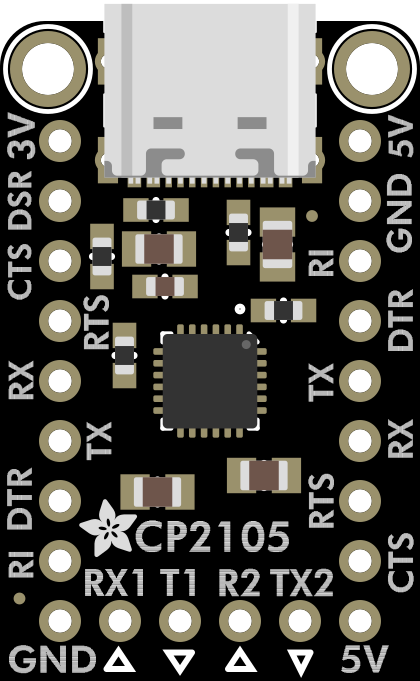
The Adafruit CP2105 Friend (Manufacturer Part ID: 6065) is a USB to dual UART serial converter designed to facilitate seamless communication between a computer and microcontrollers or other serial devices. Powered by the CP2105 chip, this compact and versatile module provides two independent UART serial ports, enabling simultaneous data transmission. It is compatible with Windows, macOS, and Linux operating systems, making it an excellent choice for debugging, programming, or interfacing with serial devices.
Explore Projects Built with Adafruit CP2105 Friend - USB to Dual UART Serial Converters
 Open Project in Cirkit Designer
 Open Project in Cirkit Designer
 Open Project in Cirkit Designer
 Open Project in Cirkit Designer
Explore Projects Built with Adafruit CP2105 Friend - USB to Dual UART Serial Converters
Open Project in Cirkit DesignerOpen Project in Cirkit DesignerOpen Project in Cirkit DesignerOpen Project in Cirkit DesignerCommon Applications and Use Cases
- Debugging and programming microcontrollers
- Interfacing with sensors, modules, or other serial devices
- Creating custom USB-to-serial communication tools
- Prototyping and testing embedded systems
- Dual-channel serial communication for advanced projects
Technical Specifications
The Adafruit CP2105 Friend is built around the Silicon Labs CP2105 chip, offering robust performance and flexibility. Below are the key technical details:
General Specifications
| Parameter | Value |
|---|---|
| USB Interface | USB 2.0 Full-Speed |
| UART Channels | 2 (Enhanced UART and Standard UART) |
| Baud Rate | Up to 921,600 bps |
| Operating Voltage | 3.3V logic level |
| Power Supply | USB-powered |
| Operating Temperature | -40°C to +85°C |
| Dimensions | 1.3" x 0.7" (33mm x 18mm) |
Pin Configuration and Descriptions
The CP2105 Friend features a 6-pin header for easy connection to external devices. Below is the pinout:
| Pin Name | Description |
|---|---|
| TXD1 | Transmit Data (Enhanced UART) |
| RXD1 | Receive Data (Enhanced UART) |
| TXD2 | Transmit Data (Standard UART) |
| RXD2 | Receive Data (Standard UART) |
| GND | Ground |
| 3V3 | 3.3V Power Output (for external devices) |
USB Driver Support
The CP2105 requires drivers for proper operation. These drivers are available for:
- Windows: Download from Silicon Labs or Adafruit's website.
- macOS: Native support in most versions; additional drivers may be required.
- Linux: Built-in kernel support for CP210x devices.
Usage Instructions
How to Use the CP2105 Friend in a Circuit
- Connect the USB Port: Plug the CP2105 Friend into your computer using a micro-USB cable.
- Install Drivers: Ensure the appropriate drivers are installed for your operating system.
- Connect to Serial Devices:
- Use the TXD1/RXD1 pins for the Enhanced UART channel.
- Use the TXD2/RXD2 pins for the Standard UART channel.
- Connect the GND pin to the ground of your circuit.
- Power External Devices: If needed, use the 3V3 pin to power external devices (up to 100mA).
Important Considerations and Best Practices
- Voltage Levels: The CP2105 Friend operates at 3.3V logic levels. Ensure your connected devices are compatible or use a level shifter.
- Avoid Overloading: Do not exceed the 100mA current limit on the 3V3 pin.
- Cable Quality: Use a high-quality micro-USB cable to ensure reliable data transmission.
- UART Channel Selection: Use the Enhanced UART for higher performance and additional features.
Example: Connecting to an Arduino UNO
To use the CP2105 Friend with an Arduino UNO, connect the Enhanced UART channel as follows:
- TXD1 → RX (Arduino UNO)
- RXD1 → TX (Arduino UNO)
- GND → GND (Arduino UNO)
Below is an example Arduino sketch to test serial communication:
// Example: Serial communication test with CP2105 Friend
// This sketch sends data from the Arduino to the computer via the CP2105 Friend.

void setup() {
  Serial.begin(9600); // Initialize serial communication at 9600 bps
  delay(1000);        // Wait for the serial connection to stabilize
  Serial.println("CP2105 Friend Test: Communication Initialized");
}

void loop() {
  Serial.println("Hello from Arduino!"); // Send a message to the computer
  delay(1000);                           // Wait 1 second before sending again
}
Troubleshooting and FAQs
Common Issues and Solutions
Device Not Recognized by Computer:
- Ensure the USB cable is functional and supports data transfer.
- Verify that the CP2105 drivers are correctly installed.
- Check the USB port for proper connection.
No Data Transmission:
- Confirm the TX and RX connections are correct.
- Ensure the baud rate matches between the CP2105 Friend and the connected device.
- Check for loose or faulty wiring.
Power Issues:
- Ensure the 3V3 pin is not overloaded (max 100mA).
- Verify that the USB port provides sufficient power.
FAQs
Q: Can I use the CP2105 Friend with a Raspberry Pi?
A: Yes, the CP2105 Friend can be used with a Raspberry Pi. Connect the UART pins to the Pi's GPIO UART pins, ensuring proper voltage levels.
Q: How do I switch between the two UART channels?
A: Both UART channels operate independently. Simply connect to the desired TX/RX pins for the channel you wish to use.
Q: Is the CP2105 Friend compatible with 5V logic devices?
A: No, the CP2105 Friend operates at 3.3V logic levels. Use a level shifter for 5V devices.
Q: Can I use both UART channels simultaneously?
A: Yes, the CP2105 Friend supports simultaneous operation of both UART channels.
By following this documentation, you can effectively integrate the Adafruit CP2105 Friend into your projects for reliable USB-to-serial communication.