
How to Use GY4725: Examples, Pinouts, and Specs
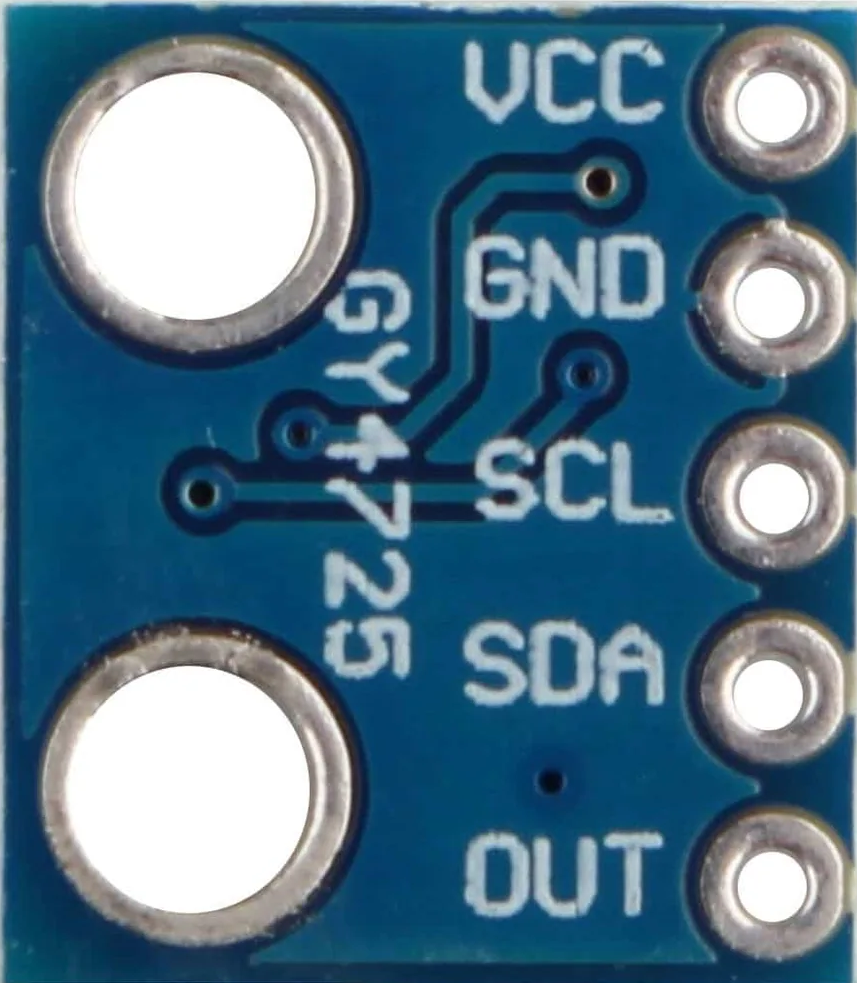
 Design with GY4725 in Cirkit Designer
Introduction
The GY4725 is a high-precision digital gyroscope sensor designed to measure angular velocity. Manufactured by "No Name" with the part ID "DAC (Digital to Analog Converter)," this component is widely used in applications requiring accurate orientation and motion tracking. Its compact design and reliable performance make it ideal for robotics, drones, gaming devices, and other motion-sensitive systems.
Explore Projects Built with GY4725
 Open Project in Cirkit Designer
 Open Project in Cirkit Designer
 Open Project in Cirkit Designer
 Open Project in Cirkit Designer
Explore Projects Built with GY4725
Open Project in Cirkit DesignerOpen Project in Cirkit DesignerOpen Project in Cirkit DesignerOpen Project in Cirkit DesignerCommon Applications:
- Robotics for precise movement control
- Drones for stabilization and navigation
- Motion tracking in gaming and virtual reality systems
- Industrial equipment for monitoring rotational motion
- Automotive systems for stability control
Technical Specifications
The GY4725 is a versatile and efficient gyroscope sensor with the following key specifications:
| Parameter | Value |
|---|---|
| Supply Voltage | 3.3V to 5V |
| Communication Protocol | I2C |
| Angular Velocity Range | ±250°/s, ±500°/s, ±1000°/s, ±2000°/s |
| Resolution | 16-bit |
| Operating Temperature | -40°C to +85°C |
| Power Consumption | Low power mode: 3.6 mA |
| Dimensions | 15mm x 15mm x 3mm |
Pin Configuration and Descriptions
The GY4725 has a standard 4-pin interface for easy integration into circuits. Below is the pinout description:
| Pin | Name | Description |
|---|---|---|
| 1 | VCC | Power supply input (3.3V to 5V) |
| 2 | GND | Ground connection |
| 3 | SDA | I2C data line for communication |
| 4 | SCL | I2C clock line for communication |
Usage Instructions
How to Use the GY4725 in a Circuit
- Power Supply: Connect the VCC pin to a 3.3V or 5V power source and the GND pin to the ground.
- I2C Communication: Connect the SDA and SCL pins to the corresponding I2C pins on your microcontroller (e.g., Arduino UNO).
- Pull-Up Resistors: Use 4.7kΩ pull-up resistors on the SDA and SCL lines if not already present on your board.
- Initialization: Configure the gyroscope's settings (e.g., angular velocity range) via I2C commands.
Important Considerations and Best Practices
- Ensure the power supply voltage matches the component's requirements to avoid damage.
- Place the sensor on a stable surface to minimize vibrations and improve accuracy.
- Use proper decoupling capacitors near the power pins to reduce noise.
- Calibrate the sensor before use to account for any offsets or drift.
Example Code for Arduino UNO
Below is an example of how to interface the GY4725 with an Arduino UNO using the I2C protocol:
#include <Wire.h> // Include the Wire library for I2C communication

#define GY4725_ADDRESS 0x68 // Default I2C address of the GY4725

void setup() {
  Wire.begin(); // Initialize I2C communication
  Serial.begin(9600); // Start serial communication for debugging

  // Initialize the GY4725
  Wire.beginTransmission(GY4725_ADDRESS);
  Wire.write(0x6B); // Access the power management register
  Wire.write(0x00); // Wake up the sensor
  Wire.endTransmission();

  Serial.println("GY4725 Initialized");
}

void loop() {
  int16_t gyroX, gyroY, gyroZ;

  // Request 6 bytes of data from the GY4725
  Wire.beginTransmission(GY4725_ADDRESS);
  Wire.write(0x43); // Starting register for gyroscope data
  Wire.endTransmission(false);
  Wire.requestFrom(GY4725_ADDRESS, 6, true);

  // Read the gyroscope data
  gyroX = (Wire.read() << 8) | Wire.read(); // Combine high and low bytes
  gyroY = (Wire.read() << 8) | Wire.read();
  gyroZ = (Wire.read() << 8) | Wire.read();

  // Print the angular velocity values
  Serial.print("Gyro X: ");
  Serial.print(gyroX);
  Serial.print(" | Gyro Y: ");
  Serial.print(gyroY);
  Serial.print(" | Gyro Z: ");
  Serial.println(gyroZ);

  delay(500); // Delay for readability
}
Troubleshooting and FAQs
Common Issues and Solutions
No Data Output:
- Ensure the SDA and SCL lines are correctly connected to the microcontroller.
- Verify that the I2C address (default: 0x68) matches the sensor's configuration.
Incorrect Readings:
- Calibrate the sensor to eliminate offsets or drift.
- Check for vibrations or unstable mounting that may affect accuracy.
Communication Errors:
- Use pull-up resistors on the SDA and SCL lines if not already present.
- Ensure the I2C clock speed is compatible with the sensor (typically 100kHz or 400kHz).
FAQs
Q: Can the GY4725 operate at 5V?
A: Yes, the GY4725 supports a supply voltage range of 3.3V to 5V.
Q: How do I change the angular velocity range?
A: The angular velocity range can be configured by writing to the appropriate register via I2C. Refer to the sensor's datasheet for detailed instructions.
Q: Is the GY4725 compatible with Raspberry Pi?
A: Yes, the GY4725 can be used with Raspberry Pi via the I2C interface.
Q: Do I need to calibrate the sensor?
A: Calibration is recommended to improve accuracy and account for environmental factors or sensor drift.
This documentation provides a comprehensive guide to using the GY4725 gyroscope sensor effectively in your projects.