
How to Use ICM20948: Examples, Pinouts, and Specs
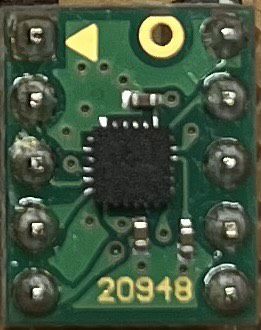
 Design with ICM20948 in Cirkit Designer
Introduction
The ICM20948, manufactured by InvenSense, is a highly integrated 9-axis motion tracking device. It combines a 3-axis gyroscope, a 3-axis accelerometer, and a 3-axis magnetometer into a single compact chip. This component is designed for applications requiring precise motion and orientation sensing, such as robotics, drones, smartphones, wearable devices, and gaming controllers.
The ICM20948 is known for its low power consumption, high accuracy, and advanced features like Digital Motion Processing™ (DMP) for sensor fusion. It communicates via I²C or SPI interfaces, making it versatile and easy to integrate into a wide range of systems.
Explore Projects Built with ICM20948
 Open Project in Cirkit Designer
 Open Project in Cirkit Designer
 Open Project in Cirkit Designer
 Open Project in Cirkit Designer
Explore Projects Built with ICM20948
Open Project in Cirkit DesignerOpen Project in Cirkit DesignerOpen Project in Cirkit DesignerOpen Project in Cirkit DesignerTechnical Specifications
Below are the key technical details of the ICM20948:
- Supply Voltage: 1.71V to 3.6V
- Gyroscope Range: ±250, ±500, ±1000, ±2000 dps
- Accelerometer Range: ±2g, ±4g, ±8g, ±16g
- Magnetometer Range: ±4900 µT
- Communication Interfaces: I²C (up to 400 kHz), SPI (up to 7 MHz)
- Operating Temperature: -40°C to +85°C
- Package: 3 mm x 3 mm x 1 mm (24-pin LGA)
Pin Configuration and Descriptions
The ICM20948 has 24 pins. Below is a table describing the key pins:
| Pin Number | Pin Name | Description |
|---|---|---|
| 1 | VDD | Main power supply (1.71V to 3.6V). |
| 2 | VDDIO | I/O voltage supply. |
| 3 | GND | Ground. |
| 4 | SCL/SCLK | I²C clock or SPI clock input. |
| 5 | SDA/SDI | I²C data or SPI data input. |
| 6 | AD0/SDO | I²C address select or SPI data output. |
| 7 | INT1 | Interrupt 1 output. |
| 8 | INT2 | Interrupt 2 output. |
| 9 | FSYNC | Frame synchronization input. |
| 10 | AUX_CL | Magnetometer I²C clock. |
| 11 | AUX_DA | Magnetometer I²C data. |
| 12-24 | NC | No connection (reserved for future use). |
Usage Instructions
How to Use the ICM20948 in a Circuit
- Power Supply: Connect the VDD pin to a 1.8V to 3.3V power source and the VDDIO pin to the desired I/O voltage level. Connect all GND pins to the ground.
- Communication Interface: Choose between I²C or SPI:
- For I²C, connect the SCL and SDA pins to the corresponding I²C lines on your microcontroller. Use pull-up resistors (typically 4.7 kΩ) on these lines.
- For SPI, connect SCLK, SDI, and SDO to the SPI lines on your microcontroller.
- Interrupts: Use the INT1 and INT2 pins to handle interrupts for motion events or data availability.
- Magnetometer: Connect AUX_CL and AUX_DA to the magnetometer's I²C lines if needed.
Important Considerations and Best Practices
- Bypass Capacitors: Place decoupling capacitors (e.g., 0.1 µF) close to the VDD and VDDIO pins to reduce noise.
- Pull-Up Resistors: Ensure proper pull-up resistors are used for I²C communication.
- Mounting: Minimize vibrations and mechanical stress on the chip to ensure accurate motion sensing.
- Calibration: Perform gyroscope, accelerometer, and magnetometer calibration for optimal performance.
Example Code for Arduino UNO
Below is an example of how to interface the ICM20948 with an Arduino UNO using I²C:
#include <Wire.h>

// ICM20948 I2C address (AD0 pin low = 0x68, AD0 pin high = 0x69)
#define ICM20948_ADDR 0x68

// Register addresses
#define WHO_AM_I 0x00
#define PWR_MGMT_1 0x06
#define ACCEL_XOUT_H 0x2D

void setup() {
  Wire.begin(); // Initialize I2C communication
  Serial.begin(9600); // Initialize serial communication

  // Wake up the ICM20948
  Wire.beginTransmission(ICM20948_ADDR);
  Wire.write(PWR_MGMT_1); // Power management register
  Wire.write(0x01); // Set clock source
  Wire.endTransmission();

  // Verify connection
  Wire.beginTransmission(ICM20948_ADDR);
  Wire.write(WHO_AM_I); // WHO_AM_I register
  Wire.endTransmission();
  Wire.requestFrom(ICM20948_ADDR, 1);
  if (Wire.available()) {
    byte whoAmI = Wire.read();
    if (whoAmI == 0xEA) { // Expected WHO_AM_I response
      Serial.println("ICM20948 connected!");
    } else {
      Serial.println("Connection failed!");
    }
  }
}

void loop() {
  // Read accelerometer data
  Wire.beginTransmission(ICM20948_ADDR);
  Wire.write(ACCEL_XOUT_H); // Start with ACCEL_XOUT_H register
  Wire.endTransmission();
  Wire.requestFrom(ICM20948_ADDR, 6); // Read 6 bytes (X, Y, Z)

  if (Wire.available() == 6) {
    int16_t accelX = (Wire.read() << 8) | Wire.read();
    int16_t accelY = (Wire.read() << 8) | Wire.read();
    int16_t accelZ = (Wire.read() << 8) | Wire.read();

    Serial.print("Accel X: ");
    Serial.print(accelX);
    Serial.print(" | Accel Y: ");
    Serial.print(accelY);
    Serial.print(" | Accel Z: ");
    Serial.println(accelZ);
  }

  delay(500); // Delay for readability
}
Troubleshooting and FAQs
Common Issues
No Response from the Sensor:
- Ensure the I²C address (0x68 or 0x69) matches the AD0 pin configuration.
- Check the pull-up resistors on the I²C lines.
- Verify the power supply connections and voltage levels.
Incorrect or No Data:
- Perform sensor calibration to eliminate offsets.
- Ensure the sensor is mounted securely to avoid vibrations.
Communication Errors:
- Verify the I²C or SPI connections and clock speed.
- Check for noise or interference on the communication lines.
Solutions and Tips
- Use a logic analyzer to debug communication issues.
- Refer to the ICM20948 datasheet for detailed register descriptions.
- If using SPI, ensure the correct mode (Mode 3: CPOL = 1, CPHA = 1) is configured.
By following this documentation, you can effectively integrate the ICM20948 into your projects and troubleshoot common issues.