
How to Use 2X12 Position Screw Terminal Block Distribution Module: Examples, Pinouts, and Specs
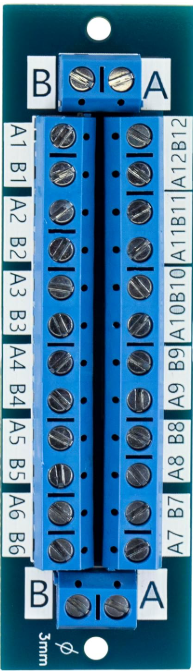
 Design with 2X12 Position Screw Terminal Block Distribution Module in Cirkit Designer
Introduction
The 2X12 Position Screw Terminal Block Distribution Module by YDDMYO is a versatile and compact terminal block designed for efficient electrical signal or power distribution. It features two rows of 12 screw terminals, allowing for the connection of multiple wires in a secure and organized manner. This module is ideal for applications requiring reliable and easy-to-use wiring solutions in both low-voltage and medium-voltage systems.
Explore Projects Built with 2X12 Position Screw Terminal Block Distribution Module
 Open Project in Cirkit Designer
 Open Project in Cirkit Designer
 Open Project in Cirkit Designer
 Open Project in Cirkit Designer
Explore Projects Built with 2X12 Position Screw Terminal Block Distribution Module
Open Project in Cirkit DesignerOpen Project in Cirkit DesignerOpen Project in Cirkit DesignerOpen Project in Cirkit DesignerCommon Applications and Use Cases
- Electrical signal distribution in control panels
- Power distribution in low-voltage circuits
- Prototyping and testing of electronic circuits
- Industrial automation and machinery wiring
- Home automation and DIY electronics projects
Technical Specifications
The following table outlines the key technical details of the 2X12 Position Screw Terminal Block Distribution Module:
| Parameter | Specification |
|---|---|
| Manufacturer | YDDMYO |
| Number of Positions | 2 rows of 12 positions (24 total) |
| Voltage Rating | Up to 300V AC/DC |
| Current Rating | Up to 15A |
| Wire Size Compatibility | 26 AWG to 12 AWG |
| Terminal Type | Screw terminal |
| Mounting Style | PCB mount or standalone |
| Material | Flame-retardant plastic (UL94-V0) |
| Dimensions | 60mm x 20mm x 15mm |
| Operating Temperature | -40°C to +85°C |
Pin Configuration and Descriptions
The 2X12 Position Screw Terminal Block does not have traditional "pins" like ICs but instead features screw terminals for wire connections. Below is a description of the terminal layout:
| Row | Position | Description |
|---|---|---|
| Row 1 | 1 to 12 | Connects to the first set of wires or signals |
| Row 2 | 1 to 12 | Connects to the second set of wires or signals |
Each terminal is clearly labeled for easy identification, and the screws can be tightened or loosened to secure wires in place.
Usage Instructions
How to Use the Component in a Circuit
- Prepare the Wires: Strip the insulation from the ends of the wires you wish to connect, exposing approximately 5-7mm of bare conductor.
- Insert the Wires: Loosen the screws on the terminal block using a small flathead screwdriver. Insert the stripped end of the wire into the terminal opening.
- Secure the Wires: Tighten the screws to clamp the wires securely in place. Ensure there is no exposed conductor outside the terminal to avoid short circuits.
- Connect to the Circuit: Use the terminal block to distribute power or signals to multiple devices or components as needed.
Important Considerations and Best Practices
- Wire Size: Ensure the wires used are within the supported range (26 AWG to 12 AWG) for optimal connection and current handling.
- Tightening Torque: Do not overtighten the screws, as this may damage the terminal block or the wires.
- Voltage and Current Ratings: Do not exceed the specified voltage (300V) or current (15A) ratings to prevent overheating or failure.
- Mounting: If mounting the terminal block on a PCB, ensure proper alignment and soldering for a secure connection.
Example: Connecting to an Arduino UNO
The terminal block can be used to distribute power or signals from an Arduino UNO to multiple devices. Below is an example of how to connect the terminal block to an Arduino UNO for powering multiple LEDs:
Circuit Description
- The Arduino UNO's 5V and GND pins are connected to the terminal block.
- Multiple LEDs are powered through the terminal block, with each LED having its own current-limiting resistor.
Sample Code
// Example code for controlling multiple LEDs connected via the terminal block
// Ensure each LED has a current-limiting resistor (e.g., 220 ohms) in series.

const int ledPins[] = {2, 3, 4, 5}; // Arduino pins connected to LEDs
const int numLeds = sizeof(ledPins) / sizeof(ledPins[0]);

void setup() {
  // Set all LED pins as outputs
  for (int i = 0; i < numLeds; i++) {
    pinMode(ledPins[i], OUTPUT);
  }
}

void loop() {
  // Turn LEDs on and off sequentially
  for (int i = 0; i < numLeds; i++) {
    digitalWrite(ledPins[i], HIGH); // Turn on LED
    delay(500);                     // Wait for 500ms
    digitalWrite(ledPins[i], LOW);  // Turn off LED
    delay(500);                     // Wait for 500ms
  }
}
Troubleshooting and FAQs
Common Issues Users Might Face
- Loose Connections: If wires are not securely clamped, the circuit may not function properly.
- Solution: Ensure the screws are tightened adequately to hold the wires in place.
- Overheating: Exceeding the current or voltage ratings can cause the terminal block to overheat.
- Solution: Verify that the connected load does not exceed 15A or 300V.
- Short Circuits: Exposed wire conductors may touch adjacent terminals, causing a short circuit.
- Solution: Ensure no bare wire is exposed outside the terminal block.
FAQs
Q: Can this terminal block be used for AC and DC circuits?
A: Yes, the terminal block is suitable for both AC and DC circuits, provided the voltage and current ratings are not exceeded.
Q: Is the terminal block suitable for outdoor use?
A: The terminal block is not weatherproof. For outdoor use, ensure it is housed in a weather-resistant enclosure.
Q: Can stranded wires be used with this terminal block?
A: Yes, stranded wires can be used. However, it is recommended to use ferrules for a more secure connection.
Q: How do I mount the terminal block on a PCB?
A: The terminal block features pins for PCB mounting. Align the pins with the PCB holes and solder them securely.
This concludes the documentation for the 2X12 Position Screw Terminal Block Distribution Module. For further assistance, refer to the manufacturer's support resources.