
How to Use XT30 Connector: Examples, Pinouts, and Specs
 Design with XT30 Connector in Cirkit Designer
Introduction
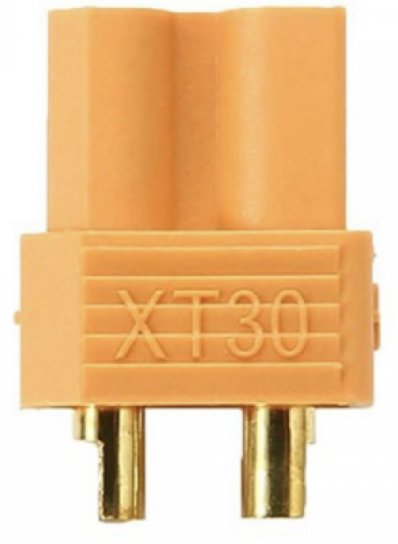
The XT30 Connector is a compact, lightweight, and durable electrical connector designed for high-current applications. It is widely used in remote-controlled (RC) vehicles, drones, and other battery-powered devices. The XT30 is known for its secure locking mechanism, which ensures a reliable connection even in environments with significant vibration or movement. With a current rating of up to 30A, it is ideal for applications requiring efficient power delivery in a small form factor.
Explore Projects Built with XT30 Connector
 Open Project in Cirkit Designer
 Open Project in Cirkit Designer
 Open Project in Cirkit Designer
 Open Project in Cirkit Designer
Explore Projects Built with XT30 Connector
Open Project in Cirkit DesignerOpen Project in Cirkit DesignerOpen Project in Cirkit DesignerOpen Project in Cirkit DesignerCommon Applications
- RC vehicles (cars, boats, planes, etc.)
- Drones and quadcopters
- Battery packs for portable devices
- Robotics and small-scale industrial equipment
- DIY electronics projects requiring high-current connections
Technical Specifications
The XT30 Connector is designed to handle high currents while maintaining a compact size. Below are its key technical details:
| Parameter | Specification |
|---|---|
| Current Rating | Up to 30A (continuous) |
| Voltage Rating | Up to 500V DC |
| Contact Resistance | ≤ 0.85 mΩ |
| Wire Gauge Support | 16-20 AWG |
| Material (Contacts) | Gold-plated brass |
| Material (Housing) | Nylon (high-temperature resistant) |
| Operating Temperature | -20°C to 120°C |
| Dimensions | 13.5mm x 7.5mm x 15mm |
| Weight (per connector) | ~2.3g |
Pin Configuration and Descriptions
The XT30 Connector consists of two main pins: a positive (+) and a negative (-) terminal. These are clearly marked on the connector housing to prevent incorrect connections.
| Pin | Description |
|---|---|
| Positive | Connects to the positive terminal of the power source or load. |
| Negative | Connects to the negative terminal of the power source or load. |
Usage Instructions
How to Use the XT30 Connector in a Circuit
- Prepare the Wires: Strip the insulation from the ends of the wires you intend to connect. Ensure the wire gauge is between 16 and 20 AWG for optimal performance.
- Solder the Wires:
- Heat the soldering iron to the appropriate temperature (around 350°C for most solder types).
- Tin the exposed wire ends by applying a small amount of solder to them.
- Insert the tinned wire ends into the connector's solder cups (positive and negative terminals).
- Apply heat and solder to secure the connection. Avoid overheating the connector housing.
- Inspect the Connection: Ensure the solder joints are clean, shiny, and free of excess solder. Verify that there are no short circuits between the positive and negative terminals.
- Assemble the Connector: Slide the heat-shrink tubing (if used) over the soldered connections and apply heat to shrink it securely in place.
- Connect to the Circuit: Plug the XT30 connectors together, ensuring the positive and negative terminals are correctly aligned.
Important Considerations and Best Practices
- Polarity: Always double-check the polarity markings on the connector to avoid reverse connections, which can damage your circuit.
- Soldering: Use a high-quality soldering iron and solder to ensure reliable connections. Avoid cold solder joints, as they can lead to poor conductivity or failure.
- Heat Management: Do not overheat the connector housing during soldering, as excessive heat can deform the nylon material.
- Secure Fit: Ensure the connectors are fully mated and locked to prevent accidental disconnection during operation.
- Wire Gauge: Use the recommended wire gauge (16-20 AWG) to handle the rated current without overheating.
Example: Connecting an XT30 to an Arduino UNO
While the XT30 is not directly connected to an Arduino UNO, it can be used to supply power to the Arduino via a battery pack. Below is an example of how to use the XT30 in such a setup:
- Connect the XT30 to a battery pack (e.g., a 7.4V LiPo battery).
- Use a voltage regulator module (e.g., LM7805) to step down the voltage to 5V for the Arduino UNO.
- Connect the output of the voltage regulator to the Arduino's 5V and GND pins.
// Example Arduino code to read battery voltage via an analog pin
const int batteryPin = A0; // Analog pin connected to the voltage divider
float voltage = 0.0;

void setup() {
  Serial.begin(9600); // Initialize serial communication
}

void loop() {
  int sensorValue = analogRead(batteryPin); // Read the analog value
  voltage = sensorValue * (5.0 / 1023.0);   // Convert to voltage
  Serial.print("Battery Voltage: ");
  Serial.print(voltage);
  Serial.println(" V");
  delay(1000); // Wait for 1 second
}
Note: Use a voltage divider circuit to scale down the battery voltage to a safe range (0-5V) for the Arduino's analog input.
Troubleshooting and FAQs
Common Issues
Loose Connections:
- Cause: Incomplete mating of the connectors or poor soldering.
- Solution: Ensure the connectors are fully locked and inspect solder joints for quality.
Overheating:
- Cause: Exceeding the current rating or using an incorrect wire gauge.
- Solution: Use wires within the recommended gauge (16-20 AWG) and ensure the current does not exceed 30A.
Melted Housing:
- Cause: Excessive heat during soldering.
- Solution: Use a temperature-controlled soldering iron and limit soldering time to a few seconds per joint.
Reverse Polarity Connection:
- Cause: Incorrect wiring or connection.
- Solution: Double-check the polarity markings on the connector before connecting.
FAQs
Q1: Can the XT30 Connector handle more than 30A?
A1: No, the XT30 is rated for a maximum continuous current of 30A. Exceeding this limit can cause overheating and damage.
Q2: Is the XT30 Connector waterproof?
A2: No, the XT30 is not waterproof. For outdoor or wet environments, consider using additional waterproofing measures.
Q3: Can I use the XT30 Connector with thicker wires (e.g., 14 AWG)?
A3: The XT30 is designed for 16-20 AWG wires. Using thicker wires may require modification, but this is not recommended as it can compromise the connection quality.
Q4: How do I disconnect the XT30 Connector?
A4: Firmly grip both connectors and pull them apart. Avoid pulling on the wires to prevent damage.
By following this documentation, you can effectively use the XT30 Connector in your projects while ensuring safety and reliability.