
How to Use Autoro Dual DV6.7: Examples, Pinouts, and Specs
 Design with Autoro Dual DV6.7 in Cirkit Designer
Introduction
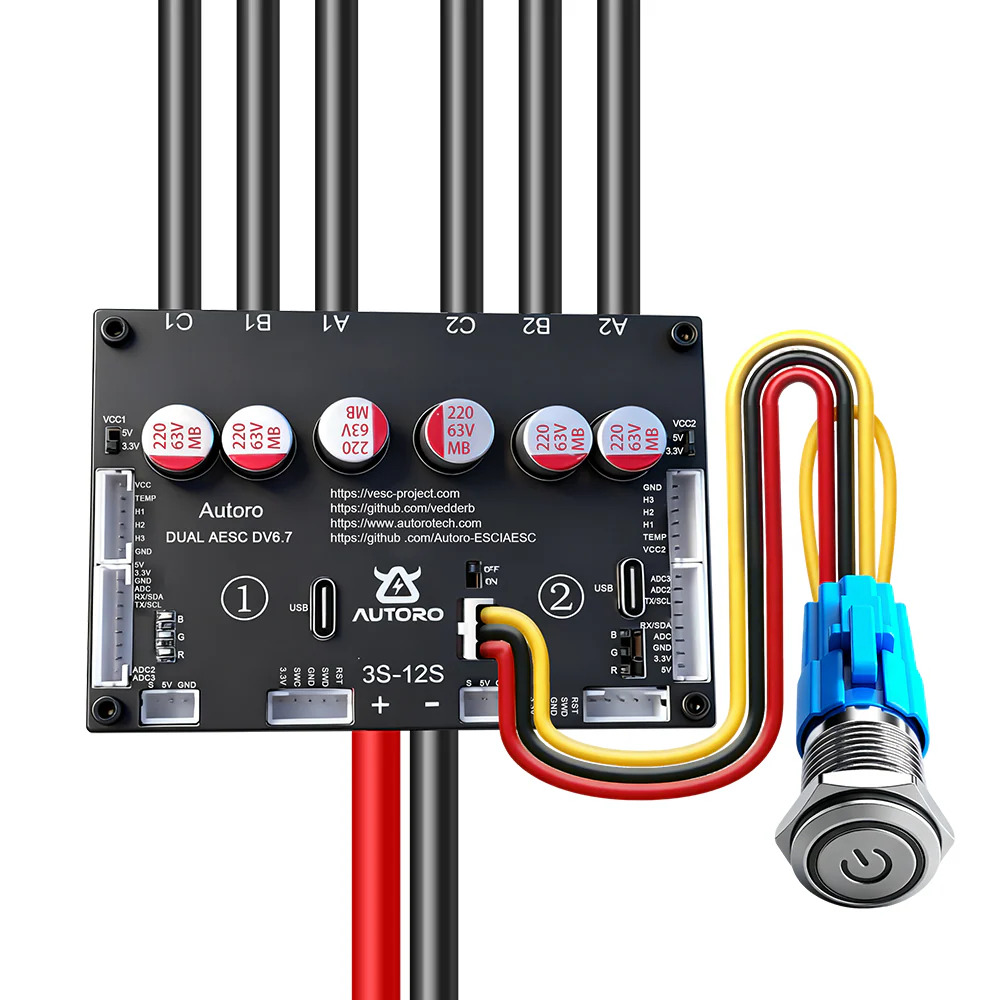
The Autoro Dual DV6.7 is a dual-channel digital voltmeter designed for accurate and reliable voltage measurements. With its clear display and adjustable settings, it is ideal for a wide range of applications, including laboratory experiments, field diagnostics, and electronic circuit testing. Its dual-channel capability allows users to measure two voltage sources simultaneously, making it a versatile tool for professionals and hobbyists alike.
Explore Projects Built with Autoro Dual DV6.7
 Open Project in Cirkit Designer
 Open Project in Cirkit Designer
 Open Project in Cirkit Designer
 Open Project in Cirkit Designer
Explore Projects Built with Autoro Dual DV6.7
Open Project in Cirkit DesignerOpen Project in Cirkit DesignerOpen Project in Cirkit DesignerOpen Project in Cirkit DesignerCommon Applications and Use Cases
- Laboratory voltage measurements for research and development
- Field diagnostics for electrical systems and equipment
- Testing and troubleshooting electronic circuits
- Educational purposes in electronics and engineering courses
- Monitoring power supplies in real-time
Technical Specifications
Key Technical Details
| Parameter | Specification |
|---|---|
| Input Voltage Range | 0 - 100 V DC |
| Measurement Accuracy | ±0.5% |
| Display Type | Dual 7-segment LED |
| Display Resolution | 0.01 V |
| Power Supply Voltage | 5 V DC |
| Power Consumption | < 200 mW |
| Operating Temperature | -10°C to 50°C |
| Dimensions | 80 mm x 40 mm x 25 mm |
| Weight | 50 g |
Pin Configuration and Descriptions
The Autoro Dual DV6.7 has a 6-pin interface for power and signal connections. The table below describes each pin:
| Pin Number | Pin Name | Description |
|---|---|---|
| 1 | VCC | Power supply input (5 V DC) |
| 2 | GND | Ground connection |
| 3 | CH1+ | Positive input for Channel 1 voltage measurement |
| 4 | CH1- | Negative input for Channel 1 voltage measurement |
| 5 | CH2+ | Positive input for Channel 2 voltage measurement |
| 6 | CH2- | Negative input for Channel 2 voltage measurement |
Usage Instructions
How to Use the Component in a Circuit
- Power the Device: Connect the
VCCpin to a 5 V DC power source and theGNDpin to ground. - Connect Voltage Sources:
- For Channel 1, connect the positive terminal of the voltage source to
CH1+and the negative terminal toCH1-. - For Channel 2, connect the positive terminal of the voltage source to
CH2+and the negative terminal toCH2-.
- For Channel 1, connect the positive terminal of the voltage source to
- Read the Display: The dual 7-segment LED display will show the voltage readings for both channels simultaneously.
Important Considerations and Best Practices
- Ensure the input voltage does not exceed the maximum range of 100 V DC to avoid damage.
- Use proper grounding to minimize noise and ensure accurate measurements.
- Avoid exposing the device to extreme temperatures or humidity.
- If using the voltmeter with an Arduino UNO or similar microcontroller, ensure the power supply is stable and within the specified range.
Example: Connecting to an Arduino UNO
The Autoro Dual DV6.7 can be used with an Arduino UNO to monitor voltage readings programmatically. Below is an example code snippet:
// Example code to read voltage from Autoro Dual DV6.7 using Arduino UNO
// Note: This assumes the voltmeter outputs analog signals for voltage readings.

const int ch1Pin = A0; // Channel 1 connected to analog pin A0
const int ch2Pin = A1; // Channel 2 connected to analog pin A1

void setup() {
  Serial.begin(9600); // Initialize serial communication at 9600 baud
}

void loop() {
  // Read analog values from both channels
  int ch1Value = analogRead(ch1Pin);
  int ch2Value = analogRead(ch2Pin);

  // Convert analog values to voltage (assuming 5V reference and 10-bit ADC)
  float ch1Voltage = (ch1Value / 1023.0) * 5.0;
  float ch2Voltage = (ch2Value / 1023.0) * 5.0;

  // Print the voltage readings to the Serial Monitor
  Serial.print("Channel 1 Voltage: ");
  Serial.print(ch1Voltage);
  Serial.println(" V");

  Serial.print("Channel 2 Voltage: ");
  Serial.print(ch2Voltage);
  Serial.println(" V");

  delay(1000); // Wait for 1 second before the next reading
}
Troubleshooting and FAQs
Common Issues and Solutions
No Display or Incorrect Readings:
- Ensure the power supply is connected properly and provides 5 V DC.
- Verify that the input voltage is within the specified range (0 - 100 V DC).
- Check for loose or incorrect wiring connections.
Flickering or Dim Display:
- Confirm that the power supply can provide sufficient current (at least 50 mA).
- Avoid using long or thin wires for the power supply, as this can cause voltage drops.
Inaccurate Measurements:
- Ensure proper grounding to reduce noise interference.
- Use shielded cables for input connections if operating in a noisy environment.
Device Overheating:
- Check that the operating temperature is within the specified range (-10°C to 50°C).
- Avoid placing the device near heat sources or in direct sunlight.
Frequently Asked Questions
Q: Can the Autoro Dual DV6.7 measure AC voltage?
A: No, the device is designed for DC voltage measurements only.
Q: Is it possible to calibrate the voltmeter?
A: The device is factory-calibrated for accuracy. If recalibration is needed, contact Autoro support.
Q: Can I use the voltmeter with a 3.3 V power supply?
A: No, the device requires a 5 V DC power supply for proper operation.
Q: What happens if the input voltage exceeds 100 V DC?
A: Exceeding the maximum input voltage may damage the device permanently. Always ensure the input voltage is within the specified range.