
How to Use Wire Connecter: Examples, Pinouts, and Specs
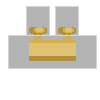
 Design with Wire Connecter in Cirkit Designer
Introduction
A wire connector is a device used to join two or more electrical wires together, ensuring a secure and reliable connection for electrical circuits. It is an essential component in electrical and electronic systems, providing a safe and efficient way to establish connections without the need for soldering. Wire connectors come in various types, such as twist-on, push-in, and crimp connectors, each designed for specific applications.
Explore Projects Built with Wire Connecter
 Open Project in Cirkit Designer
 Open Project in Cirkit Designer
 Open Project in Cirkit Designer
 Open Project in Cirkit Designer
Explore Projects Built with Wire Connecter
Open Project in Cirkit DesignerOpen Project in Cirkit DesignerOpen Project in Cirkit DesignerOpen Project in Cirkit DesignerCommon Applications and Use Cases
- Electrical wiring in residential, commercial, and industrial installations
- Connecting wires in automotive and marine systems
- Joining wires in electronic circuits and prototyping
- Repairing or extending existing wiring systems
- Ensuring safe and insulated connections in high-voltage or high-current applications
Technical Specifications
Wire connectors vary in design and specifications depending on their type and intended use. Below are general specifications for common wire connectors:
General Specifications
| Parameter | Value/Range |
|---|---|
| Voltage Rating | 300V to 600V (varies by type) |
| Current Rating | 10A to 50A (depending on size) |
| Wire Gauge Compatibility | 22 AWG to 6 AWG |
| Material | Plastic (insulation), Metal (contact) |
Pin Configuration and Descriptions
Wire connectors do not have traditional "pins" like ICs or modules, but they have terminals or slots for wire insertion. Below is a description of the typical parts of a wire connector:
| Part Name | Description |
|---|---|
| Terminal Slots | Openings where wires are inserted for connection. |
| Contact Material | Conductive metal (e.g., copper or brass) that ensures electrical continuity. |
| Insulation Shell | Non-conductive plastic housing that provides safety and prevents shorting. |
| Locking Mechanism | (Optional) Ensures wires remain securely connected. |
Usage Instructions
How to Use the Component in a Circuit
- Select the Appropriate Connector: Choose a wire connector compatible with the wire gauge and current rating of your circuit.
- Prepare the Wires:
- Strip approximately 1/2 inch (12-13 mm) of insulation from the ends of the wires.
- Ensure the exposed wire is clean and free of damage.
- Insert the Wires:
- For twist-on connectors: Insert the stripped wires into the connector and twist until secure.
- For push-in connectors: Insert the stripped wires into the designated slots until they lock in place.
- For crimp connectors: Insert the wires into the connector and use a crimping tool to secure them.
- Test the Connection:
- Gently tug on the wires to ensure they are firmly connected.
- Use a multimeter to verify electrical continuity.
Important Considerations and Best Practices
- Always turn off power to the circuit before working with wire connectors.
- Use connectors rated for the voltage and current of your application.
- Avoid over-tightening twist-on connectors, as this can damage the wires.
- Ensure no exposed wire is visible outside the connector to prevent short circuits.
- For outdoor or high-moisture environments, use waterproof or weather-resistant connectors.
Example: Connecting Wires to an Arduino UNO
While wire connectors are not directly programmable, they can be used to securely connect wires from sensors, modules, or power supplies to an Arduino UNO. Below is an example of connecting a sensor to an Arduino using wire connectors:
// Example: Reading a sensor value connected via wire connectors
// Ensure all connections are secure and insulated to avoid short circuits.

const int sensorPin = A0; // Analog pin connected to the sensor
int sensorValue = 0;      // Variable to store the sensor reading

void setup() {
  Serial.begin(9600); // Initialize serial communication
}

void loop() {
  sensorValue = analogRead(sensorPin); // Read the sensor value
  Serial.println(sensorValue);        // Print the value to the Serial Monitor
  delay(500);                         // Wait for 500ms before the next reading
}
Troubleshooting and FAQs
Common Issues Users Might Face
Loose Connections:
- Cause: Wires not properly inserted or connector not tightened.
- Solution: Reinsert the wires and ensure they are securely fastened.
Overheating:
- Cause: Connector used with wires carrying excessive current.
- Solution: Use a connector rated for the current in your circuit.
Wire Slipping Out:
- Cause: Incorrect wire gauge or improper crimping.
- Solution: Use a connector compatible with the wire gauge and ensure proper crimping.
Short Circuits:
- Cause: Exposed wires touching each other or other conductive surfaces.
- Solution: Ensure all wires are fully inserted and no exposed wire is visible.
FAQs
Q1: Can wire connectors be reused?
A1: Some wire connectors, such as twist-on and push-in types, can be reused if they are undamaged. Crimp connectors, however, are typically single-use.
Q2: Are wire connectors waterproof?
A2: Standard wire connectors are not waterproof. For outdoor or wet environments, use waterproof connectors or apply additional insulation, such as heat shrink tubing.
Q3: How do I choose the right wire connector?
A3: Consider the wire gauge, current, and voltage requirements of your application. Refer to the connector's specifications to ensure compatibility.
Q4: Can wire connectors be used for high-voltage applications?
A4: Yes, but only if the connector is rated for the voltage in your application. Always check the voltage rating before use.