
How to Use ICS 43434: Examples, Pinouts, and Specs
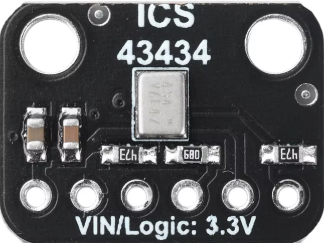
 Design with ICS 43434 in Cirkit Designer
Introduction
The ICS 43434 is a low-power, high-performance MEMS (Micro-Electro-Mechanical Systems) microphone designed for audio applications. Manufactured by Anyone, this microphone features a digital Pulse Density Modulation (PDM) output, making it ideal for integration into modern digital systems. Its compact size, low power consumption, and high signal-to-noise ratio (SNR) make it suitable for use in smartphones, tablets, laptops, and other portable devices. The ICS 43434 is optimized for clear sound capture with minimal noise, ensuring high-quality audio performance.
Explore Projects Built with ICS 43434
 Open Project in Cirkit Designer
 Open Project in Cirkit Designer
 Open Project in Cirkit Designer
 Open Project in Cirkit Designer
Explore Projects Built with ICS 43434
Open Project in Cirkit DesignerOpen Project in Cirkit DesignerOpen Project in Cirkit DesignerOpen Project in Cirkit DesignerCommon Applications
- Smartphones and tablets
- Wearable devices
- Voice-controlled systems (e.g., smart speakers)
- Audio recording equipment
- IoT devices with voice input functionality
Technical Specifications
Key Technical Details
| Parameter | Value |
|---|---|
| Supply Voltage (VDD) | 1.62V to 3.63V |
| Signal-to-Noise Ratio (SNR) | 65 dB (typical) |
| Acoustic Overload Point | 120 dB SPL |
| Sensitivity | -26 dBFS ±1 dB |
| Frequency Response | 50 Hz to 20 kHz |
| Output Format | Digital PDM |
| Current Consumption | 650 µA (typical) |
| Operating Temperature Range | -40°C to +85°C |
| Package Dimensions | 3.50 mm × 2.65 mm × 0.98 mm |
Pin Configuration and Descriptions
The ICS 43434 has a 5-pin configuration. The table below describes each pin:
| Pin Name | Pin Number | Description |
|---|---|---|
| VDD | 1 | Power supply input (1.62V to 3.63V). |
| GND | 2 | Ground connection. |
| DATA | 3 | Digital PDM output signal. |
| CLK | 4 | Clock input for PDM interface. |
| SEL | 5 | Channel select (left/right). |
Usage Instructions
How to Use the ICS 43434 in a Circuit
- Power Supply: Connect the VDD pin to a stable power source within the range of 1.62V to 3.63V. Connect the GND pin to the ground of the circuit.
- Clock Signal: Provide a clock signal (typically 1 MHz to 3.25 MHz) to the CLK pin. This clock drives the PDM output.
- Digital Output: The DATA pin outputs the PDM signal, which can be processed by a microcontroller or digital signal processor (DSP).
- Channel Selection: Use the SEL pin to configure the microphone as either the left or right channel in a stereo setup:
- Connect SEL to GND for the left channel.
- Connect SEL to VDD for the right channel.
Important Considerations
- Decoupling Capacitor: Place a 0.1 µF decoupling capacitor close to the VDD pin to reduce noise and ensure stable operation.
- Clock Signal Quality: Ensure the clock signal is clean and within the specified frequency range to avoid distortion in the PDM output.
- PCB Layout: Minimize the trace length for the DATA and CLK lines to reduce signal degradation and noise interference.
- Acoustic Design: Position the microphone aperture away from sources of mechanical vibration or airflow to maintain audio quality.
Example: Connecting ICS 43434 to an Arduino UNO
The ICS 43434 can be interfaced with an Arduino UNO using a PDM-to-PCM library for audio processing. Below is an example setup and code:
Circuit Connections
| ICS 43434 Pin | Arduino UNO Pin |
|---|---|
| VDD | 3.3V |
| GND | GND |
| DATA | Digital Pin 2 |
| CLK | Digital Pin 3 |
| SEL | GND (Left Channel) or 3.3V (Right Channel) |
Arduino Code
#include <PDM.h> // Include the PDM library for audio processing

// Define pins for the ICS 43434
#define PDM_DATA_PIN 2 // Pin connected to the DATA pin of ICS 43434
#define PDM_CLK_PIN 3  // Pin connected to the CLK pin of ICS 43434

// Buffer to store audio samples
#define BUFFER_SIZE 256
int16_t audioBuffer[BUFFER_SIZE];

// Callback function to handle incoming PDM data
void onPDMData() {
  int bytesAvailable = PDM.available(); // Check available bytes
  PDM.read(audioBuffer, bytesAvailable); // Read PDM data into buffer
}

void setup() {
  // Initialize serial communication for debugging
  Serial.begin(9600);
  while (!Serial);

  // Configure PDM microphone
  if (!PDM.begin(1, 16000)) { // Mono channel, 16 kHz sample rate
    Serial.println("Failed to start PDM!");
    while (1);
  }

  // Set the PDM data callback
  PDM.onReceive(onPDMData);

  Serial.println("PDM microphone initialized.");
}

void loop() {
  // Process audio data in the main loop
  // (e.g., send data to a computer or perform real-time analysis)
}
Troubleshooting and FAQs
Common Issues and Solutions
No Output Signal from DATA Pin
- Cause: Missing or incorrect clock signal.
- Solution: Verify that the CLK pin is receiving a clean clock signal within the specified frequency range (1 MHz to 3.25 MHz).
Distorted Audio Output
- Cause: Incorrect power supply voltage or noisy clock signal.
- Solution: Ensure the VDD pin is supplied with a stable voltage (1.62V to 3.63V). Use a decoupling capacitor near the VDD pin. Check the quality of the clock signal.
Microphone Not Responding
- Cause: Incorrect SEL pin configuration.
- Solution: Verify the SEL pin connection. Connect it to GND for the left channel or VDD for the right channel.
High Noise in Output
- Cause: Poor PCB layout or external interference.
- Solution: Minimize trace lengths for DATA and CLK lines. Keep the microphone away from sources of mechanical vibration or airflow.
FAQs
Q: Can the ICS 43434 operate at 5V?
A: No, the ICS 43434 operates within a supply voltage range of 1.62V to 3.63V. Exceeding this range may damage the component.
Q: Is the ICS 43434 suitable for outdoor use?
A: The ICS 43434 is designed for indoor use. If used outdoors, ensure it is protected from moisture and extreme environmental conditions.
Q: Can I use multiple ICS 43434 microphones in a single system?
A: Yes, you can use multiple microphones. Configure the SEL pin of each microphone to assign it as the left or right channel in a stereo setup.
This concludes the documentation for the ICS 43434 MEMS microphone. For further assistance, refer to the manufacturer's datasheet or contact technical support.