
How to Use Relay MY2N: Examples, Pinouts, and Specs
 Design with Relay MY2N in Cirkit Designer
Introduction
The Relay MY2N is a compact electromagnetic relay manufactured by tptupstmj (Part ID: tptupstmj-0326). It features a Double Pole Double Throw (DPDT) configuration, making it suitable for switching applications that require moderate load handling. The relay operates with a coil voltage typically ranging from 5V to 24V, providing versatility for various control and automation systems.
Explore Projects Built with Relay MY2N
 Open Project in Cirkit Designer
 Open Project in Cirkit Designer
 Open Project in Cirkit Designer
 Open Project in Cirkit Designer
Explore Projects Built with Relay MY2N
Open Project in Cirkit DesignerOpen Project in Cirkit DesignerOpen Project in Cirkit DesignerOpen Project in Cirkit DesignerCommon Applications and Use Cases
- Industrial automation and control systems
- Home appliances and HVAC systems
- Motor control circuits
- Signal switching in low-power circuits
- Power isolation between high-voltage and low-voltage systems
Technical Specifications
Key Technical Details
| Parameter | Value |
|---|---|
| Manufacturer | tptupstmj |
| Part ID | tptupstmj-0326 |
| Relay Type | Electromagnetic |
| Configuration | DPDT (Double Pole Double Throw) |
| Coil Voltage Range | 5V DC to 24V DC |
| Contact Rating | 5A at 250V AC / 5A at 30V DC |
| Coil Resistance | Varies by coil voltage (e.g., 5V: ~70Ω) |
| Dielectric Strength | 1,000V AC (coil to contact) |
| Operating Temperature | -40°C to +70°C |
| Dimensions | 28mm x 21mm x 36mm |
| Mounting Type | PCB or socket |
Pin Configuration and Descriptions
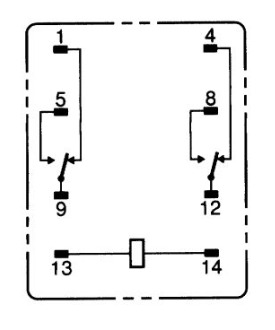
The Relay MY2N has a total of 8 pins, as shown in the table below:
| Pin Number | Pin Name | Description |
|---|---|---|
| 1 | Coil Terminal 1 | Connect to one side of the relay coil |
| 2 | Coil Terminal 2 | Connect to the other side of the relay coil |
| 3 | Common 1 (COM1) | Common terminal for the first pole |
| 4 | Normally Open 1 | NO terminal for the first pole |
| 5 | Normally Closed 1 | NC terminal for the first pole |
| 6 | Common 2 (COM2) | Common terminal for the second pole |
| 7 | Normally Open 2 | NO terminal for the second pole |
| 8 | Normally Closed 2 | NC terminal for the second pole |
Usage Instructions
How to Use the Relay MY2N in a Circuit
- Power the Coil: Connect the relay coil terminals (pins 1 and 2) to a DC voltage source within the specified range (e.g., 5V, 12V, or 24V). Ensure the voltage matches the relay's rated coil voltage.
- Control the Load: Use the common (COM), normally open (NO), and normally closed (NC) terminals to control the load:
- When the coil is not energized, the COM terminal is connected to the NC terminal.
- When the coil is energized, the COM terminal switches to the NO terminal.
- Isolation: Use the relay to isolate the control circuit (low voltage) from the load circuit (high voltage).
- Mounting: Mount the relay on a PCB or use a compatible socket for easy replacement.
Important Considerations and Best Practices
- Diode Protection: Add a flyback diode across the coil terminals to protect the driving circuit from voltage spikes when the coil is de-energized.
- Current Rating: Ensure the load current does not exceed the relay's contact rating (5A).
- Contact Protection: For inductive loads (e.g., motors), use a snubber circuit or RC network to reduce arcing and prolong contact life.
- Testing: Test the relay in your circuit before finalizing the design to ensure proper operation.
Example: Using Relay MY2N with Arduino UNO
Below is an example of how to control the Relay MY2N using an Arduino UNO:
// Define the pin connected to the relay's coil
const int relayPin = 7;

void setup() {
  pinMode(relayPin, OUTPUT); // Set the relay pin as an output
  digitalWrite(relayPin, LOW); // Ensure the relay is off initially
}

void loop() {
  digitalWrite(relayPin, HIGH); // Energize the relay (turn it on)
  delay(1000); // Keep the relay on for 1 second
  digitalWrite(relayPin, LOW); // De-energize the relay (turn it off)
  delay(1000); // Keep the relay off for 1 second
}
Note: Connect the relay's coil terminals to the Arduino through a transistor or relay driver circuit, as the Arduino's GPIO pins cannot directly supply enough current to drive the relay.
Troubleshooting and FAQs
Common Issues and Solutions
Relay Not Switching
- Cause: Insufficient coil voltage or current.
- Solution: Verify the coil voltage matches the relay's rated voltage. Check the power supply and connections.
Contacts Not Conducting
- Cause: Dirty or worn-out contacts.
- Solution: Clean the contacts or replace the relay if necessary.
Excessive Heat
- Cause: Overloading the relay contacts.
- Solution: Ensure the load current does not exceed the relay's contact rating (5A).
Noise or Chattering
- Cause: Unstable coil voltage or interference.
- Solution: Use a stable power supply and add a capacitor across the coil terminals to filter noise.
FAQs
Q: Can the Relay MY2N handle AC loads?
A: Yes, it can handle AC loads up to 250V with a maximum current of 5A.Q: Do I need a driver circuit to control the relay with a microcontroller?
A: Yes, use a transistor or relay driver IC to provide sufficient current to the relay coil.Q: What is the purpose of the flyback diode?
A: The flyback diode protects the driving circuit from voltage spikes generated when the relay coil is de-energized.Q: Can I use the Relay MY2N for high-frequency switching?
A: No, electromagnetic relays like the MY2N are not suitable for high-frequency switching due to mechanical limitations. Use a solid-state relay for such applications.