
How to Use solar charge controller: Examples, Pinouts, and Specs
 Design with solar charge controller in Cirkit Designer
Introduction
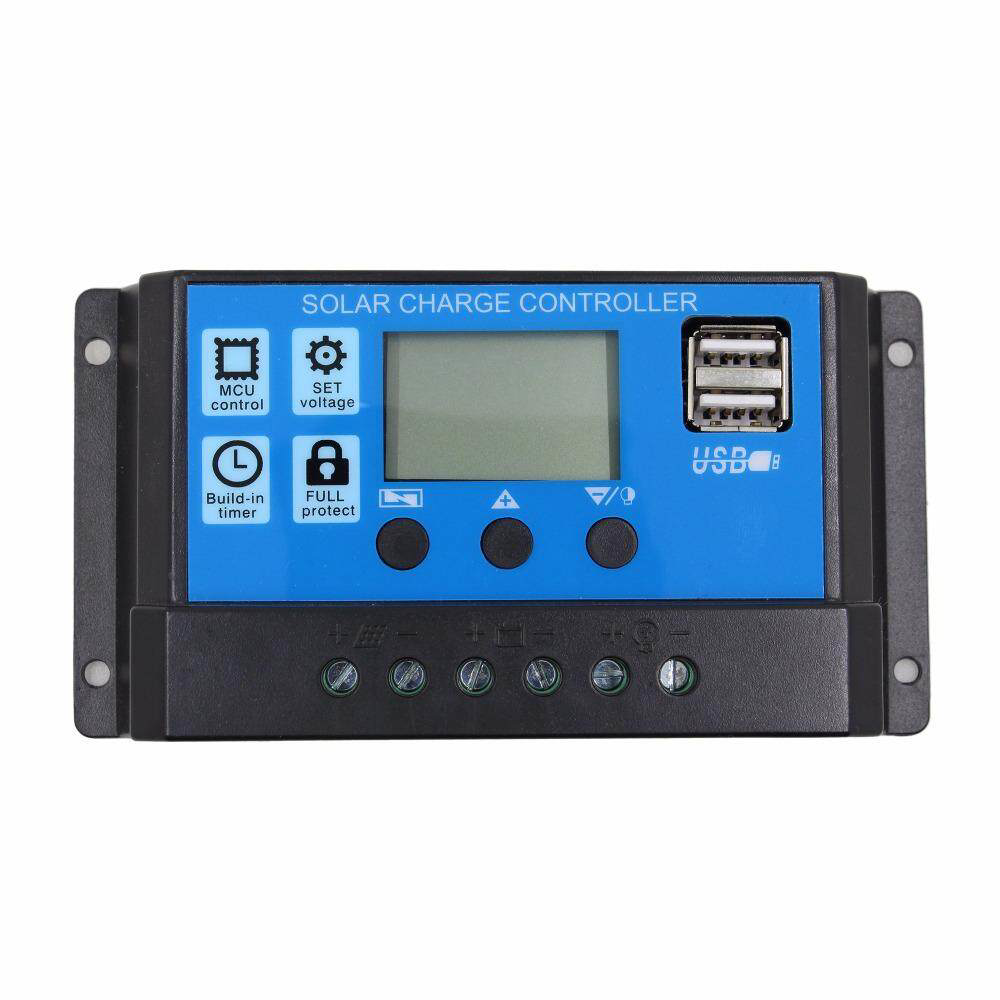
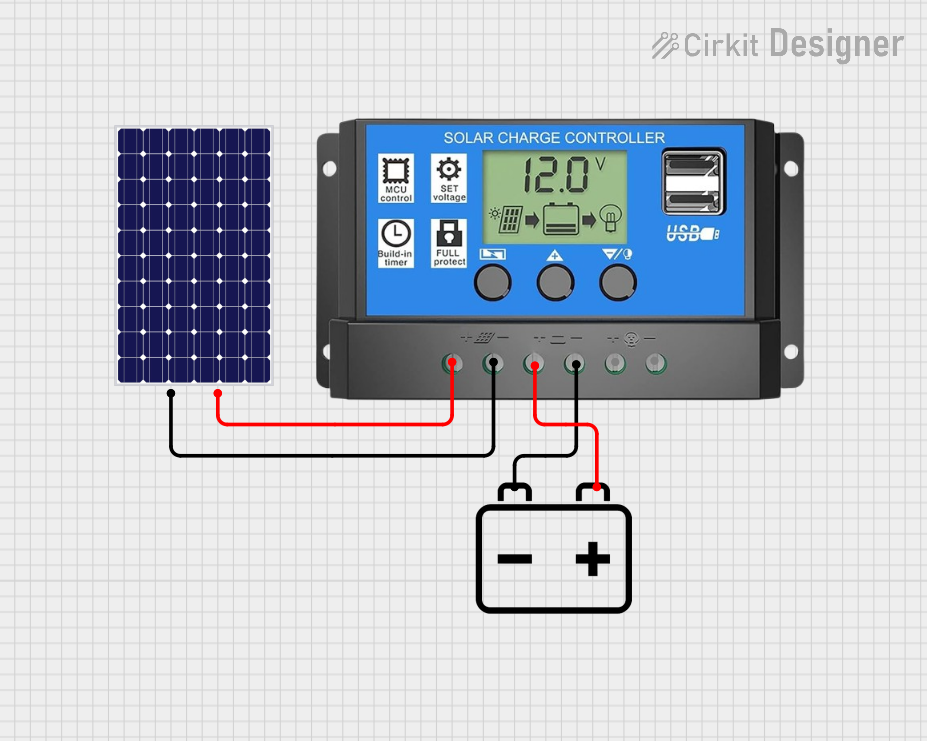
A solar charge controller, manufactured by sfijd-0 with part ID dmgowfow, is a critical component in solar power systems. It regulates the voltage and current coming from solar panels to prevent overcharging of batteries, ensuring efficient energy storage and prolonging battery life. Additionally, it protects batteries from over-discharge and can manage power distribution to connected loads.
Explore Projects Built with solar charge controller
 Open Project in Cirkit Designer
 Open Project in Cirkit Designer
 Open Project in Cirkit Designer
 Open Project in Cirkit Designer
Explore Projects Built with solar charge controller
Open Project in Cirkit DesignerOpen Project in Cirkit DesignerOpen Project in Cirkit DesignerOpen Project in Cirkit DesignerCommon Applications and Use Cases
- Solar-powered home systems
- Off-grid solar installations
- Solar street lighting
- RV and marine solar systems
- Portable solar power kits
Technical Specifications
Key Technical Details
| Parameter | Value |
|---|---|
| Manufacturer | sfijd-0 |
| Part ID | dmgowfow |
| Input Voltage Range | 12V/24V auto-detect |
| Maximum Input Current | 20A, 30A, or 40A (model-dependent) |
| Battery Voltage Range | 12V/24V |
| Charging Technology | PWM (Pulse Width Modulation) or MPPT (Maximum Power Point Tracking) |
| Operating Temperature | -20°C to +50°C |
| Efficiency | Up to 98% (MPPT models) |
| Load Output Current | 10A |
| Protection Features | Overcharge, over-discharge, short circuit, reverse polarity |
Pin Configuration and Descriptions
| Pin/Terminal Name | Description |
|---|---|
| Solar Panel (+) | Positive input terminal for the solar panel |
| Solar Panel (-) | Negative input terminal for the solar panel |
| Battery (+) | Positive terminal for the battery connection |
| Battery (-) | Negative terminal for the battery connection |
| Load (+) | Positive terminal for the load connection |
| Load (-) | Negative terminal for the load connection |
Usage Instructions
How to Use the Component in a Circuit
- Connect the Battery: Always connect the battery to the charge controller first. Match the positive (+) and negative (-) terminals of the battery to the corresponding terminals on the controller.
- Connect the Solar Panel: Attach the solar panel to the controller's solar input terminals. Ensure the polarity is correct.
- Connect the Load (Optional): If you want to power a load directly from the charge controller, connect it to the load terminals.
- Power On: Once all connections are secure, the charge controller will automatically detect the system voltage (12V or 24V) and begin operation.
Important Considerations and Best Practices
- Battery Type: Ensure the charge controller is compatible with your battery type (e.g., lead-acid, lithium-ion).
- System Voltage: Use a charge controller that matches your system's voltage (12V or 24V).
- Current Rating: The charge controller's current rating should exceed the maximum current output of your solar panel array.
- Placement: Install the charge controller in a well-ventilated area to prevent overheating.
- Wiring: Use appropriately sized wires to handle the current without significant voltage drops.
Arduino UNO Integration Example
If you want to monitor the charge controller's output using an Arduino UNO, you can connect the load output to an analog input pin. Below is an example code snippet:
// Solar Charge Controller Monitoring with Arduino UNO
// Reads voltage from the charge controller's load output

const int loadPin = A0; // Analog pin connected to the load output
float voltage = 0.0;

void setup() {
  Serial.begin(9600); // Initialize serial communication
}

void loop() {
  int sensorValue = analogRead(loadPin); // Read analog value
  voltage = sensorValue * (5.0 / 1023.0) * 11;
  // Convert to voltage (assuming a 10:1 voltage divider is used)

  Serial.print("Load Voltage: ");
  Serial.print(voltage);
  Serial.println(" V");

  delay(1000); // Wait 1 second before next reading
}
Note: Use a voltage divider circuit to step down the load voltage to a safe range (0-5V) for the Arduino's analog input.
Troubleshooting and FAQs
Common Issues Users Might Face
No Power Output:
- Cause: Incorrect wiring or loose connections.
- Solution: Double-check all connections and ensure proper polarity.
Battery Overcharging:
- Cause: Incorrect battery type setting or faulty charge controller.
- Solution: Verify the battery type setting on the controller. Replace the controller if necessary.
Load Not Powering On:
- Cause: Load current exceeds the controller's rating or load terminals are disabled.
- Solution: Check the load current and ensure it is within the controller's limits. Enable the load terminals if they are disabled.
Controller Overheating:
- Cause: Poor ventilation or excessive current.
- Solution: Improve ventilation around the controller and ensure the current does not exceed its rating.
Solutions and Tips for Troubleshooting
- Check LED Indicators: Most solar charge controllers have LED indicators or an LCD screen to display system status. Refer to the user manual for indicator meanings.
- Measure Voltages: Use a multimeter to verify the input and output voltages at the controller terminals.
- Inspect Wiring: Ensure all wires are securely connected and free from damage.
- Reset the Controller: Disconnect all inputs and outputs, then reconnect them in the correct order (battery first, solar panel second, load last).
By following this documentation, you can effectively integrate and troubleshoot the sfijd-0 dmgowfow solar charge controller in your solar power system.