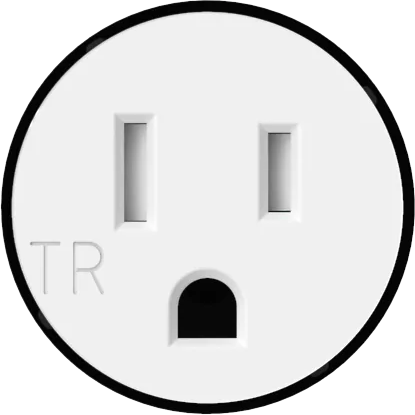
A 120V outlet is a standard electrical component that provides 120 volts of alternating current (AC) at a frequency of 60 Hz. It is widely used in residential, commercial, and industrial settings to power a variety of household appliances, electronic devices, and tools. The outlet typically features two vertical slots and a round grounding hole, ensuring compatibility with most standard plugs.
Explore Projects Built with 120V Outlet
Use Cirkit Designer to design, explore, and prototype these projects online. Some projects support real-time simulation. Click "Open Project" to start designing instantly!
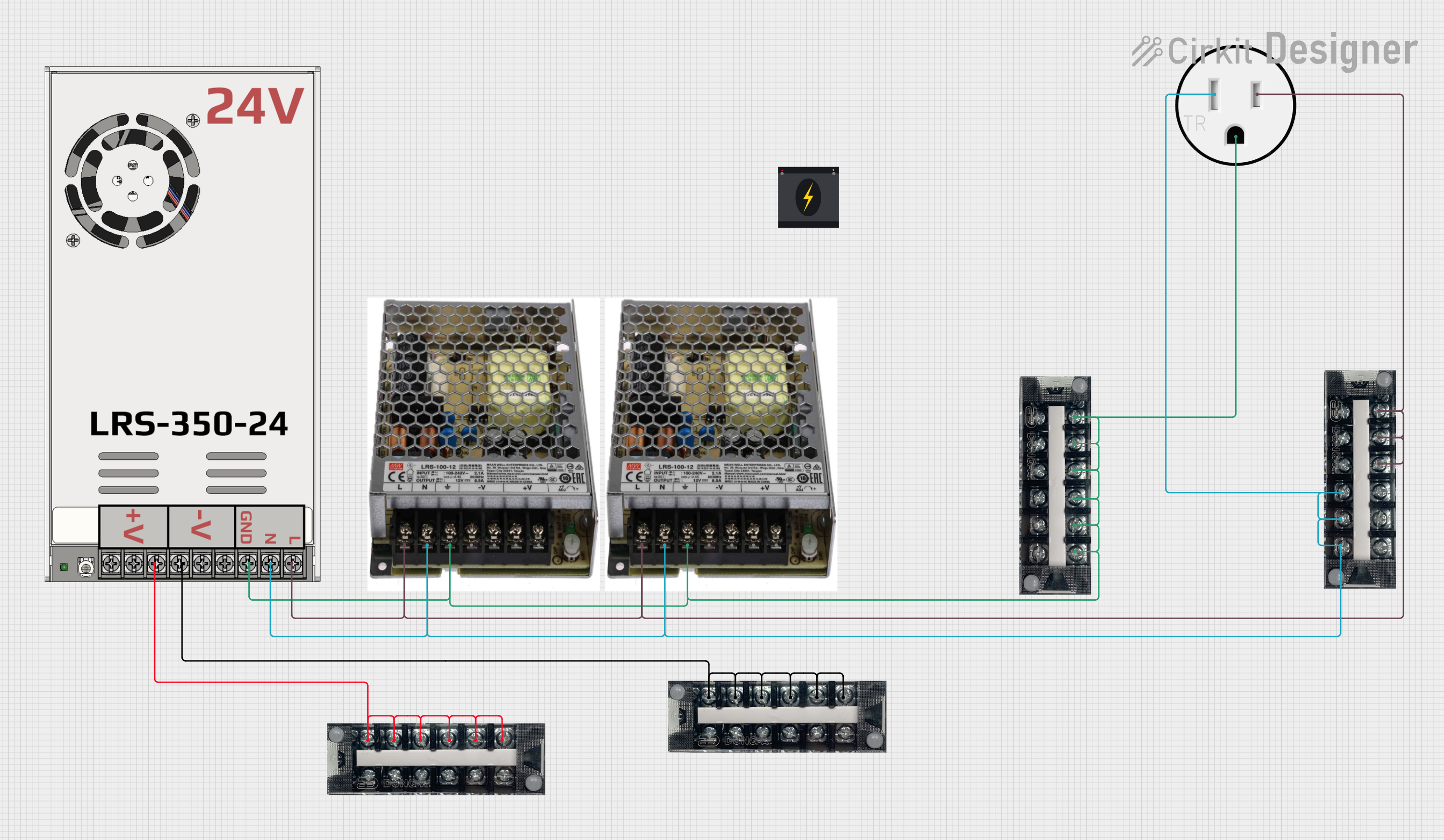
This circuit is designed to convert 240V AC power to both 12V and 24V DC outputs using multiple SMPS units. Terminal blocks are used to organize and distribute the power, while a 120V outlet provides additional AC power access. The circuit is likely used for powering various electronic devices that require different voltage levels.
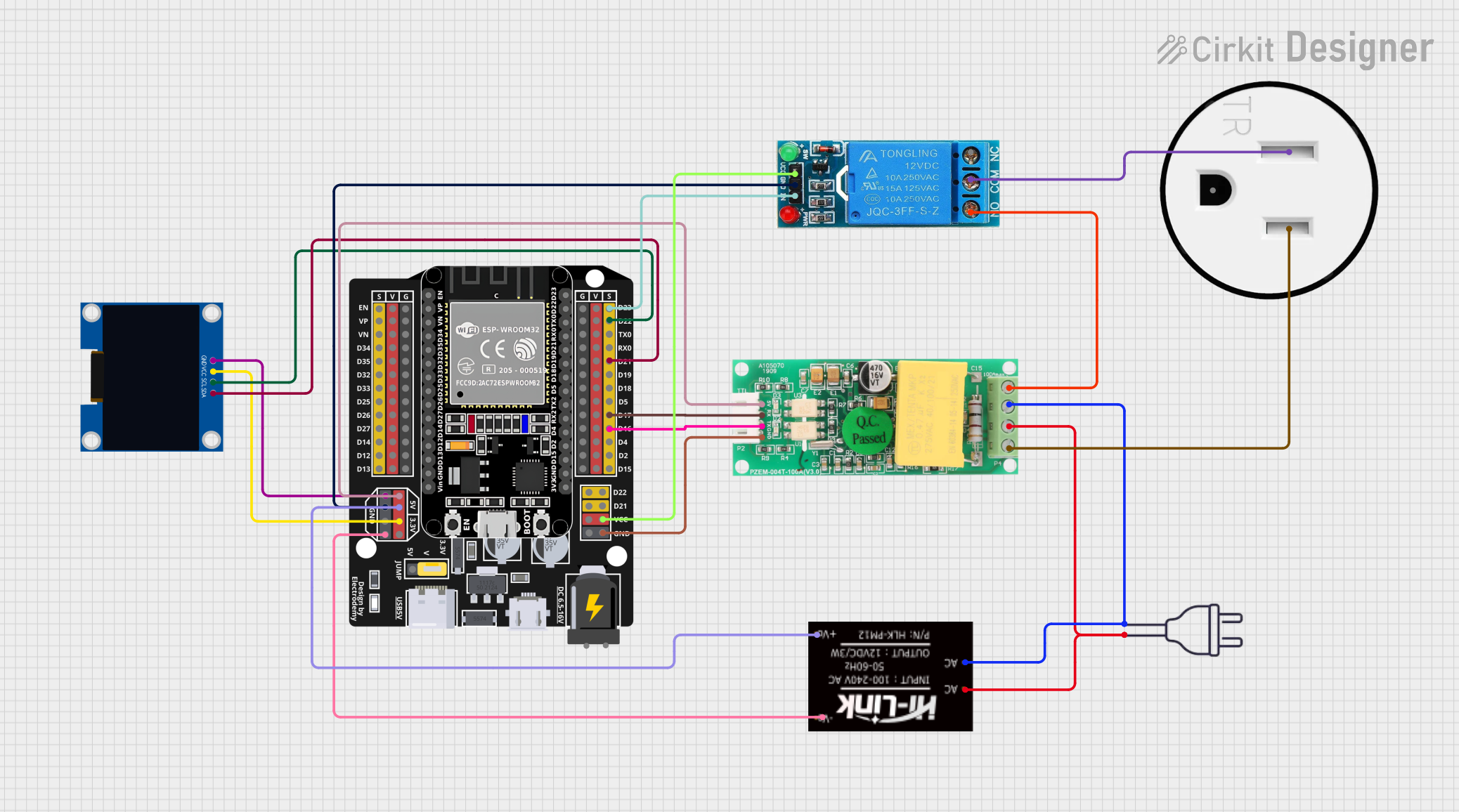
This circuit is designed to monitor and control a 120V AC outlet using an ESP32 microcontroller. It includes a PZEM004t module for measuring voltage, current, and power, and a 12V relay to switch the outlet on and off. An OLED display is used to show real-time data, and the HLK-PM12 module provides the necessary 5V and 3.3V power to the components.
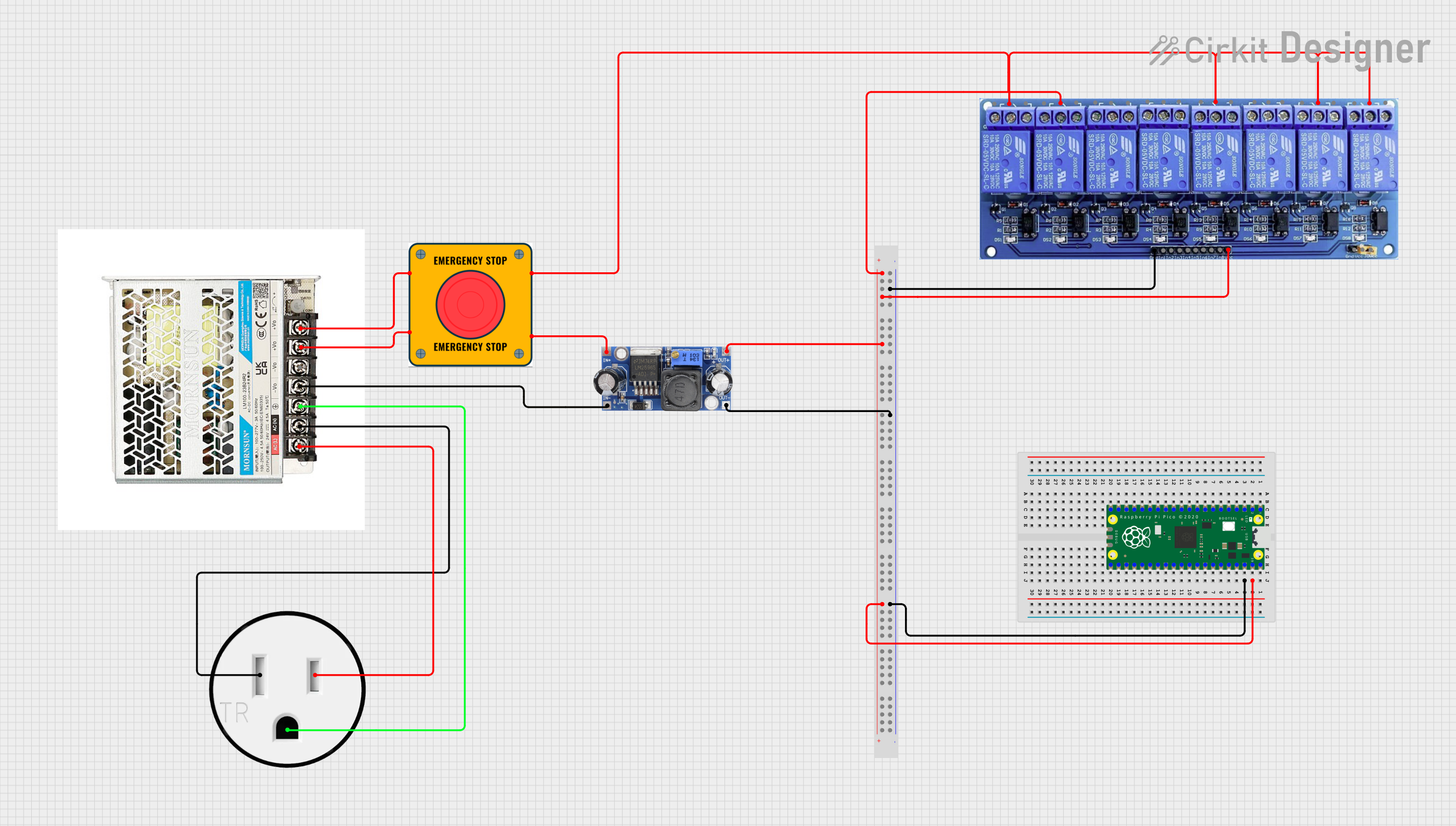
This circuit converts 120V AC power from an outlet to a regulated DC voltage using an AC/DC converter and a DC/DC converter. It includes a Raspberry Pi Pico microcontroller connected to an 8-channel relay module for controlling various devices, with an emergency stop button integrated for safety.
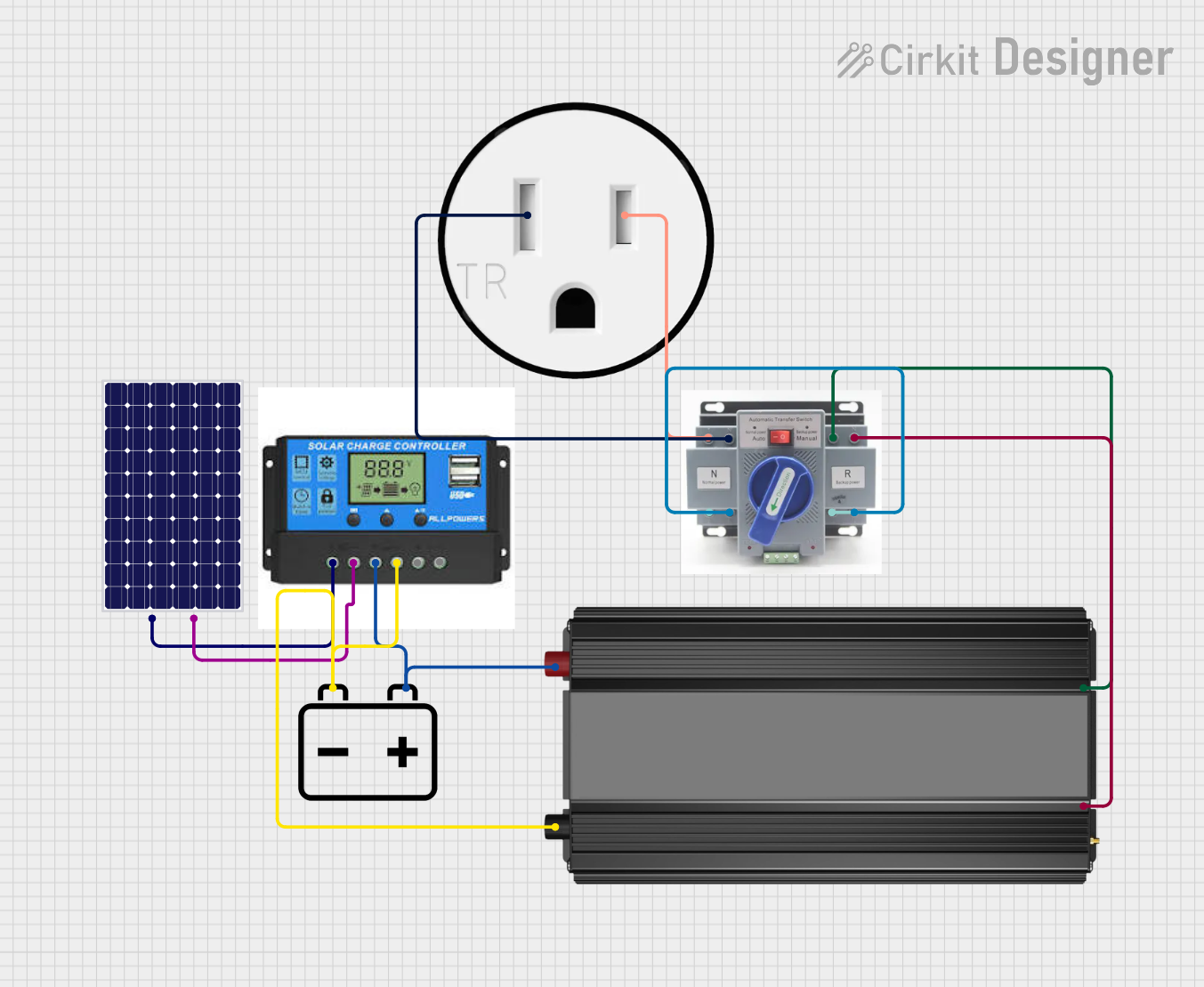
This circuit is designed to harness solar energy, regulate its storage, and convert it for use in standard AC appliances. A solar panel charges a 12V battery through a charge controller, which ensures safe charging and discharging of the battery. The power inverter then converts the stored DC power from the battery into AC power, which is supplied to a 120V outlet through an Automatic Transfer Switch (ATS), ensuring power continuity and safety.
Powering household appliances such as lamps, televisions, and kitchen devices.
Charging electronic devices like laptops and smartphones (via adapters).
Supplying power to tools and equipment in workshops or garages.
Providing electricity for small office equipment such as printers and monitors.
Technical Specifications
Below are the key technical details and pin configuration for a standard 120V outlet:
Key Technical Details
Parameter
Value
Voltage Rating
120V AC
Frequency
60 Hz
Current Rating
Typically 15A or 20A
Power Rating
1800W (15A) or 2400W (20A)
Grounding
Yes (via grounding pin)
Outlet Type
NEMA 5-15 (most common)
Material
Thermoplastic or metal
Operating Temperature
-20°C to 60°C
Pin Configuration and Descriptions
Pin Name
Description
Hot (Live)
Supplies 120V AC power. Typically connected to the narrower vertical slot.
Neutral
Returns current to the power source. Connected to the wider vertical slot.
Ground
Provides a safety path for fault currents. Connected to the round hole.
Usage Instructions
How to Use the 120V Outlet in a Circuit
Wiring the Outlet:
Connect the hot wire (black) to the brass screw terminal on the outlet.
Connect the neutral wire (white) to the silver screw terminal.
Connect the ground wire (green or bare copper) to the green screw terminal.
Ensure all connections are secure and insulated to prevent short circuits.
Mounting the Outlet:
Install the outlet into an electrical box that complies with local building codes.
Use screws to secure the outlet to the box and attach a faceplate for safety.
Powering Devices:
Plug the device's power cord into the outlet.
Ensure the device's power rating does not exceed the outlet's capacity (e.g., 1800W for a 15A outlet).
Important Considerations and Best Practices
Always turn off the power at the circuit breaker before installing or servicing the outlet.
Use outlets rated for the specific current (15A or 20A) required by your circuit.
Avoid overloading the outlet by connecting multiple high-power devices simultaneously.
Ensure proper grounding to reduce the risk of electric shock or fire.
Use a voltage tester to confirm the outlet is functioning correctly after installation.
Example: Connecting a 120V Outlet to an Arduino UNO
While an Arduino UNO cannot directly interface with a 120V outlet, you can use a relay module to control devices powered by the outlet. Below is an example code snippet for controlling a lamp connected to a 120V outlet via a relay:
// Example: Controlling a 120V outlet using a relay and Arduino UNO
// Note: Ensure proper isolation between the Arduino and the high-voltage circuit.

const int relayPin = 7; // Pin connected to the relay module

void setup() {
  pinMode(relayPin, OUTPUT); // Set relay pin as output
  digitalWrite(relayPin, LOW); // Ensure relay is off at startup
}

void loop() {
  digitalWrite(relayPin, HIGH); // Turn on the relay (power the outlet)
  delay(5000); // Keep the outlet powered for 5 seconds
  digitalWrite(relayPin, LOW); // Turn off the relay (cut power to the outlet)
  delay(5000); // Wait for 5 seconds before repeating
}
Warning: Always use a relay module rated for 120V AC and ensure proper insulation to prevent electrical hazards.
Troubleshooting and FAQs
Common Issues and Solutions
Outlet Not Providing Power:
Cause: Circuit breaker tripped or fuse blown.
Solution: Check the breaker panel and reset the breaker or replace the fuse.
Device Not Working When Plugged In:
Cause: Loose wiring or faulty outlet.
Solution: Turn off power, inspect wiring, and tighten connections. Replace the outlet if necessary.
Sparks or Burning Smell:
Cause: Overloaded outlet or damaged wiring.
Solution: Disconnect all devices immediately. Inspect the outlet and wiring for damage. Replace components as needed.
Grounding Issues:
Cause: Ground wire not connected or improperly installed.
Solution: Ensure the ground wire is securely connected to the green screw terminal.
FAQs
Q1: Can I use a 120V outlet for 240V appliances?
A1: No, 120V outlets are not designed for 240V appliances. Using a 240V device with a 120V outlet can damage the device and pose safety risks.
Q2: How do I know if my outlet is 15A or 20A?
A2: Check the outlet's faceplate or the circuit breaker. A 20A outlet typically has a horizontal slot in addition to the vertical slots.
Q3: Is it safe to use a power strip with a 120V outlet?
A3: Yes, but ensure the total power draw of connected devices does not exceed the outlet's capacity (e.g., 1800W for a 15A outlet).
Q4: Can I install a 120V outlet outdoors?
A4: Yes, but use a weatherproof outlet and enclosure rated for outdoor use. Ensure proper grounding and GFCI protection.

 Open Project in Cirkit Designer