
Cirkit Designer
Your all-in-one circuit design IDE
Home /
Component Documentation
How to Use MRB Planetary gearbox motor: Examples, Pinouts, and Specs
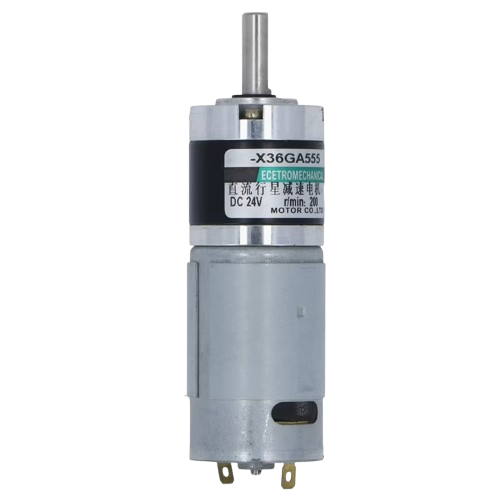
 Design with MRB Planetary gearbox motor in Cirkit Designer
Introduction
The MRB Planetary Gearbox Motor is a high-performance motor designed for applications requiring high torque and precise speed control. It combines a DC motor with a planetary gearbox, which provides a compact design and efficient torque transmission. This motor is widely used in robotics, automation systems, and industrial machinery due to its durability and reliability.
Explore Projects Built with MRB Planetary gearbox motor
ESP32-Controlled Robotics Interface with AC Synchronous Motor and L298N H-Bridge
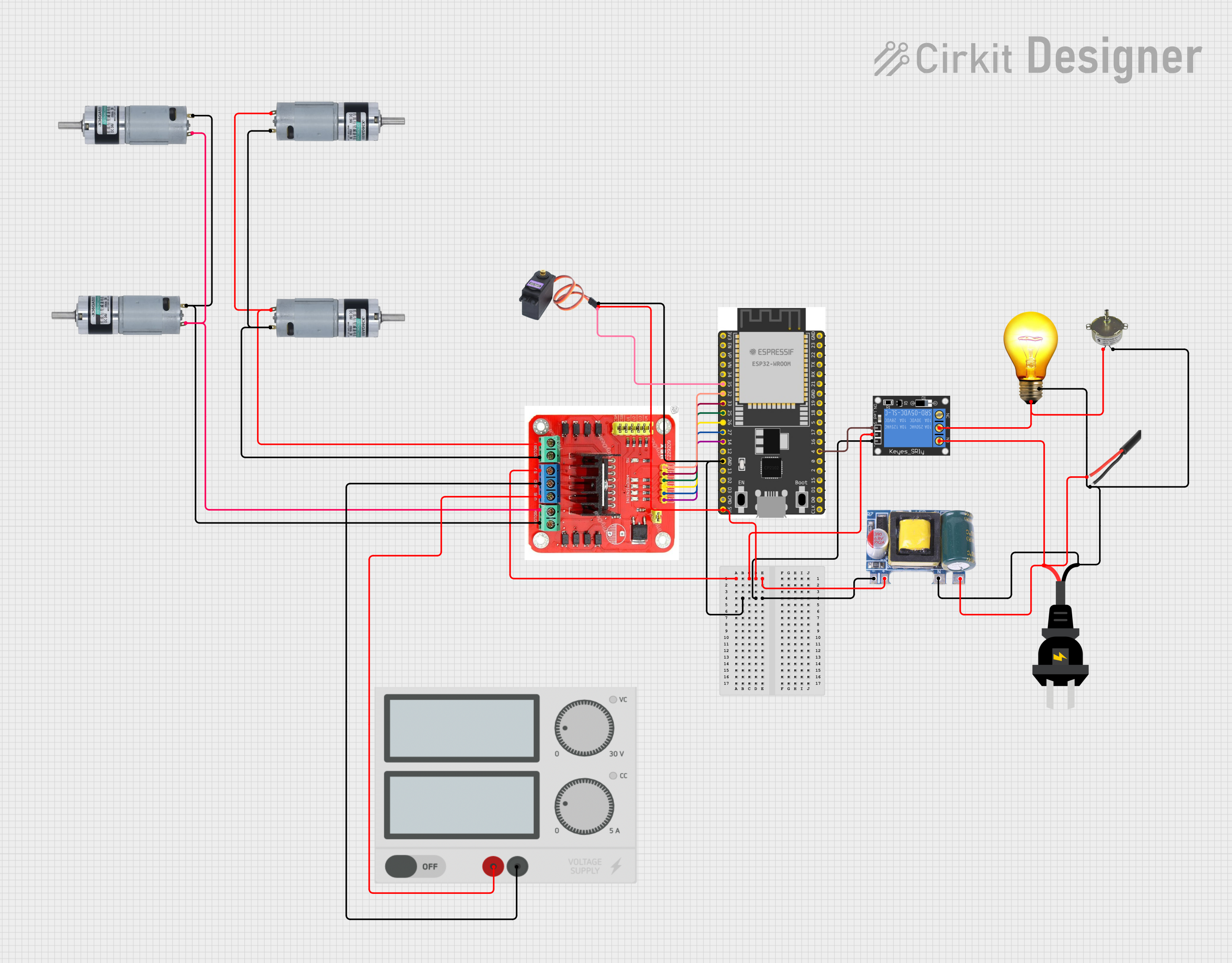
This circuit controls a set of MRB Planetary gearbox motors and an AC synchronous motor using an ESP32 microcontroller. The ESP32 interfaces with an L298N Dual H Bridge for motor control and a 1-Channel Relay to switch an AC bulb and the AC synchronous motor. A Mini AC-DC module provides 5V power to the ESP32, the relay, and the servo motor (MG996R), while the main power supply drives the L298N and the gearbox motors.
Open Project in Cirkit DesignerDual Motor Control System with DPDT Switches and Planetary Gearbox Motors
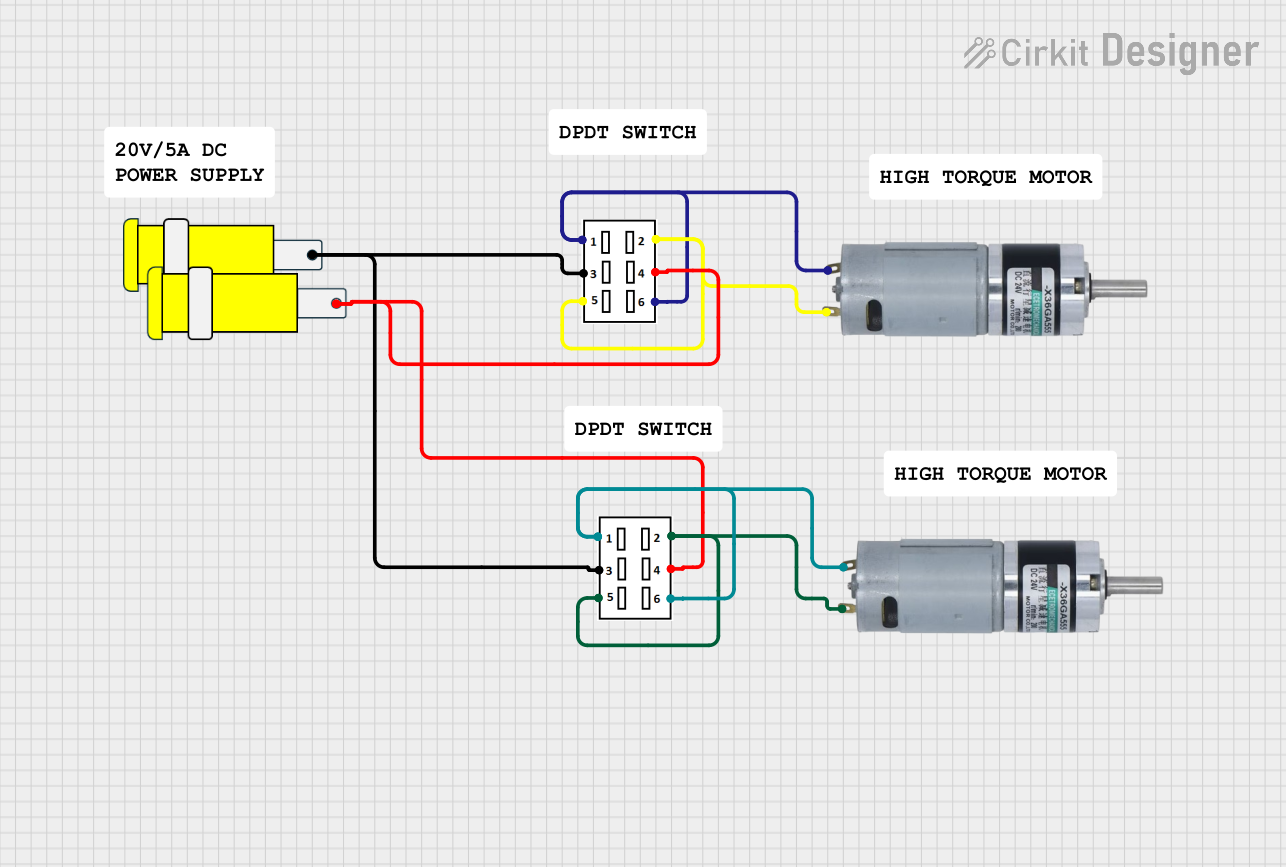
This circuit features two DPDT switches that control the direction of two MRB Planetary gearbox motors. The switches are connected to a connector, allowing for external control inputs to change the motor directions.
Open Project in Cirkit DesignerArduino Mega 2560 Controlled Motor System with LCD Display and Keypad Interface
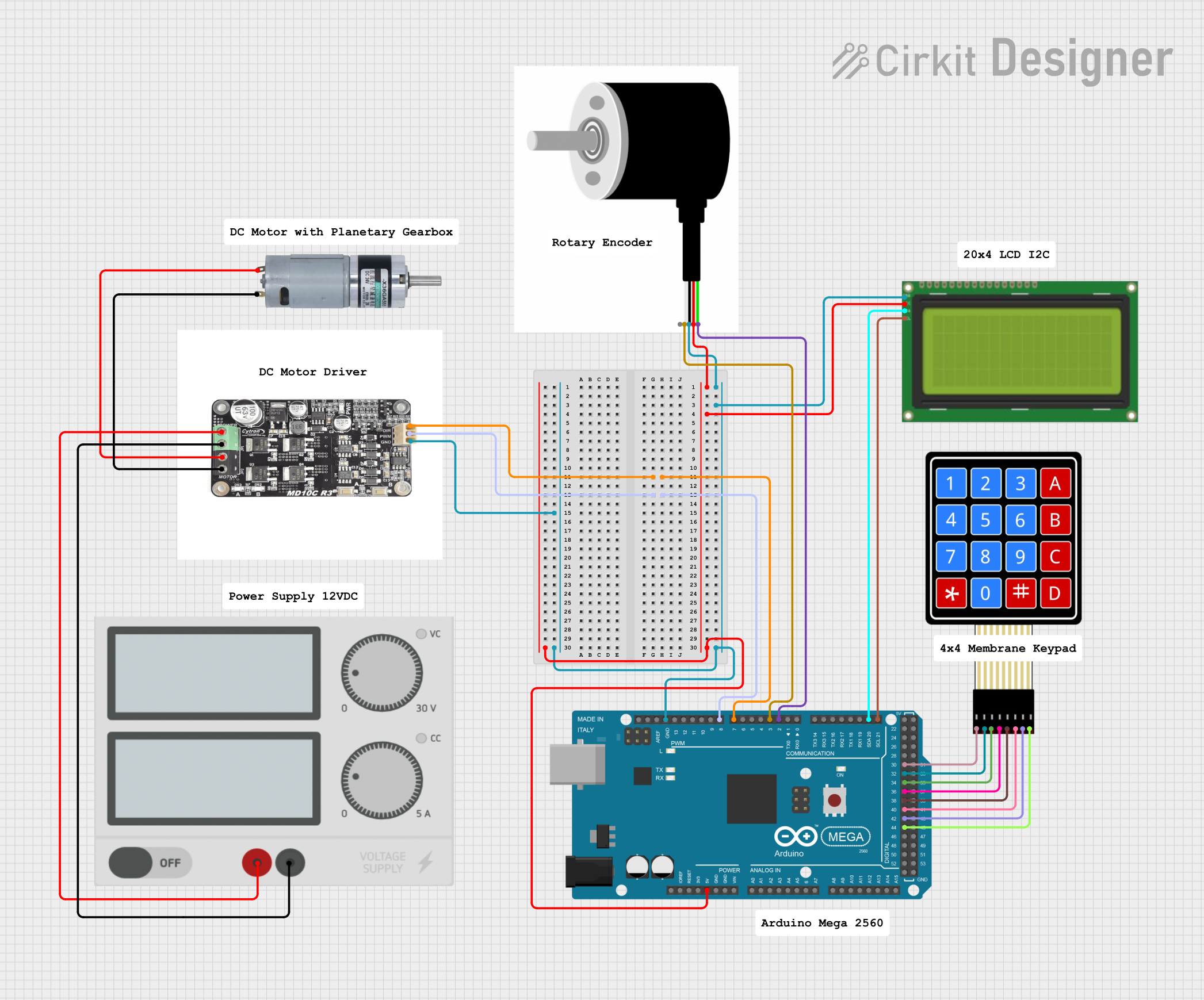
This circuit is a motor control system using an Arduino Mega 2560, which interfaces with a motor driver to control an MRB Planetary gearbox motor. It includes a rotary encoder for feedback, an LCD display for user interface, and a 4x4 membrane keypad for input, all powered by a central power supply.
Open Project in Cirkit DesignerArduino UNO Controlled Bluetooth Robotic Vehicle with L298N Motor Driver

This circuit features an Arduino UNO microcontroller interfaced with an L298N DC motor driver to control multiple MRB Planetary gearbox motors. The HC-05 Bluetooth Module is connected to the Arduino for wireless communication, allowing remote control of the motors. A 12V battery powers the system, with a buck converter stepping down the voltage to supply the Arduino and the Bluetooth module.
Open Project in Cirkit DesignerExplore Projects Built with MRB Planetary gearbox motor
ESP32-Controlled Robotics Interface with AC Synchronous Motor and L298N H-Bridge
This circuit controls a set of MRB Planetary gearbox motors and an AC synchronous motor using an ESP32 microcontroller. The ESP32 interfaces with an L298N Dual H Bridge for motor control and a 1-Channel Relay to switch an AC bulb and the AC synchronous motor. A Mini AC-DC module provides 5V power to the ESP32, the relay, and the servo motor (MG996R), while the main power supply drives the L298N and the gearbox motors.
Open Project in Cirkit DesignerDual Motor Control System with DPDT Switches and Planetary Gearbox Motors
This circuit features two DPDT switches that control the direction of two MRB Planetary gearbox motors. The switches are connected to a connector, allowing for external control inputs to change the motor directions.
Open Project in Cirkit DesignerArduino Mega 2560 Controlled Motor System with LCD Display and Keypad Interface
This circuit is a motor control system using an Arduino Mega 2560, which interfaces with a motor driver to control an MRB Planetary gearbox motor. It includes a rotary encoder for feedback, an LCD display for user interface, and a 4x4 membrane keypad for input, all powered by a central power supply.
Open Project in Cirkit DesignerArduino UNO Controlled Bluetooth Robotic Vehicle with L298N Motor Driver
This circuit features an Arduino UNO microcontroller interfaced with an L298N DC motor driver to control multiple MRB Planetary gearbox motors. The HC-05 Bluetooth Module is connected to the Arduino for wireless communication, allowing remote control of the motors. A 12V battery powers the system, with a buck converter stepping down the voltage to supply the Arduino and the Bluetooth module.
Open Project in Cirkit DesignerCommon Applications and Use Cases
- Robotics (e.g., robotic arms, mobile robots)
- Conveyor systems
- Automated guided vehicles (AGVs)
- Precision machinery
- Electric actuators
Technical Specifications
Key Technical Details
- Motor Type: DC motor with planetary gearbox
- Operating Voltage: 6V to 24V DC (varies by model)
- Rated Torque: Up to 50 Nm (depending on the gear ratio)
- Gear Ratios: Common ratios include 4:1, 16:1, 64:1, etc.
- No-Load Speed: 10 RPM to 500 RPM (varies by model)
- Efficiency: Up to 90% (gearbox efficiency)
- Shaft Diameter: 6mm to 12mm (model-dependent)
- Weight: 300g to 1.5kg (depending on size and configuration)
Pin Configuration and Descriptions
The MRB Planetary Gearbox Motor typically has two terminals for power input. Some models may include additional pins for encoder feedback.
| Pin | Description |
|---|---|
| Terminal 1 | Positive power input (+V). Connect to the positive terminal of the power supply. |
| Terminal 2 | Negative power input (-V). Connect to the ground of the power supply. |
| Encoder A | (Optional) Encoder signal A for speed and position feedback. |
| Encoder B | (Optional) Encoder signal B for speed and position feedback. |
| Encoder VCC | (Optional) Power supply for the encoder (typically 5V). |
| Encoder GND | (Optional) Ground connection for the encoder. |
Usage Instructions
How to Use the Component in a Circuit
- Power Supply: Ensure the motor is powered by a DC voltage within its operating range (e.g., 12V DC). Use a regulated power supply to avoid voltage spikes.
- Motor Driver: Use a motor driver or H-bridge circuit to control the motor. This allows for speed and direction control.
- Connections:
- Connect Terminal 1 to the positive output of the motor driver.
- Connect Terminal 2 to the negative output of the motor driver.
- If using an encoder, connect the encoder pins to a microcontroller (e.g., Arduino) for feedback.
- Mounting: Secure the motor using appropriate brackets or mounts to prevent vibration during operation.
Important Considerations and Best Practices
- Gear Ratio Selection: Choose a gear ratio that matches your application's torque and speed requirements.
- Current Limiting: Use a motor driver with current limiting to protect the motor from overcurrent conditions.
- Heat Dissipation: Ensure proper ventilation or heat sinks to prevent overheating during prolonged use.
- Encoder Usage: If precise control is required, use the encoder feedback to implement closed-loop control.
Example: Connecting to an Arduino UNO
Below is an example of controlling the MRB Planetary Gearbox Motor using an Arduino UNO and an L298N motor driver.
// Example code to control MRB Planetary Gearbox Motor with Arduino UNO
// and L298N motor driver. Adjust pin numbers as per your setup.

#define ENA 9  // PWM pin for motor speed control
#define IN1 8  // Motor direction pin 1
#define IN2 7  // Motor direction pin 2

void setup() {
  pinMode(ENA, OUTPUT); // Set ENA as output
  pinMode(IN1, OUTPUT); // Set IN1 as output
  pinMode(IN2, OUTPUT); // Set IN2 as output
}

void loop() {
  // Rotate motor forward
  digitalWrite(IN1, HIGH); // Set IN1 high
  digitalWrite(IN2, LOW);  // Set IN2 low
  analogWrite(ENA, 150);   // Set speed (0-255)

  delay(3000); // Run motor for 3 seconds

  // Rotate motor backward
  digitalWrite(IN1, LOW);  // Set IN1 low
  digitalWrite(IN2, HIGH); // Set IN2 high
  analogWrite(ENA, 150);   // Set speed (0-255)

  delay(3000); // Run motor for 3 seconds

  // Stop motor
  digitalWrite(IN1, LOW);  // Set IN1 low
  digitalWrite(IN2, LOW);  // Set IN2 low
  analogWrite(ENA, 0);     // Set speed to 0

  delay(3000); // Wait for 3 seconds before repeating
}
Troubleshooting and FAQs
Common Issues Users Might Face
- Motor Not Spinning:
- Check the power supply voltage and ensure it matches the motor's specifications.
- Verify the connections to the motor driver and ensure the driver is functioning correctly.
- Overheating:
- Ensure the motor is not overloaded. Reduce the load or use a higher torque motor if necessary.
- Check for proper ventilation or add a heat sink.
- No Encoder Feedback:
- Verify the encoder connections to the microcontroller.
- Ensure the encoder is powered correctly (e.g., 5V for most encoders).
- Noise or Vibration:
- Check for loose mounting or misalignment of the motor shaft.
- Inspect the gearbox for wear or damage.
Solutions and Tips for Troubleshooting
- Use a multimeter to check voltage and current at the motor terminals.
- Test the motor with a simple DC power supply to rule out issues with the motor driver.
- If using an encoder, use an oscilloscope or logic analyzer to verify the encoder signals.
- Regularly inspect and maintain the motor and gearbox to ensure optimal performance.