
How to Use HC-05 Bluetooth Module (6-pin male header): Examples, Pinouts, and Specs
 Design with HC-05 Bluetooth Module (6-pin male header) in Cirkit Designer
Introduction
The HC-05 Bluetooth module is a versatile and widely used component that enables wireless communication between devices. It is based on Bluetooth 2.0 technology and supports both master and slave modes, making it suitable for a variety of applications. The module features a 6-pin male header for easy integration with microcontrollers, such as Arduino, Raspberry Pi, and other embedded systems.
Explore Projects Built with HC-05 Bluetooth Module (6-pin male header)
 Open Project in Cirkit Designer
 Open Project in Cirkit Designer
 Open Project in Cirkit Designer
 Open Project in Cirkit Designer
Explore Projects Built with HC-05 Bluetooth Module (6-pin male header)
Open Project in Cirkit DesignerOpen Project in Cirkit DesignerOpen Project in Cirkit DesignerOpen Project in Cirkit DesignerCommon Applications and Use Cases
- Wireless data transmission between microcontrollers
- Remote control of robots, drones, and other devices
- Home automation systems
- Wireless sensor networks
- Serial communication replacement for wired connections
Technical Specifications
The HC-05 Bluetooth module is designed for reliable and efficient wireless communication. Below are its key technical details:
General Specifications
| Parameter | Value |
|---|---|
| Bluetooth Version | 2.0 + EDR (Enhanced Data Rate) |
| Operating Voltage | 3.3V to 5V |
| Communication Protocol | UART (Universal Asynchronous Receiver-Transmitter) |
| Default Baud Rate | 9600 bps |
| Range | Up to 10 meters (line of sight) |
| Power Consumption | < 50mA |
| Operating Temperature | -20°C to +75°C |
Pin Configuration and Descriptions
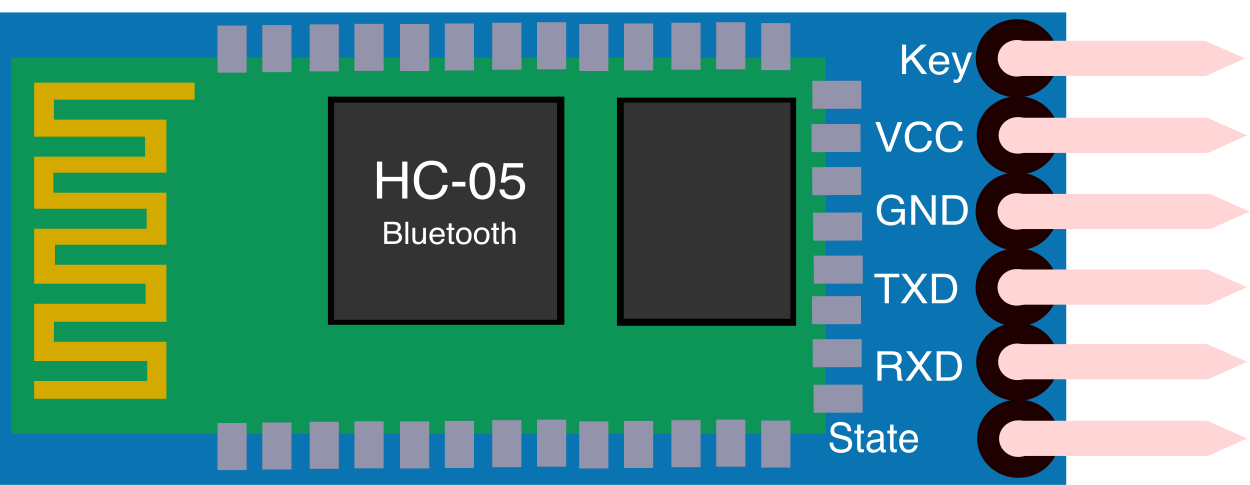
The HC-05 module has a 6-pin male header for easy connection. Below is the pinout:
| Pin Name | Description |
|---|---|
| EN/KEY | Used to switch between command mode and data mode. Pull HIGH for command mode. |
| VCC | Power supply input (3.3V to 5V). |
| GND | Ground connection. |
| TXD | Transmit data pin (connect to RX of microcontroller). |
| RXD | Receive data pin (connect to TX of microcontroller). |
| STATE | Indicates the connection status (HIGH when connected, LOW when disconnected). |
Usage Instructions
The HC-05 Bluetooth module is straightforward to use in a circuit. Follow the steps below to integrate it into your project:
Connecting the HC-05 to an Arduino UNO
Wiring the Module:
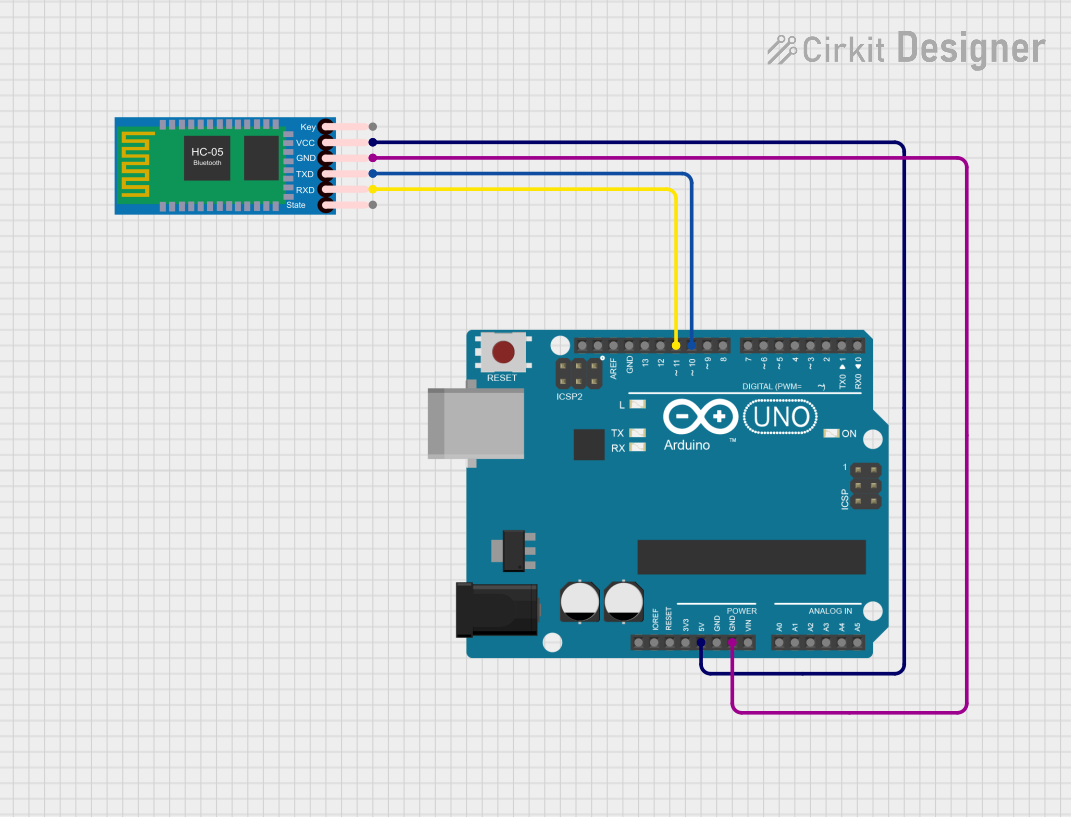
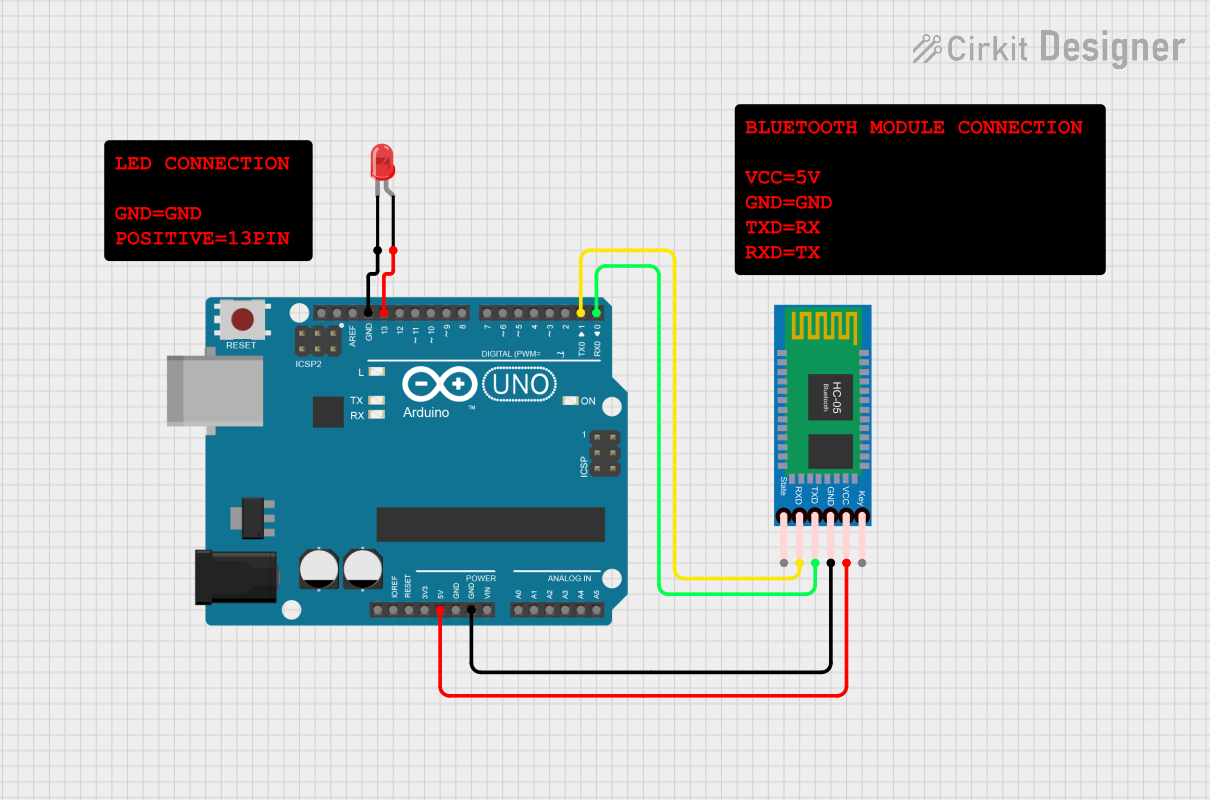
- Connect the
VCCpin of the HC-05 to the 5V pin on the Arduino. - Connect the
GNDpin of the HC-05 to the GND pin on the Arduino. - Connect the
TXDpin of the HC-05 to the RX (pin 0) of the Arduino. - Connect the
RXDpin of the HC-05 to the TX (pin 1) of the Arduino. Use a voltage divider (e.g., 1kΩ and 2kΩ resistors) to step down the Arduino's 5V TX signal to 3.3V for the HC-05's RX pin. - Optionally, connect the
EN/KEYpin to a digital pin on the Arduino for mode switching.
- Connect the
Uploading Code:
- Disconnect the
TXDandRXDpins while uploading code to the Arduino to avoid interference with the serial communication.
- Disconnect the
Example Code: Below is an example Arduino sketch to send and receive data via the HC-05 module:
// Example code for HC-05 Bluetooth module with Arduino UNO
// This code sends and receives data over Bluetooth.

void setup() {
  Serial.begin(9600); // Initialize serial communication at 9600 baud
  Serial.println("HC-05 Bluetooth Module Initialized");
}

void loop() {
  // Check if data is available from the Bluetooth module
  if (Serial.available()) {
    char receivedChar = Serial.read(); // Read the incoming data
    Serial.print("Received: ");        // Print the received data
    Serial.println(receivedChar);
  }

  // Send data to the Bluetooth module
  Serial.println("Hello from Arduino!"); // Send a message
  delay(1000); // Wait for 1 second before sending the next message
}
Important Considerations and Best Practices
- Voltage Levels: The HC-05's RX pin operates at 3.3V logic. Use a voltage divider or level shifter when connecting to a 5V microcontroller.
- Mode Switching: To enter command mode, pull the
EN/KEYpin HIGH before powering the module. In command mode, you can configure the module using AT commands. - Baud Rate: Ensure the baud rate of the microcontroller matches the HC-05's default baud rate (9600 bps) or the configured baud rate.
- Interference: Avoid placing the module near sources of electromagnetic interference, such as motors or high-frequency circuits.
Troubleshooting and FAQs
Common Issues and Solutions
Module Not Responding:
- Ensure the
VCCandGNDconnections are secure. - Verify that the module is powered with the correct voltage (3.3V to 5V).
- Check the baud rate settings in your code.
- Ensure the
Unable to Pair with Device:
- Ensure the module is in data mode (not command mode).
- Check the Bluetooth name and PIN (default PIN is usually
1234or0000).
Data Transmission Issues:
- Verify the TX and RX connections between the module and the microcontroller.
- Use a voltage divider for the RX pin if the microcontroller operates at 5V logic.
STATE Pin Not Changing:
- Ensure the module is properly paired with a Bluetooth device.
- Check the wiring of the
STATEpin.
FAQs
Q1: Can the HC-05 module communicate with smartphones?
Yes, the HC-05 can communicate with smartphones that support Bluetooth 2.0 or higher. Use a terminal app to send and receive data.
Q2: How do I reset the HC-05 module?
To reset the module, disconnect and reconnect the power supply. Alternatively, use AT commands to restore factory settings.
Q3: Can I use the HC-05 module for audio transmission?
No, the HC-05 is designed for serial data communication and does not support audio transmission.
Q4: How do I change the module's name or PIN?
Enter command mode and use AT commands such as AT+NAME to change the name and AT+PSWD to change the PIN.
By following this documentation, you can effectively integrate and troubleshoot the HC-05 Bluetooth module in your projects.