
How to Use Fuse 15A: Examples, Pinouts, and Specs
 Design with Fuse 15A in Cirkit Designer
Introduction
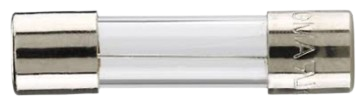
A Fuse 15A is a safety device designed to protect electrical circuits by interrupting the flow of current when it exceeds 15 amperes. This prevents damage to components, overheating, and potential fire hazards. Fuses are essential in both household and industrial applications, ensuring the safety and longevity of electrical systems.
Explore Projects Built with Fuse 15A
 Open Project in Cirkit Designer
 Open Project in Cirkit Designer
 Open Project in Cirkit Designer
 Open Project in Cirkit Designer
Explore Projects Built with Fuse 15A
Open Project in Cirkit DesignerOpen Project in Cirkit DesignerOpen Project in Cirkit DesignerOpen Project in Cirkit DesignerCommon Applications and Use Cases
- Automotive Systems: Protects vehicle wiring and components from overcurrent.
- Power Supplies: Safeguards sensitive electronics from power surges.
- Home Appliances: Prevents damage to devices like microwaves, washing machines, and air conditioners.
- Industrial Equipment: Ensures the safety of heavy machinery and control systems.
Technical Specifications
The Fuse 15A is a passive component with the following key specifications:
| Parameter | Value |
|---|---|
| Rated Current | 15A |
| Rated Voltage | 250V AC / 32V DC |
| Breaking Capacity | 1000A at 250V AC |
| Fuse Type | Cartridge or Blade |
| Response Time | Fast-acting or Time-delay |
| Material | Ceramic or Glass Body |
| Operating Temperature | -55°C to +125°C |
| Dimensions | Varies (e.g., 6.3x32mm for cartridge fuses) |
Pin Configuration and Descriptions
For blade-type fuses, the pin configuration is as follows:
| Pin | Description |
|---|---|
| Pin 1 | Input terminal (connect to power source) |
| Pin 2 | Output terminal (connect to load) |
For cartridge fuses, the fuse is cylindrical and does not have distinct pins. Instead, it is inserted into a fuse holder or clip.
Usage Instructions
How to Use the Fuse 15A in a Circuit
- Determine the Load Current: Ensure the load current does not exceed 15A under normal operating conditions.
- Select the Fuse Type: Choose between fast-acting or time-delay fuses based on the application:
- Fast-acting: For sensitive electronics that require immediate protection.
- Time-delay: For devices with inrush currents, such as motors or transformers.
- Install the Fuse:
- For blade fuses, insert the fuse into the appropriate slot in the fuse box.
- For cartridge fuses, place the fuse in a compatible fuse holder or clip.
- Verify Connections: Ensure secure and proper connections to avoid loose contacts.
- Test the Circuit: Power on the circuit and confirm normal operation.
Important Considerations and Best Practices
- Always use a fuse with the correct current and voltage rating for your application.
- Replace blown fuses with identical specifications to maintain safety.
- Avoid bypassing or shorting the fuse, as this defeats its protective purpose.
- Use a fuse holder or clip that matches the fuse's size and type.
- Periodically inspect fuses for signs of wear or damage.
Example: Using a Fuse 15A with an Arduino UNO
When connecting an Arduino UNO to a power supply, a Fuse 15A can be used to protect the circuit from overcurrent. Below is an example circuit setup:
- Connect the positive terminal of the power supply to one terminal of the Fuse 15A.
- Connect the other terminal of the fuse to the VIN pin of the Arduino UNO.
- Connect the negative terminal of the power supply to the GND pin of the Arduino UNO.
// Example Arduino code to demonstrate a simple LED circuit
// This assumes the Fuse 15A is protecting the power supply to the Arduino.

const int ledPin = 13; // Pin connected to the LED

void setup() {
  pinMode(ledPin, OUTPUT); // Set the LED pin as an output
}

void loop() {
  digitalWrite(ledPin, HIGH); // Turn the LED on
  delay(1000);                // Wait for 1 second
  digitalWrite(ledPin, LOW);  // Turn the LED off
  delay(1000);                // Wait for 1 second
}
Troubleshooting and FAQs
Common Issues Users Might Face
Fuse Blows Frequently:
- Cause: The load current exceeds 15A or there is a short circuit.
- Solution: Check the circuit for faults or reduce the load current.
Fuse Does Not Blow When Expected:
- Cause: Incorrect fuse rating or type.
- Solution: Verify that the fuse's current and voltage ratings match the application.
Loose Connections:
- Cause: Improper installation or worn-out fuse holder.
- Solution: Ensure the fuse is securely installed and replace damaged holders.
Fuse Overheats Without Blowing:
- Cause: Poor contact or high ambient temperature.
- Solution: Check for secure connections and ensure proper ventilation.
FAQs
Q: Can I use a Fuse 15A for both AC and DC circuits?
A: Yes, but ensure the fuse's voltage rating is suitable for the circuit. For example, a fuse rated for 250V AC can typically handle up to 32V DC.
Q: How do I know if a fuse is blown?
A: Inspect the fuse visually for a broken filament (glass fuses) or use a multimeter to check for continuity.
Q: Can I replace a Fuse 15A with a higher-rated fuse?
A: No, using a higher-rated fuse can compromise safety and may not protect the circuit effectively.
Q: What is the difference between fast-acting and time-delay fuses?
A: Fast-acting fuses blow quickly when the current exceeds the rated value, while time-delay fuses allow brief surges (e.g., inrush currents) before blowing.
By following this documentation, users can safely and effectively integrate a Fuse 15A into their electrical systems.