
How to Use 3V Coin Cell Battery 2032: Examples, Pinouts, and Specs
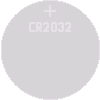
 Design with 3V Coin Cell Battery 2032 in Cirkit Designer
Introduction
The 3V Coin Cell Battery 2032 is a small, round, and lightweight battery commonly used in compact electronic devices. With a nominal voltage of 3 volts, it is ideal for low-power applications requiring a reliable and long-lasting power source. Its compact size and high energy density make it a popular choice for devices such as watches, calculators, remote controls, key fobs, and small IoT devices.
Explore Projects Built with 3V Coin Cell Battery 2032
 Open Project in Cirkit Designer
 Open Project in Cirkit Designer
 Open Project in Cirkit Designer
 Open Project in Cirkit Designer
Explore Projects Built with 3V Coin Cell Battery 2032
Open Project in Cirkit DesignerOpen Project in Cirkit DesignerOpen Project in Cirkit DesignerOpen Project in Cirkit DesignerTechnical Specifications
Below are the key technical details of the 3V Coin Cell Battery 2032:
| Parameter | Specification |
|---|---|
| Nominal Voltage | 3V |
| Capacity | ~220 mAh (varies by manufacturer) |
| Diameter | 20 mm |
| Thickness | 3.2 mm |
| Chemistry | Lithium Manganese Dioxide (LiMnO2) |
| Operating Temperature | -20°C to +60°C |
| Weight | ~3 grams |
| Shelf Life | Up to 10 years |
Pin Configuration and Descriptions
The 3V Coin Cell Battery 2032 has two terminals:
| Terminal | Description |
|---|---|
| Positive (+) | The flat side of the battery, marked with a "+" symbol. |
| Negative (-) | The rounded side of the battery. |
Usage Instructions
How to Use the 3V Coin Cell Battery in a Circuit
- Identify the Terminals: Ensure you correctly identify the positive (+) and negative (-) terminals of the battery.
- Insert into a Battery Holder: Use a compatible CR2032 battery holder to securely connect the battery to your circuit. This prevents accidental short circuits and ensures proper contact.
- Connect to the Circuit:
- Connect the positive terminal of the battery to the positive rail of your circuit.
- Connect the negative terminal to the ground (GND) of your circuit.
- Power the Device: Once connected, the battery will provide a steady 3V power supply to your circuit.
Important Considerations and Best Practices
- Avoid Short Circuits: Never connect the positive and negative terminals directly, as this can cause overheating or damage to the battery.
- Polarity Matters: Always ensure the correct polarity when connecting the battery to a circuit. Reversing the polarity can damage your components.
- Battery Holder: Use a proper battery holder to avoid loose connections and ensure safety.
- Storage: Store unused batteries in a cool, dry place to maximize shelf life.
- Disposal: Dispose of used batteries responsibly, as they contain chemicals that can harm the environment.
Example: Using the 3V Coin Cell Battery with an Arduino UNO
The 3V Coin Cell Battery 2032 can be used to power small sensors or modules connected to an Arduino UNO. Below is an example of powering an LED with the battery:
Circuit Setup
- Connect the positive terminal of the battery to a 220-ohm resistor.
- Connect the other end of the resistor to the anode (long leg) of the LED.
- Connect the cathode (short leg) of the LED to the negative terminal of the battery.
Arduino Code
Although the battery itself does not directly interface with the Arduino, here is an example code to blink an LED if powered by the Arduino:
// This code blinks an LED connected to pin 13 of the Arduino UNO.
// Ensure the LED is connected with the correct polarity.

void setup() {
  pinMode(13, OUTPUT); // Set pin 13 as an output pin
}

void loop() {
  digitalWrite(13, HIGH); // Turn the LED on
  delay(1000);            // Wait for 1 second
  digitalWrite(13, LOW);  // Turn the LED off
  delay(1000);            // Wait for 1 second
}
Troubleshooting and FAQs
Common Issues
Battery Drains Quickly:
- Cause: High current draw from the circuit.
- Solution: Ensure the circuit is designed for low-power consumption. Use components with low current requirements.
Device Does Not Power On:
- Cause: Incorrect polarity or loose connections.
- Solution: Double-check the battery's polarity and ensure secure connections in the battery holder.
Battery Overheats:
- Cause: Short circuit or excessive current draw.
- Solution: Inspect the circuit for short circuits and ensure the current draw is within the battery's limits.
Battery Does Not Fit in Holder:
- Cause: Incompatible battery holder.
- Solution: Use a holder specifically designed for CR2032 batteries.
FAQs
Q: Can I recharge a 3V Coin Cell Battery 2032?
A: No, CR2032 batteries are not rechargeable. Attempting to recharge them can cause leakage or explosion. Use rechargeable alternatives like LIR2032 if recharging is required.Q: How long does a CR2032 battery last?
A: The lifespan depends on the device's power consumption. In low-power devices like watches, it can last several years.Q: Can I use multiple CR2032 batteries in series?
A: Yes, connecting two CR2032 batteries in series will provide 6V. Ensure your circuit can handle the increased voltage.Q: What happens if I store the battery in a hot environment?
A: High temperatures can reduce the battery's capacity and shelf life. Always store it in a cool, dry place.
By following these guidelines and best practices, you can effectively use the 3V Coin Cell Battery 2032 in your projects.