
How to Use PCM5102A: Examples, Pinouts, and Specs
 Design with PCM5102A in Cirkit Designer
Introduction
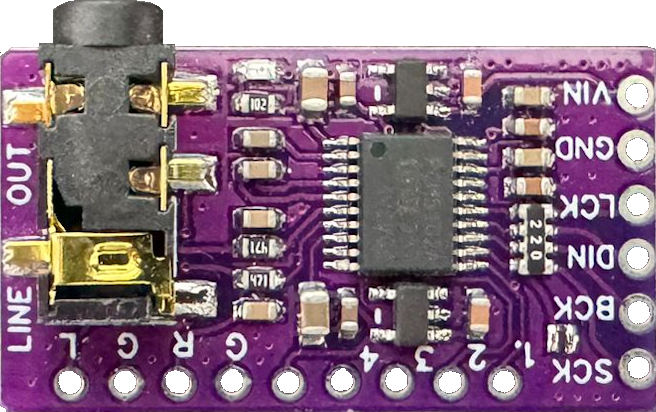
The PCM5102A, manufactured by Texas Instruments, is a high-performance digital-to-analog converter (DAC) designed specifically for audio applications. It supports 32-bit audio processing and delivers exceptional audio quality with low distortion and a high signal-to-noise ratio (SNR). This makes it an ideal choice for high-fidelity audio systems, home theater setups, and professional audio equipment.
Explore Projects Built with PCM5102A
 Open Project in Cirkit Designer
 Open Project in Cirkit Designer
 Open Project in Cirkit Designer
 Open Project in Cirkit Designer
Explore Projects Built with PCM5102A
Open Project in Cirkit DesignerOpen Project in Cirkit DesignerOpen Project in Cirkit DesignerOpen Project in Cirkit DesignerCommon Applications
- High-fidelity audio systems
- Home theater receivers
- Digital audio players
- USB DACs for computers
- Professional audio equipment
- Wireless audio systems
Technical Specifications
Key Technical Details
- Audio Resolution: Up to 32-bit
- Sampling Rate: Supports up to 384 kHz
- Signal-to-Noise Ratio (SNR): 112 dB (typical)
- Total Harmonic Distortion + Noise (THD+N): -93 dB
- Output Voltage: 2.1 Vrms (typical)
- Power Supply Voltage:
- Analog: 3.3 V
- Digital: 1.8 V to 3.3 V
- Power Consumption: Low-power operation with typical consumption under 20 mW
- Interface: I²S (Inter-IC Sound) for digital audio input
- Package: 20-pin TSSOP (Thin Shrink Small Outline Package)
Pin Configuration and Descriptions
The PCM5102A comes in a 20-pin TSSOP package. Below is the pin configuration and description:
| Pin Number | Pin Name | Description |
|---|---|---|
| 1 | DVDD | Digital power supply (1.8 V to 3.3 V) |
| 2 | DGND | Digital ground |
| 3 | SCK | System clock input (optional for asynchronous mode) |
| 4 | BCK | Bit clock input for I²S interface |
| 5 | DIN | Digital audio data input (I²S format) |
| 6 | LRCK | Left-right clock input for I²S interface |
| 7 | FMT | Audio format selection (I²S, left-justified, or right-justified) |
| 8 | XSMT | Soft mute control (active low) |
| 9 | FLT | Filter selection (sharp or slow roll-off) |
| 10 | SCL | I²C clock input (optional, for advanced control) |
| 11 | SDA | I²C data input/output (optional, for advanced control) |
| 12 | NC | No connection |
| 13 | VCOM | Common-mode voltage output |
| 14 | AGND | Analog ground |
| 15 | VOUTL | Left-channel analog audio output |
| 16 | VOUTR | Right-channel analog audio output |
| 17 | AVDD | Analog power supply (3.3 V) |
| 18 | NC | No connection |
| 19 | NC | No connection |
| 20 | NC | No connection |
Usage Instructions
How to Use the PCM5102A in a Circuit
Power Supply:
- Connect the analog power supply (AVDD) to 3.3 V and the digital power supply (DVDD) to a voltage between 1.8 V and 3.3 V.
- Ensure proper decoupling capacitors are placed near the power supply pins to reduce noise.
I²S Interface:
- Connect the I²S signals (BCK, LRCK, and DIN) from your microcontroller, DSP, or audio source to the corresponding pins on the PCM5102A.
- If using an external system clock, connect it to the SCK pin. Otherwise, the PCM5102A can operate in asynchronous mode without an external clock.
Audio Output:
- Connect the left and right analog audio outputs (VOUTL and VOUTR) to your amplifier or audio output stage.
- Use proper filtering capacitors to ensure clean audio signals.
Control Pins:
- Use the FMT pin to select the desired audio format (I²S, left-justified, or right-justified).
- The FLT pin can be used to select between sharp and slow roll-off filters for audio processing.
- The XSMT pin can be used to enable or disable soft mute functionality.
PCB Layout:
- Keep the analog and digital ground planes separate to minimize noise.
- Place decoupling capacitors as close as possible to the power supply pins.
Example: Connecting PCM5102A to an Arduino UNO
The PCM5102A can be connected to an Arduino UNO using the I²S interface. Below is an example of how to configure the Arduino to send audio data to the PCM5102A.
Wiring Diagram
| PCM5102A Pin | Arduino Pin | Description |
|---|---|---|
| BCK | Pin 9 | Bit clock |
| LRCK | Pin 10 | Left-right clock |
| DIN | Pin 11 | Data input |
| DVDD | 3.3 V | Digital power supply |
| AVDD | 3.3 V | Analog power supply |
| DGND, AGND | GND | Ground |
Arduino Code
#include <I2S.h> // Include the I2S library for audio data transmission

void setup() {
  // Initialize the I2S interface in master mode
  if (!I2S.begin(I2S_PHILIPS_MODE, 44100, 32)) {
    // Check if I2S initialization failed
    while (1) {
      // Stay in an infinite loop if initialization fails
    }
  }
}

void loop() {
  // Generate a simple sine wave for testing
  for (int i = 0; i < 360; i++) {
    // Calculate the sine wave value
    int sample = (int)(sin(i * DEG_TO_RAD) * 32767);
    // Send the sample to the PCM5102A
    I2S.write(sample);
  }
}
Important Considerations
- Ensure the power supply voltages are within the specified range to avoid damaging the component.
- Use proper grounding techniques to minimize noise and interference.
- If using the I²C interface for advanced control, ensure pull-up resistors are connected to the SDA and SCL lines.
Troubleshooting and FAQs
Common Issues and Solutions
No Audio Output:
- Verify that the power supply voltages (AVDD and DVDD) are correct and stable.
- Check the I²S connections (BCK, LRCK, and DIN) for proper wiring.
- Ensure the audio source is configured to output data in a compatible format (e.g., I²S).
Distorted Audio:
- Check the decoupling capacitors near the power supply pins.
- Verify that the analog output stage is properly designed and free of noise.
High Noise or Interference:
- Ensure proper separation of analog and digital ground planes on the PCB.
- Use shielded cables for audio connections if necessary.
PCM5102A Overheating:
- Verify that the power supply voltages are within the specified range.
- Check for short circuits or excessive current draw in the circuit.
FAQs
Q: Can the PCM5102A operate without an external system clock?
A: Yes, the PCM5102A can operate in asynchronous mode without an external system clock. However, for best performance, an external clock is recommended.
Q: What audio formats does the PCM5102A support?
A: The PCM5102A supports I²S, left-justified, and right-justified audio formats.
Q: Can I use the PCM5102A with a 5 V microcontroller?
A: Yes, but you will need level shifters to convert the 5 V logic signals to 3.3 V for compatibility with the PCM5102A.
Q: How do I select the filter type?
A: Use the FLT pin to select between sharp and slow roll-off filters. Refer to the datasheet for more details on filter characteristics.