
How to Use TP4056 Charging Module: Examples, Pinouts, and Specs
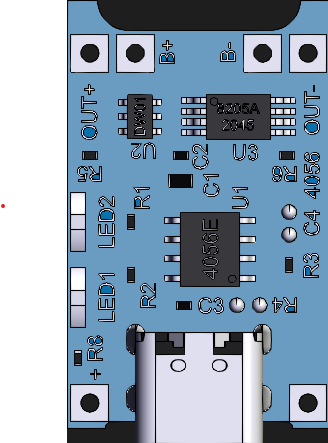
 Design with TP4056 Charging Module in Cirkit Designer
Introduction
The TP4056 Charging Module is a compact and efficient lithium battery charging module designed for charging single-cell lithium-ion batteries. It utilizes a constant current/constant voltage (CC/CV) charging method to ensure safe and reliable charging. The module is widely used in portable electronics, DIY projects, and battery-powered devices due to its simplicity and effectiveness.
Explore Projects Built with TP4056 Charging Module
 Open Project in Cirkit Designer
 Open Project in Cirkit Designer
 Open Project in Cirkit Designer
 Open Project in Cirkit Designer
Explore Projects Built with TP4056 Charging Module
Open Project in Cirkit DesignerOpen Project in Cirkit DesignerOpen Project in Cirkit DesignerOpen Project in Cirkit DesignerCommon Applications
- Charging single-cell lithium-ion batteries (3.7V nominal voltage)
- Power banks and portable chargers
- DIY electronics projects
- Battery-powered IoT devices
- Wearable technology
Technical Specifications
The TP4056 Charging Module is designed to provide optimal charging performance while maintaining safety. Below are its key technical details:
Key Technical Details
| Parameter | Value |
|---|---|
| Input Voltage Range | 4.5V to 5.5V |
| Charging Voltage | 4.2V ± 1% |
| Maximum Charging Current | 1A (adjustable via resistor) |
| Charging Method | Constant Current / Constant Voltage (CC/CV) |
| Battery Type Supported | Single-cell lithium-ion batteries |
| Operating Temperature | -10°C to +85°C |
| Dimensions | ~25mm x 19mm |
Pin Configuration and Descriptions
| Pin Name | Description |
|---|---|
| IN+ | Positive input terminal for the charging voltage (typically 5V). |
| IN- | Negative input terminal (ground) for the charging voltage. |
| BAT+ | Positive terminal for connecting the lithium-ion battery. |
| BAT- | Negative terminal for connecting the lithium-ion battery. |
| OUT+ | Positive output terminal for powering the load (connected to the battery). |
| OUT- | Negative output terminal for powering the load (connected to the battery). |
Note: Some TP4056 modules include a protection circuit with additional pins for load sharing and over-discharge protection.
Usage Instructions
How to Use the TP4056 Charging Module in a Circuit
Connect the Input Voltage:
- Connect a 5V DC power source (e.g., USB power) to the
IN+andIN-pins. - Ensure the input voltage is within the range of 4.5V to 5.5V to avoid damaging the module.
- Connect a 5V DC power source (e.g., USB power) to the
Connect the Battery:
- Connect the positive terminal of the lithium-ion battery to the
BAT+pin. - Connect the negative terminal of the battery to the
BAT-pin.
- Connect the positive terminal of the lithium-ion battery to the
Optional Load Connection:
- If the module includes load-sharing functionality, connect the load to the
OUT+andOUT-pins. - This allows the battery to power the load while charging.
- If the module includes load-sharing functionality, connect the load to the
Monitor the Charging Status:
- The module typically includes two LEDs:
- Red LED: Indicates charging is in progress.
- Blue LED: Indicates charging is complete.
- The module typically includes two LEDs:
Important Considerations and Best Practices
- Battery Compatibility: Only use the module with single-cell lithium-ion batteries (nominal voltage of 3.7V).
- Heat Dissipation: The module may heat up during charging. Ensure proper ventilation or heat sinking if necessary.
- Adjusting Charging Current: The default charging current is 1A. To adjust it, replace the onboard resistor (Rprog) according to the formula: [ I_{CHG} = \frac{1200}{R_{PROG}} ] where ( R_{PROG} ) is in kΩ and ( I_{CHG} ) is in mA.
- Avoid Overvoltage: Do not exceed the input voltage range to prevent damage to the module.
Example: Using TP4056 with Arduino UNO
The TP4056 module can be used in conjunction with an Arduino UNO to monitor the charging status. Below is an example code snippet:
// Example code to monitor TP4056 charging status using Arduino UNO
const int chargingPin = 2;  // Pin connected to the TP4056 charging status LED
const int donePin = 3;      // Pin connected to the TP4056 charge complete LED

void setup() {
  pinMode(chargingPin, INPUT);  // Set charging status pin as input
  pinMode(donePin, INPUT);      // Set charge complete pin as input
  Serial.begin(9600);           // Initialize serial communication
}

void loop() {
  int chargingStatus = digitalRead(chargingPin);  // Read charging status
  int doneStatus = digitalRead(donePin);          // Read charge complete status

  if (chargingStatus == LOW) {
    Serial.println("Battery is charging...");
  } else if (doneStatus == LOW) {
    Serial.println("Charging complete!");
  } else {
    Serial.println("No battery detected or idle state.");
  }

  delay(1000);  // Wait for 1 second before checking again
}
Note: Ensure proper connections between the TP4056 module and the Arduino UNO. Use resistors if necessary to avoid overloading the Arduino pins.
Troubleshooting and FAQs
Common Issues and Solutions
Module Overheating:
- Cause: Excessive input voltage or high charging current.
- Solution: Ensure the input voltage is within the specified range (4.5V to 5.5V). Reduce the charging current by replacing the Rprog resistor.
Battery Not Charging:
- Cause: Incorrect wiring or damaged battery.
- Solution: Double-check the connections to the
BAT+andBAT-pins. Verify the battery is functional.
LEDs Not Lighting Up:
- Cause: No input power or faulty module.
- Solution: Check the input voltage at the
IN+andIN-pins. Replace the module if necessary.
Charging Takes Too Long:
- Cause: Low charging current or high battery capacity.
- Solution: Increase the charging current by adjusting the Rprog resistor, but ensure it does not exceed the battery's safe charging current.
FAQs
Q: Can I use the TP4056 module to charge multiple batteries in series?
A: No, the TP4056 is designed for single-cell lithium-ion batteries only. Charging multiple batteries in series requires a specialized balancing charger.
Q: Is it safe to leave the battery connected to the module after charging is complete?
A: Yes, the TP4056 includes overcharge protection and will stop charging once the battery is fully charged.
Q: Can I power a load directly from the module while charging the battery?
A: Yes, if the module includes load-sharing functionality. However, ensure the load does not exceed the module's current capacity.
Q: How do I adjust the charging current?
A: Replace the Rprog resistor on the module. Use the formula ( I_{CHG} = \frac{1200}{R_{PROG}} ) to calculate the desired resistor value.
By following this documentation, you can safely and effectively use the TP4056 Charging Module in your projects.